
springmvc maven搭建二之springmvc的security
上一篇文档初步搭建了一个springmvc的web工程,现在要来实现第二步咯。将登录校验整合到项目中,我用的是spring 3.0.2的版本,所以这里的登录用了security来处理。不多说,上代码。
web.xml
 <?xml version="1.0" encoding="UTF-8"?>

 <web-app version="2.4" xmlns="http://java.sun.com/xml/ns/j2ee"

     xmlns:xsi="http://www.w3.org/2001/XMLSchema-instance"

     xsi:schemaLocation="http://java.sun.com/xml/ns/j2ee

     http://java.sun.com/xml/ns/j2ee/web-app_2_4.xsd">

     <!-- spring核心监听器 配置ContextLoaderListener表示,该工程要以spring的方式启动。启动时会默认在/WEB-INF目录下查找 applicationContext.xml作为spring容器的配置文件 -->

     <listener>

         <listener-class>org.springframework.web.context.ContextLoaderListener</listener-class>

     </listener>

     <!-- 配置DispatcherServlet表示,该工程将采用springmvc的方式。启动时也会默认在/WEB-INF目录下查找XXX-servlet.xml作为配置文件,XXX就是DispatcherServlet的名字 -->

     <!-- spring-servlet.xml -->

     <servlet>

         <servlet-name>spring</servlet-name>

         <servlet-class>org.springframework.web.servlet.DispatcherServlet</servlet-class>

     </servlet>

     <servlet-mapping>

         <servlet-name>spring</servlet-name>

         <url-pattern>/</url-pattern>

     </servlet-mapping>

     <!-- spring security -->

     <filter>

         <filter-name>springSecurityFilterChain</filter-name>

         <filter-class>org.springframework.web.filter.DelegatingFilterProxy

         </filter-class>

     </filter>

     <filter-mapping>

         <filter-name>springSecurityFilterChain</filter-name>

         <url-pattern>/*</url-pattern>

     </filter-mapping>

     <context-param>

         <param-name>contextConfigLocation</param-name>

         <param-value>classpath*:applicationContext-security.xml</param-value>

     </context-param>

     <!-- 欢迎页 -->

     <welcome-file-list>

         <welcome-file>login.jsp</welcome-file>

     </welcome-file-list>

 </web-app>
web.xml
login.jsp
 <%@ page language="java" contentType="text/html; charset=utf-8"

     pageEncoding="utf-8"%>

 <!DOCTYPE html PUBLIC "-//W3C//DTD HTML 4.01 Transitional//EN" "http://www.w3.org/TR/html4/loose.dtd">

 <html>

 <head>

 <meta http-equiv="Content-Type" content="text/html; charset=utf-8">

 <title>title</title>

 <script type="text/javascript">

     function login() {

         var loginName = "qiuj";

         var loginPas = "qiuj";

         if (loginName == "") {

             $.messager.alert('提示','请输入用户名!','warning');

             loginForm.username.focus();

             return;

         } else if(loginPas == "") {

             $.messager.alert('提示','请输入密码!','warning');

             loginForm.password.focus();

             return;

         } else {

             loginForm.action = "j_spring_security_check";

             loginForm.submit();

         }

     }

 </script>

 </head>

 <body>

     <div>

         <form id="loginForm" action="" method="post">

             <input type="text" name="username" id="username"/>

             <input type="password" name="password" id="password"/>

             <input type="button" value="登录" onclick="login();"/>

         </form>

     </div>

 </body>

 </html>
login.jsp
有的这次相比上次没改动过的文件就不写啦,参照上文咯,因为这次添加了security,所以pom文件也要加依赖
pom.xml
 <project xmlns="http://maven.apache.org/POM/4.0.0" xmlns:xsi="http://www.w3.org/2001/XMLSchema-instance"

   xsi:schemaLocation="http://maven.apache.org/POM/4.0.0 http://maven.apache.org/maven-v4_0_0.xsd">

   <modelVersion>4.0.0</modelVersion>

   <groupId>com.qiuj</groupId>

   <artifactId>springmvc-demo</artifactId>

   <packaging>war</packaging>

   <version>0.0.1-SNAPSHOT</version>

   <name>springmvc-demo Maven Webapp</name>

   <url>http://maven.apache.org</url>

   <dependencies>

     <dependency>

       <groupId>junit</groupId>

       <artifactId>junit</artifactId>

       <version>3.8.1</version>

       <scope>test</scope>

     </dependency>

     <dependency>

         <groupId>org.springframework</groupId>

         <artifactId>spring-web</artifactId>

         <version>3.0.5.RELEASE</version>

     </dependency>

     <dependency>

         <groupId>org.springframework</groupId>

         <artifactId>spring-webmvc</artifactId>

         <version>3.0.5.RELEASE</version>

     </dependency>

     <dependency>

         <groupId>org.apache.geronimo.specs</groupId>

         <artifactId>geronimo-servlet_2.5_spec</artifactId>

         <version>1.2</version>

     </dependency>

     <dependency>

         <groupId>org.springframework.security</groupId>

         <artifactId>spring-security-web</artifactId>

         <version>3.0.5.RELEASE</version>

     </dependency>

     <dependency>

         <groupId>org.springframework.security</groupId>

         <artifactId>spring-security-config</artifactId>

         <version>3.0.5.RELEASE</version>

     </dependency>

   </dependencies>

   <build>

     <finalName>springmvc-demo</finalName>

   </build>

 </project>
pom.xml
因为我这里security只负责登录处理,所以本着低耦合的设计思想,把这部分配置单拿出来了(这是有问题的,先上这个代码,下边会给正确的,别急)
applicationContext-security.xml
 <?xml version="1.0" encoding="UTF-8"?>

 <beans:beans xmlns="http://www.springframework.org/schema/security"

     xmlns:beans="http://www.springframework.org/schema/beans" xmlns:xsi="http://www.w3.org/2001/XMLSchema-instance"

     xsi:schemaLocation="http://www.springframework.org/schema/beans

     http://www.springframework.org/schema/beans/spring-beans-3.0.xsd

     http://www.springframework.org/schema/security

     http://www.springframework.org/schema/security/spring-security-3.0.xsd">

     <!-- http安全配置 -->

     <http use-expressions='true'

         entry-point-ref="authenticationProcessingFilterEntryPoint"

         access-denied-page="/access-denied.jsp">

             <!-- 登录页面不过滤 -->

             <intercept-url pattern="/login.jsp" filters="none" />

             <!-- 修改注销页面 -->

             <logout invalidate-session="true" logout-success-url="/login.jsp" logout-url="/j_spring_security_logout" />

         </http>

         <!-- 登录验证器 -->

         <beans:bean id="loginFilter"

             class="com.test.service.security.MyUsernamePasswordAuthenticationFilter">

             <!-- 处理登录 -->

             <beans:property name="filterProcessesUrl" value="/j_spring_security_check"></beans:property>

             <beans:property name="authenticationSuccessHandler" ref="loginLogAuthenticationSuccessHandler"></beans:property>

             <beans:property name="authenticationFailureHandler" ref="simpleUrlAuthenticationFailureHandler"></beans:property>

             <beans:property name="authenticationManager" ref="myAuthenticationManager"></beans:property>

         </beans:bean>

          <!-- 未登录的切入点 -->

         <beans:bean id="loginLogAuthenticationSuccessHandler"

             class="org.springframework.security.web.authentication.SavedRequestAwareAuthenticationSuccessHandler">

             <beans:property name="defaultTargetUrl" value="/index.jsp"></beans:property>

         </beans:bean>

         <beans:bean id="simpleUrlAuthenticationFailureHandler"

             class="org.springframework.security.web.authentication.SimpleUrlAuthenticationFailureHandler">

             <beans:property name="defaultFailureUrl" value="/login.jsp"></beans:property>

         </beans:bean>

         <!-- 用户拥有的权限:登录后取得用户所保有的权限信息 -->

         <beans:bean id="myUserDetailService" class="com.test.service.security.AdminUserDetailServiceImpl">

         </beans:bean>

         <!-- 未登录的切入点 -->

         <beans:bean id="authenticationProcessingFilterEntryPoint"

             class="org.springframework.security.web.authentication.LoginUrlAuthenticationEntryPoint">

             <beans:property name="loginFormUrl" value="/login.jsp"></beans:property>

         </beans:bean>

         <!-- 认证配置,使用userDetailsService提供的用户信息,实现了UserDetailsService的Bean -->

         <authentication-manager alias="myAuthenticationManager">

             <authentication-provider

                 user-service-ref="myUserDetailService">

                 <!-- 默认提供的PasswordEncoder包含plaintext, sha, sha-256, md5, md4, {sha},

                     {ssha}。 其中{sha}和{ssha}是专门为ldap准备的,plaintext意味着不对密码进行加密, 如果我们不设置PasswordEncoder,默认就会使用它。 -->

                 <password-encoder hash="plaintext" />

             </authentication-provider>

         </authentication-manager>

 </beans:beans>
applicationContext-security.xml
上两个java文件
AdminUserDetailServiceImpl.java
 /**

  *

  */

 /**

  * @author Administrator

  *

  */

 package com.test.service.security;

 import java.util.Set;

 import org.springframework.security.core.GrantedAuthority;

 import org.springframework.security.core.userdetails.User;

 import org.springframework.security.core.userdetails.UserDetails;

 import org.springframework.security.core.userdetails.UserDetailsService;

 import org.springframework.security.core.userdetails.UsernameNotFoundException;

 public class AdminUserDetailServiceImpl implements UserDetailsService {

     //登录验证

     public UserDetails loadUserByUsername(String username) throws UsernameNotFoundException {

         Set<GrantedAuthority> grantedAuths = null;

                 //封装成spring security的user

                 User userdetail = new User("", "",

                 true, // 账号状态 0 表示停用 1表示启用

                 true, true, true, grantedAuths // 用户的权限

                 );

                 return userdetail;

     }

 }
AdminUserDetailServiceImpl.java
MyUsernamePasswordAuthenticationFilter.java
 /**

  *

  */

 /**

  * @author Administrator

  *

  */

 package com.test.service.security;

 import javax.servlet.http.HttpServletRequest;

 import javax.servlet.http.HttpServletResponse;

 import org.springframework.security.authentication.AuthenticationServiceException;

 import org.springframework.security.authentication.UsernamePasswordAuthenticationToken;

 import org.springframework.security.core.Authentication;

 import org.springframework.security.core.AuthenticationException;

 import org.springframework.security.web.authentication.UsernamePasswordAuthenticationFilter;

 public class MyUsernamePasswordAuthenticationFilter extends UsernamePasswordAuthenticationFilter{

     public static final String USERNAME = "username";

     public static final String PASSWORD = "password";

     @Override

     public Authentication attemptAuthentication(HttpServletRequest request, HttpServletResponse response) throws AuthenticationException {

         if (!request.getMethod().equals("POST")) {

             throw new AuthenticationServiceException("Authentication method not supported: " + request.getMethod());

         }

         String username = obtainUsername(request);

         String password = obtainPassword(request);

         if (username == null) {

             username = "";

         }

         if (password == null) {

             password = "";

         }

         username = username.trim();

         UsernamePasswordAuthenticationToken authRequest = new UsernamePasswordAuthenticationToken(username, password);

         setDetails(request, authRequest);

         return this.getAuthenticationManager().authenticate(authRequest);

     }

     @Override

     protected String obtainUsername(HttpServletRequest request) {

         Object obj = request.getParameter(USERNAME);

         return null == obj ? "" : obj.toString();

     }

     @Override

     protected String obtainPassword(HttpServletRequest request) {

         Object obj = request.getParameter(PASSWORD);

         return null == obj ? "" : obj.toString();

     }

 }
MyUsernamePasswordAuthenticationFilter.java
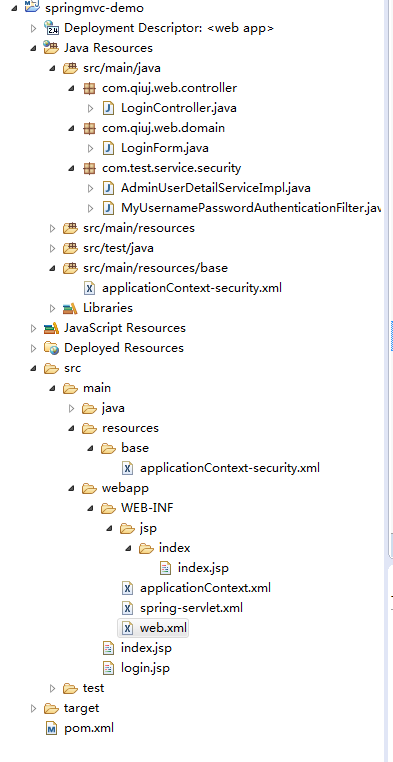
项目结构(注意:我这里给的都是按照我的结构配置的,如不一样,要自己客户化啊)
好了,这就是第一次运行了
登录。。。。。。报错。。。。404。。。似曾相识的错误啊
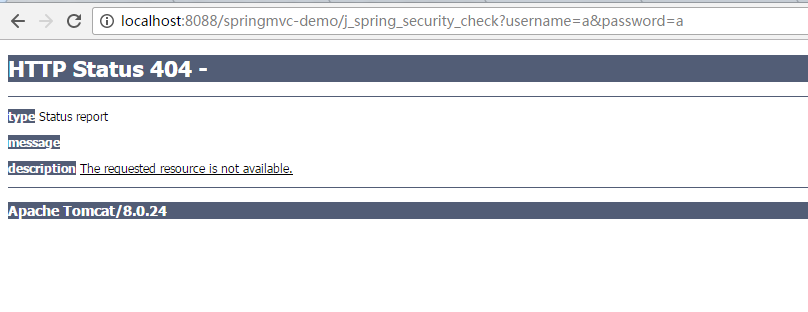

应该applicationContext-security.xml文件配置哪里有问题。。。
瞎调了半天,觉得还是要认真理解配置都代表啥才能更好的对症下药。。。
配置自定义custom-filter---------问题在这里
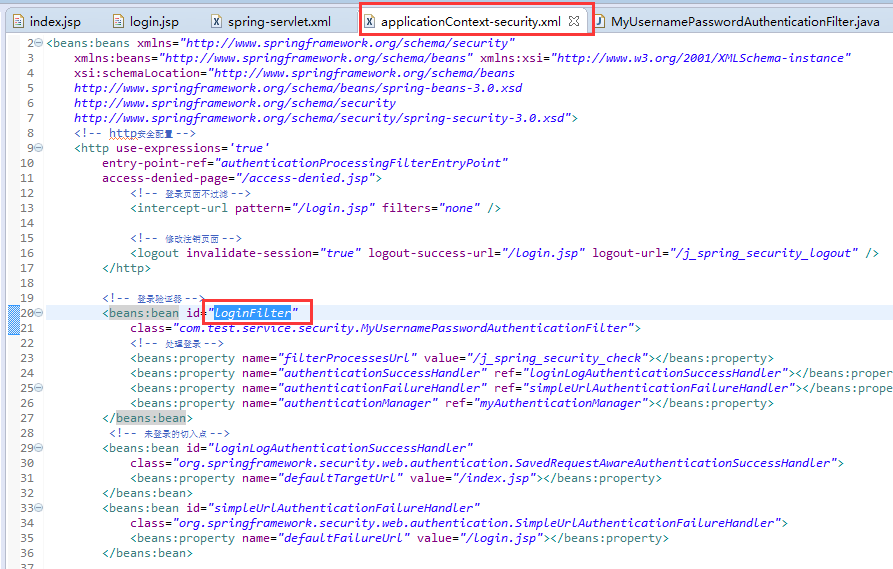
这是第一次配置的截图,这里的bean并没有对应的自定义过滤器调用啊啊啊啊啊。。。。
修改为:

好 上代码
applicationContext-security.xml
 <?xml version="1.0" encoding="UTF-8"?>

 <beans:beans xmlns="http://www.springframework.org/schema/security"

     xmlns:beans="http://www.springframework.org/schema/beans" xmlns:xsi="http://www.w3.org/2001/XMLSchema-instance"

     xsi:schemaLocation="http://www.springframework.org/schema/beans

     http://www.springframework.org/schema/beans/spring-beans-3.0.xsd

     http://www.springframework.org/schema/security

     http://www.springframework.org/schema/security/spring-security-3.0.xsd">

     <!-- http安全配置 -->

     <http use-expressions="true"

         entry-point-ref="authenticationProcessingFilterEntryPoint">

             <!-- 登录页面不过滤 -->

             <intercept-url pattern="/login.jsp" filters="none" />

             <!-- 只有权限才能访问的请求 -->

             <intercept-url pattern="/**" access="hasRole('ROLE_USER')"/>

             <custom-filter ref="loginFilter" position="FORM_LOGIN_FILTER" />

             <!-- 修改注销页面 -->

             <logout invalidate-session="true" logout-success-url="/login.jsp" logout-url="/j_spring_security_logout" />

         </http>

         <!-- 登录验证器 -->

         <beans:bean id="loginFilter"

             class="com.test.service.security.MyUsernamePasswordAuthenticationFilter">

             <!-- 处理登录 -->

             <beans:property name="filterProcessesUrl" value="/j_spring_security_check"></beans:property>

             <beans:property name="authenticationSuccessHandler" ref="loginLogAuthenticationSuccessHandler"></beans:property>

             <beans:property name="authenticationFailureHandler" ref="simpleUrlAuthenticationFailureHandler"></beans:property>

             <beans:property name="authenticationManager" ref="myAuthenticationManager"></beans:property>

         </beans:bean>

          <!-- 未登录的切入点 -->

         <beans:bean id="loginLogAuthenticationSuccessHandler"

             class="org.springframework.security.web.authentication.SavedRequestAwareAuthenticationSuccessHandler">

             <beans:property name="defaultTargetUrl" value="/login"></beans:property>

         </beans:bean>

         <beans:bean id="simpleUrlAuthenticationFailureHandler"

             class="org.springframework.security.web.authentication.SimpleUrlAuthenticationFailureHandler">

             <beans:property name="defaultFailureUrl" value="/login.jsp"></beans:property>

         </beans:bean>

         <!-- 用户拥有的权限:登录后取得用户所保有的权限信息 -->

         <beans:bean id="myUserDetailService" class="com.test.service.security.AdminUserDetailServiceImpl">

         </beans:bean>

         <!-- 未登录的切入点 -->

         <beans:bean id="authenticationProcessingFilterEntryPoint"

             class="org.springframework.security.web.authentication.LoginUrlAuthenticationEntryPoint">

             <beans:property name="loginFormUrl" value="/login.jsp"></beans:property>

         </beans:bean>

         <!-- 认证配置,使用userDetailsService提供的用户信息,实现了UserDetailsService的Bean -->

         <authentication-manager alias="myAuthenticationManager">

             <authentication-provider

                 user-service-ref="myUserDetailService">

                 <!-- 默认提供的PasswordEncoder包含plaintext, sha, sha-256, md5, md4, {sha},

                     {ssha}。 其中{sha}和{ssha}是专门为ldap准备的,plaintext意味着不对密码进行加密, 如果我们不设置PasswordEncoder,默认就会使用它。 -->

                 <password-encoder hash="plaintext" />

             </authentication-provider>

         </authentication-manager>

 </beans:beans>
applicationContext-security.xml
顺便为了规范化,也将欢迎页和登录跳转的成功页修改了
MyUsernamePasswordAuthenticationFilter.java
 /**

  *

  */

 /**

  * @author Administrator

  *

  */

 package com.test.service.security;

 import javax.servlet.http.HttpServletRequest;

 import javax.servlet.http.HttpServletResponse;

 import org.springframework.security.authentication.AuthenticationServiceException;

 import org.springframework.security.authentication.UsernamePasswordAuthenticationToken;

 import org.springframework.security.core.Authentication;

 import org.springframework.security.core.AuthenticationException;

 import org.springframework.security.web.authentication.UsernamePasswordAuthenticationFilter;

 public class MyUsernamePasswordAuthenticationFilter extends UsernamePasswordAuthenticationFilter{

     public static final String USERNAME = "username";

     public static final String PASSWORD = "password";

     @Override

     public Authentication attemptAuthentication(HttpServletRequest request, HttpServletResponse response) throws AuthenticationException {

         if (!request.getMethod().equals("POST")) {

             throw new AuthenticationServiceException("Authentication method not supported: " + request.getMethod());

         }

         String username = obtainUsername(request);

         String password = obtainPassword(request);

         if (username == null) {

             username = "";

         }

         if (password == null) {

             password = "";

         }

         username = username.trim();

         UsernamePasswordAuthenticationToken authRequest = new UsernamePasswordAuthenticationToken(username, password);

         setDetails(request, authRequest);

         return this.getAuthenticationManager().authenticate(authRequest);

     }

     @Override

     protected String obtainUsername(HttpServletRequest request) {

         Object obj = request.getParameter(USERNAME);

         return null == obj ? "" : obj.toString();

     }

     @Override

     protected String obtainPassword(HttpServletRequest request) {

         Object obj = request.getParameter(PASSWORD);

         return null == obj ? "" : obj.toString();

     }

 }
MyUsernamePasswordAuthenticationFilter.java
AdminUserDetailServiceImpl.java
 /**

  *

  */

 /**

  * @author Administrator

  *

  */

 package com.test.service.security;

 import java.util.ArrayList;

 import java.util.Collection;

 import org.springframework.security.core.GrantedAuthority;

 import org.springframework.security.core.authority.GrantedAuthorityImpl;

 import org.springframework.security.core.userdetails.User;

 import org.springframework.security.core.userdetails.UserDetails;

 import org.springframework.security.core.userdetails.UserDetailsService;

 import org.springframework.security.core.userdetails.UsernameNotFoundException;

 public class AdminUserDetailServiceImpl implements UserDetailsService {

     //登录验证

     public UserDetails loadUserByUsername(String username) throws UsernameNotFoundException {

         Collection<GrantedAuthority> auths = new ArrayList<GrantedAuthority>();

         auths.add(new GrantedAuthorityImpl("ROLE_USER"));

         String password = "1234";

         //String password = loginUser.getLoginPW();

                 //封装成spring security的user

                 User userdetail = new User(username, password,

                 true, // 账号状态 0 表示停用 1表示启用

                 true, true, true, auths // 用户的权限

                 );

                 return userdetail;

     }

 }
AdminUserDetailServiceImpl.java
跑起来

目前这个版本还没有用到数据库判断权限啊 用户啊之类的,都是写死的配置,先初步出来一版吧,感觉对整体有个概念,然后想要理解。。。spring源码,I'm coming。。。
源码还是依旧百度云盘吧。。。干巴呆
springmvc maven搭建二之springmvc的security的更多相关文章
- springmvc maven搭建一
一.标题:使用maven搭建一个简单的web工程 二.涉及工具:Eclipse.maven.tomcat8.0.jdk1.8 三.操作: 完善项目:增加src/main/java,src/test/r ...
- 用Maven搭建简单的SpringMVC框架
本文会详细阐述如何用Maven搭建一个简单的SpringMVC框架 这里就不介绍SpringMVC框架了,咱们直接来搭建 第一步 创建一个Maven的web项目 这里有一个简单的方法 new一个Ma ...
- springMVC入门(二)------springMVC入门案例
简介 本案例主要完成了springMVC的基本配置,可针对响应的HTTP URL返回数据与视图 一.###web.xml的配置 要使springMVC生效,首先需要对web.xml进行配置,配置spr ...
- springmvc+maven搭建web项目之二 通过另一种方式配置spring
1.创建maven web项目 2. 配置pom.xml <project xmlns="http://maven.apache.org/POM/4.0.0" xmlns:x ...
- springmvc+maven搭建web项目
1.创建一个maven project 为spring1 2.进行项目的配置:默认的java 1.5 在properties中选择project facts项目进行配置,反选web之后修改java环境 ...
- SpringMVC系列(二): SpringMVC各个注解的使用
1.@RequestMapping 1.@RequestMapping除了能修饰方法,还能修饰类(1)修饰类:提供初步的请求映射信息,相对于web请求的根目录(2)修饰方法:提供进一步的细分映射信息相 ...
- IDEA 搭建 springmvc maven 项目
前言:将搭建 java springmvc maven 项目的过程及问题记录下来,以及配置文件.这次没有涉及到数据库,后续再写. 目录: 一.首先在 IDEA 中创建 springmvc maven ...
- Maven搭建Spring+SpringMVC+Mybatis+Shiro项目详解
一. 环境搭建: 1. 开发工具:myeclipse 2014 / IDEA: 2. maven管理版本:apache-maven-3.0+: 3. jdk 1.7.0+4. Tomcat8.0 二: ...
- 手把手Maven搭建SpringMVC+Spring+MyBatis框架(超级详细版)
手把手Maven搭建SpringMVC+Spring+MyBatis框架(超级详细版) SSM(Spring+SpringMVC+Mybatis),目前较为主流的企业级架构方案.标准的MVC设计模式, ...
随机推荐
- CUDA三维数组
http://hpcbbs.it168.com/forum.php?mod=viewthread&tid=1643 根据上面链接的帖子研究了下三维数组,就像他自己说的一样是有问题的,我自己修改 ...
- ajaxfileup.js
<img id="tinyPic" class="user-icon" :src="headPortrait"><inpu ...
- 5.Spring Cloud初相识-------Hystrix熔断器
前言: 1.介绍Hystrix 在一个分布式系统里,许多依赖不可避免的会调用失败,比如超时.异常等,如何能够保证在一个依赖出问题的情况下,不会导致整体服务失败,这个就是Hystrix需要做的事情.Hy ...
- web攻击技术与防护
一.跨站脚本攻击(XSS) 跨站脚本攻击是指通过存在安全漏洞的Web网站注册用户的浏览器运行非法的HTML标签或JavaScript进行的一种攻击.动态创建的HTML部分有可能隐藏着安全漏洞.就这样, ...
- STL 之 set的应用
关于set Set是STL中的一个容器,特点是其中包含的元素值是唯一的,set根据其底层实现机制分为hash存储和红黑树存储两种方式,这两种结构最本质的区别就是有序和无序,红黑树的存储是有序的而has ...
- mysql基础 反范式化
- 聊聊我这两年都在忙什么,IT技术男如何转型!
从09年开始,从事软件测试工作:至今六年有余: 从当初的简单的功能测试,到后来的整体系统测试,性能测试,至公司测试负责人: 我常常在想,IT技术男,有哪些转型机会,是不是得一辈子从事测试这个职业(注: ...
- Web前端开发面试技巧
Web前端开发面试技巧 面试前端工程师对我来说是一件非常有意思的事,因为面试过程很大程度上也是自我提升的过程.无论大公司还是小公司,之所以在如何招聘到真正有能力的,前端工程师方面会遇到同样的问题. 近 ...
- scrapy--BeautifulSoup
BeautifulSoup官方文档:https://beautifulsoup.readthedocs.io/zh_CN/latest/#id8 太繁琐的,精简了一些自己用的到的. 1.index.h ...
- JAVA8新特性--集合遍历之forEach
java中的集合有两种形式Collection<E>,Map<K,V> Collection类型集合 在JAVA7中遍历有一下几种方式:List<String> l ...