
Spring MVC + Thymeleaf
参考网址: https://www.cnblogs.com/litblank/p/7988689.html
一、简介
1、Thymeleaf 在有网络和无网络的环境下皆可运行,而且完全不需启动WEB应用,即它可以让美工在浏览器查看页面的静态效果,也可以让程序员在服务器查看带数据的动态页面效果。浏览器解释 html 时会忽略未定义的标签属性,所以 thymeleaf 的模板可以静态地运行;当有数据返回到页面时,Thymeleaf 标签会动态地替换掉静态内容,使页面动态显示。
2、Thymeleaf 开箱即用的特性。它提供标准和spring标准两种方言,可以直接套用模板实现JSTL、 OGNL表达式效果,避免每天套模板、该jstl、改标签的困扰。同时开发人员也可以扩展和创建自定义的方言。
3、Thymeleaf 提供spring标准方言和一个与 SpringMVC 完美集成的可选模块,可以快速的实现表单绑定、属性编辑器、国际
化等功能。
二、目的
为了修改样式的时候不需要启动服务器。直接打开html。
三、解析器
Thymeleaf模板视图解析器配置步骤:模板解析器->模板引擎->视图解析器,注释掉的代码为个人JSP、Tiles视图解析器的测试代码,与本例无关。
四、SpringMVC+Thymeleaf
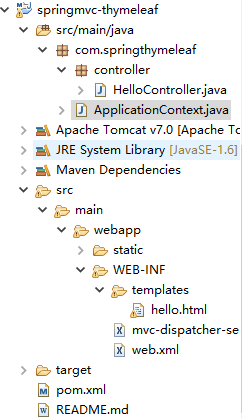
Pom.xml

<project xmlns="http://maven.apache.org/POM/4.0.0"

xmlns:xsi="http://www.w3.org/2001/XMLSchema-instance"

xsi:schemaLocation="http://maven.apache.org/POM/4.0.0 http://maven.apache.org/maven-v4_0_0.xsd">

    <modelVersion>4.0.0</modelVersion>

    <groupId>com.springthymeleaf</groupId>

    <artifactId>springmvc-thymeleaf</artifactId>

    <packaging>war</packaging>

    <version>1.0-SNAPSHOT</version>

    <name>Spring Thymeleaf Example</name>

    <url>http://maven.apache.org</url>

    <properties>

        <spring.version>4.1.3.RELEASE</spring.version>

        <thymeleaf.version>2.1.2.RELEASE</thymeleaf.version>

    </properties>

    <dependencies>

        <dependency>

            <groupId>org.springframework</groupId>

            <artifactId>spring-core</artifactId>

            <version>${spring.version}</version>

        </dependency>

        <dependency>

            <groupId>org.springframework</groupId>

            <artifactId>spring-web</artifactId>

            <version>${spring.version}</version>

        </dependency>

        <!-- <dependency>

            <groupId>javax.servlet</groupId>

            <artifactId>servlet-api</artifactId>

            <version>2.5</version>

            <scope>provided</scope>

        </dependency> -->

        <dependency>

            <groupId>org.springframework</groupId>

            <artifactId>spring-webmvc</artifactId>

            <version>${spring.version}</version>

        </dependency>

        <dependency>

            <groupId>org.springframework</groupId>

            <artifactId>spring-beans</artifactId>

            <version>${spring.version}</version>

        </dependency>

        <dependency>

            <groupId>org.thymeleaf</groupId>

            <artifactId>thymeleaf-spring4</artifactId>

            <version>${thymeleaf.version}</version>

        </dependency>

        <dependency>

            <groupId>org.thymeleaf</groupId>

            <artifactId>thymeleaf</artifactId>

            <version>${thymeleaf.version}</version>

        </dependency>

    </dependencies>

    <build>

        <outputDirectory>src/main/webapp/WEB-INF/classes</outputDirectory>

        <plugins>

            <plugin>

                <artifactId>maven-compiler-plugin</artifactId>

                <configuration>

                    <source>1.6</source>

                    <target>1.6</target>

                </configuration>

            </plugin>

        </plugins>

    </build>

</project>
Web.xml
<web-app id="WebApp_ID" version="2.4" xmlns="http://java.sun.com/xml/ns/j2ee" xmlns:xsi="http://www.w3.org/2001/XMLSchema-instance" xsi:schemaLocation="http://java.sun.com/xml/ns/j2ee

    http://java.sun.com/xml/ns/j2ee/web-app_2_4.xsd">

    <display-name>springmvc thymeleaf</display-name>

    <servlet>

        <servlet-name>mvc-dispatcher</servlet-name>

        <servlet-class>org.springframework.web.servlet.DispatcherServlet</servlet-class>

        <load-on-startup>1</load-on-startup>

    </servlet>

    <servlet-mapping>

        <servlet-name>mvc-dispatcher</servlet-name>

        <url-pattern>/</url-pattern>

    </servlet-mapping>

    <context-param>

        <param-name>contextConfigLocation</param-name>

        <param-value>/WEB-INF/mvc-dispatcher-servlet.xml</param-value>

    </context-param>

    <listener>

        <listener-class>org.springframework.web.context.ContextLoaderListener</listener-class>

    </listener>

</web-app>
mvc-dispatcher-servlet.xml
注:可以深入了解thymeleef 模板解析器的源码,生命周期等
<beans xmlns="http://www.springframework.org/schema/beans" xmlns:context="http://www.springframework.org/schema/context" xmlns:mvc="http://www.springframework.org/schema/mvc" xmlns:xsi="http://www.w3.org/2001/XMLSchema-instance"

    xsi:schemaLocation="

        http://www.springframework.org/schema/beans

        http://www.springframework.org/schema/beans/spring-beans-3.0.xsd

        http://www.springframework.org/schema/context

        http://www.springframework.org/schema/context/spring-context-3.0.xsd

        http://www.springframework.org/schema/mvc

        http://www.springframework.org/schema/mvc/spring-mvc-3.0.xsd">

    <context:component-scan base-package="com.springthymeleaf"/>

    <mvc:annotation-driven />

    <mvc:resources location="/static/" mapping="/static/**" />

    <!-- 模板解析器  -->

    <bean id="templateResolver" class="org.thymeleaf.templateresolver.ServletContextTemplateResolver">

        <property name="prefix" value="/WEB-INF/templates/" />

        <property name="suffix" value=".html" />

        <property name="templateMode" value="HTML5" />

        <property name="cacheable" value="false" />

        <property name="characterEncoding" value="UTF-8"/>

    </bean>

    <bean id="templateEngine" class="org.thymeleaf.spring4.SpringTemplateEngine">

        <property name="templateResolver" ref="templateResolver" />

    </bean>

    <bean class="org.thymeleaf.spring4.view.ThymeleafViewResolver">

        <property name="templateEngine" ref="templateEngine" />

        <property name="characterEncoding"  value="UTF-8" />

    </bean>

</beans>
hello.html
 <html  xmlns:th="http://www.thymeleaf.org" >

<head>

<meta charset="UTF-8" />

<script type="text/javascript" src="static/js/jquery-1.10.2.min.js" th:src="@{/static/js/jquery-1.10.2.min.js}" ></script>

<script th:inline="javascript">

  $(function(){

   var _ctx = [[${application.ctx}]];

    alert("Project ContextPath:"+_ctx);

    alert("路径:"+$("#ctx").val());

  });

</script>

<title>Spring MVC + Thymeleaf Example</title>

</head>

<body>

    <!-- Project ContextPath -->

    <input type="hidden" id="ctx" th:value="${application.ctx}" /> Hello,

    <span th:text="${name}" />!

    <br /> Hello,

    <span th:text="${query}" />!

    <br /> Hello,

    <span th:text="${submit}" />!

    <br />

    <a th:href="@{/query?name=a_href}"> query</a>

    <br />

    <form th:action="@{/submit}">

        <input type="text" name="name" />

        <button type="submit">submit</button>

    </form>

</body>

</html>
HelloController.java
package com.springthymeleaf.controller;

import org.springframework.stereotype.Controller;

import org.springframework.ui.ModelMap;

import org.springframework.web.bind.annotation.PathVariable;

import org.springframework.web.bind.annotation.RequestMapping;

import org.springframework.web.bind.annotation.RequestMethod;

import org.springframework.web.bind.annotation.RequestParam;

@Controller

@RequestMapping("/")

public class HelloController {

    @RequestMapping(value = "/{name}", method = RequestMethod.GET)

    public String getMovie(@PathVariable String name, ModelMap model) {

        model.addAttribute("name", name);

        model.addAttribute("query", "");

        model.addAttribute("submit", "");

        return "hello";

    }

    @RequestMapping(value = "/query", method = RequestMethod.GET)

    public String query(@RequestParam("name") String name, ModelMap model) {

        model.addAttribute("name", "");

        model.addAttribute("query", name);

        model.addAttribute("submit", "");

        return "hello";

    }

    @RequestMapping(value = "/submit", method = RequestMethod.GET)

    public String submit(@RequestParam("name") String name, ModelMap model) {

        model.addAttribute("name", "");

        model.addAttribute("query", "");

        model.addAttribute("submit", name);

        return "hello";

    }

}
ApplicationContext.java
package com.springthymeleaf;

import javax.servlet.ServletContext;

import org.springframework.stereotype.Component;

import org.springframework.web.context.ServletContextAware;

/**

 * 将ContextPath写入application中,给静态文件引用时用、及URL链接地址用

 */

@Component

public class ApplicationContext implements ServletContextAware {

    @Override

    public void setServletContext(ServletContext context) {

        String ctx = context.getContextPath();

        System.out.println("ctx=" + ctx);

        context.setAttribute("ctx", ctx);

    }

}
五、参考链接:
thymeleaf 模板语言简介 http://blog.csdn.net/mlin_123/article/details/51816533
org.thymeleaf.spring4.templateresolver模板视图解析器 http://http://blog.csdn.net/mayi92/article/details/77720663
Spring MVC + Thymeleaf的更多相关文章
- Spring - MVC - thymeleaf 缓存关闭
1. 概述 spring 配合 thymeleaf 关闭页面缓存 2. 背景 最近复习 spring 找了本书叫 spring in action 5th 本人水平有限 书还写得那么难 调试中遇到了问 ...
- A real ROCA using Bootstrap, jQuery, Thymeleaf, Spring HATEOAS and Spring MVC
http://www.tuicool.com/articles/ENfe2u https://github.com/tobiasflohre/movie-database What is the be ...
- Spring MVC视图层:thymeleaf vs. JSP
本文对比了同一Spring MVC工程中相同页面(一个订阅表单)分别采用Thymeleaf和JSP(包括JSP.JSTL.Spring tag lib)两种方式的实现. 本文的所有代码来自一个可运行的 ...
- Thymeleaf 3与Spring MVC 4 整合配置
Thymeleaf 3与Spring MVC 4 整合配置 Maven 依赖配置 Spring 相关依赖就不说了 <dependency> <groupId>org.thyme ...
- Spring MVC 5 + Thymeleaf 基于Java配置和注解配置
Spring MVC 5 + Thymeleaf 注解配置 Spring的配置方式一般为两种:XML配置和注解配置 Spring从3.0开始以后,推荐使用注解配置,这两种配置的优缺点说的人很多,我就不 ...
- 在Spring MVC和Spring Boot中使用thymeleaf模板
Spring MVC: POM: <!-- thymeleaf模板 --> <!-- https://mvnrepository.com/artifact/org.thymeleaf ...
- Spring MVC : Java模板引擎 Thymeleaf (二)
本文原计划直接介绍Thymeleaf的视图解析,但考虑到学习的方便,决定先构建一个spring-mvc. 以下的全部过程仅仅要一个记事本和JDK就够了. 第一步,使用maven构建一个web app. ...
- Spring Boot 2.X(三):使用 Spring MVC + MyBatis + Thymeleaf 开发 web 应用
前言 Spring MVC 是构建在 Servlet API 上的原生框架,并从一开始就包含在 Spring 框架中.本文主要通过简述 Spring MVC 的架构及分析,并用 Spring Boot ...
- springboot Serving Web Content with Spring MVC
Serving Web Content with Spring MVC This guide walks you through the process of creating a "hel ...
随机推荐
- 关于.net Core项目发布在Linux上的填坑
本文主要记录.net Core项目发布在Linux服务器上面所遇到的问题,防止遗忘是 1.在发布文件中执行 dotnet xxxxxx.dll的时候提示如下错误: An assembly specif ...
- MySQL中的正则表达式
正则表达式是用正则表达式语言来建立 基本字符的匹配 .是正则表达式语言中的一个特殊的字符,它表示匹配任意一个字符 在LIKE和REGEXP之间有一个重要的差别,LIKE匹配整个列,如果被匹配的文本仅在 ...
- php soap连接https的wsdl报错SOAP-ERROR: Parsing WSDL:Couldn't load from
转发:https://blog.csdn.net/keyunq/article/details/51804728 SOAP-ERROR: Parsing WSDL:Couldn’t load from ...
- 51nod1043(数位dp)
题目链接:https://www.51nod.com/onlineJudge/questionCode.html#!problemId=1043 题意:中文题诶- 思路:数位dp 我们用dp[i][j ...
- 谢特——后缀数组+tire 树
题目 [题目描述] 由于你成功地在 $ \text{1 s} $ 内算出了上一题的答案,英雄们很高兴并邀请你加入了他们的游戏.然而进入游戏之后你才发现,英雄们打的游戏和你想象的并不一样…… 英雄们打的 ...
- @Transactional之Spring事务深入理解
Spring支持两种事务方式: 编程式事务:使用的是TransactionTemplate(或者org.springframework.transaction.PlatformTransac ...
- springboot和Druid整合配置数据源
@Configuration public class DruidConfiguration { @ConfigurationProperties(prefix = "spring.data ...
- linux别名防删除
最近有不相信rm -rf 了,虽然恢复了但是很难受啊 加个别名吧, 1.查看系统别名配置 alias 2.配置别名(临时生效) alias rm='echo do not use rm command ...
- chapter03
import scala.collection.mutable.ArrayBuffer /** * Created by EX-CHENZECHAO001 on 2018-03-29. */class ...
- jvm 锁Lock
自旋锁 线程想要获得一个对象的锁,如果没有得到,会继承占用CPU尝试获取锁, 线程不进入阻塞状态,仍然在Running 锁消除 public void lockTest() { String aa = ...