
(WPF) ComboBox 之绑定
1. 在UI(Xaml) 里面直接绑定数据.
<Window x:Class="WpfTutorialSamples.ComboBox_control.ComboBoxSample"

        xmlns="http://schemas.microsoft.com/winfx/2006/xaml/presentation"

        xmlns:x="http://schemas.microsoft.com/winfx/2006/xaml"

        Title="ComboBoxSample" Height="150" Width="200">

    <StackPanel Margin="10">

        <ComboBox>

            <ComboBoxItem>ComboBox Item #1</ComboBoxItem>

            <ComboBoxItem IsSelected="True">ComboBox Item #2</ComboBoxItem>

            <ComboBoxItem>ComboBox Item #3</ComboBoxItem>

        </ComboBox>

    </StackPanel>

</Window>
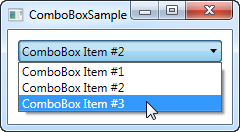
效果如下:
2. 动态绑定数据.
2.1 绑定XML到ComboBox
前台Xaml里面需要在Resource里面指定XmlDataProvider. 并设定绑定. 后台无需任何代码。
<Window x:Class="WpfApplication1.MainWindow"

        xmlns="http://schemas.microsoft.com/winfx/2006/xaml/presentation"

        xmlns:x="http://schemas.microsoft.com/winfx/2006/xaml"

        Title="MainWindow" Height="350" Width="525">

  <Window.Resources>

    <XmlDataProvider x:Key="DataProvider" Source="pack://siteoforigin:,,,/TestData.xml" XPath="Countries"/>

  </Window.Resources>

  <StackPanel>

    <ComboBox x:Name="com_Country" ItemsSource="{Binding Source={StaticResource DataProvider}, XPath=Country}" DisplayMemberPath="@Name" Margin="5"/>

    <ComboBox x:Name="com_City" DataContext="{Binding ElementName=com_Country, Path=SelectedItem}" ItemsSource="{Binding XPath=City}" DisplayMemberPath="@Name" Margin="5"/>

    <TextBlock Margin="5">

      <TextBlock.Inlines>

        <Run Text="Selected Country: "/>

        <Run Text="{Binding ElementName=com_Country, Path=SelectedItem.Attributes[Name].Value, Mode=OneWay}"/>

        <LineBreak/>

        <Run Text="Selected City: "/>

        <Run Text="{Binding ElementName=com_City, Path=SelectedItem.Attributes[Name].Value}"/>

      </TextBlock.Inlines>

    </TextBlock>

  </StackPanel>

</Window>
3. 绑定Dictionary到ComboBox.
 private void BindingToProjects()

        {

            this.projects.Add("AAA", new List<string>()

            {

                "VID_045",

                "VID_046"

            this.projects.Add("BBB", new List<string>()

            {

                "VID_111",

                "VID_222",

            });

            this.cbProjectName.ItemsSource = this.projects;

            this.cbProjectName.DisplayMemberPath = "Key";

            this.cbProjectName.SelectedValuePath = "Key";

        }

        private void cbProjectName_SelectionChanged(object sender, SelectionChangedEventArgs e)

        {

            this.lbVidPid.Items.Clear();

            List<string> registryList = this.projects.Where(dic => dic.Key == this.cbProjectName.SelectedValue.ToString()).Select(dic => dic.Value).First();

            foreach (var registryKey in registryList)

            {

                this.usbRegistryList.Add(registryKey);

                this.lbVidPid.Items.Add(registryKey);

            }

        }
参考: http://www.wpf-tutorial.com/list-controls/combobox-control/
(WPF) ComboBox 之绑定的更多相关文章
- WPF dataGrid下的ComboBox的绑定
WPF dataGrid下的ComboBox的绑定 Wpf中dataGrid中的某列是comboBox解决这个问题费了不少时间,不废话了直接上代码 xaml 代码 <DataGridTempla ...
- WPF 支持集合绑定的控件
WPF 支持集合绑定的控件 ListBox ComboBox ListView DataGrid
- [WinForm] DataGridView 绑定 DT && ComboBox 列绑定 Dict
一 需求介绍 一般像枚举类型的数据,我们在数据库里存储着诸如(1.2.3.4-)或者("001"."002"."003"-)此类,但是界面 ...
- WPF数据双向绑定
设置双向绑定,首先控件要绑定的对象要先继承一个接口: INotifyPropertyChanged 然后对应被绑定的属性增加代码如下: 意思就是当Age这个属性变化时,要通知监听它变化的人. 即:Pr ...
- WPF的DataTrigger绑定自身属性
原文:WPF的DataTrigger绑定自身属性 <DataTrigger Binding="{Binding RelativeSource={RelativeSource self} ...
- WPF UserControl 的绑定事件、属性、附加属性
原文:WPF UserControl 的绑定事件.属性.附加属性 版权声明:本文为博主原创文章,未经博主允许不得转载. https://blog.csdn.net/Vblegend_2013/arti ...
- 封装:WPF中可以绑定的BindPassWord控件
原文:封装:WPF中可以绑定的BindPassWord控件 一.目的:本身自带的PassWord不支持绑定 二.Xaml部分 <UserControl x:Class="HeBianG ...
- WPF ComboBox(转)
WPF ComboBox 创建一个ComboBox控件,并设置ComboBox控件的名称,高度,宽度.及设置ComboBox的垂直和水平对齐. <ComboBox Name="Comb ...
- 继续聊WPF——获取ComboBox中绑定的值
千万不要认为WPF中的数据绑定会很复杂,尽管它的确比Winform程序灵活多了,但其本质是不变的,特别是ComboBox控件,我们知道在Winform中对该控件的有两个专为数据绑定而设定的属性——Di ...
随机推荐
- NOIP2018初赛总结(提高组)(试题+答案+简要解析)
NOIP2018初赛总结(提高组) 更新完毕(纯手敲),如果有错误请在下面留言 单选题 T1.下列四个不同进制的数中,与其它三项数值上不相等的是 A.\((269)_{16}\) B.\((617)_ ...
- [USACO10OCT]湖计数Lake Counting 联通块
题目描述 Due to recent rains, water has pooled in various places in Farmer John's field, which is repres ...
- JIRA安装部署说明
参考 https://blog.51cto.com/tiantiantesting/1744175 前提:已安装好JDK.MySQL JIRA 是澳大利亚 Atlassian 公司开发的一款优秀的问 ...
- CoreData 数据库
封装CoreManager类 @implementation CoreDataManager { //上下文 NSManagedObjectContext *_ctx; } //单例 +(instan ...
- EXCEL 导入SQL SERVER 方法
1.注意:确认是否已安装 AccessDatabaseEngine.exe 2.可视化按提示操作.
- VMware硬盘空间——扩容
VMware原来分配的硬盘空间太小了--扩容 找到VMware的安装路径,如我是默认安装的:C:\Program Files (x86)\VMware\VMware Workstation,打开该路径 ...
- 08-----pymysql模块使用
pymysql的下载和使用 exctue() 之sql注入 增.删.改:conn.commit() 查:fetchone.fetchmany.fetchall 一.pytmysql的下载和使用 ...
- py---------面向对象进阶
一.isinstance 和 issubclass isinstance(obj,cls)检查obj是否是类cls的对象,是则返回True class Foo(object): pass obj = ...
- elasticsearch 插件 大全
本文使用的elasticsearch版本:1.7.3 推荐几款比较常用的elasticsearch插件 1.集群监控插件 bigdesk node cluster 2.集群资源查看和查询插件 kopf ...
- 性能测试工具Jmeter03-功能概要
Jmeter工具组成部分 资源生成器:用于生成测试过程中服务器.负载机的资源代码.(LR中的VuGen) 用户运行器:通常是一个脚本运行引擎,根据脚本要求模拟指定的用户行为.(LR中的Controll ...