
SpringMVC 之URL请求到Action的映射(1)
URL路径映射
1.1.对一个action配置多个URL映射:
@RequestMapping(value={"/index", "/hello"}, method = {RequestMethod.GET}),这表示对该action配置了/index和/hello两个映射。运行测试,可以看到/helloworld/hello请求也成功匹配。
1.2.URL请求参数映射:
这在查询的时候经常用到,比如我们根据id或编号来获取某一条记录。
在HelloWorldController添加一个getDetail的action,代码如下:
@RequestMapping(value="/detail/{id}", method = {RequestMethod.GET})public ModelAndView getDetail(@PathVariable(value="id") Integer id){


    ModelAndView modelAndView = new ModelAndView();

    modelAndView.addObject("id", id);

    modelAndView.setViewName("detail");

    return modelAndView;

}
其中value="/detail/{id}",中的{id}为占位符表示可以映射请求为/detail/xxxx 的URL如:/detail/123等。
方法的参数@PathVariable(value="id") Integer id 用于将URL中占位符所对应变量映射到参数id上,@PathVariable(value="id") 中value的值要和占位符/{id}大括号中的值一致。
在views中添加detail.jsp视图,用于将获取到的id值展示出来。视图内容如下:
<%@ page language="java" contentType="text/html; charset=UTF-8"

    pageEncoding="UTF-8"%><!DOCTYPE html PUBLIC "-//W3C//DTD HTML 4.01 Transitional//EN" "http://www.w3.org/TR/html4/loose.dtd"><html><head><meta http-equiv="Content-Type" content="text/html; charset=UTF-8"><title>Insert title here</title></head><body>

    ${id}</body></html>
运行测试,请求URL地址 http://localhost:8080/SpringMVCLesson/helloworld/detail/123 ,可以看到已经正确的显示了我们请求的id。
1.3.URL通配符映射:
我们还可以通过通配符对URL映射进行配置,通配符有“?”和“*”两个字符。其中“?”表示1个字符,“*”表示匹配多个字符,“**”表示匹配0个或多个路径。
例如:
“/helloworld/index?”可以匹配“/helloworld/indexA”、“/helloworld/indexB”,但不能匹配“/helloworld/index”也不能匹配“/helloworld/indexAA”;
“/helloworld/index*”可以匹配“/helloworld/index”、“/helloworld/indexA”、“/helloworld/indexAA”但不能匹配“/helloworld/index/A”;
“/helloworld/index/*”可以匹配“/helloworld/index/”、“/helloworld/index/A”、“/helloworld/index/AA”、“/helloworld/index/AB”但不能匹配 “/helloworld/index”、“/helloworld/index/A/B”;
“/helloworld/index/**”可以匹配“/helloworld/index/”下的多有子路径,比如:“/helloworld/index/A/B/C/D”;
如果现在有“/helloworld/index”和“/helloworld/*”,如果请求地址为“/helloworld/index”那么将如何匹配?Spring MVC会按照最长匹配优先原则(即和映射配置中哪个匹配的最多)来匹配,所以会匹配“/helloworld/index”,下面来做测试:
在HelloWorldController添加一个urlTest的action,内容如下:
@RequestMapping(value="/*", method = {RequestMethod.GET})public ModelAndView urlTest(){


    ModelAndView modelAndView = new ModelAndView();

    modelAndView.setViewName("urltest");

    return modelAndView;

}
在views文件夹中新加一个视图urltest.jsp,为了和index.jsp做区别urltest.jsp的内容如下:
<%@ page language="java" contentType="text/html; charset=UTF-8"

    pageEncoding="UTF-8"%><!DOCTYPE html PUBLIC "-//W3C//DTD HTML 4.01 Transitional//EN" "http://www.w3.org/TR/html4/loose.dtd"><html><head><meta http-equiv="Content-Type" content="text/html; charset=UTF-8"><title>Insert title here</title></head><body>

    urlTest!</body></html>
请求http://localhost:8080/SpringMVCLesson/helloworld/index查看结果:可以看出映射的是index对应的action。
请求http://localhost:8080/SpringMVCLesson/helloworld/AAA查看结果:可以看出映射的是urlTest对应的action。
1.4.URL正则表达式映射:
Spring MVC还支持正则表达式方式的映射配置,我们通过一个测试来展示:
在HelloWorldController添加一个regUrlTest的action,内容如下:
@RequestMapping(value="/reg/{name:\\w+}-{age:\\d+}", method = {RequestMethod.GET})public ModelAndView regUrlTest(@PathVariable(value="name") String name, @PathVariable(value="age") Integer age){


    ModelAndView modelAndView = new ModelAndView();

    modelAndView.addObject("name", name);

    modelAndView.addObject("age", age);

    modelAndView.setViewName("regurltest");

    return modelAndView;

}
在views文件夹中新加一个视图regurltest.jsp内容如下:
<%@ page language="java" contentType="text/html; charset=UTF-8"

    pageEncoding="UTF-8"%><!DOCTYPE html PUBLIC "-//W3C//DTD HTML 4.01 Transitional//EN" "http://www.w3.org/TR/html4/loose.dtd"><html><head><meta http-equiv="Content-Type" content="text/html; charset=UTF-8"><title>Insert title here</title></head><body>

    ${name}-${age}</body></html>
请求http://localhost:8080/SpringMVCLesson/helloworld/reg/Hanmeimei-18查看结果:
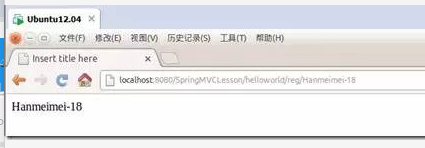
请求http://localhost:8080/SpringMVCLesson/helloworld/reg/Hanmeimei-Lilei查看结果(会发现找不到对应的action返回404):
2.限制action所接受的请求方式(get或post):
之前我们在HelloWorldController的index() action方法上配置的为@RequestMapping(value="/*", method = {RequestMethod.GET})我们把它改为@RequestMapping(value="/*", method = {RequestMethod.POST})再次请求http://localhost:8080/SpringMVCLesson/helloworld/index试一下:
这里可以看到结果映射到了urlTest这个action,这是因为我们在urlTest上配置的为@RequestMapping(value="/*", method = {RequestMethod.GET}),当index这个action映射不在符合时便映射到了urlTest。
我们也可以这样配置@RequestMapping(value="/*", method = {RequestMethod.GET, RequestMethod.POST})表示该action可以接受get或post请求,不过更简单的是不对method做配置则默认支持所有请求方式。
3.限制action所接受请求的参数:
我们可以为某个action指定映射的请求中必须包含某参数,或必须不包含某参数,或者某参数必须等于某个值,或者某参数必须不等于某个值这些限制。
3.1.指定映射请求必须包含某参数:
在HelloWorldController添加一个paramsTest的action,内容如下:
@RequestMapping(value="/paramstest", params="example", method = {RequestMethod.GET})public ModelAndView paramsTest(){


    ModelAndView modelAndView = new ModelAndView();

    modelAndView.setViewName("paramstest");

    return modelAndView;

}
在views文件夹中新加一个视图paramstest.jsp内容如下:
<%@ page language="java" contentType="text/html; charset=UTF-8"

    pageEncoding="UTF-8"%><!DOCTYPE html PUBLIC "-//W3C//DTD HTML 4.01 Transitional//EN" "http://www.w3.org/TR/html4/loose.dtd"><html><head><meta http-equiv="Content-Type" content="text/html; charset=UTF-8"><title>Insert title here</title></head><body>

    paramstest!</body></html>
请求http://localhost:8080/SpringMVCLesson/helloworld/paramstest查看结果:
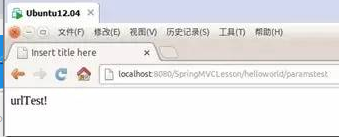
这里可以看到没有找到paramsTest这个action结果还是映射到了urlTest这个action。
请求http://localhost:8080/SpringMVCLesson/helloworld/paramstest?example查看结果:
这次可以看到请求映射到了paramsTest这个action。
3.2.指定映射请求必须不包含某参数:
把刚才添加的paramsTest的@RequestMapping(value="/paramstest", params="example", method = {RequestMethod.GET}) 改为@RequestMapping(value="/paramstest", params="!example", method = {RequestMethod.GET})
重新请求http://localhost:8080/SpringMVCLesson/helloworld/paramstest?example查看结果:
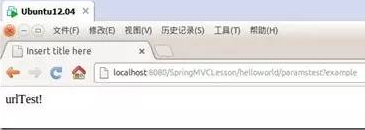
可以看到又没有找到paramsTest这个action而映射到了urlTest这个action。
3.3.指定映射请求中或者某参数必须等于某个值:
把刚才添加的paramsTest的@RequestMapping(value="/paramstest", params="example", method = {RequestMethod.GET}) 改为@RequestMapping(value="/paramstest", params="example=AAA", method = {RequestMethod.GET})
请求http://localhost:8080/SpringMVCLesson/helloworld/paramstest?example=BBB查看结果:
可以看到没有找到paramsTest这个action而映射到了urlTest这个action。
请求http://localhost:8080/SpringMVCLesson/helloworld/paramstest?example=AAA查看结果:
这次可以看到请求映射到了paramsTest这个action。
3.4.指定映射请求中或者某参数必须不等于某个值:
把刚才添加的paramsTest的@RequestMapping(value="/paramstest", params="example", method = {RequestMethod.GET}) 改为@RequestMapping(value="/paramstest", params="example!=AAA", method = {RequestMethod.GET})
请求http://localhost:8080/SpringMVCLesson/helloworld/paramstest?example=BBB查看结果:
可以看到请求映射到了paramsTest这个action。
请求http://localhost:8080/SpringMVCLesson/helloworld/paramstest?example=AAA查看结果:
可以看到没有找到paramsTest这个action而映射到了urlTest这个action。
注:当我们为params指定多个参数时如:params={"example1", "example2"},表示的是and关系,即两个参数限制必须同时满足。
4.限制action所接受请求头参数:
同限制action所接受的请求参数一样,我们也可以为某个action指定映射的请求头中必须包含某参数,或必须不包含某参数,或者某参数必须等于某个值,或者某参数必须不等于某个值这些限制。
4.1.指定映射请求头必须包含某参数:
@RequestMapping(value="/headerTest", headers = "example")。与限制请求参数是一样的,可以参考上面的例子进行测试。
4.2.指定映射请求头必须不包含某参数:
@RequestMapping(value="/headerTest", headers = "!example")。与限制请求参数是一样的,可以参考上面的例子进行测试。
4.3.指定映射请求头中或者某参数必须等于某个值:
@RequestMapping(value="/headerTest", headers = "Accept=text/html")。与限制请求参数是一样的,可以参考上面的例子进行测试。
4.4.指定映射请求头中或者某参数必须不等于某个值:
@RequestMapping(value="/headerTest", headers = "Accept!=text/html")。与限制请求参数是一样的,可以参考上面的例子进行测试。
注:当我们为headers指定多个参数时如:headers={"example1", "example2"},表示的是and关系,即两个参数限制必须同时满足。
SpringMVC 之URL请求到Action的映射(1)的更多相关文章
- SpringMVC(3)URL请求到Action的映射规则
在SpringMVC(2)经典的HelloWorld实现我们展示了一个简单的get请求,并返回了一个简单的helloworld页面.本篇我们来学习如何来配置一个action的url映射规则. 在Spr ...
- SpringMVC学习系列(3) 之 URL请求到Action的映射规则
在系列(2)中我们展示了一个简单的get请求,并返回了一个简单的helloworld页面.本篇我们来学习如何来配置一个action的url映射规则. 在系列(2)中我们在HelloWorldContr ...
- SpringMVCURL请求到Action的映射规则
SpringMVC学习系列(3) 之 URL请求到Action的映射规则 在系列(2)中我们展示了一个简单的get请求,并返回了一个简单的helloworld页面.本篇我们来学习如何来配置一个acti ...
- springmvc处理url请求步骤
处理步骤: 1.调用DispatcherServlet的doService方法 2.进入DispatchServlet的doDispatch方法 3.进入DispatchServlet的getHand ...
- springMVC学习总结(二)路径映射和请求方法限定
springMVC学习总结(二)路径映射和请求方法限定 一.路径映射 无参数的访问路径 对springmvc项目的访问路径,是由根路径和子路径组成:在注解式开发中,根路径标注在类名之上,子路径标注在方 ...
- SpringMVC中url映射到Controller
SpringMVC也是一种基于请求驱动的WEB框架,并且使用了前端控制器的设计模式.前端控制器就是DispatcherServlet控制器,只要满足web.xml文件中的[url-pattern]的规 ...
- SpringMVC项目中获取所有URL到Controller Method的映射
Spring是一个很好很强大的开源框架,它就像是一个容器,为我们提供了各种Bean组件和服务.对于MVC这部分而言,它里面实现了从Url请求映射控制器方法的逻辑处理,在我们平时的开发工作中并不需要太多 ...
- Struts2框架action路径问题心得----》页面url请求怎么找action
Struts2 页面url请求怎么找action Struts2 页面url请求如何找action 1.我们使用最原始的方法去查找action,不同注解. struts.xml文件先配置 <!- ...
- springMVC的rest风格的url请求
rest是一个架构风格,用url来访问网络上的任何资源.rest的一种思想就是用http中的动作get,post,put,delete,来进行增删改查. 这里介绍的是springMVC的rest请求. ...
随机推荐
- java深入探究12-框架之Spring
1.引入Spring 我们在搭建框架时常常会解决问题:对象创建,对象之间依赖关系如何处理,Spring就是来解决这类问题的:控制反转依赖注入 2.环境搭建 1)下载源码:其中3.0以下版本源码中有Sp ...
- js实现级联菜单(没有后台)
html代码: <!-- js级联菜单 --> <div id="cascMenu"> <select id="select" o ...
- Javascript中的prototype和__proto__的联系区别
转载至http://www.cnblogs.com/sinstone/p/5136871.html 一.联系 prototype和__proto__都指向原型对象,任意一个函数(包括构造函数)都有 ...
- python字典方法
本文参考自<python基础教程 (第二版)> 操作 语法 举例 结果 建立字典 dict() 1.以关键字参数建立字典 2.以其他映射作为参数建立字典 1.d = dict(name=' ...
- java JDBC与MySQL 关于日间与日期
//MySQL Date类型 -> java.sql.Date java.sql.Date d = new java.sql.Date(Calendar.getInstance().getTim ...
- BitmapUtil(高效压缩不失真)
package com.changim.patient.app.utils; import android.app.Activity; import android.content.ContentRe ...
- 配合Jenkins自动化构建,bat脚本(一)
C:\Windows\System32\inetsrv\appcmd.exe stop site ServiceIIS C:\Windows\System32\inetsrv\appcmd.exe s ...
- WinForm判断程序是否已经在运行,且只允许运行一个实例
我们开发WinFrom程序,很多时候都希望程序只有一个实例在运行,避免运行多个同样的程序,一是没有意义,二是容易出错. 为了更便于使用,笔者整理了一段自己用的代码,可以判断程序是否在运行,只运行一个实 ...
- hdoj-1017-A Mathematical Curiosity(格式坑)
题目链接 /* Name: Copyright: Author: Date: 2018/5/3 16:32:15 Description: */ #include <iostream> # ...
- mysql定时任务备份bat命令-记录一下待日后使用
最近有个任务,需要每日备份数据库到某个磁盘,使用window定时任务调用bat文件实现. %Date:~0,2%获取星期几,这个要根据系统进行尝试, 有 星期几 7/25/2018 有 2018/ ...