
深入理解sudo
[root@cairui ~]# cat /etc/sudoers

## Sudoers allows particular users to run various commands as

## the root user, without needing the root password.        #sudoers允许特定的用户去执行各种命令以rot的身份,不需要root密码。

##

## Examples are provided at the bottom of the file for collections

## of related commands, which can then be delegated out to particular

## users or groups.

##

## This file must be edited with the 'visudo' command.

## Host Aliases

## Groups of machines. You may prefer to use hostnames (perhaps using

## wildcards for entire domains) or IP addresses instead.

# Host_Alias     FILESERVERS = fs1, fs2

# Host_Alias     MAILSERVERS = smtp, smtp2

## User Aliases

## These aren't often necessary, as you can use regular groups

## (ie, from files, LDAP, NIS, etc) in this file - just use %groupname

## rather than USERALIAS

# User_Alias ADMINS = jsmith, mikem

## Command Aliases

## These are groups of related commands...

## Networking

# Cmnd_Alias NETWORKING = /sbin/route, /sbin/ifconfig, /bin/ping, /sbin/dhclient, /usr/bin/net, /sbin/iptables, /usr/bin/rfcomm, /usr/bin/wvdial, /sbin/iwconfig, /sbin/mii-tool

## Installation and management of software

# Cmnd_Alias SOFTWARE = /bin/rpm, /usr/bin/up2date, /usr/bin/yum

## Services

# Cmnd_Alias SERVICES = /sbin/service, /sbin/chkconfig

## Updating the locate database

# Cmnd_Alias LOCATE = /usr/bin/updatedb

## Storage

# Cmnd_Alias STORAGE = /sbin/fdisk, /sbin/sfdisk, /sbin/parted, /sbin/partprobe, /bin/mount, /bin/umount

## Delegating permissions

# Cmnd_Alias DELEGATING = /usr/sbin/visudo, /bin/chown, /bin/chmod, /bin/chgrp

## Processes

# Cmnd_Alias PROCESSES = /bin/nice, /bin/kill, /usr/bin/kill, /usr/bin/killall

## Drivers

# Cmnd_Alias DRIVERS = /sbin/modprobe

# Defaults specification

#

# Refuse to run if unable to disable echo on the tty.

#

Defaults   !visiblepw

#

# Preserving HOME has security implications since many programs

# use it when searching for configuration files. Note that HOME

# is already set when the the env_reset option is enabled, so

# this option is only effective for configurations where either

# env_reset is disabled or HOME is present in the env_keep list.

#

Defaults    always_set_home

Defaults    env_reset

Defaults    env_keep =  "COLORS DISPLAY HOSTNAME HISTSIZE INPUTRC KDEDIR LS_COLORS"

Defaults    env_keep += "MAIL PS1 PS2 QTDIR USERNAME LANG LC_ADDRESS LC_CTYPE"

Defaults    env_keep += "LC_COLLATE LC_IDENTIFICATION LC_MEASUREMENT LC_MESSAGES"

Defaults    env_keep += "LC_MONETARY LC_NAME LC_NUMERIC LC_PAPER LC_TELEPHONE"

Defaults    env_keep += "LC_TIME LC_ALL LANGUAGE LINGUAS _XKB_CHARSET XAUTHORITY"

#

# Adding HOME to env_keep may enable a user to run unrestricted

# commands via sudo.

#

# Defaults   env_keep += "HOME"

Defaults    secure_path = /sbin:/bin:/usr/sbin:/usr/bin

## Next comes the main part: which users can run what software on

## which machines (the sudoers file can be shared between multiple

## systems).

## Syntax:

##

##     user    MACHINE=COMMANDS

##

## The COMMANDS section may have other options added to it.

##

## Allow root to run any commands anywhere

root    ALL=(ALL)     ALL

## Allows members of the 'sys' group to run networking, software,

## service management apps and more.

# %sys ALL = NETWORKING, SOFTWARE, SERVICES, STORAGE, DELEGATING, PROCESSES, LOCATE, DRIVERS

## Allows people in group wheel to run all commands

# %wheel    ALL=(ALL)    ALL

## Same thing without a password

# %wheel    ALL=(ALL)    NOPASSWD: ALL

## Allows members of the users group to mount and unmount the

## cdrom as root

# %users  ALL=/sbin/mount /mnt/cdrom, /sbin/umount /mnt/cdrom

## Allows members of the users group to shutdown this system

# %users  localhost=/sbin/shutdown -h now

## Read drop-in files from /etc/sudoers.d (the # here does not mean a comment)

#includedir /etc/sudoers.d
注意:修改完(visudo)之后,需要visudo -c检查一下是否有错误。
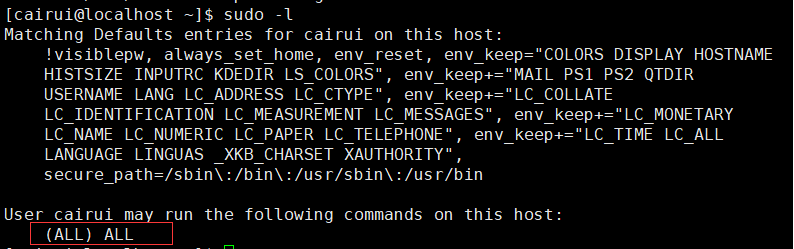
sudo -l查看用户拥有的权限。

1、sudoers配置文件别名介绍
(1)Host Aliases(主机别名)
生产环境中一般不会设置主机别名,一般主机别名不太常用
root    ALL=(ALL)     ALL    #第一个ALL就是主机别名的应用位置

(2)User Aliases(用户别名)
如果表示用户组那么前面加%
root ALL=(ALL) ALL #root就是用户别名的应用位置
User_Aliases ADMINS = jsmith,mikem

(3)Runas_Alias别名
此别名是指定“用户身份”,即sudo允许切换到的用户
root    ALL=(ALL)     ALL    #第二个ALL就是用户别名的应用位置
Runas_Alias OP = root

(4)Cmnd_Alias(命令别名)
就是定义一个别名,它可以包含一堆命令的内容(一组相关命令的集合)
root    ALL=(ALL)     ALL

Cmnd_Alias DRIVERS = /sbin/modpro

2、sudo日志审计
(1)生产环境中日志方案
    a、syslog全部操作日志审计,这种方法信息量大,不便查看
      b、sudo日志配置syslog服务进行日志审查
      c、堡垒机日志审查
    d、bash安装监视器,记录用户使用操作
(2)配合sudo日志审计
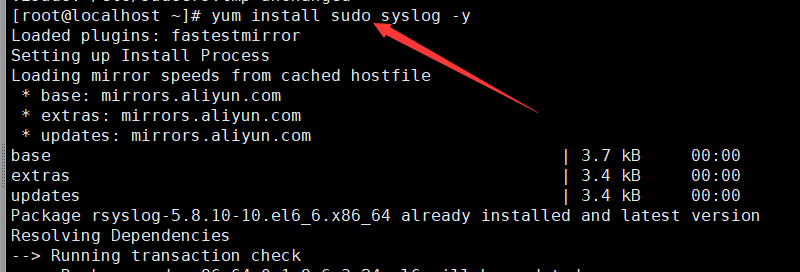
安装sudo与syslog服务

配置服务
创建日志保存目录
[root@localhost ~]# mkdir -p /var/log/
查看服务器版本,6.x为/etc/rsyslog.conf,5.x版本为syslog.conf


上述为rsyslog的配置文件

上述为sudoers的配置文件
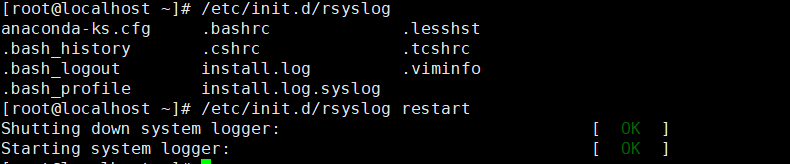
测试结果:
[root@localhost ~]# su - cairui

[cairui@localhost ~]$ sudo visudo

[sudo] password for cairui:

visudo: /etc/sudoers.tmp unchanged

[cairui@localhost ~]$ cd /tmp/

[cairui@localhost tmp]$ touch .txt

[cairui@localhost tmp]$ sudo ll

sudo: ll: command not found

[cairui@localhost tmp]$ sudo ls -ll

total

-rw-rw-r--   cairui cairui  Feb  : .txt

-rw-------.  root   root    Feb   : yum.log

[cairui@localhost tmp]$ sudo cat /var/log/sudo.log

Feb  :: : cairui : TTY=pts/ ; PWD=/home/cairui ; USER=root ;

    COMMAND=/usr/sbin/visudo

Feb  :: : cairui : TTY=pts/ ; PWD=/tmp ; USER=root ; COMMAND=/bin/ls

    -ll

Feb  :: : cairui : TTY=pts/ ; PWD=/tmp ; USER=root ; COMMAND=/bin/cat

    /var/log/sudo.log
深入理解sudo的更多相关文章
- 深入理解 sudo 与 su 之间的区别【转】
深入理解 sudo 与 su 之间的区别 两个命令的最大区别是: sudo 命令需要输入当前用户的密码,su 命令需要输入 root 用户的密码.另外一个区别是其默认行为.sudo 命令只允许使用提升 ...
- 深入理解 sudo 与 su 之间的区别
深入理解 sudo 与 su 之间的区别 作者: Himanshu Arora 译者: LCTT zhb127 在早前的一篇文章中,我们深入讨论了 sudo 命令的相关内容.同时,在该文章的末尾有提到 ...
- Linux中su和sudo的用法整理
一.为什么会有su和sudo命令? 主要是因为在实际工作当中需要在Linux不同用户之间进行切换.root用户权限最高很多时候需要root用户才能执行一些关键命令.所以需要临时切换为root用户.工作 ...
- npm常用命令小结
目录(更新于2016.09.23): 1.认识和使用NPM 2.npm包安装模式 3.npm包管理(package的安装.卸载.升级.查看.搜索.发布,其他等) npm install [-g] 本地 ...
- extjs的使用笔记
2006年jack slocum斯洛克姆 基于yui写的扩展前端框架(就是由一些前端可视化组件如表单,树, 表格,等组成的frameset或者叫做 ui engine),叫yui-ext, 后来成熟后 ...
- 深入理解 JavaScript,以及 Linux 下的开发调试工具
前言 JavaScript 是我接触到的第二门编程语言,第一门是 C 语言.然后才是 C++.Java 还有其它一些什么.所以我对 JavaScript 是非常有感情的,毕竟使用它有十多年了.早就想写 ...
- linux su和sudo命令的区别
一. 使用 su 命令临时切换用户身份 1.su 的适用条件和威力 su命令就是切换用户的工具,怎么理解呢?比如我们以普通用户beinan登录的,但要添加用户任务,执行useradd ,beinan用 ...
- 理解Docker(4):Docker 容器使用 cgroups 限制资源使用
本系列文章将介绍Docker的有关知识: (1)Docker 安装及基本用法 (2)Docker 镜像 (3)Docker 容器的隔离性 - 使用 Linux namespace 隔离容器的运行环境 ...
- Linux sudo 命令的应用
.note-content { font-family: "Helvetica Neue", Arial, "Hiragino Sans GB", STHeit ...
随机推荐
- DCloud-wap2app:杂项
ylbtech-DCloud-wap2app:杂项 1.返回顶部 2.返回顶部 3.返回顶部 4.返回顶部 5.返回顶部 6.返回顶部 7.返回顶部 8.返回顶部 ...
- SQL基础(3)
SQL FULL JOIN (1)SQL FULL JOIN关键字 只要其中某个表存在匹配,FULL JOIN 关键字就会返回行. (2)语法 SELECT column_name(s) FROM t ...
- Socket中常见的几个转换函数(htonl,htons,ntohl,ntohs,inet_addr,inet_ntoa)
Socket中常见的几个转换函数(htonl,htons,ntohl,ntohs,inet_addr,inet_ntoa) htonl() htons() ntohl() ntohs()及inet_n ...
- mysql添加用户
增加新用户: 格式:grant select on 数据库.* to 用户名@登录主机 identified by "密码" 例1.增加一个用户test1密码为abc,让他可以在任 ...
- Python的安装以及路径的设置(python的下载地址:www.python.org)
在有的Python版本中在安装时,我们的可以再安装时选择Python路径的自动配备 在选择python的安装程序的时候,我们尽量选择python的2.版本,因为随着Python的更新,Python的数 ...
- html乱码原因与网页乱码解决方法
造成html网页乱码原因主要是html源代码内中文字内容与html编码不同造成.但无论是哪种情况造成乱码在网页开始时候都需要设置网页编码. charset编码设置 html网页乱码效果截图 一.乱码造 ...
- 【总结整理】JS的继承
参考阮一峰的文章:http://javascript.ruanyifeng.com/oop/inheritance.html#toc4 function Shape() { this.x = 0; t ...
- 使用Get进行Http通信
--------------siwuxie095 有道翻译官网:http://fanyi.youdao.com/ 找到官网页面下方的 有道翻译API,选择 调用数据接口,申请一个 key (申请内容可 ...
- Switch/Case 的穿透性
/*键盘录入1到12 ,对应输出该月份对应的季节 .如果输入的不是1到12,输出提示信息:您输入的数据有误. PS: 春季:3,4,5月份 夏季: 6,7,8月份 秋季: 9,10,11月份 冬季:1 ...
- Java3D-对象基本变换
一个球体与三个圆柱体形成一个组合体,在该组合体中,球体的透明度属性是由全透明到不透明之间变换,而且包括:旋转.平移等变换. package com.vfsd.test0621; import java ...