
WPF Combobox数据绑定 Binding
combobox数据绑定List链表集合区分显示值与选择的值
整体效果:
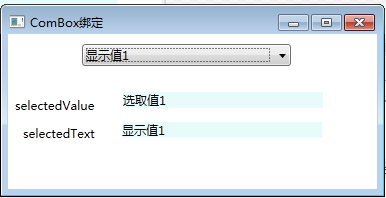
根据combobox选择情况分别打印选取值与显示值
代码:
Windows窗体:
 <Window x:Class="ComboxBinding.MainWindow"

         xmlns="http://schemas.microsoft.com/winfx/2006/xaml/presentation"

         xmlns:x="http://schemas.microsoft.com/winfx/2006/xaml"

         Title="ComBox绑定" Height="192.857" Width="385" WindowStartupLocation="CenterScreen" Loaded="Window_Loaded">

     <Grid>

         <ComboBox Name="comBox1" HorizontalAlignment="Left" Margin="74,10,0,0" Width="209" Height="22" VerticalAlignment="Top"/>

         <TextBlock Name="txtSelectedValue" Width="200" Text="{Binding ElementName=comBox1, Path=SelectedValue}" HorizontalAlignment="Left" Margin="115,58,0,0" TextWrapping="Wrap" VerticalAlignment="Top" Background="#FFE7FBFA"/>

         <TextBlock Name="txtSelectedText" Width="200" Text="{Binding ElementName=comBox1, Path=Text}" HorizontalAlignment="Left" Margin="114,88,0,0" TextWrapping="Wrap" VerticalAlignment="Top" Background="#FFE7FBFA"/>

         <Label Content="selectedValue" HorizontalAlignment="Left" Margin="2,58,0,0" VerticalAlignment="Top"/>

         <Label Content="selectedText" HorizontalAlignment="Left" Margin="10,86,0,0" VerticalAlignment="Top"/>

     </Grid>

 </Window>
Xaml
 using System.Collections.Generic;

 using System.Windows;

 namespace ComboxBinding

 {

     /// <summary>

     /// MainWindow.xaml 的交互逻辑

     /// </summary>

     public partial class MainWindow : Window

     {

         public MainWindow()

         {

             InitializeComponent();

         }

         private void Window_Loaded(object sender, RoutedEventArgs e)

         {

             List<ComboxBind> lstCmbBind = new List<ComboxBind>();//用于绑定数据源

             //初始化数据源

             ComboxBind cbb = new ComboxBind("显示值1", "选取值1");

             lstCmbBind.Add(cbb);

             cbb = new ComboxBind("显示值2", "选取值2");

             lstCmbBind.Add(cbb);

             cbb = new ComboxBind("显示值3", "选取值3");

             lstCmbBind.Add(cbb);

             this.comBox1.ItemsSource = lstCmbBind;

             comBox1.DisplayMemberPath = "CmbText";//类ComboxBind中的属性

             comBox1.SelectedValuePath = "CmbValue";//类ComboxBind中的属性

         }

     }

 }
用于绑定combobox的类
 namespace ComboxBinding

 {

     /// <summary>

     /// 用于Combox数据绑定

     /// </summary>

     class ComboxBind

     {

         //构造函数

         public ComboxBind(string _cmbText, string _cmbValue)

         {

             this.cmbText = _cmbText;

             this.cmbValue = _cmbValue;

         }

         //用于显示值

         private string cmbText;

         public string CmbText

         {

             get { return cmbText; }

             set { cmbText = value; }

         }

         //用于实际选取的值

         private string cmbValue;

         public string CmbValue

         {

             get { return cmbValue; }

             set { cmbValue = value; }

         }

     }

 }
C#
WPF Combobox数据绑定 Binding的更多相关文章
- WPF combobox数据绑定和数据获取
本文章仅为个人学习,如有错误之处请指正. 搭建WPF界面的时候,想用combobox构建一个下拉菜单,搜索的时候看到大多数都是大段代码,逻辑顺序不是很详细,摸索了大概,记录一下方便来者. 拖入comb ...
- WPF数据绑定Binding(二)
WPF数据绑定Binding(二) 1.UI控件直接的数据绑定 UI对象间的绑定,也是最基本的形式,通常是将源对象Source的某个属性值绑定 (拷贝) 到目标对象Destination的某个属性上. ...
- WPF ComboBox Binding
public ConnectionViewModel { private readonly CollectionView _phonebookEntries; private string _phon ...
- wpf Content数据绑定StringFormat起作用的原理和解决
原文:wpf Content数据绑定StringFormat起作用的原理和解决 <Window x:Class="WpfOne.Bind.Bind6" xmlns=" ...
- WPF ComboBox 默认选中无效
在WPF开发当中,我发现ComboBox的默认选中逻辑失效了,仔细查找后发现后台逻辑并没有出现问题. 测试后发现在XAML中,ComBoBox控件的SelectedValue属性需要写在ItemSou ...
- WPF:数据绑定总结(1) https://segmentfault.com/a/1190000012981745
WPF:数据绑定总结(1) visual-studio c# 1.3k 次阅读 · 读完需要 16 分钟 0 一.概念:什么是数据绑定? WPF中的数据绑定:是在应用程序 UI 与业务逻辑之间建立 ...
- C# WinForm 中ComboBox数据绑定的问题 (转)
来自:http://blog.sina.com.cn/s/blog_5fb9e26301013wga.html C# WinForm 中ComboBox数据绑定的问题 怎样让WinForm中的Comb ...
- 【转】WPF中的Binding技巧(二)
WPF中的Binding技巧(二) 接上篇, 我们来看一看Elementname,Source,RelativeSource 三种绑定的方式 1.ElementName顾名思义就是根据Ui元素 ...
- combobox数据绑定
jquery easyui datagrid 可编辑行 combobox数据绑定问题 将带有参数的url地址赋值给变量,然后将变量赋值给url <script type="text/j ...
随机推荐
- dagger2 依赖注入
前言: 当 mvp + dagger2 + rxjava 三者遇上,架构更加清晰,代码更加灵活,巧妙结合. 依赖注入:是为了解耦,达到高内聚低耦合的目的,保证代码的健壮性.灵活性和可维护性. publ ...
- ECMA Script 6_RegExp 正则表达式
在 ES5 中 RegExp 构造函数的参数有两种情况 RegExp(字符串, 正则表达式的修饰符) RegExp(正则表达式); var regex = new RegExp('xyz', 'i') ...
- linux中安装和配置 jdk
01.去官网下载指定的jdk 02.使用xftp把下载好的文件 传递到 linux指定文件夹中03.进入指定的文件夹输入tar -zxvf 文件名称04.发现文件 05.进入文件cd jdk1.8.0 ...
- systemverilog中实现饱和截位和饱和截位的分析
截位(rnd/prnd/floor):都是去掉低位数据的操作(去掉低位低精度的数据,或者说小数位,降低数据的精度) 饱和(sat/sym_sat):都是去掉高位数据的操作,(去掉无符号数高位的0,或者 ...
- 19.3.25 sql查询语句
1.单表查询:select * from 表名 where id = 111 2.查询表内数据并以id排序:select * from 表名 order by id (降序:desc/升序:asc) ...
- POJ 2533 - Longest Ordered Subsequence - [最长递增子序列长度][LIS问题]
题目链接:http://poj.org/problem?id=2533 Time Limit: 2000MS Memory Limit: 65536K Description A numeric se ...
- Python 学习笔记2 变量
Python变量的一些命名规则和指南 每种编程语言都需要变量, 这些变量的命名,我们一般会遵守一些公认的规则. 已达到方便自己,他人阅读的好处. 变量只能包含字母.数字和下划线.变量可以以字母和下划线 ...
- Python---函数的相关知识点总结一:
1:定义函数 def printInfo(): print("I love Python!") #调用函数 #注意:函数定义完毕并不会被默认执行,只能通过调用的方式来让它执行 pr ...
- WebBrowser 打印
<%@ Page Language="C#" AutoEventWireup="true" CodeFile="RTMInterViewInfo ...
- python learning 字符串方法
一.重点掌握的6种字符串方法: 1.join命令 功能:用于合并,将字符串中的每一个元素按照指定分隔符进行拼接 程序举例: seq = ['1','2','3','4'] sep = '+' v = ...