
Dynamics CRM图表高级话题:创建跨实体的图表
关注本人微信和易信公众号: 微软动态CRM专家罗勇 ,回复147或者20150728可方便获取本文,同时可以在第一时间得到我发布的最新的博文信息,follow me!
制作图表你会发现,在界面上只能选择主实体的字段,不能选择关联实体的字段,有没有办法突破?这就是今天博文的内容。我这里以一个简单的例子说明,就是订单按照客户的性别来分类汇总金额。
我打开 素格格新疆特产店解决方案 ,在订单实体的 图表 节点新建一个图表如下,可以知道,我无法在水平(分类)轴标签中选择和订单关联的实体字段,而只能选择订单实体的字段。
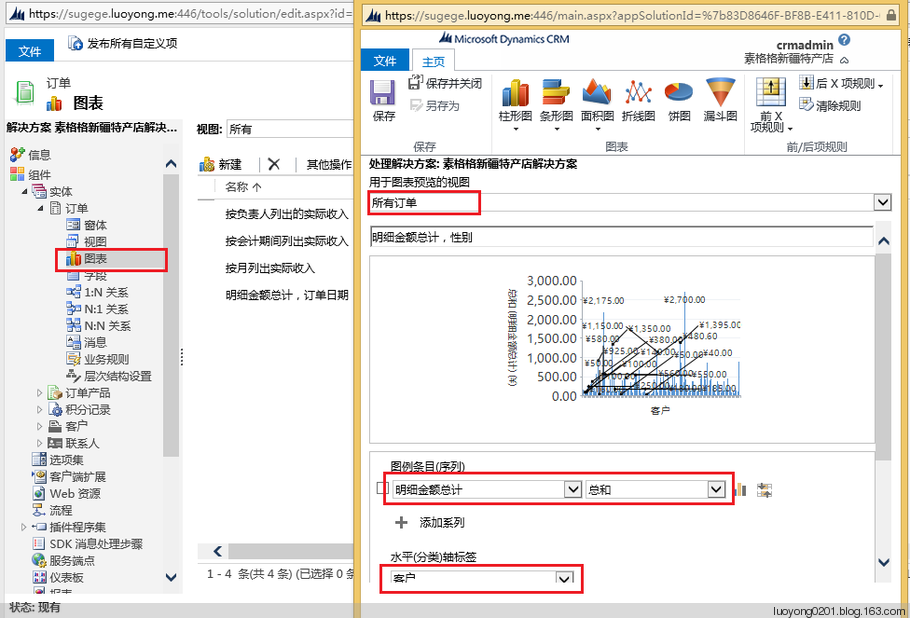
保存后我导出该图表。

导出后的XML如下所示:
<visualization>

  <visualizationid>{9448A1C1-B634-E511-80CF-00155D016400}</visualizationid>

  <name>明细金额总计,性别</name>

  <primaryentitytypecode>salesorder</primaryentitytypecode>

  <datadescription>

    <datadefinition>

      <fetchcollection>

        <fetch mapping="logical" aggregate="true">

          <entity name="salesorder">

            <attribute groupby="true" alias="_CRMAutoGen_groupby_column_Num_0" name="customerid" />

            <attribute alias="_CRMAutoGen_aggregate_column_Num_0" name="totallineitemamount" aggregate="sum" />

          </entity>

        </fetch>

      </fetchcollection>

      <categorycollection>

        <category alias="_CRMAutoGen_groupby_column_Num_0">

          <measurecollection>

            <measure alias="_CRMAutoGen_aggregate_column_Num_0" />

          </measurecollection>

        </category>

      </categorycollection>

    </datadefinition>

  </datadescription>

  <presentationdescription>

    <Chart Palette="None" PaletteCustomColors="91,151,213; 237,125,49; 160,116,166; 255,192,0; 68,114,196; 112,173,71; 37,94,145; 158,72,14; 117,55,125; 153,115,0; 38,68,120; 67,104,43; 124,175,221; 241,151,90; 186,144,192; 255,205,51; 105,142,208; 140,193,104; 50,125,194; 210,96,18; 150,83,159; 204,154,0; 51,90,161; 90,138,57;">

      <Series>

        <Series ChartType="Column" IsValueShownAsLabel="True" Font="{0}, 9.5px" LabelForeColor="59, 59, 59" CustomProperties="PointWidth=0.75, MaxPixelPointWidth=40"></Series>

      </Series>

      <ChartAreas>

        <ChartArea BorderColor="White" BorderDashStyle="Solid">

          <AxisY LabelAutoFitMinFontSize="8" TitleForeColor="59, 59, 59" TitleFont="{0}, 10.5px" LineColor="165, 172, 181" IntervalAutoMode="VariableCount">

            <MajorGrid LineColor="239, 242, 246" />

            <MajorTickMark LineColor="165, 172, 181" />

            <LabelStyle Font="{0}, 10.5px" ForeColor="59, 59, 59" />

          </AxisY>

          <AxisX LabelAutoFitMinFontSize="8" TitleForeColor="59, 59, 59" TitleFont="{0}, 10.5px" LineColor="165, 172, 181" IntervalAutoMode="VariableCount">

            <MajorTickMark LineColor="165, 172, 181" />

            <MajorGrid LineColor="Transparent" />

            <LabelStyle Font="{0}, 10.5px" ForeColor="59, 59, 59" />

          </AxisX>

        </ChartArea>

      </ChartAreas>

      <Titles>

        <Title Alignment="TopLeft" DockingOffset="-3" Font="{0}, 13px" ForeColor="59, 59, 59"></Title>

      </Titles>

    </Chart>

  </presentationdescription>

  <isdefault>false</isdefault>

</visualization>
为了方便我更改其中的Fetch XML,我这里通过高级查询构造一个如下的高级查询,并下载Fetch XML.
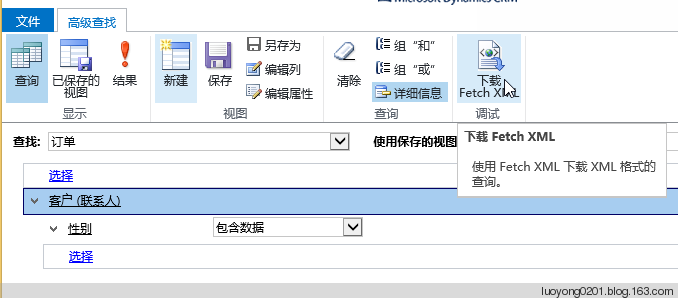
下载的Fetch XML如下:
<fetch version="1.0" output-format="xml-platform" mapping="logical" distinct="false">

  <entity name="salesorder">

    <attribute name="name" />

    <attribute name="customerid" />

    <attribute name="statuscode" />

    <attribute name="totalamount" />

    <attribute name="salesorderid" />

    <order attribute="name" descending="false" />

    <link-entity name="contact" from="contactid" to="customerid" alias="ab">

      <filter type="and">

        <condition attribute="gendercode" operator="not-null" />

      </filter>

    </link-entity>

  </entity>

</fetch>
我这里对图表的XML改动很简单,主要是修改了fetch元素,删除了salesorder实体的customerid属性,增加了和contact实体的关联,并且将性别属性(gendercode)设置为分组属性。
<fetch mapping="logical" aggregate="true">

  <entity name="salesorder">

    <attribute alias="_CRMAutoGen_aggregate_column_Num_0" name="totallineitemamount" aggregate="sum" />

    <link-entity name="contact" from="contactid" to="customerid" alias="ab">

      <attribute name ="gendercode" groupby="true" alias="_CRMAutoGen_groupby_column_Num_0" />

      <filter type="and">

        <condition attribute="gendercode" operator="not-null" />

      </filter>

    </link-entity>

  </entity>

</fetch>
为了更好的对比,我将默认的条形图改成了饼状图,也就是将ChartType属性值从Column改成了Pie。
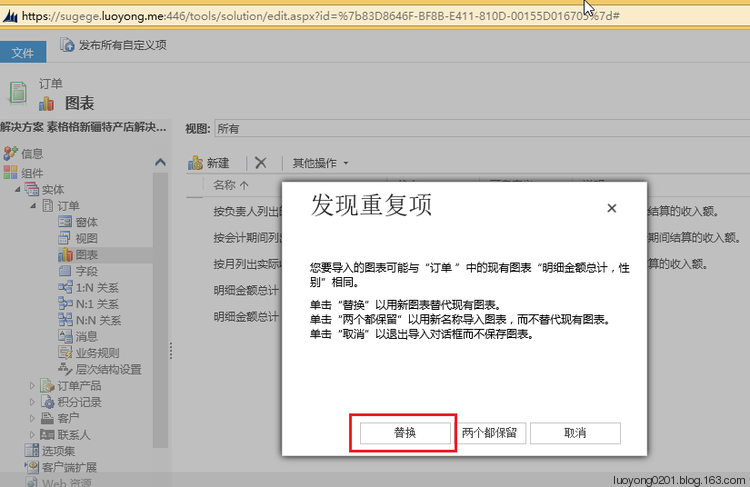
然后我导入这个图表,发现重复项的时候选择替换。
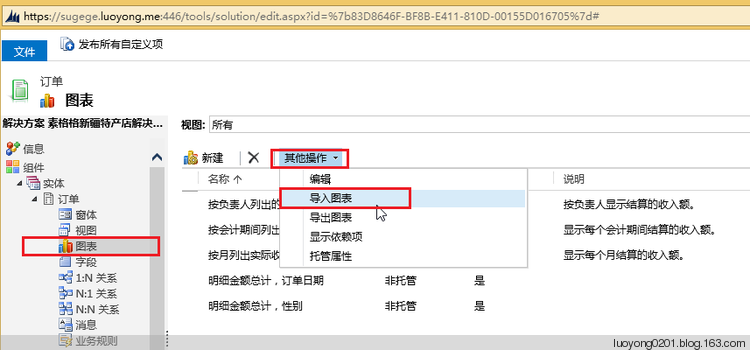
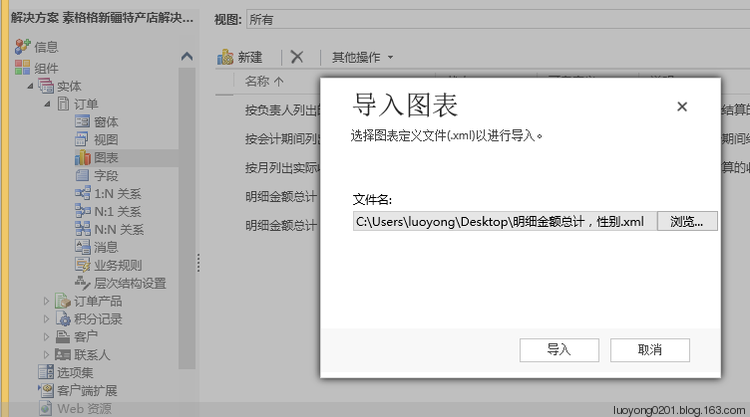
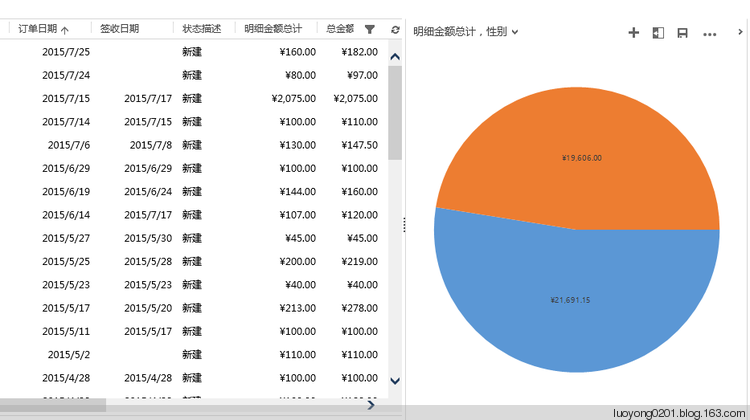
发布解决方案后我们去看效果如下:
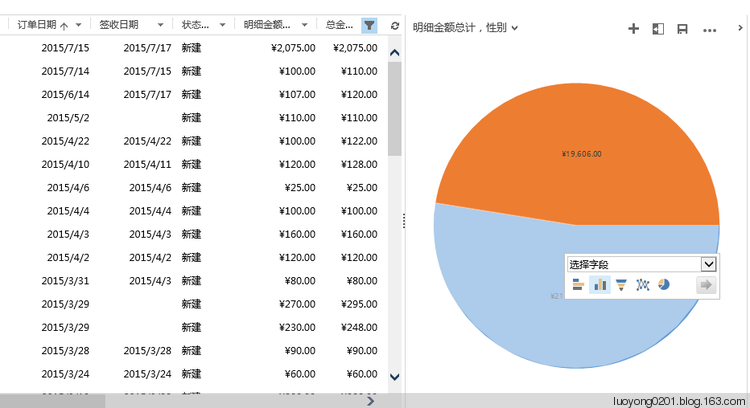
当然这个图表依然是可以点击饼状图的部分进行钻取的。
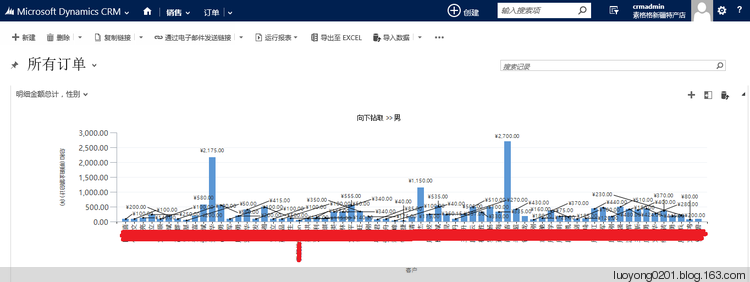
我们看看是哪些男客户,为了尊重隐私我将姓名做了处理,因为我这里是真实订单信息:
Dynamics CRM图表高级话题:创建跨实体的图表的更多相关文章
- Dynamics CRM 客户端程序开发:在实体的列表界面添加按钮
关注本人微信和易信公众号: 微软动态CRM专家罗勇 ,回复114或者20140312可方便获取本文,同时可以在第一时间得到我发布的最新的博文信息,follow me! 如果没有安装Ribbon Wor ...
- Dynamics CRM使用元数据之一:查询实体的主字段(托管代码版本)
关注本人微信和易信公众号: 微软动态CRM专家罗勇 ,回复159或者20151013可方便获取本文,同时可以在第一时间得到我发布的最新的博文信息,follow me! Dynamics CRM是基于元 ...
- Dynamics CRM 通过RetrieveEntityRibbonRequest和RetrieveApplicationRibbonRequest导出实体的Ribbon XML
今天看到勇哥的博客介绍了两个request指令用来导出实体的Ribbon XML,在没有工具之前编辑ribbon都是手工导出xml然后编辑的对于很多一开始接触CRM就用工具的人可能不是很熟悉.查了下这 ...
- Dynamics CRM 2015 站点地图公告配置实体显示名称的变更
CRM更新2015后,在设置里找不到公告配置了 在原来的位置上你会东西一个叫活动源配置的东西,点开看后就是原来的公告配置.
- Step by Step 创建一个新的Dynamics CRM Organization
原创地址:http://www.cnblogs.com/jfzhu/p/4012833.html 转载请注明出处 前面演示过如何安装Dynamics CRM 2013,参见<Step by st ...
- Dynamics CRM命令栏定制基础知识及手动编辑customization.xml实例
关注本人微信和易信公众号: 微软动态CRM专家罗勇 ,回复166或者20151028可方便获取本文,同时可以在第一时间得到我发布的最新的博文信息,follow me! 前面的博文:Dynamics C ...
- Step by step Dynamics CRM 2013安装
原创地址:http://www.cnblogs.com/jfzhu/p/4008391.html 转载请注明出处 SQL Server可以与CRM装在同一台计算机上,也可安装在不同的计算机上.演示 ...
- Dynamics CRM实体系列之图表
本节开始讲解Dynamics CRM的图表功能.任何产品基本上都会有数据分析的工具,Dynamics CRM当然也不例外,作为一个专门做销售管理的软件数据分析自然也是对于销售管理者的决策有很大的作用的 ...
- Dynamics CRM实体系列之视图
这一节开始讲视图.视图在Dynamics CRM中代表着实体的数据展示列表,通过这个列表可以对数据进行一个初步预览,也可以进行一些数据的定向筛选和搜索进行精确的浏览一部分数据.同时视图也是查看详细实体 ...
随机推荐
- .NET Core多平台开发体验[3]: Linux (Windows Linux子系统)
如果想体验Linux环境下开发和运行.NET Core应用,我们有多种选择.一种就是在一台物理机上安装原生的Linux,我们可以根据自身的喜好选择某种Linux Distribution,目前来说像R ...
- emWin仪表界面设计,含uCOS-III和FreeRTOS两个版本
第7期:多功能仪表界面设计配套例子:V6-912_STemWin提高篇实验_多功能仪表界面设计(uCOS-III)V6-913_STemWin提高篇实验_多功能仪表界面设计(FreeRTOS) 例程下 ...
- Python爬虫7-Cookie & Session
GitHub代码练习地址:1.手动利用cookie访问网页:https://github.com/Neo-ML/PythonPractice/blob/master/SpiderPrac10_cook ...
- [Java]LeetCode284. 顶端迭代器 | Peeking Iterator
Given an Iterator class interface with methods: next() and hasNext(), design and implement a Peeking ...
- [Swift]LeetCode572. 另一个树的子树 | Subtree of Another Tree
Given two non-empty binary trees s and t, check whether tree t has exactly the same structure and no ...
- BBS论坛(七)
7.1.修改邮箱界面完成 (1)cms/cms_resetemail.html {% extends 'cms/cms_base.html' %} {% block title -%} 修改邮箱 {% ...
- ElasticSearch(1)---Mysql同步数据到ElSearch
ElasticSearch同步Mysql 先讲项目需求:对于资讯模块添加搜索功能 这个搜索功能我就是采用ElasticSearch实现的,功能刚实现完,所以写这篇博客做个记录,让自己在记录下整个步骤和 ...
- 【Python3爬虫】网易云音乐歌单下载
一.目标: 下载网易云音乐热门歌单 二.用到的模块: requests,multiprocessing,re. 三.步骤: (1)页面分析:首先打开网易云音乐,选择热门歌单,可以看到以下歌单列表,然后 ...
- 基于IdentityServer4 实现.NET Core的认证授权
IdentityServer4是什么? IdentityServer4是基于ASP.NET Core实现的认证和授权框架,是对OpenID Connect和OAuth 2.0协议的实现. OpenID ...
- C语言实现循环队列的初始化&进队&出队&读取队头元素&判空-2
/*顺序表实现队列的一系列操作(设置flag标志不损失数组空间)*/ #include<stdio.h> #include<stdlib.h> #define Queue_Si ...