
利用svn的补丁文件打包生成增量文件
下面的代码是maven版本
1. 创建patch.txt增量文件
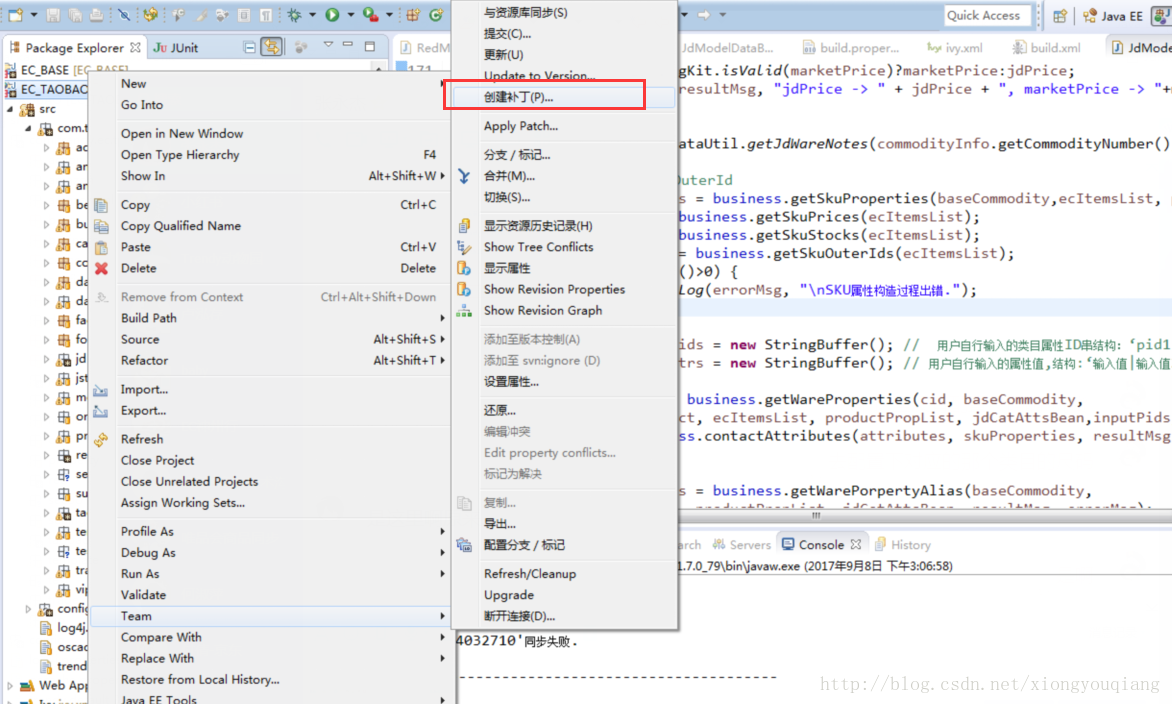
保存到 文件目录下
比如 E:\aa\patch.txt
2. 编写java代码
package utils;

import java.io.BufferedInputStream;

import java.io.BufferedOutputStream;

import java.io.BufferedReader;

import java.io.File;

import java.io.FileInputStream;

import java.io.FileOutputStream;

import java.io.IOException;

import java.io.InputStreamReader;

import java.util.ArrayList;

import java.util.HashMap;

import java.util.List;

import java.util.Map;

import java.util.Set;

/*

 * 利用svn的补丁文件打包生成增量文件

 * 参考 https://blog.csdn.net/happydecai/article/details/81940484

 *

 * */

public class FreePatchUtil {

	public static String patchFile = "E:\\patch.txt";// 补丁文件,由eclipse svn plugin生成

	public static String projectPath ="E:\\Projects\\SourceCode\\adpp";// "D:\\javaprojects\\portal\\tepin-manage";// 项目文件夹路径

	public static String webContent = "src/main/webapp";// web应用文件夹名

	public static String classPath ="F:\\tomcat-7.0.69\\webapps\\adpp\\WEB-INF\\classes"; //"D:\\javaprojects\\portal\\tepin-manage\\target\\classes";// class存放路径

	public static String desPath ="E:\\zengliangbao" ;//"C:\\Users\\sz\\Documents\\portal_for_bi";// 补丁文件包存放路径

	public static String version = "patch_20190411";//+UtilDateTime.getNowTime().substring(0, 10);// 补丁版本

	/**

	 * @param args

	 * @throws Exception

	 */

	public static void main(String[] args) throws Exception {

		copyFiles(getPatchFileList());

	}

	/****

	 * 读取补丁配置文件解析出修改的文件并返回到list集合

	 *

	 * @return

	 * @throws Exception

	 */

	public static List<String> getPatchFileList() throws Exception {

		List<String> fileList = new ArrayList<String>();

		FileInputStream f = new FileInputStream(patchFile);

		BufferedReader dr = new BufferedReader(new InputStreamReader(f, "utf-8"));

		String line;

		while ((line = dr.readLine()) != null) {

			if (line.startsWith("Index:")) {

				line = line.replaceAll(" ", "");

				line = line.substring(line.indexOf(":") + 1, line.length());

				fileList.add(line);

			}

		}

		dr.close();

		return fileList;

	}

	/***

	 *

	 * @param list

	 *            修改的文件

	 */

	public static void copyFiles(List<String> list) {

		for (String fullFileName : list) {

			if (fullFileName.indexOf("src/main/webapp") == -1) {// 对源文件目录下的文件处理

				String fileName = fullFileName.replace("src", "");//目标路径

				fullFileName = classPath + fileName;

				if (fileName.endsWith(".java")) {

//					fileName = fileName.replace(".java", ".class").replace("/main/java", "");

//					fullFileName = fullFileName.replace(".java", ".class").replace("/main/java", "");

					int i= fileName.indexOf("/com");

					//System.out.println(i);

					if (i>0) {

						fileName=fileName.substring(i);

					}

					//System.out.println(fileName);

					fileName = fileName.replace(".java", ".class").replace("/main/java", "");

					//System.out.println(fileName);

					fullFileName = classPath + fileName;

					fullFileName = fullFileName.replace(".java", ".class").replace("/main/java", "");

					//System.out.println("fullFileName>"+fullFileName);

				}else{

					fileName = fileName.replace("/main/resources", "");

					fullFileName = fullFileName.replace("/main/resources", "");

				}

				String tempDesPath = fileName.substring(0,fileName.lastIndexOf("/"));

				String desFilePathStr = desPath + "/" + version + "/WEB-INF/classes" + tempDesPath;

				String desFileNameStr = desPath + "/" + version + "/WEB-INF/classes" + fileName;

				File desFilePath = new File(desFilePathStr);

				if (!desFilePath.exists()) {

					desFilePath.mkdirs();

				}

				copyFile(fullFileName, desFileNameStr);

				System.out.println(fullFileName + "复制完成");

				// 遍历目录,是否存在内部类,如果有内部,则将所有的额内部类挑选出来放到

				//copyInnerClassFile(fullFileName, desFileNameStr);

			} else {// 对普通目录的处理

				String desFileName = fullFileName.replace(webContent, "");

				fullFileName = projectPath + "/" + fullFileName;// 将要复制的文件全路径

				String fullDesFileNameStr = desPath + "/" + version + "/" + desFileName;

				String desFilePathStr = fullDesFileNameStr.substring(0,fullDesFileNameStr.lastIndexOf("/"));

				File desFilePath = new File(desFilePathStr);

				if (!desFilePath.exists()) {

					desFilePath.mkdirs();

				}

				copyFile(fullFileName, fullDesFileNameStr);

				System.out.println(fullFileName + "复制完成");

			}

		}

	}

	/***

	 * 处理内部类的情况 解析源路径名称,遍历此文件路径下是否存在这个类的内部类 内部类编译后的格式一般是

	 * OuterClassName$InnerClassName.class

	 *

	 * @param sourceFullFileName

	 *            原路径

	 * @param desFullFileName

	 *            目标路径

	 */

	@SuppressWarnings("unused")

	private static void copyInnerClassFile(String sourceFullFileName,String desFullFileName) {

		String sourceFileName = sourceFullFileName.substring(sourceFullFileName.lastIndexOf("/") + 1);

		String sourcePackPath = sourceFullFileName.substring(0, sourceFullFileName.lastIndexOf("/"));

		String destPackPath = desFullFileName.substring(0, desFullFileName.lastIndexOf("/"));

		String tempFileName = sourceFileName.split("\\.")[0];

		File packFile = new File(sourcePackPath);

		if (packFile.isDirectory()) {

			String[] listFiles = packFile.list();

			for (String fileName : listFiles) {

				// 可以采用正则表达式处理

				if (fileName.indexOf(tempFileName + "$") > -1 && fileName.endsWith(".class")) {

					String newSourceFullFileName = sourcePackPath + "/" + fileName;

					String newDesFullFileName = destPackPath + "/" + fileName;

					copyFile(newSourceFullFileName, newDesFullFileName);

					System.out.println(newSourceFullFileName + "复制完成");

				}

			}

		}

	}

	private static void copyFile(String sourceFileNameStr, String desFileNameStr) {

		File srcFile = new File(sourceFileNameStr);

		File desFile = new File(desFileNameStr);

		try {

			copyFile(srcFile, desFile);

		} catch (IOException e) {

			e.printStackTrace();

		}

	}

	public static void copyFile(File sourceFile, File targetFile)

			throws IOException {

		BufferedInputStream inBuff = null;

		BufferedOutputStream outBuff = null;

		try {

			// 新建文件输入流并对它进行缓冲

			inBuff = new BufferedInputStream(new FileInputStream(sourceFile));

			// 新建文件输出流并对它进行缓冲

			outBuff = new BufferedOutputStream(new FileOutputStream(targetFile));

			// 缓冲数组

			byte[] b = new byte[1024 * 5];

			int len;

			while ((len = inBuff.read(b)) != -1) {

				outBuff.write(b, 0, len);

			}

			// 刷新此缓冲的输出流

			outBuff.flush();

		} finally {

			// 关闭流

			if (inBuff != null)

				inBuff.close();

			if (outBuff != null)

				outBuff.close();

		}

	}

}
利用svn的补丁文件打包生成增量文件的更多相关文章
- linux(以ubuntu为例)下Android利用ant自动编译、修改配置文件、批量多渠道,打包生成apk文件
原创,转载请注明:http://www.cnblogs.com/ycxyyzw/p/4555328.html 之前写过一篇<windows下Android利用ant自动编译.修改配置文件.批量 ...
- 使用ant自动编译、打包生成apk文件
上次使用命令行生成apk文件<Android 命令行编译.打包生成apk文件>,学习命令行生成的目的是为了编写ant打下基础. 一. ant环境 下载ant包,配置环境变量 二.ant编译 ...
- Android 自动编译、打包生成apk文件 3 - 使用SDK Ant方式
相关文章列表: < Android 自动编译.打包生成apk文件 1 - 命令行方式> < Android 自动编译.打包生成apk文件 2 - 使用原生Ant方式> &l ...
- Android 自动编译、打包生成apk文件 4 - 多渠道批量打包
相关文章列表: < Android 自动编译.打包生成apk文件 1 - 命令行方式> < Android 自动编译.打包生成apk文件 2 - 使用原生Ant方式 > < ...
- java项目打包生成MD5文件
之所以发出这篇博客,因为我前几天搞这个问题搞了几天,各种百度居然都没有找到相关的案例,虽然很简单的事件.可是百度博客上面居然都搜不到案例o(* ̄︶ ̄*)o觉得奇怪!!! 新总监来了,项目要上线,以前都 ...
- Android 自动编译、打包生成apk文件 2 - 使用原生Ant方式
from://http://blog.csdn.net/androiddevelop/article/details/11100109 相关文章列表: <Android 自动编译.打包生成apk ...
- VS2010 打包生成exe文件后 执行安装文件出现 TODO:<文件说明>已停止工作并已关闭
一.VS2010 打包生成exe文件后 执行安装文件出现 TODO:<文件说明>已停止工作并已关闭 TODO: <文件说明>已停止工作 原因: 打包的时候在文件系统中建立了 ...
- 将 Python3 文件打包成 exe 文件
我们用 Python 写好的代码,如何给别人在没有配置 Python 环境的情况下直接使用呢?尤其是面向 windows 众. 因为 Python 是一门解释性的语言,离开了 Python 解释器,P ...
- bootstrap 中是通过写less文件来生成css文件,用什么工具来编写呢?
bootstrap 中是通过写less文件来生成css文件,用什么工具来编写呢? 如果用sublime的话如何实现代码保存后浏览器刷新成最新的代码样式? 或者有什么其他好用的工具? 从网上找了很多方法 ...
随机推荐
- Error: EACCES: permission denied, mkdir '......node-sass/build'错误解决方案
安装node-sass时出现一下错误: gyp ERR! configure error gyp ERR! stack Error: EACCES: permission denied, mkdir ...
- git push origin master 上传失败
http://blog.csdn.net/llf369477769/article/details/51917557 按照网上教程用git把项目上传到github,但是在最后一步git push or ...
- 第 9 章 数据管理 - 073 - 如何实现跨 Docker 主机存储?
从业务数据的角度看,容器可以分为两类: 无状态(stateless)容器 无状态是指容器在运行过程中不需要保存数据,每次访问的结果不依赖上一次访问,比如提供静态页面的 web 服务器. 有状态(sta ...
- Ubuntu - Start - 必要软件安装
1.安装Chromium浏览器 sudo apt install chromium-browser 如果出错, 先更新下apt sudo apt update 2. 安装rime输入法 sudo ap ...
- @RequestMapping的Ant风格URL
Ant风格资源地址支持3中匹配符 ? 匹配文件名中一个字符. * 匹配 文件名中任意字符 ** 匹配多层路径 例如 /hello/*/myspring 匹配 /hello/abc/mysprin ...
- android -------- 沉浸式状态栏和沉浸式导航栏(ImmersionBar)
android 4.4以上沉浸式状态栏和沉浸式导航栏管理,包括状态栏字体颜色,适用于Activity.Fragment.DialogFragment.Dialog,并且适配刘海屏,适配软键盘弹出等问题 ...
- mpvue开发项目总结(从0到上线)
1.简言 为期一个半月的小程序开发,其中夹杂其他项目的功能迭代,跌跌撞撞的将项目完成了,今天中秋节放假前一天,以此来记录下此次打怪升级的心得与分享其中遇到花费时间的问题. 因为此次开发的是一个类电商项 ...
- C# WPF开发之MVVM模式开发
MVVM模式由Model,View,ViewModel三部分组成. Model需继承INotifyPropertyChange(属性修改通知) ViewModel负责业务逻辑,连接View和Model ...
- github项目上传与克隆
1. 先去git官网https://git-scm.com/下载git: 2. 桌面新建文件夹,例如project,文件夹中新建任意文件例如index.html: 3. 打开文件夹,按住shift+右 ...
- tortoisegit里的cleanup坑
tortoisegit的clean up功能(以下红框部分)真的不要去点啊,你所有被ignore(忽略)的本地文件会被全部删除,而且是无法恢复的,因为远程仓库里根本就没有这些文件. 血的教训啊,本以为 ...