
MR单元测试以及DeBug调试
Hadoop的MapReduce程序提交到集群环境中运行,出问题时定位非常麻烦,有时需要一遍遍修改代码和打印日志来排查问题,哪怕是比较小的问题。如果数据量很大的话调试起来就相当耗费时间。 而且,Map和Reduce的一些参数是Hadoop框架在运行时传入的,比如Context、InputSplit,这进一步增加了调试的难度。如果有一个良好的单元测试框架能帮助尽早发现、清除bug,那就太好了。
MRUnit 框架
MRUnit是Cloudera公司专为Hadoop MapReduce写的单元测试框架,API非常简洁实用。MRUnit针对不同测试对象使用不同的Driver:
MapDriver:针对单独的Map测试
ReduceDriver:针对单独的Reduce测试
MapReduceDriver:将map和reduce串起来测试
PipelineMapReduceDriver:将多个MapReduce对串志来测试
接下来,小讲就以Temperature程序作为测试案例,说明如何使用MRUnit框架?
准备测试案例
为了理解单元测试框架,我们准备了一个 MapReduce 程序,这里还是以 Temperature 作为测试案例进行演示,只不过 map 方法中的气象站id(key)是从读入文件名称中提取的,为了便于单元测试,这里我们将 key 设置为常量weatherStationId,Temperature 具体代码如下所示。
import java.io.IOException;

import org.apache.hadoop.conf.Configuration;

import org.apache.hadoop.conf.Configured;

import org.apache.hadoop.fs.FileSystem;

import org.apache.hadoop.fs.Path;

import org.apache.hadoop.io.IntWritable;

import org.apache.hadoop.io.LongWritable;

import org.apache.hadoop.io.Text;

import org.apache.hadoop.mapreduce.Job;

import org.apache.hadoop.mapreduce.Mapper;

import org.apache.hadoop.mapreduce.Reducer;

import org.apache.hadoop.mapreduce.lib.input.FileInputFormat;

import org.apache.hadoop.mapreduce.lib.input.FileSplit;

import org.apache.hadoop.mapreduce.lib.output.FileOutputFormat;

import org.apache.hadoop.util.Tool;

import org.apache.hadoop.util.ToolRunner;

/**

 *

 * @function 统计美国各个气象站30年来的平均气温

 * @author 小讲

 *

 */

public class Temperature extends Configured implements Tool {

	public static class TemperatureMapper extends Mapper< LongWritable, Text, Text, IntWritable> {

		/**

		 * @function Mapper 解析气象站数据

		 * @input key=偏移量  value=气象站数据

		 * @output key=weatherStationId value=temperature

		 */

		public void map(LongWritable key, Text value, Context context) throws IOException, InterruptedException {

			String line = value.toString(); //读取每行数据

			int temperature = Integer.parseInt(line.substring(14, 19).trim());//气温

			if (temperature != -9999) { //过滤无效数据

				String weatherStationId = "weatherStationId";//真实的气象站id是从文件名字中提取,为了便于单元测试,这里key设置为常量weatherStationId

				context.write(new Text(weatherStationId), new IntWritable(temperature));

			}

		}

	}

	/**

	 *

	 * @function Reducer 统计美国各个州的平均气温

	 * @input key=weatherStationId  value=temperature

	 * @output key=weatherStationId value=average(temperature)

	 */

	public static class TemperatureReducer extends Reducer< Text, IntWritable, Text, IntWritable> {

		private IntWritable result = new IntWritable();

		public void reduce(Text key, Iterable< IntWritable> values,Context context) throws IOException, InterruptedException {

			int sum = 0;

			int count = 0;

			for (IntWritable val : values) {

				sum += val.get();

				count++;

			}

			result.set(sum / count);

			context.write(key, result);

		}

	}

	/**

	 * @function 任务驱动方法

	 * @param args

	 * @return

	 * @throws Exception

	 */

	@SuppressWarnings("deprecation")

	@Override

	public int run(String[] args) throws Exception {

		// TODO Auto-generated method stub

		Configuration conf = new Configuration();//读取配置配置

		Path mypath = new Path(args[1]);

		FileSystem hdfs = mypath.getFileSystem(conf);

		if (hdfs.isDirectory(mypath)) {

			hdfs.delete(mypath, true);

		}

		Job job = new Job(conf, "temperature");//新建一个任务

		job.setJarByClass(Temperature.class);// 主类

		FileInputFormat.addInputPath(job, new Path(args[0]));// 输入路径

		FileOutputFormat.setOutputPath(job, new Path(args[1]));// 输出路径

		job.setMapperClass(TemperatureMapper.class);// Mapper

		job.setReducerClass(TemperatureReducer.class);// Reducer

		job.setOutputKeyClass(Text.class);

		job.setOutputValueClass(IntWritable.class);

		return job.waitForCompletion(true) ? 0 : 1;//提交任务

	}

	/**

	 * @function main 方法

	 * @param args

	 * @throws Exception

	 */

	public static void main(String[] args) throws Exception {

		String[] args0 = {

				"hdfs://djt002:9000/weather/",

				"hdfs://djt002:9000/weather/out/"};

		int ec = ToolRunner.run(new Configuration(), new Temperature(), args0);

		System.exit(ec);

	}

}
准备好这个类之后,我们开始对这个类进行单元测试。
注:本实例需要用到mrunit包,猛戳此链接下载mrunit-hadoop.jar
Mapper 单元测试
Mapper 的逻辑就是从读取的气象站数据中,提取气温值。比如读取一行"1985 07 31 02 200 94 10137 220 26 1 0 -9999"气象数据,提取第14位到19位之间的字符即为气温值200。
import java.io.IOException;

import org.apache.hadoop.io.IntWritable;

import org.apache.hadoop.io.LongWritable;

import org.apache.hadoop.io.Text;

import org.apache.hadoop.mapreduce.Mapper;

import org.apache.hadoop.mrunit.mapreduce.MapDriver;

import org.junit.Before;

import org.junit.Test;

import com.dajiangtai.hadoop.advance.Temperature;

/**

 * Mapper 端的单元测试

 */

@SuppressWarnings("all")

public class TemperatureMapperTest {

	private Mapper mapper;//定义一个Mapper对象

	private MapDriver driver;//定义一个MapDriver 对象

	@Before

	public void init() {

		mapper = new Temperature.TemperatureMapper();//实例化一个Temperature中的TemperatureMapper对象

		driver = new MapDriver(mapper);//实例化MapDriver对象

	}

	@Test

	public void test() throws IOException {

		//输入一行测试数据

		String line = "1985 07 31 02   200    94 10137   220    26     1     0 -9999";

		driver.withInput(new LongWritable(), new Text(line))//跟TemperatureMapper输入类型一致

				.withOutput(new Text("weatherStationId"), new IntWritable(200))//跟TemperatureMapper输出类型一致

				.runTest();

	}

}
在test()方法中,withInput的key/value参数分别为偏移量和一行气象数据,其类型要与TemperatureMapper的输入类型一致即为LongWritable和Text。 withOutput的key/value参数分别是我们期望输出的new Text("weatherStationId")和new IntWritable(200),我们要达到的测试效果就是我们的期望输出结果与 TemperatureMapper 的实际输出结果一致。
Mapper 端的单元测试,只需要鼠标放在 TemperatureMapperTest 类上右击,选择 Run As ——> JUnit test,运行结果如下图所示。
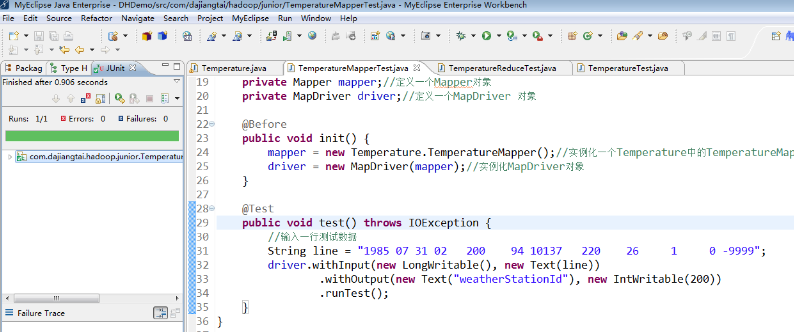
测试方法为 test() 方法,左边的对话框里显示"Runs:1/1,Errors:0,Failures:0",说明 Mapper 测试成功了。
Reducer 单元测试
Reduce 函数的逻辑就是把key相同的 value 值相加然后取平均值,Reducer 单元测试代码如下所示。
import java.io.IOException;

import java.util.ArrayList;

import java.util.List;

import org.apache.hadoop.io.IntWritable;

import org.apache.hadoop.io.Text;

import org.apache.hadoop.mapreduce.Reducer;

import org.apache.hadoop.mrunit.mapreduce.ReduceDriver;

import org.junit.Before;

import org.junit.Test;

import com.dajiangtai.hadoop.advance.Temperature;

/**

 * Reducer 单元测试

 */

@SuppressWarnings("all")

public class TemperatureReduceTest {

	private Reducer reducer;//定义一个Reducer对象

	private ReduceDriver driver;//定义一个ReduceDriver对象

	@Before

	public void init() {

		reducer = new Temperature.TemperatureReducer();//实例化一个Temperature中的TemperatureReducer对象

		driver = new ReduceDriver(reducer);//实例化ReduceDriver对象

	}

	@Test

	public void test() throws IOException {

		String key = "weatherStationId";//声明一个key值

		List values = new ArrayList();

		values.add(new IntWritable(200));//添加第一个value值

		values.add(new IntWritable(100));//添加第二个value值

		driver.withInput(new Text("weatherStationId"), values)//跟TemperatureReducer输入类型一致

			  .withOutput(new Text("weatherStationId"), new IntWritable(150))//跟TemperatureReducer输出类型一致

			  .runTest();

	}

}
在test()方法中,withInput的key/value参数分别为new Text("weatherStationId")和List类型的集合values。withOutput 的key/value参数分别是我们所期望输出的new Text("weatherStationId")和new IntWritable(150),我们要达到的测试效果就是我们的期望输出结果与TemperatureReducer实际输出结果一致。
Reducer 端的单元测试,鼠标放在 TemperatureReduceTest 类上右击,选择 Run As ——> JUnit test,运行结果如下所示。
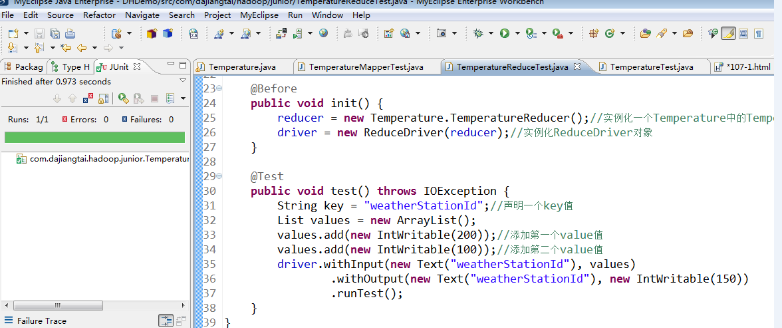
测试方法为 test() 方法,左边的对话框里显示"Runs:1/1,Errors:0,Failures:0",说明 Reducer 测试成功了。
MapReduce 单元测试
把 Mapper 和 Reducer 集成起来的测试案例代码如下。
import java.io.IOException;

import org.apache.hadoop.io.IntWritable;

import org.apache.hadoop.io.LongWritable;

import org.apache.hadoop.io.Text;

import org.apache.hadoop.mapreduce.Mapper;

import org.apache.hadoop.mapreduce.Reducer;

import org.apache.hadoop.mrunit.mapreduce.MapReduceDriver;

import org.junit.Before;

import org.junit.Test;

import com.dajiangtai.hadoop.advance.Temperature;

/**

 * Mapper 和 Reducer 集成起来测试

 */

@SuppressWarnings("all")

public class TemperatureTest {

	private Mapper mapper;//定义一个Mapper对象

	private Reducer reducer;//定义一个Reducer对象

	private MapReduceDriver driver;//定义一个MapReduceDriver 对象

	@Before

	public void init() {

		mapper = new Temperature.TemperatureMapper();//实例化一个Temperature中的TemperatureMapper对象

		reducer = new Temperature.TemperatureReducer();//实例化一个Temperature中的TemperatureReducer对象

		driver = new MapReduceDriver(mapper, reducer);//实例化MapReduceDriver对象

	}

	@Test

	public void test() throws RuntimeException, IOException {

		//输入两行行测试数据

		String line = "1985 07 31 02   200    94 10137   220    26     1     0 -9999";

		String line2 = "1985 07 31 11   100    56 -9999    50     5 -9999     0 -9999";

		driver.withInput(new LongWritable(), new Text(line))//跟TemperatureMapper输入类型一致

			  .withInput(new LongWritable(), new Text(line2))

			  .withOutput(new Text("weatherStationId"), new IntWritable(150))//跟TemperatureReducer输出类型一致

			  .runTest();

	}

}
在 test() 方法中,withInput添加了两行测试数据line和line2,withOutput 的key/value参数分别为我们期望的输出结果new Text("weatherStationId")和new IntWritable(150)。我们要达到的测试效果就是我们期望的输出结果与Temperature实际的输出结果一致。
MapReduce 端的单元测试,鼠标放在 TemperatureTest 类上右击,选择 Run As ——> JUnit test,运行结果如下所示。
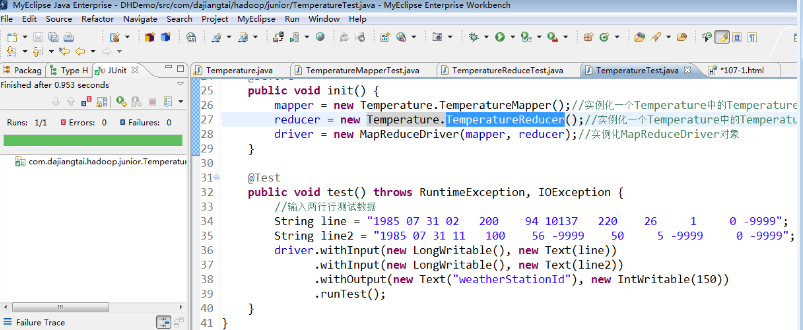
测试方法为 test() 方法,左边的对话框里显示"Runs:1/1,Errors:0,Failures:0",说明 MapReduce 测试成功了。
写程序几乎一大半的时间是调试,分布式程序调试的成本更高。 那么分布式的代码程序该如何调试呢?下面我们一起学习 MapReduce 代码如何使用 Debug 来调试。(hadoop 分布式集群的搭建,后续课程会详细讲解)
MapReduce 的Debug 调试
这里我们以 Temperature 为例,右键 Temperature 项目,选择"Debug As" ——> "java Application",在程序中打上断点后直接进入调试模式,如下图所示。
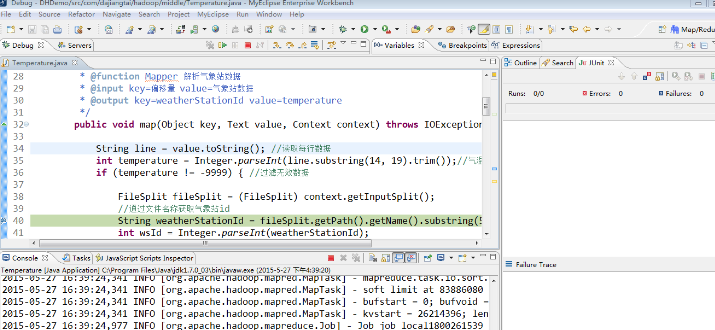
程序进入debug调试后,后续的调试步骤跟 Eclipse 调试 java程序是一样的,这里就不再赘述。
MR单元测试以及DeBug调试的更多相关文章
- Eclipse的Debug调试技巧
作为开发人员,掌握开发环境下的调试技巧十分有必要.我们在编写java程序的过程中,经常会遇到各种莫名其妙的问题,为了检测程序是哪里出现问题,经常需要增加日志,看变量的值,这样调试很麻烦.假设我每天花费 ...
- 远程debug调试java代码
远程debug调试java代码 日常环境和预发环境遇到问题时,可以用远程调试的方法本地打断点,在本地调试.生产环境由于网络隔离和系统稳定性考虑,不能进行远程代码调试. 整体过程是通过修改远程服务JAV ...
- u-boot 2011.09 开启debug 调试
以前做过,现在刚才又想不起来了,这个错误非常的严重. 在这里记一下. debug 调试信息的开启在 include/common.h 有如下宏定义: #ifdef DEBUG #define debu ...
- 使用Eclipse开发Java Web过程中Debug调试的使用方法
里介绍的是在Eclipse中的Debug调试. 首先右击项目选择Debug As -- Debug on Server 或者点击Server面板的小昆虫图标,启动Debug模式. 运行web项目,进行 ...
- eclipse debug (调试) 学习心得
eclipse debug (调试) 学习心得 进入debug模式: 1.设置断点 2.启动servers端的debug模式 3.运行程序,在后台遇到断点时,进入debug调试状态 ...
- Eclipse debug调试
Eclipse debug调试: F5:跳入方法F6:向下逐行调试F7:跳出方法F8:直接跳转到下一个断点
- (转) eclipse debug (调试) 学习心得
1.Step Into (also F5) 跳入2.Step Over (also F6) 跳过3.Step Return (also F7) 执行完当前method,然后return跳出此metho ...
- Android Studio的使用(二)--Debug调试
使用Android Studio进行Debug调试,这里有一篇比较详细的介绍 http://www.2cto.com/kf/201506/408358.html 故不再重复介绍.
- Eclipse中debug调试java代码一直报Source not found的解决办法
今天使用eclipse的debug调试代码,一直没法正常调试,一按F6就提示Source not found 根据提示发现可能是另一个项目影响了,所以把另一个项目Close Project,这次直接t ...
随机推荐
- springcloud之服务注册与发现
本次分享的是关于springcloud服务注册与发现的内容,将通过分别搭建服务中心,服务注册,服务发现来说明:现在北京这边很多创业公司都开始往springcloud靠了,可能是由于文档和组件比较丰富的 ...
- localStorage之本地储存
一.定义json var employees = [{ "firstName":"Bill" , "lastName":"Gate ...
- 从无到有-在create-react-app基础上接入react-router、redux-saga
搭建项目框架 新建项目 执行如下代码,用create-react-app来建立项目的基础框架,然后安装需要用到的依赖. $ npx create-react-app my-test-project $ ...
- SpringCloud入门之常用的配置文件 application.yml和 bootstrap.yml区别
作者其他技术文章 1) Spring Boot 简介 2)SpringCloud入门之YAML格式文件规范学习 3)SpringCloud入门之Spring Boot多环境配置切换指南 4) Elas ...
- Docker 镜像之存储管理
笔者在<Docker 镜像之进阶篇>中介绍了镜像分层.写时复制以及内容寻址存储(content-addressable storage)等技术特性,为了支持这些特性,docker 设计了一 ...
- Spring基础系列-参数校验
原创作品,可以转载,但是请标注出处地址:https://www.cnblogs.com/V1haoge/p/9953744.html Spring中使用参数校验 概述 JSR 303中提出了Bea ...
- 四种途径提高RabbitMQ传输数据的可靠性(二)
前言 上一篇四种途径提高RabbitMQ传输消息数据的可靠性(一)已经介绍了两种方式提高数据可靠性传输的方法,本篇针对上一篇中提出的问题(1)与问题(2)提出解决常用的方法. 本文其实也就是结合以上四 ...
- Gartner 2018 数据库系列报告发布 巨杉数据库连续两年入选
近期,Gartner陆续发布了2018年的数据库系列报告,包括<数据库魔力象限><数据库核心能力>以及<数据库推荐报告>.其中,SequoiaDB巨杉数据库作为业界 ...
- rpm和yum软件管理(week2_day5)--技术流ken
rpm简介 这是一个数据库管理工具,可以通过读取数据库,判断软件是否已经安装,如果已经安装可以读取出来所有文件的所在位置等,并可以实现删除这些文件. rpm:RPM is Redhat Package ...
- 内存管理-MRC与ARC详解
Objective-C提供了两种内存管理机制MRC(Mannul Reference Counting)和ARC(Automatic Reference Counting),为Objective-C提 ...