
TMS320DM642学习----第六篇(CCS中.dat文件类型详解)
1、如下为.dat文件中文件头的基本格式:
MagicNumber Format StartingAddress PageNum Length [NewFormat]
下面是分别的解释:
MagicNumber:1651.
Format:a number from 1 to 4, indicating the format of the samples in the file. This number represents a data format:
- (1) - hexadecimal,
- (2) - integer
- (3) - long
- (4) - float
- (9) - Use new scheme
StartingAddress:starting address of the block that was saved.
PageNum:page number the block was taken from.
Length:number of samples in the block.
NewFormat:Format (9); the new scheme. This is optional when usign the legacy formats 1 - 4
如下例子中的数据:
 1651 2 8cc0 0 1a70c

 79

 74

 74

 67

 ...

 ...
第一行的数据为:1651 2 8cc0 0 1a70c
1651标志着这是TI的.dat文件的格式。
表示了这个文件中的数据是整数格式的,比如第二行的数据79是interger的格式。
8cc0表示这段数据Load Memory到CCS软件的过程中,是加载到0x8cc0对应的地址上的。
0表示这段数据将加载到page0的位置上。
1a70c表示这段数据的总长度为0x1a70c(Hex) = 108300(Decimal)
2、创建图像对应的.dat文件:
如下的图片,转换为190*190大小的图片,并生成对应的.dat文件.

Code(文件名称:_dat_create.py):
 import cv2

 import glob

 Path = glob.glob('*.jpg')

 count = 0

 for Pic in Path:

         I = cv2.imread(Pic)

         res = cv2.resize(I,(190,190),interpolation=cv2.INTER_CUBIC)

         Name = "Test" + str(count)

         cv2.imwrite(Name + ".png",res)

         fid = open(Name + ".dat",'w')

         fid.write('1651 2 8cc0 0 1a70c'+'\n')

         width,height = res.shape[:2]

         for channel in range(3):

                 for row in range(height):

                         for col in range(width):

                                 fid.write(str(res[row][col][channel])+'\n')

         count += 1
将上述代码以及要处理的图片拷贝到同一个目录下,双击运行python脚本文件即可生成:

我们可以通过修改代码中的190*190的图像尺寸来生成不同的图像数据,并生成对应的.dat文件。
3、创建音频对应的.dat文件:
如下链接中的单音音源sin.wav,生成对应的.dat文件.
https://files.cnblogs.com/files/uestc-mm/sin.7z
Code(文件名Audio2Dat.py):
 from scipy.io.wavfile import write, read

 import numpy as np

 import math

 import glob

 import sys

 import os

 INT16_FAC = (2**15)-1

 INT32_FAC = (2**31)-1

 INT64_FAC = (2**63)-1

 norm_fact = {'int16':INT16_FAC, 'int32':INT32_FAC, 'int64':INT64_FAC,'float32':1.0,'float64':1.0}

 def wavread(filename):

     """

     Read a sound file and convert it to a normalized floating point array

     filename: name of file to read

     returns fs: sampling rate of file, x: floating point array

     """

     if (os.path.isfile(filename) == False):                  # raise error if wrong input file

             print("Input file does not exist. Make sure you computed the analysis/synthesis")

     fs, x = read(filename)

     if (len(x.shape) !=1):                                   # raise error if more than one channel

             raise ValueError("Audio file should be mono")

     if (fs !=44100):                                         # raise error if more than one channel

             raise ValueError("Sampling rate of input sound should be 44100")

     #scale down and convert audio into floating point number in range of -1 to 1

     x = np.float32(x)/norm_fact[x.dtype.name]

     return fs, x

 path = glob.glob('*.wav')

 count = 1

 for p in path:

     fs, dat = wavread(str(p))

     fid = open(str(count)+'.dat','w')

     # flie·Magic=1651 X=9 data·StartAddress=0x80000000 X=0 data·Number(Hex)=0x7a120 X=5

     fid.write('1651 9 80000000 0 7a120 5'+'\n')

     for i in dat:

             fid.write(str(i)+'\n')

     fid.close()

     count += 1
将上述代码以及要处理的图片拷贝到同一个目录下,双击运行python脚本文件即可生成.dat文件:
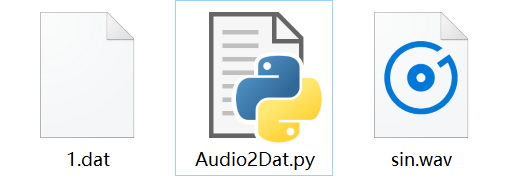
结果如下:
 1651 9 80000000 0 7a120 5

 0.0

 0.05011866

 0.10004042

 0.14956915

 0.19851027

 ...

 ...
参考内容:
Reference001:来自TI员工的回答,https://e2e.ti.com/support/tools/ccs/f/81/t/789759?tisearch=e2e-sitesearch&keymatch=%20user:332444
Reference002:所有代码,图片-音频打包下载(TI_dat_create.7z),https://files.cnblogs.com/files/uestc-mm/TI_dat_create.7z
TMS320DM642学习----第六篇(CCS中.dat文件类型详解)的更多相关文章
- log4CXX第二篇---配置文件(properties文件)详解
一.Log4j简介 Log4j有三个主要的组件:Loggers(记录器),Appenders (输出源)和Layouts(布局).这里可简单理解为日志类别,日志要输出的地方和日志以何种形式输出.综合使 ...
- android中的文件操作详解以及内部存储和外部存储(转载)
原文链接:http://m.blog.csdn.net/article/details?id=17725989 摘要 其实安卓文件的操作和java在pc环境下的操作并无二致,之所以需要单独讲解是因为安 ...
- Java中的枚举类型详解
枚举类型介绍 枚举类型(Enumerated Type) 很早就出现在编程语言中,它被用来将一组类似的值包含到一种类型当中.而这种枚举类型的名称则会被定义成独一无二的类型描述符,在这一点上和常量的定义 ...
- linux系统中的文件权限详解(转)
一.在<Linux系统中如何查看文件属性>中介绍了通过ls指令来查看文件的属性,具体如下: [命令] letuknowit@ubuntu:/$ cd /tmp letuknowit@ubu ...
- 【转】 android中的文件操作详解以及内部存储和外部存储
摘要 其实安卓文件的操作和Java在pc环境下的操作并无二致,之所以需要单独讲解是因为安卓系统提供了不同于pc的访问文件系统根路径的api,同时对一个应用的私有文件做了统一的管理.根据我的经验,初学者 ...
- VMware虚拟机文件夹中各文件作用详解
虚拟机的文件管理由VMware Workstation来执行 一个虚拟机一般以一系列文件的形式储存在宿主机中,这些文件一般在由workstation为虚拟机所创建的那个目录中 这里列出了这些关键文件及 ...
- linux学习之路第八天(linux文件权限详解)
建议和我上一篇博客一起通读,效果更加 1.权限的基本介绍 通过一张图片解决疑惑(重点) rwx权限详解 rwx作用到文件 1)[r]代表可读(read) :可以读取,查看 2)[w]代表可写(writ ...
- python基础语法_python中的布尔类型详解
转自:http://www.cnblogs.com/521yywzyzhc/p/6264885.html 我们已经了解了Python支持布尔类型的数据,布尔类型只有True和False两种值,但是 ...
- Python学习第六篇——字典中的键和值
favorite_language ={ "jen":"python", "sarah":"c", "edwa ...
随机推荐
- hadoop记录-hive常见设置
分区表 set hive.exec.dynamic.partition=true; set hive.exec.dynamic.partition.mode=nonstrict;create tabl ...
- 移动开发day2_css预处理器_flex布局
css预处理器 一种技术,可以提高编写css代码的技术而已. 有3种预处理器常见 less sass stylues less使用流程 编写符合less语法的less文件 使用工具 将less编译成 ...
- django --视图装饰器
- 浅入深出Vue:工具准备之PostMan安装配置及Mock服务配置
浅入深出Vue之工具准备(二):PostMan安装配置 由于家中有事,文章没顾得上.在此说声抱歉,这是工具准备的最后一章. 接下来就是开始环境搭建了~尽情期待 工欲善其事必先利其器,让我们先做好准备工 ...
- word20170102日用家电 household appliances
1. Vacuum cleaner: 吸尘器 2.Cordless vacuum cleaner: 无线吸尘器 3.Robotic vacuum cleaner: 机器人吸尘器 动词:to vacuu ...
- 关于微信emoji 表情数据库存不了,或者显示为???的问题
必须我utf8mb4,数据库就可以存 2. 数据库连接也需要是utf8mb4
- git本机服务器配置(二):TortoiseGit的安装
1. 下载TortoiseGit https://tortoisegit.org/ 1.1 下载安装包 下载对应安装包,如果不知道自己该下载哪个,那就下载32位的. 1.2 下载语言包 下载和安装包相 ...
- Sublime Text 3删除插件
Ctrl+Shift+P调出命令窗口,输入remove: 选择第二个Remove Package,会看到如下界面: 里面列出了你已经安装的插件,之后选择你想要卸载的就好了.
- 如何在sublime安装ctags函数追踪插件
一.这个插件是需要下载执行软件才能够操作的,下载地址http://prdownloads.sourceforge.net/ctags/ctags58.zip 然后解压到自己喜欢的目录下,我是安装到 D ...
- Operation System