
USB PIC Programmer (Brenner8)
http://uzzors2k.4hv.org/index.php?page=usbpicprog
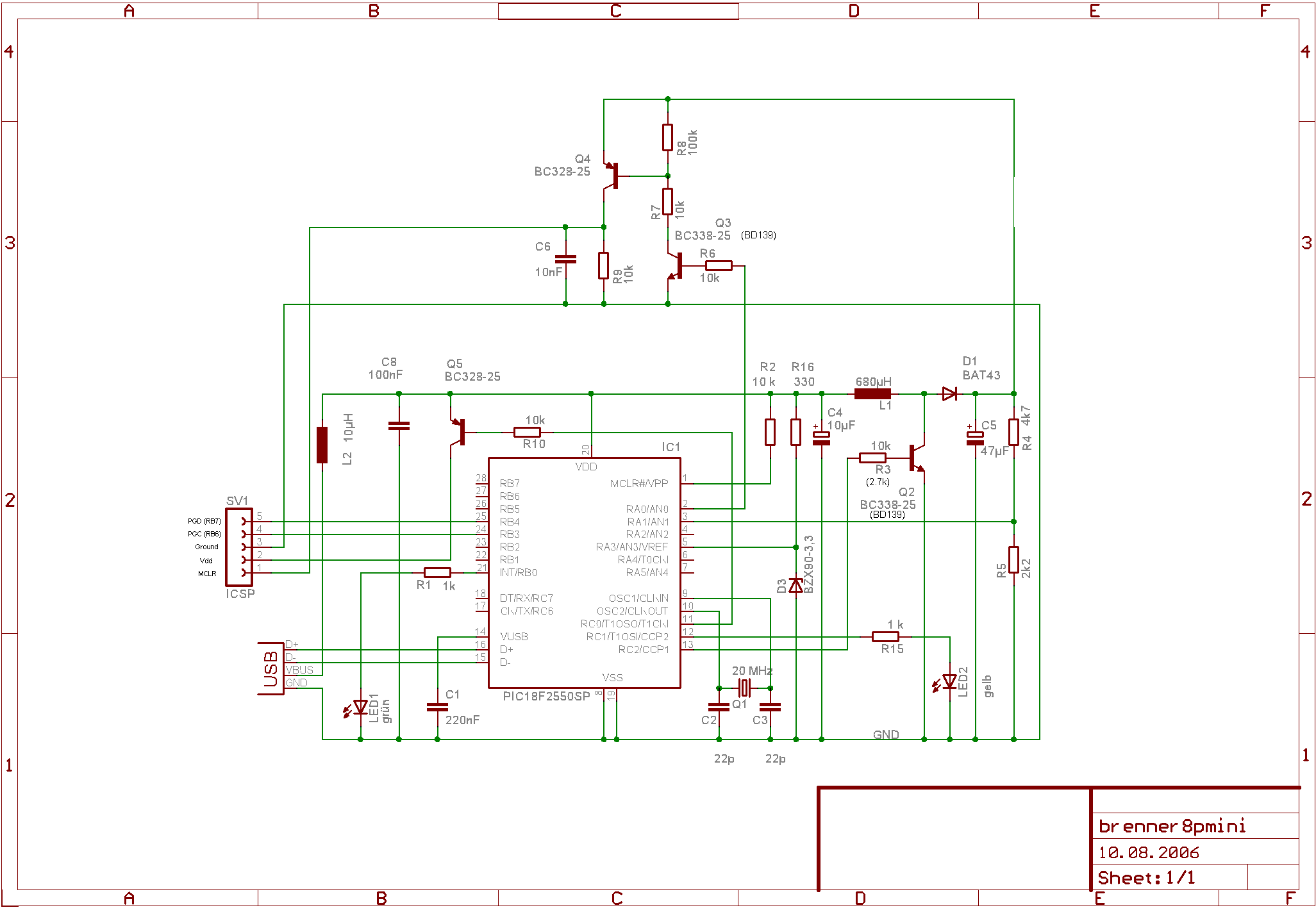
My Tait Serial programmer works alright, but not every computer has a parallel port, and these days they're almost extinct. Most laptop don't even have a serial port! Thinking ahead a USB programmer seems like a smart investment. Fortunately someone has made a diy version, the Brenner8. It consists of a PIC18F2550 and some transistors, nothing more. The PIC18F2550 even runs a boost-converter supplying the MCLR voltage, so all power is supplied through USB! Very elegant. There are several variations to the main design, but I chose the mini ICSP version. Since I only program 18 pin PICs the whole 40 pin ZIF socket would be overkill, and additional sockets can be added to the ICSP connector easily.
The programmer is pretty easy to put together, the catch is the PIC18F2550 which needs to be programmed with a bootloader. Any parallel or serial port programmer can do this, I usedmy previous PIC programmer and this programming software. Remember to invert VDD and VPP, and that the PIC18F2550 MCLR voltage is 12.5V maximum compared 13.6V used in the Tait programmer. I had to use a 15k pull down on PGM (pin 26) and a 100 ohm resistor in series with PGD (pin 28) + 100pF cap to ground on PGD line. PGC is pin 27, MCLR pin 1, Vdd is pin 20 and ground is pins 8 and 19. The bootloader hex is bootloader_0_20mhz.hex if using a 20 MHz clock which we are. All the software and firmware required can be found in USBurn 1.5. Download and install it. Updated firmware and bootloader software can be found at thecreator's website.
Once the PIC18F2550 is programmed, build the circuit as shown above. I had problems with transistors Q2 and Q3, but using BD139's instead solved it. Q2's base resistor had to be changed to 2.7k. Component values are fairly non-critical, except for R4, R5, Q1 and D3. However R4, R5, and D3 can be compensated for in the USBurn software. Once built, put the programmed PIC18F2550 into the programmer and plug it in. The computer should recognize the device, and prompt you to install drivers. Click through until you can select a location to install the the drivers from, then browse to the drivers folder in the USBurn folder. Select it and windows should install the drivers. Once installed, go to control panel -> system -> hardware -> device manager -> other devices -> PICbrenner8 (sprut). Go to properties, power management and do not allow windows to turn off device to save power. Your programmer is now installed.

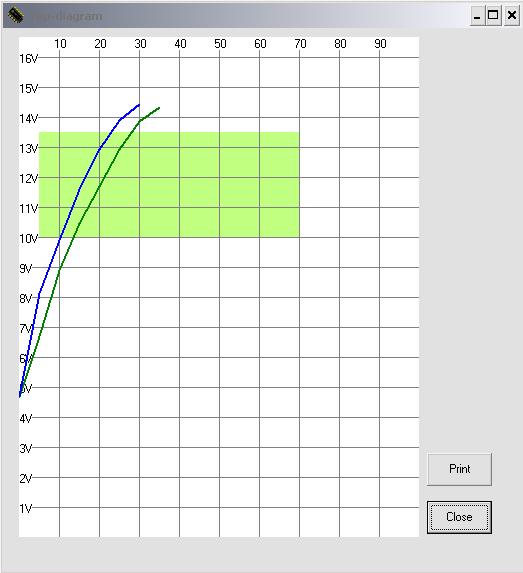
he next step is to calibrate the programmer. Open USBurn and go to options -> Calibration/Test. First turn the on various voltages and test for 5V on all but Vpp. For SDATA ensure that the programmer reads the correct data in. Once the main signal points check out, it's time for MCLR voltage calibration. Turn on Vpp, and measure the zener diode voltage drop at pin 5 with a multimeter. Enter this voltage into the zener diode section (Z-voltage). If you used a 4.7k and 2.2k resistor the U-divider can be left untouched, otherwise adjust it to reflect the resistor divider' input to output voltage ratio. Once this is done turn on both Vdd and Vpp, then hit "3: auto-adjust offset and gain". Now push the 13V button, and finally ">" button which measures Vpp. If calibrated correctly the voltage should be around 13V, and the voltage measured by USBurn should be almost equal to the multimeter voltage. Push the "graph" button to see that the boost converter is working properly. The correct graph will look something like the one to the right. As long as the lines pass through the green area the boost converter section is working correctly.
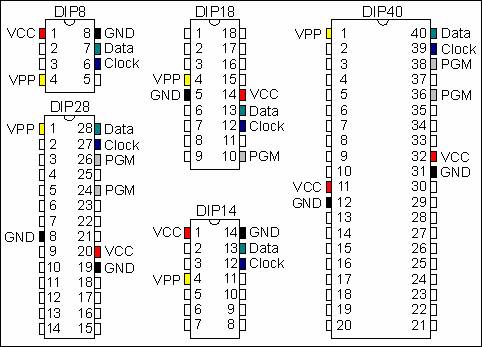
Your Brenner8 should now be ready for use! See PIC programming specifications for details on programming PICs in various packages.

USB PIC Programmer (Brenner8)的更多相关文章
- BeeProg2C Extremely fast universal USB interfaced programmer
http://www.elnec.com/products/universal-programmers/beeprog2c/ FPGA based totally reconfigurable 48 ...
- PIC JDM Prototype Programmer 1001
In need of a programmer for PIC micro controllers I decided to build my own one. This programmer has ...
- USB ISP(ICSP) Open Programmer < PWM ADC HV PID >
http://sourceforge.net/projects/openprogrammer/?source=navbar Open Programmer http://openprog.alterv ...
- Programmer in Google Code
https://code.google.com/p/vsprog/ CLI program support USB_TO_XXX of Versaloon. Support AVR_ISP/JTAG, ...
- ELNEC Programmer
BeeHive204 Very fast universal 4x 48-pindrive concurrent multiprogramming system with ISP capability ...
- Hello Raspberry Pi
Raspberry Pi 入手好一段时间了,原意是想撸 linux,但是后来一整年都在忙孩子房子户口本子的事,这玩意也就搁了一年尘. 最近终于被生活折腾到了尾声,开始找一些东西来折腾折腾. 一.什么是 ...
- RFID 仿真/模拟/监控/拦截/检测/嗅探器
Sound card based RFID sniffer/emulator (Too tired after recon.cx to do draw the schematics better th ...
- RFID Reader 线路图收集
This 125 kHz RFID reader http://www.serasidis.gr/circuits/RFID_reader/125kHz_RFID_reader.htm http:// ...
- Cubieboard Linaro 搭建超节能监控平台
转载的,不知道原作者是谁.list很好,但我没有全部测试和验证,部分内容或已失效,如有人找到原作者的更新或者最新的心得.请告知. Cubieboard是一款ARM架构的开发板, 1GHz 的 All ...
随机推荐
- eclipse各种报错
1.控制台报这个错是由于tomcat的session缓存的问题; org.apache.catalina.session.StandardManager doLoad 造成原因:上次未正确关闭tomc ...
- 牛客红包OI赛 B 小可爱序列
Description 链接:https://ac.nowcoder.com/acm/contest/224/B 来源:牛客网 "我愿意舍弃一切,以想念你,终此一生." " ...
- Code Conventions for the JavaScript Programming Language
This is a set of coding conventions and rules for use in JavaScript programming. It is inspired by t ...
- Codeforces Round #408 (Div. 2)C. Bank Hacking(STL)
题目链接:http://codeforces.com/problemset/problem/796/C 题目大意:有n家银行,第一次可以攻击任意一家银行(能量低于自身),跟被攻击银行相邻或者间接相邻( ...
- contabs.js 的使用
1. 先下载两个文件 https://files.cnblogs.com/files/xiaojf/style.css https://files.cnblogs.com/files/xiaojf/c ...
- VMware虚拟机Mac OS X无法调整扩展硬盘大小的解决方案
使用VMware虚拟机搭建的MacOSX,在10.10以上可能会出现无法扩充磁盘大小的问题. 因为很多朋友在初次安装MacOSX的时候都默认选择40G的磁盘大小,结果用了没两天之后就发现磁盘不够用了. ...
- 使用ngx_lua构建高并发应用
http://blog.csdn.net/chosen0ne/article/details/7304192
- 【51nod】1061 最复杂的数 V2
题解 我是榜上最后一名= = 可能高精度用vector太慢了吧--什么破题= = 这道题很简单,如果高精度熟练代码--也很简单--然而,参数调了好久 我们发现质数的指数一定是,质数越小,指数越大,这个 ...
- CentOS7多实例安装mysq5.6二进制版本
1丶下载mysql,解压,创建用户,创建软链接 test -d /tools || mkdir /tools ;cd /tools wget http://mirrors.sohu.com/mysql ...
- java 里的内部类
java里的内部类通常能帮我们隐藏一些具体实现,体现良好的封装效果. 内部类又分几种: 1.普通内部类 2.局部内部类 3.匿名内部类 4.静态内部类 普通内部类 先来看第一种普通的内部类,这种内部类 ...