
[翻译] DCPathButton
DCPathButton
https://github.com/Tangdixi/DCPathButton
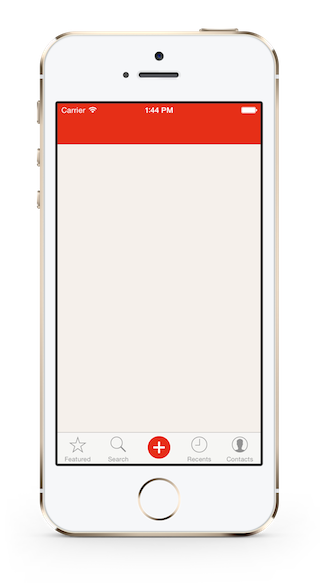
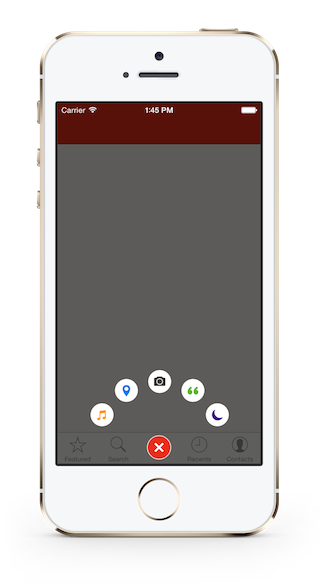
DCPathButton 2.0 is a menu button for iOS. Designed by a famous iOS App Path.
Since Path 4.0, this beautiful button was moved into the tab bar, with a new design.
So the DCPathButton is totally a copy, including the animations, the sounds and the button's images ( of cource you can use your own images ).
DCPathButton2.0是一个iOS菜单按钮.是Path应用中一个很精彩的设计.
自从Path4.0之后,这个按钮就被移动到了tab bar上去了,变成另外一种新的设计了.
所以,DCPathButton完全复制了它的功能,包括动画,声音以及按钮图标(当然,你也可以替换成你自己的图标)
How To Get Started - 如何开始
- Download DCPathButton 直接下载DCPathButton
- Clone DCPathButton 通过git来下载
git clone git@github.com:Tangdixi/DCPathButton.git
Installation - 安装
Of cource, you can install DCPathButton in a traditional way -- drag the DCPathButton folder into your projects. but I strongly recommanded that you install from CocoaPods
当然,你也可以直接用传统的方式来安装DCPathButton = 将DCPathButton文件夹拖到你的项目当中去.但是我强烈建议你通过CocoaPods来安装.
Requirement
- AudioToolBox.framework
- QuartzCore.framework
Install with CocoaPods - 通过CocoaPods安装
CocoaPods is a dependency manager for Objective-C, which automates and simplifies the process of using 3rd-party libraries like DCPathButton in your projects.
Podfile
platform :ios, '7.0'

pod 'DCPathButton', '~> 2.0'
Usage - 使用
Create a DCPathButton - 创建DCPathButton
1.import the "DCPathButton" to your controller 将DCPathButton头文件引入到你的控制器中
import "DCPathButton.h"
2.Add the DCPathButtonDelegate to your controller 添加代理
@interface ViewController ()<DCPathButtonDelegate>
3.Create a center button and add it into your view 创建一个中间的按钮并添加到你的view上
DCPatButton *centerButton = [[DCPathButton alloc]initWithCenterImage:[UIImage imageNamed:@"chooser-button-tab"]

                                                      hilightedImage:[UIImage imageNamed:@"chooser-button-tab-highlighted"]];

[self.view addSubView:centerButton];
4.Create some item buttons and add them into the center button 创建其他的item按钮并将它附加在刚刚在中间创建的按钮上
    DCPathItemButton *itemButton_1 = [[DCPathItemButton alloc]initWithImage:[UIImage imageNamed:@"image"]

                                                           highlightedImage:[UIImage imageNamed:@"highlightedImage"]

                                                            backgroundImage:[UIImage imageNamed:@"backgroundImage"]

                                                 backgroundHighlightedImage:[UIImage imageNamed:@"backgroundhighlightedImage"]];

[centerButton addPathItems:@[itemButton_1]];
DCPathButtonDelegate - 代理方法
DCPathButtonDelegate handle the action when you fire the item buttons which is similar to theUITableViewDelegate, control the items through the index
You can add one item at least or five items at most. Assume we have five items, so the index is 0 to 4 :)
当你点击按钮的时候,DCPathButtonDelegate控制着所有的按钮事件,你可以通过index值来识别按钮,最少一个按钮以及最多5个按钮.
- (void)itemButtonTappedAtIndex:(NSUInteger)index

{

  if(index == 0){

    // When the user tap index 1 here ...

  }

  else{

    // other code here ...

  }

}
Custom Property - 自定义属性
@property (assign, nonatomic) CGFloat bloomRadius;
bloomRadius is use to handle the item button bloom radius, default is 105.0f;
bloomRadius是用来控制展开i899iseftet效果的角度的,默认值为105.f;
Now there is only one public property in DCPathButton. :|
If you want more DIY. Just open an issue, tell me what you want. :)
现在在DCPathButton里面只有一个公开的属性:|,如果你想要更多的定制的效果,你就提一个issue,告诉我你想要添加的:)
Problems, bugs or advice - 问题,bug以及建议
Open an issue guys :)
I will reply you as quickly as I can.
提issue吧,我会尽快回复你的:)
[翻译] DCPathButton的更多相关文章
- 《Django By Example》第五章 中文 翻译 (个人学习,渣翻)
书籍出处:https://www.packtpub.com/web-development/django-example 原作者:Antonio Melé (译者@ucag注:大家好,我是新来的翻译, ...
- 《Django By Example》第四章 中文 翻译 (个人学习,渣翻)
书籍出处:https://www.packtpub.com/web-development/django-example 原作者:Antonio Melé (译者注:祝大家新年快乐,这次带来<D ...
- [翻译]开发文档:android Bitmap的高效使用
内容概述 本文内容来自开发文档"Traning > Displaying Bitmaps Efficiently",包括大尺寸Bitmap的高效加载,图片的异步加载和数据缓存 ...
- 【探索】机器指令翻译成 JavaScript
前言 前些时候研究脚本混淆时,打算先学一些「程序流程」相关的概念.为了不因太枯燥而放弃,决定想一个有趣的案例,可以边探索边学. 于是想了一个话题:尝试将机器指令 1:1 翻译 成 JavaScript ...
- 《Django By Example》第三章 中文 翻译 (个人学习,渣翻)
书籍出处:https://www.packtpub.com/web-development/django-example 原作者:Antonio Melé (译者注:第三章滚烫出炉,大家请不要吐槽文中 ...
- 《Django By Example》第二章 中文 翻译 (个人学习,渣翻)
书籍出处:https://www.packtpub.com/web-development/django-example 原作者:Antonio Melé (译者注:翻译完第一章后,发现翻译第二章的速 ...
- 《Django By Example》第一章 中文 翻译 (个人学习,渣翻)
书籍出处:https://www.packtpub.com/web-development/django-example 原作者:Antonio Melé (译者注:本人目前在杭州某家互联网公司工作, ...
- 【翻译】Awesome R资源大全中文版来了,全球最火的R工具包一网打尽,超过300+工具,还在等什么?
0.前言 虽然很早就知道R被微软收购,也很早知道R在统计分析处理方面很强大,开始一直没有行动过...直到 直到12月初在微软技术大会,看到我软的工程师演示R的使用,我就震惊了,然后最近在网上到处了解和 ...
- ASP.NET MVC with Entity Framework and CSS一书翻译系列文章之第一章:创建基本的MVC Web站点
在这一章中,我们将学习如何使用基架快速搭建和运行一个简单的Microsoft ASP.NET MVC Web站点.在我们马上投入学习和编码之前,我们首先了解一些有关ASP.NET MVC和Entity ...
随机推荐
- HMM分词实例
class HMM(object): def __init__(self): import os # 主要是用于存取算法中间结果,不用每次都训练模型 self.model_file = 'model/ ...
- redis 安装 与错误解决办法
redis 安装与安装中遇到的错误 redis 安装 wget http://download.redis.io/releases/redis-4.0.11.tar.gz .tar.gz cd red ...
- C/C++中的static
一.静态全局变量 理解static关键字之前首先回顾一下C/C++程序的在内存中的分配情况.从低地址到高地址依次分为:代码区.全局数据区.堆区.栈区.函数之外的全局变量和静态变量(包括全局变量和静态变 ...
- KafkaOffsetMonitor监控kafka
KafkaOffsetMonitor监控kafka 1. KafkaOffsetMonitor是一个可以用于监控Kafka的Topic及Consumer消费状况的工具,其配置和使用特别的方便.源项目G ...
- 设计模式学习--装饰者模式(Decorator Pattern)
概念: 装饰者模式(Decorator Pattern): 动态地将功能添加到对象,相比生成子类更灵活,更富有弹性. 解决方案: 装饰者模式的重点是对象的类型,装饰者对象必须有着相同的接口,也也就是有 ...
- SQL Server数据库状态和文件状态
数据库状态 (database states) 查询数据库的当前状态 : 1.查询所有数据库的状态 ,通过sys.databases目录视图的state_desc列 user master go se ...
- [日常] Redis基本使用测试
Redis 是一个开源(BSD许可)的,内存中的数据结构存储系统,它可以用作数据库.缓存和消息中间件. 它支持多种类型的数据结构,如 字符串(strings), 散列(hashes), 列表(list ...
- [Linux] Linux系统(进程管理)
进程:当我们运行程序时,Linux会为程序创建一个特殊的环境,包含程序运行的所有资源,这个环境就称为进程 前台进程:一般我们使用一些命令,都属于前台进程,直接输出结果到显示器 后台进程:在命令的末尾加 ...
- iOS 网络请求数据缓存
1. NSURLCache简介: iOS对NSURLRequest提供了7种缓存策略:(实际上能用的只有4种) NSURLRequestUseProtocolCachePolicy // 默认的缓存策 ...
- 一次单核CPU占用过高问题的处理
客户现场反馈,top的检查结果中,一个CPU的占用一直是100%.实际上现场有4个CPU,而且这个服务器是mysql专属服务器. 我的第一反应是io_thread一类的参数设置有问题,检查以后发现re ...