
MVC使用Gantt Chart实现甘特图,管理事情进度
借助"甘特图",可以直观地了解任务、活动、工作的进度。dhtmlxGantt是一个开源的Javacirpt库,能帮助我们快速创建"甘特图",本篇体验在MVC中的实现。主要包括:
- 认识"甘特图"
- 下载dhtmlxGantt包
- 把dhtmlxGantt相关CSS、JS、样式引入到_Layout.cshtml中
- 初始化dhtmlxGantt
- 通过EF Code First创建初始数据
- 显示数据
- 保存数据
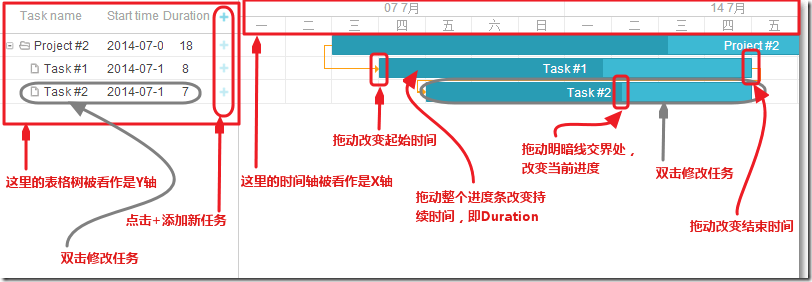
认识"甘特图"
下载dhtmlxGantt包
通过NuGet,输入关键字"Gantt Chart",下载dhtmlxGantt包。
把dhtmlxGantt相关CSS、JS、样式引入到_Layout.cshtml中
<head>

    <meta charset="utf-8" />

    <meta name="viewport" content="width=device-width" />

    <title>@ViewBag.Title</title>

    @Styles.Render("~/Content/css")

    <script src="~/Scripts/dhtmlxgantt/dhtmlxgantt.js"></script>

    <link href="~/Content/dhtmlxgantt/dhtmlxgantt.css" rel="stylesheet" />

    <script src="~/Scripts/dhtmlxgantt/locale/locale_cn.js"></script>

    <style type="text/css">

        html, body {

            height: %;

            padding: 0px;

            margin: 0px;

            overflow: hidden;

        }

    </style>

</head>

<body>

    @RenderBody()

    <script src="~/Scripts/main.js"></script>

</body>
以上,locale_cn.js用来汉化,main.js用来初始化配置。
初始化dhtmlxGantt
在Home/Index.cshtml中,创建一个id为ganttContainer的div,dhtmlxGantt将被加载到此div中。
@{

    ViewBag.Title = "Index";

    Layout = "~/Views/Shared/_Layout.cshtml";

}

<div id="ganttContainer" style="width: 100%; height: 100%;"></div>
main.js中的配置如下:
(function () {

    // add month scale

    gantt.config.scale_unit = "week"; //第一个时间尺度,即X轴的单位,包括:"minute", "hour", "day", "week", "month", "year"

    gantt.config.step = ;//步进,默认为1

    gantt.templates.date_scale = function (date) {//日期格式化

        var dateToStr = gantt.date.date_to_str("%d %M");

        var endDate = gantt.date.add(gantt.date.add(date, , "week"), -, "day");

        return dateToStr(date) + " - " + dateToStr(endDate);

    };

    gantt.config.subscales = [ //第二个时间尺度单位

        { unit: "day", step: , date: "%D" }

    ];

    gantt.config.scale_height = ; //设置时间尺度和Grid树的高度

    // configure milestone description

    gantt.templates.rightside_text = function (start, end, task) {//进度条右侧的提示文字

        if (task.type == gantt.config.types.milestone) {

            return task.text;

        }

        return "";

    };

    // add section to type selection: task, project or milestone

    gantt.config.lightbox.sections = [//弹出对话框设置

        { name: "description", height: , map_to: "text", type: "textarea", focus: true },

        { name: "type", type: "typeselect", map_to: "type" },

        { name: "time", height: , type: "duration", map_to: "auto" }

    ];

    gantt.config.xml_date = "%Y-%m-%d %H:%i:%s"; // XML中的日期格式

    gantt.init("ganttContainer"); // 初始化dhtmlxGantt,ganttContainer为视图中div的id

    gantt.load("/Home/Data", "json");//加载数据

    // enable dataProcessor

    var dp = new dataProcessor("/Home/Save");//dhtmlxGantt保存变化,包括添加、更新、删除

    dp.init(gantt);

})();
通过EF Code First创建初始数据
参照dhtmlxGantt官方文档,我们建立这样的模型:
Link类体现Task间的相关性。
using System.ComponentModel.DataAnnotations;

namespace MyGanttChart.Models

{

    public class Link

    {

        public int Id { get; set; }

        [MaxLength()]

        public string Type { get; set; }

        public int SourceTaskId { get; set; }

        public int TargetTaskId { get; set; }

    }

}
Task类是任务的抽象。
using System;

using System.ComponentModel.DataAnnotations;

namespace MyGanttChart.Models

{

    public class Task

    {

        public int Id { get; set; }

        [MaxLength()]

        public string Text { get; set; }

        public DateTime StartDate { get; set; }

        public int Duration { get; set; }

        public decimal Progress { get; set; }

        public int SortOrder { get; set; }

        public string Type { get; set; }

        public int? ParentId { get; set; }

    }

}
创建一个派生于DbContext的上下文类:
using System.Data.Entity;

using MyGanttChart.Models;

namespace MyGanttChart.DAL

{

    public class GanttContext : DbContext

    {

        public GanttContext() : base("GanttContext") { }

        public DbSet<Task> Tasks { get; set; }

        public DbSet<Link> Links { get; set; }

    }

}
创建一些种子数据:
using System;

using System.Collections.Generic;

using System.Data.Entity;

using MyGanttChart.Models;

namespace MyGanttChart.DAL

{

    public class GanttInitializer : DropCreateDatabaseIfModelChanges<GanttContext>

    {

        protected override void Seed(GanttContext context)

        {

            List<Task> tasks = new List<Task>()

            {

                new Task() { Id = , Text = "Project #2", StartDate = DateTime.Today.AddDays(-), Duration = , SortOrder = , Progress = 0.4m, ParentId = null },

                new Task() { Id = , Text = "Task #1", StartDate = DateTime.Today.AddDays(-), Duration = , SortOrder = , Progress = 0.6m, ParentId =  },

                new Task() { Id = , Text = "Task #2", StartDate = DateTime.Today.AddDays(-), Duration = , SortOrder = , Progress = 0.6m, ParentId =  }

            };

            tasks.ForEach(s => context.Tasks.Add(s));

            context.SaveChanges();

            List<Link> links = new List<Link>()

            {

                new Link() { Id = , SourceTaskId = , TargetTaskId = , Type = "" },

                new Link() { Id = , SourceTaskId = , TargetTaskId = , Type = "" }

            };

            links.ForEach(s => context.Links.Add(s));

            context.SaveChanges();

        }

    }

}
在Web.config中配置种子数据:
<entityFramework>

    <contexts>

      <context type="MyGanttChart.DAL.GanttContext, MyGanttChart">

        <databaseInitializer type="MyGanttChart.DAL.GanttInitializer, MyGanttChart" />

      </context>

    </contexts>

    <defaultConnectionFactory type="System.Data.Entity.Infrastructure.SqlConnectionFactory, EntityFramework" />

    <providers>

      <provider invariantName="System.Data.SqlClient" type="System.Data.Entity.SqlServer.SqlProviderServices, EntityFramework.SqlServer" />

    </providers>

  </entityFramework>
以上,type="MyGanttChart.DAL.GanttInitializer, MyGanttChart"中,MyGanttChart.DAL为种子类GanttInitializer所在的命名空间,MyGanttChart为程序集的名称。
在Web.config中配置连接字符串:
<connectionStrings>

    <add name="GanttContex"

       connectionString="Data Source=.;User=some user name;Password=some password;Initial Catalog=Gantt;Integrated Security=True"

       providerName="System.Data.SqlClient"/>

  </connectionStrings>
显示数据
HomeController的Data()方法加载数据,以json格式返回。
using System;

using System.Collections.Generic;

using System.Linq;

using System.Web.Mvc;

using System.Xml.Linq;

using MyGanttChart.DAL;

using MyGanttChart.Models;

namespace MyGanttChart.Controllers

{

    public class HomeController : Controller

    {

        private readonly GanttContext db = new GanttContext();

        public ActionResult Index()

        {

            return View();

        }

        [HttpGet]

        public JsonResult Data()

        {

            var jsonData = new

            {

                data = (

                    from t in db.Tasks.AsEnumerable()

                    select new

                    {

                        id = t.Id,

                        text = t.Text,

                        start_date = t.StartDate.ToString("u"),

                        duration = t.Duration,

                        order = t.SortOrder,

                        progress = t.Progress,

                        open = true,

                        parent = t.ParentId,

                        type = (t.Type != null) ? t.Type : String.Empty

                    }

                ).ToArray(),

                links = (

                    from l in db.Links.AsEnumerable()

                    select new

                    {

                        id = l.Id,

                        source = l.SourceTaskId,

                        target = l.TargetTaskId,

                        type = l.Type

                    }

                ).ToArray()

            };

            return new JsonResult { Data = jsonData, JsonRequestBehavior = JsonRequestBehavior.AllowGet };

        }

        ......

}
在main.js中,已经对加载数据做了设置:
gantt.load("/Home/Data", "json");//加载数据
运行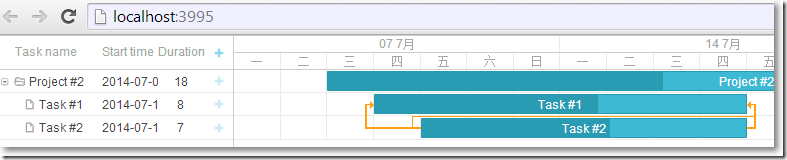
保存数据
当在"甘特图"上进行任何的操作再保存到数据库的时候,请求表头信息大致如下: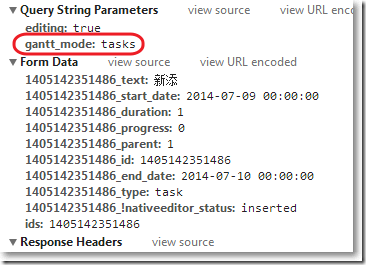
dhtmlxGantt为我们提供了一个GanttRequest类,提供了Parse(FormCollection form, string ganttMode)方法把从客户端拿到的表头信息赋值到GanttRequest类的各个属性中。
public class GanttRequest

    {

        public GanttMode Mode { get; set; }

        public GanttAction Action { get; set; }

        public Task UpdatedTask { get; set; }

        public Link UpdatedLink { get; set; }

        public long SourceId { get; set; }

        /// <summary>

        /// Create new GanttData object and populate it

        /// </summary>

        /// <param name="form">Form collection</param>

        /// <returns>New GanttData</returns>

        public static List<GanttRequest> Parse(FormCollection form, string ganttMode)

        {

            // save current culture and change it to InvariantCulture for data parsing

            var currentCulture = Thread.CurrentThread.CurrentCulture;

            Thread.CurrentThread.CurrentCulture = CultureInfo.InvariantCulture;

            var dataActions = new List<GanttRequest>();

            var prefixes = form["ids"].Split(',');

            foreach (var prefix in prefixes)

            {

                var request = new GanttRequest();

                // lambda expression for form data parsing

                Func<string, string> parse = x => form[String.Format("{0}_{1}", prefix, x)];

                request.Mode = (GanttMode)Enum.Parse(typeof(GanttMode), ganttMode, true);

                request.Action = (GanttAction)Enum.Parse(typeof(GanttAction), parse("!nativeeditor_status"), true);

                request.SourceId = Int64.Parse(parse("id"));

                // parse gantt task

                if (request.Action != GanttAction.Deleted && request.Mode == GanttMode.Tasks)

                {

                    request.UpdatedTask = new Task()

                    {

                        Id = (request.Action == GanttAction.Updated) ? (int)request.SourceId : ,

                        Text = parse("text"),

                        StartDate = DateTime.Parse(parse("start_date")),

                        Duration = Int32.Parse(parse("duration")),

                        Progress = Decimal.Parse(parse("progress")),

                        ParentId = (parse("parent") != "") ? Int32.Parse(parse("parent")) : (int?)null,

                        SortOrder = (parse("order") != null) ? Int32.Parse(parse("order")) : ,

                        Type = parse("type")

                    };

                }

                // parse gantt link

                else if (request.Action != GanttAction.Deleted && request.Mode == GanttMode.Links)

                {

                    request.UpdatedLink = new Link()

                    {

                        Id = (request.Action == GanttAction.Updated) ? (int)request.SourceId : ,

                        SourceTaskId = Int32.Parse(parse("source")),

                        TargetTaskId = Int32.Parse(parse("target")),

                        Type = parse("type")

                    };

                }

                dataActions.Add(request);

            }

            // return current culture back

            Thread.CurrentThread.CurrentCulture = currentCulture;

            return dataActions;

        }

    }
保存数据,有可能是对Task的操作,也有可能是对Link的操作,把这2种模式封装到一个枚举中:
public enum GanttMode

    {

        Tasks,

        Links

    }
而所有的动作无非是添加、更新、删除等,也封装到枚举中:
public enum GanttAction

    {

        Inserted,

        Updated,

        Deleted,

        Error

    }
接下来,HomeController的Save()方法,根据请求表头的信息,借助GanttRequest类的静态方法Parse(FormCollection form, string ganttMode)把表头信息封装到GanttRequest类的属性中,然后根据这些属性采取相应的操作:
using System;

using System.Collections.Generic;

using System.Linq;

using System.Web.Mvc;

using System.Xml.Linq;

using MyGanttChart.DAL;

using MyGanttChart.Models;

namespace MyGanttChart.Controllers

{

    public class HomeController : Controller

    {

        private readonly GanttContext db = new GanttContext();

        ......

        /// <summary>

        /// Update Gantt tasks/links: insert/update/delete

        /// </summary>

        /// <param name="form">Gantt data</param>

        /// <returns>XML response</returns>

        [HttpPost]

        public ContentResult Save(FormCollection form)

        {

            var dataActions = GanttRequest.Parse(form, Request.QueryString["gantt_mode"]);

            try

            {

                foreach (var ganttData in dataActions)

                {

                    switch (ganttData.Mode)

                    {

                        case GanttMode.Tasks:

                            UpdateTasks(ganttData);

                            break;

                        case GanttMode.Links:

                            UpdateLinks(ganttData);

                            break;

                    }

                }

                db.SaveChanges();

            }

            catch

            {

                // return error to client if something went wrong

                dataActions.ForEach(g => { g.Action = GanttAction.Error; });

            }

            return GanttRespose(dataActions);

        }

        /// <summary>

        /// Update gantt tasks

        /// </summary>

        /// <param name="ganttData">GanttData object</param>

        private void UpdateTasks(GanttRequest ganttData)

        {

            switch (ganttData.Action)

            {

                case GanttAction.Inserted:

                    // add new gantt task entity

                    db.Tasks.Add(ganttData.UpdatedTask);

                    break;

                case GanttAction.Deleted:

                    // remove gantt tasks

                    db.Tasks.Remove(db.Tasks.Find(ganttData.SourceId));

                    break;

                case GanttAction.Updated:

                    // update gantt task

                    db.Entry(db.Tasks.Find(ganttData.UpdatedTask.Id)).CurrentValues.SetValues(ganttData.UpdatedTask);

                    break;

                default:

                    ganttData.Action = GanttAction.Error;

                    break;

            }

        }

        /// <summary>

        /// Update gantt links

        /// </summary>

        /// <param name="ganttData">GanttData object</param>

        private void UpdateLinks(GanttRequest ganttData)

        {

            switch (ganttData.Action)

            {

                case GanttAction.Inserted:

                    // add new gantt link

                    db.Links.Add(ganttData.UpdatedLink);

                    break;

                case GanttAction.Deleted:

                    // remove gantt link

                    db.Links.Remove(db.Links.Find(ganttData.SourceId));

                    break;

                case GanttAction.Updated:

                    // update gantt link

                    db.Entry(db.Links.Find(ganttData.UpdatedLink.Id)).CurrentValues.SetValues(ganttData.UpdatedLink);

                    break;

                default:

                    ganttData.Action = GanttAction.Error;

                    break;

            }

        }

        /// <summary>

        /// Create XML response for gantt

        /// </summary>

        /// <param name="ganttData">Gantt data</param>

        /// <returns>XML response</returns>

        private ContentResult GanttRespose(List<GanttRequest> ganttDataCollection)

        {

            var actions = new List<XElement>();

            foreach (var ganttData in ganttDataCollection)

            {

                var action = new XElement("action");

                action.SetAttributeValue("type", ganttData.Action.ToString().ToLower());

                action.SetAttributeValue("sid", ganttData.SourceId);

                action.SetAttributeValue("tid", (ganttData.Mode == GanttMode.Tasks) ? ganttData.UpdatedTask.Id : ganttData.UpdatedLink.Id);

                actions.Add(action);

            }

            var data = new XDocument(new XElement("data", actions));

            data.Declaration = new XDeclaration("1.0", "utf-8", "true");

            return Content(data.ToString(), "text/xml");

        }

    }

}
运行,点击+添加一个新的task: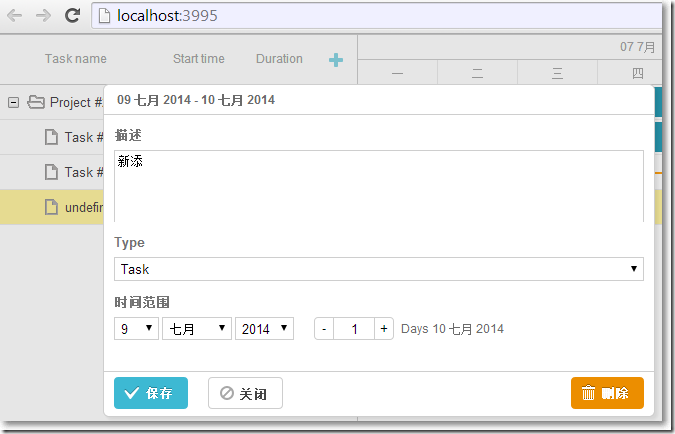
参考资料:
Gantt Chart for ASP.NET MVC with dhtmlxGantt
MVC使用Gantt Chart实现甘特图,管理事情进度的更多相关文章
- 甘特图 (Gantt )的优缺点
时间管理 - 甘特图 (Gantt ) 优点:甘特图直观.简单.容易制作,便于理解,能很清晰地标识出直到每一项任务的起始与结束时间,一般适用比较简单的小型项目,可用于WBS的任何层次.进度控制.资源优 ...
- odoo10甘特图gantt view
odoo10中的gantt图示例 1.Gantt属性说明 甘特图视图的根元素是<gantt />,它没有子节点但可以采用以下属性: date_start (required) 提供每条记录 ...
- 自己做的js甘特图插件
版权所有,禁止转载 内容都在代码中,上图上代码! 代码 <!DOCTYPE html> <html> <head> <title>ganttu.html ...
- 一款开源且功能强大的C#甘特图控件.NET Winforms Gantt Chart Control
甘特图在项目管理中非常重要,甘特图的思想比较简单,即以图示的方式通过活动列表和时间刻度形象地表示出任何特定项目的活动顺序与持续时间.它直观地表明任务计划在什么时候进行,及实际进展与计划要求的对比.管理 ...
- R-plotly|交互式甘特图(Gantt chart)-项目管理/学习计划
本文首发于“生信补给站”微信公众号,https://mp.weixin.qq.com/s/CGz51qOjFSJ4Wx_qOMzjiw 更多关于R语言,ggplot2绘图,生信分析的内容,敬请关注小号 ...
- 【转载】 JQuery.Gantt(甘特图) 开发指南
转载来自: http://www.cnblogs.com/liusuqi/archive/2013/06/09/3129293.html JQuery.Gantt是一个开源的基于JQuery库的用于实 ...
- JQuery.Gantt(甘特图)开发
一.简介 JQuery.Gantt是一个开源的基于JQuery库的用于实现甘特图效果的可扩展功能的JS组件库. 二.前端页面 2.1 资源引用 首先需要将下载到的源码中的CSS.IMG.JS等资源放入 ...
- [转]用Excel制作甘特图并管理项目
对于比较简单的项目管理,或绘制甘特图,选用电子表格工具——比如价格高也最强大的Excel.开源的OpenOffice.免费的WPS——可能比项目管理软件更方便. 1. XL-Easy Gantt 模板 ...
- Twproject Gantt开源甘特图功能扩展
1.Twproject Gantt甘特图介绍 Twproject Gantt 是一款基于 jQuery 开发的甘特图组件,也可以创建其它图表,例如任务树(Task Trees).内置编辑.缩放和 CS ...
随机推荐
- (五)动态SQL
第一节:if条件 第二节:choose,when和otherwise条件 第三节:where条件 1.自动加上where: 2.如果where子句以and或者or开头,则自动删除第一个and或者or: ...
- extjs获取选中列表!
extjs 当批量某一table 元素时! 获取元素的属性! var list= []; var array = grid.getSelectionModel().getSelections() ...
- Linux学习笔记:pwd与dirs的区别
在Linux中可以使用pwd和dirs进行当前目录查看,分别用于显示当前目录和显示完整目录记录.具体如下: 1.pwd 显示当前目录 2.dirs 显示目录堆叠中的记录 END 2018-08-21 ...
- information_schema Introduction
information_schema介绍 information_schema数据库是MySQL自带的,里面的“表”保存着服务器当前的实时信息.它提供了访问数据库元数据的方式.元数据是关于数据的数据, ...
- 浅谈C#中的模式窗体和非模式窗体
ShowDialog(); // 模式窗体 Show(); // 非模式窗体 区别: 返回值不同,DialogResult/void 模式窗体会使程序中断,直到关闭模式窗口 打开模式窗体后不能切换到应 ...
- 一步一步学习IdentityServer4 (5) .NETCore2.0 Swagger
首先添加nuget: Swashbuckle.AspNetCore services.AddSwaggerGen(c => { c.SwaggerDoc("v1", new ...
- React.js学习之环境搭建
1 工欲善其事必先利其器:前端开发工具 1.1 WebStorm和Sublime Text Sublime Text:作为代码编辑器,Sublime Text的优点如下: 主流前端开发编辑器 体积较小 ...
- 【Java】java.lang.NullPointerException的两个原因
自己写程序时出现过 java.lang.NullPointerException错误的一些原因 (1)自己建立了一个数组,但每个数组元素没单独初始化(单独new一个新对象). (2)在进行if (ar ...
- Hibernate or JPA Annotation中BLOB、CLOB注解写法
BLOB和CLOB都是大字段类型,BLOB是按二进制字节码来存储的,而CLOB是可以直接存储字符串的. 在hibernate or JPA Annotation中,实体BLOB.CLOB类型的注解与普 ...
- Java内存是怎么管理的
JAVA 内存管理总结 1. java是如何管理内存的 Java的内存管理就是对象的分配和释放问题.(两部分) 分配 :内存的分配是由程序完成的,程序员需要通过关键字new 为每个对象申请内存空间 ( ...