
springboot之websocket,STOMP协议
一、WebSocket 是 HTML5 开始提供的一种在单个 TCP 连接上进行全双工通讯的协议。
WebSocket 使得客户端和服务器之间的数据交换变得更加简单,允许服务端主动向客户端推送数据。在 WebSocket API 中,浏览器和服务器只需要完成一次握手,两者之间就直接可以创建持久性的连接,并进行双向数据传输。
在 WebSocket API 中,浏览器和服务器只需要做一个握手的动作,然后,浏览器和服务器之间就形成了一条快速通道。两者之间就直接可以数据互相传送。
二、STOMP即Simple (or Streaming) Text Orientated Messaging Protocol,简单(流)文本定向消息协议,它提供了一个可互操作的连接格式,允许STOMP客户端与任意STOMP消息代理(Broker)进行交互。STOMP协议由于设计简单,易于开发客户端,因此在多种语言和多种平台上得到广泛地应用。
三、首先,我们先理解一下为什么需要STOMP。
1)常规的websocket连接和普通的TCP基本上没有什么差别的。
2)那我们如果像http一样加入一些响应和请求层。
3)所以STOMP在websocket上提供了一中基于帧线路格式(frame-based wire format)。
4)简单一点,就是在我们的websocket(TCP)上面加了一层协议,使双方遵循这种协议来发送消息。
四、STOMP
1)Frame

例如:
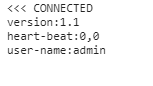
command:CONNECT
其他部分都是headers的一部分。
2)command类别
CONNECT
SEND
SUBSCRIBE
UNSUBSCRIBE
BEGIN
COMMIT
ABORT
ACK
NACK
DISCONNECT
3)客户端常用连接方式
a、ws
  var url = "ws://localhost:8080/websocket";

  var client = Stomp.client(url);
b、sockJs
  <script src="http://cdn.sockjs.org/sockjs-0.3.min.js"></script>

  <script>

    // use SockJS implementation instead of the browser's native implementation

    var ws = new SockJS(url);

    var client = Stomp.over(ws);

    [...]

  </script>
说明:使用ws协议需要浏览器的支持,但是一些老版本的浏览器不一定支持。Stomp.over(ws)的凡是就是用来定义服务websocket的协议。
4)服务端的实现过程
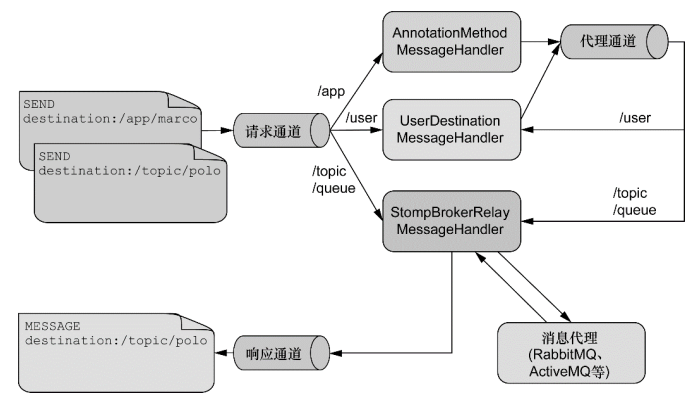
a、服务端:/app,这里访问服务端,前缀通过设定的方式访问。
b、用户:/user,这里针对的是用户消息的传递,针对于当前用户进行传递。
c、其他消息:/topic、/queue,这两种方式。都是定义出来用于订阅。并且消息只能从这里通过并处理
五、springboot的简单例子
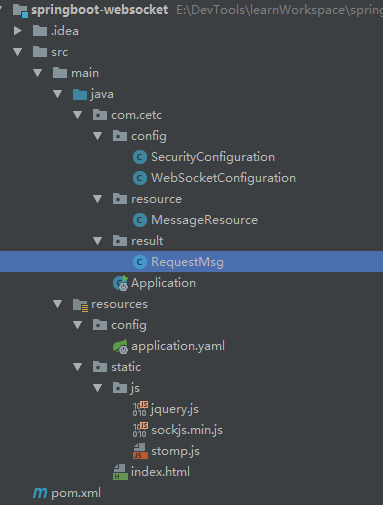
1)目录结构
2)依赖包(pom.xml)
    <parent>

        <groupId>org.springframework.boot</groupId>

        <artifactId>spring-boot-starter-parent</artifactId>

        <version>2.0.0.RELEASE</version>

    </parent>

    <dependencies>

        <dependency>

            <groupId>org.springframework.boot</groupId>

            <artifactId>spring-boot-starter-web</artifactId>

        </dependency>

        <dependency>

            <groupId>org.springframework.boot</groupId>

            <artifactId>spring-boot-starter-websocket</artifactId>

        </dependency>

        <dependency>

            <groupId>org.springframework.boot</groupId>

            <artifactId>spring-boot-starter-security</artifactId>

        </dependency>

    </dependencies>
3)websocket配置(WebSocketConfiguration、SecurityConfiguration)
/**

 * webSocket配置

 */

@Configuration

@EnableWebSocketMessageBroker

public class WebSocketConfiguration implements WebSocketMessageBrokerConfigurer {

    /**

     * 注册stomp端点,主要是起到连接作用

     * @param stompEndpointRegistry

     */

    @Override

    public void registerStompEndpoints(StompEndpointRegistry stompEndpointRegistry) {

        stompEndpointRegistry

                .addEndpoint("/webSocket")  //端点名称

                //.setHandshakeHandler() 握手处理,主要是连接的时候认证获取其他数据验证等

                //.addInterceptors() 拦截处理,和http拦截类似

                .setAllowedOrigins("*") //跨域

                .withSockJS(); //使用sockJS

    }

    /**

     * 注册相关服务

     * @param registry

     */

    @Override

    public void configureMessageBroker(MessageBrokerRegistry registry) {

        //这里使用的是内存模式,生产环境可以使用rabbitmq或者其他mq。

        //这里注册两个,主要是目的是将广播和队列分开。

        //registry.enableStompBrokerRelay().setRelayHost().setRelayPort() 其他方式

        registry.enableSimpleBroker("/topic", "/queue");

        //客户端名称前缀

        registry.setApplicationDestinationPrefixes("/app");

        //用户名称前

        registry.setUserDestinationPrefix("/user");

    }

}
认证配置:
/**

 * 配置基本登录

 */

@Configuration

@EnableWebSecurity

public class SecurityConfiguration extends WebSecurityConfigurerAdapter{

    /**

     * 加密方式

     */

    @Autowired

    private BCryptPasswordEncoder passwordEncoder;

    /**

     * 所有请求过滤,包含webSocket

     * @param http

     * @throws Exception

     */

    @Override

    protected void configure(HttpSecurity http) throws Exception {

        http

            .authorizeRequests().anyRequest().authenticated()

        .and()

            .httpBasic();

    }

    /**

     * 加入两个用户测试不同用的接受情况

     * @param auth

     * @throws Exception

     */

    @Override

    protected void configure(AuthenticationManagerBuilder auth) throws Exception {

        auth.inMemoryAuthentication()

            .withUser("admin").password(passwordEncoder.encode("admin")).roles("ADMIN")

        .and()

            .withUser("user").password(passwordEncoder.encode("user")).roles("USER");

    }

    @Bean

    public BCryptPasswordEncoder bCryptPasswordEncoder() {

        return new BCryptPasswordEncoder();

    }

}
4)服务端
/**

 * 消息接收处理

 */

@RestController

public class MessageResource {

    //spring提供的推送方式

    @Autowired

    private SimpMessagingTemplate messagingTemplate;

    /**

     * 广播模式

     * @param requestMsg

     * @return

     */

    @MessageMapping("/broadcast")

    @SendTo("/topic/broadcast")

    public String broadcast(RequestMsg requestMsg) {

        //这里是有return,如果不写@SendTo默认和/topic/broadcast一样

        return "server:" + requestMsg.getBody().toString();

    }

    /**

     * 订阅模式,只是在订阅的时候触发,可以理解为:访问——>返回数据

     * @param id

     * @return

     */

    @SubscribeMapping("/subscribe/{id}")

    public String subscribe(@DestinationVariable Long id) {

        return "success";

    }

    /**

     * 用户模式

     * @param requestMsg

     * @param principal

     */

    @MessageMapping("/one")

    //@SendToUser("/queue/one") 如果存在return,可以使用这种方式

    public void one(RequestMsg requestMsg, Principal principal) {

        //这里使用的是spring的security的认证体系,所以直接使用Principal获取用户信息即可。

        //注意为什么使用queue,主要目的是为了区分广播和队列的方式。实际采用topic,也没有关系。但是为了好理解

        messagingTemplate.convertAndSendToUser(principal.getName(), "/queue/one", requestMsg.getBody());

    }

}
客户端(JavaScript):
<!DOCTYPE html>

<html lang="en">

<head>

    <meta charset="UTF-8">

    <title>webSocket</title>

    <script src="js/jquery.js"></script>

    <script src="js/sockjs.min.js"></script>

    <script src="js/stomp.js"></script>

</head>

<body>

    <div>

        <button id="connect">连接</button>

        <button id="disconnect" disabled="disabled">断开</button>

    </div>

    <div>

        <h3>广播形式</h3>

        <button id="broadcastButton">发送</button><input id="broadcastText" type="text">

        <label>广播消息:</label><input id="broadcastMsg" type="text" disabled="disabled">

    </div>

    <div>

        <h3>订阅形式</h3>

        <label>订阅消息:</label><input id="subscribeMsg" type="text" disabled="disabled">

    </div>

    <div>

        <h3>角色形式</h3>

        <button id="userButton">发送</button><input id="userText" type="text">

        <label>用户消息:</label><input id="userMsg" type="text" disabled="disabled">

    </div>

    <div>

        <h3>无APP</h3>

        <button id="appButton">发送</button><input id="appText" type="text">

        <label>前端消息:</label><input id="appMsg" type="text" disabled="disabled">

    </div>

</body>

<script>

    var stomp = null;

    $("#connect").click(function () {

        var url = "http://localhost:8080/webSocket"

        var socket = new SockJS(url);

        stomp = Stomp.over(socket);

        //连接

        stomp.connect({}, function (frame) {

            //订阅广播

            stomp.subscribe("/topic/broadcast", function (res) {

                $("#broadcastMsg").val(res.body);

            });

            //订阅,一般只有订阅的时候在返回

            stomp.subscribe("/app/subscribe/1", function (res) {

                $("#subscribeMsg").val(res.body);

            });

            //用户模式

            stomp.subscribe("/user/queue/one", function (res) {

                $("#userMsg").val(res.body);

            });

            //无APP

            stomp.subscribe("/topic/app", function (res) {

                $("#appMsg").val(res.body);

            });

            setConnect(true);

        });

    });

    $("#disconnect").click(function () {

        if (stomp != null) {

            stomp.disconnect();

        }

        setConnect(false);

    });

    //设置按钮

    function setConnect(connectStatus) {

        $("#connect").attr("disabled", connectStatus);

        $("#disconnect").attr("disabled", !connectStatus);

    }

    //发送广播消息

    $("#broadcastButton").click(function () {

        stomp.send("/app/broadcast", {}, JSON.stringify({"body":$("#broadcastText").val()}))

    });

    //发送用户消息

    $("#userButton").click(function () {

        stomp.send("/app/one", {}, JSON.stringify({"body":$("#userText").val()}))

    });

    //发送web消息

    $("#appButton").click(function () {

        stomp.send("/topic/app", {}, JSON.stringify({"body":$("#appText").val()}))

    });

</script>

</html>
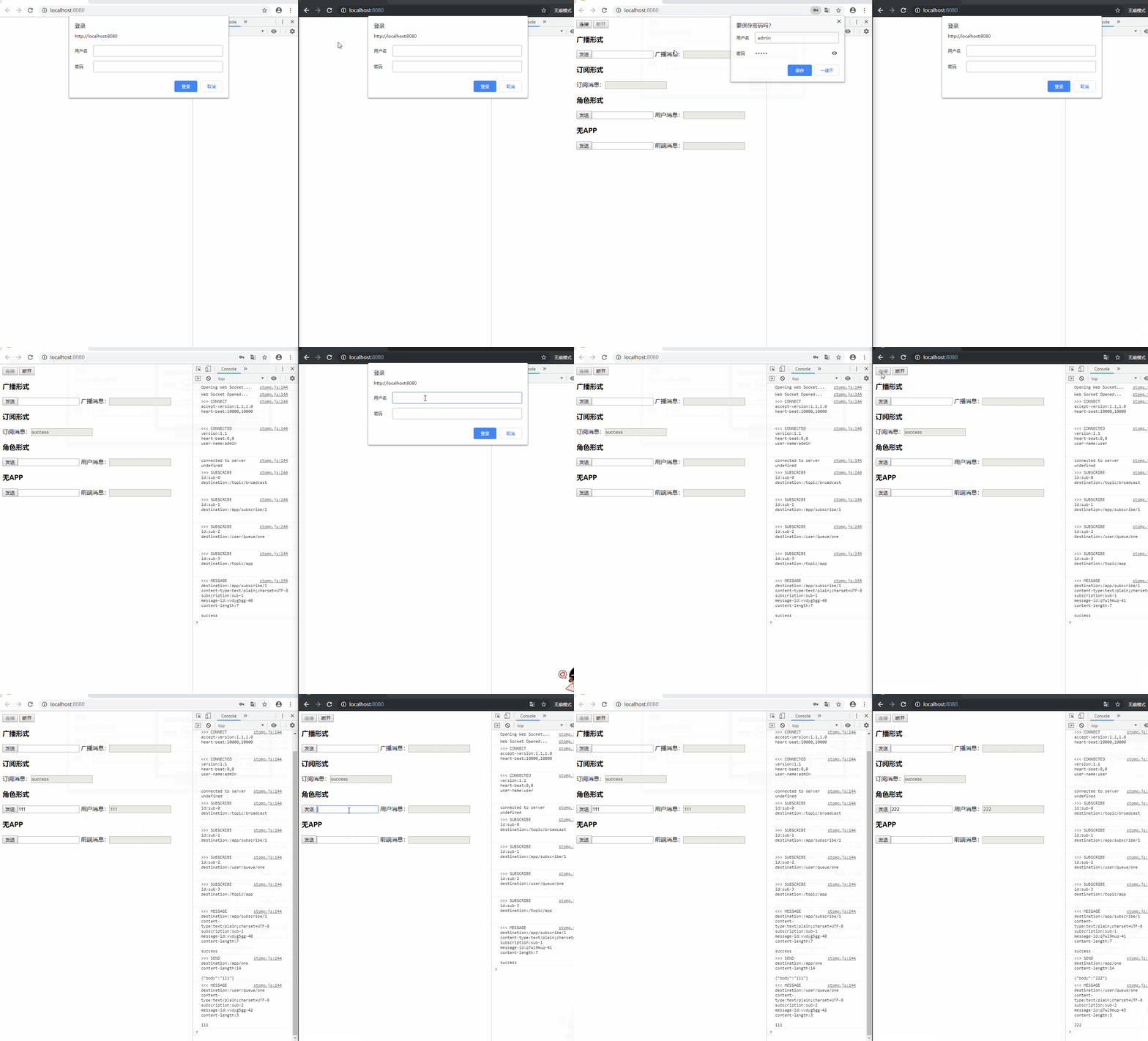
5)普通测试
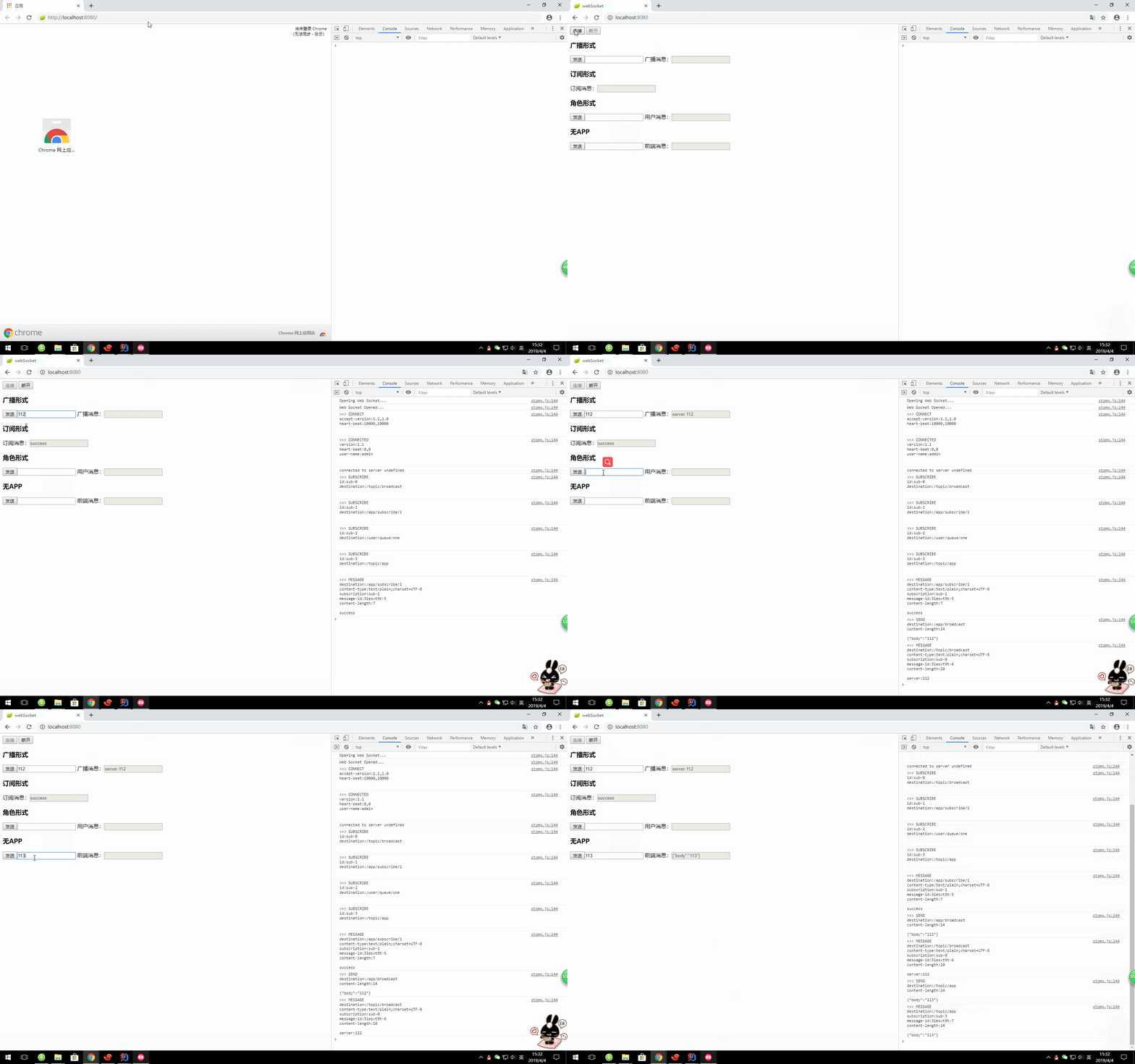
角色测试:
六、相关资料
http://jmesnil.net/stomp-websocket/doc/
七、源码:https://github.com/lilin409546297/springboot-websocket
springboot之websocket,STOMP协议的更多相关文章
- 【Java分享客栈】SpringBoot整合WebSocket+Stomp搭建群聊项目
前言 前两周经常有大学生小伙伴私信给我,问我可否有偿提供毕设帮助,我说暂时没有这个打算,因为工作实在太忙,现阶段无法投入到这样的领域内,其中有两个小伙伴又问到我websocket该怎么使用,想给自己的 ...
- springboot websocket集群(stomp协议)连接时候传递参数
最近在公司项目中接到个需求.就是后台跟前端浏览器要保持长连接,后台主动往前台推数据. 网上查了下,websocket stomp协议处理这个很简单.尤其是跟springboot 集成. 但是由于开始是 ...
- springboot+websocket+sockjs进行消息推送【基于STOMP协议】
springboot+websocket+sockjs进行消息推送[基于STOMP协议] WebSocket是在HTML5基础上单个TCP连接上进行全双工通讯的协议,只要浏览器和服务器进行一次握手,就 ...
- springBoot -webSocket 基于STOMP协议交互
浅谈WebSocket WebSocket是在HTML5基础上单个TCP连接上进行全双工通讯的协议,只要浏览器和服务器进行一次握手,就可以建立一条快速通道,两者就可以实现数据互传了.说白了,就是打破了 ...
- SpringBoot WebSocket STOMP 广播配置
目录 1. 前言 2. STOMP协议 3. SpringBoot WebSocket集成 3.1 导入websocket包 3.2 配置WebSocket 3.3 对外暴露接口 4. 前端对接测试 ...
- websocket的子协议stomp协议
stomp协议Spring实现 服务器注册EndPoint 用来与客户端建立websocket连接 websocket连接的建立应该与客户端与服务器之间的通道无关 jdk中 javax下的websoc ...
- Spring Boot实现STOMP协议的WebSocket
关注公众号:锅外的大佬 每日推送国外优秀的技术翻译文章,励志帮助国内的开发者更好地成长! WebSocket协议是应用程序处理实时消息的方法之一.最常见的替代方案是长轮询(long polling)和 ...
- spring-boot支持websocket
spring-boot本身对websocket提供了很好的支持,可以直接原生支持sockjs和stomp协议.百度搜了一些中文文档,虽然也能实现websocket,但是并没有直接使用spring-bo ...
- SpringBoot 整合 WebSocket
SpringBoot 整合 WebSocket(topic广播) 1.什么是WebSocket WebSocket为游览器和服务器提供了双工异步通信的功能,即游览器可以向服务器发送消息,服务器也可以向 ...
随机推荐
- ASP.NET MVC使用AuthenticationAttribute验证登录
首先,添加一个类AuthenticationAttribute,该类继承AuthorizeAttribute,如下: using System.Web; using System.Web.Mvc; n ...
- C#.NET里面抽象类,接口,虚方法
1抽象类 (1) 抽象方法只作声明,而不包含实现,可以看成是没有实现体的虚方法 (2) 抽象类不能被实例化 (3) 抽象类可以但不是必须有抽象属性和抽象方法,但是一旦有了抽象方法,就一定要把这个类声明 ...
- sql建JOB语句
declare job_id pls_integer; begin sys.dbms_job.submit(job => job_id, what => 'proc_AGTAWBSTATI ...
- idea插件 总结 自认用比较不错的插件的总结
1.Background Image Plus 设置你喜欢的图片,提升你编码逼格!还可以设置以轮播图的形式变换图片 还可以设置图片的透明度等现实的方式 2.CodeGlance 类似SublimeTe ...
- 第2次作业——APP案例分析
第一部分 调研, 评测 1.下载软件并使用起来,描述最简单直观的个人第一次上手体验. 知乎,中文互联网最大的知识平台.使用知乎这个APP3年了,目睹了它的兴盛(当然没有衰亡@_@).打开这款APP,主 ...
- CPU中MMU的作用
http://blog.csdn.net/jjw97_5/article/details/39340261 MMU是个硬件,每当cpu访问一个地址的时候,MMU从内存里面查table,把cpu想访问的 ...
- Oracle学习(十一):PL/SQL
版权声明:本文为博主原创文章.未经博主同意不得转载. https://blog.csdn.net/v123411739/article/details/30231659 1.知识点:能够对照以下的录屏 ...
- 【转】【iOS开发】打开另一个APP(URL Scheme与openURL)
目标 平常我们做iOS开发,会经常遇到打开其他的APP的功能.本篇文章讲的就是打开别人的APP的一些知识.我们的目标是: 打开别人的APP 让别人打开我们的APP iOS9的适配问题 使用URL Sc ...
- ubuntu16.04常见的问题解决方案
问题一:关于咖啡主机和其他服务器厂商和个人虚拟机VM10安装ubuntu16.04 ubuntu16.04默认是没有root用户的,要想有必须要通过用户创建,通常安装ubuntu16.04会有个让你创 ...
- cmdb截图