
PopupWindow 的常用api封装
对PopupWindow常用API的简单封装,几行代码就搞定PopupWindow弹窗,使用Builder模式,链式调用,像使用AlertDialog 一样
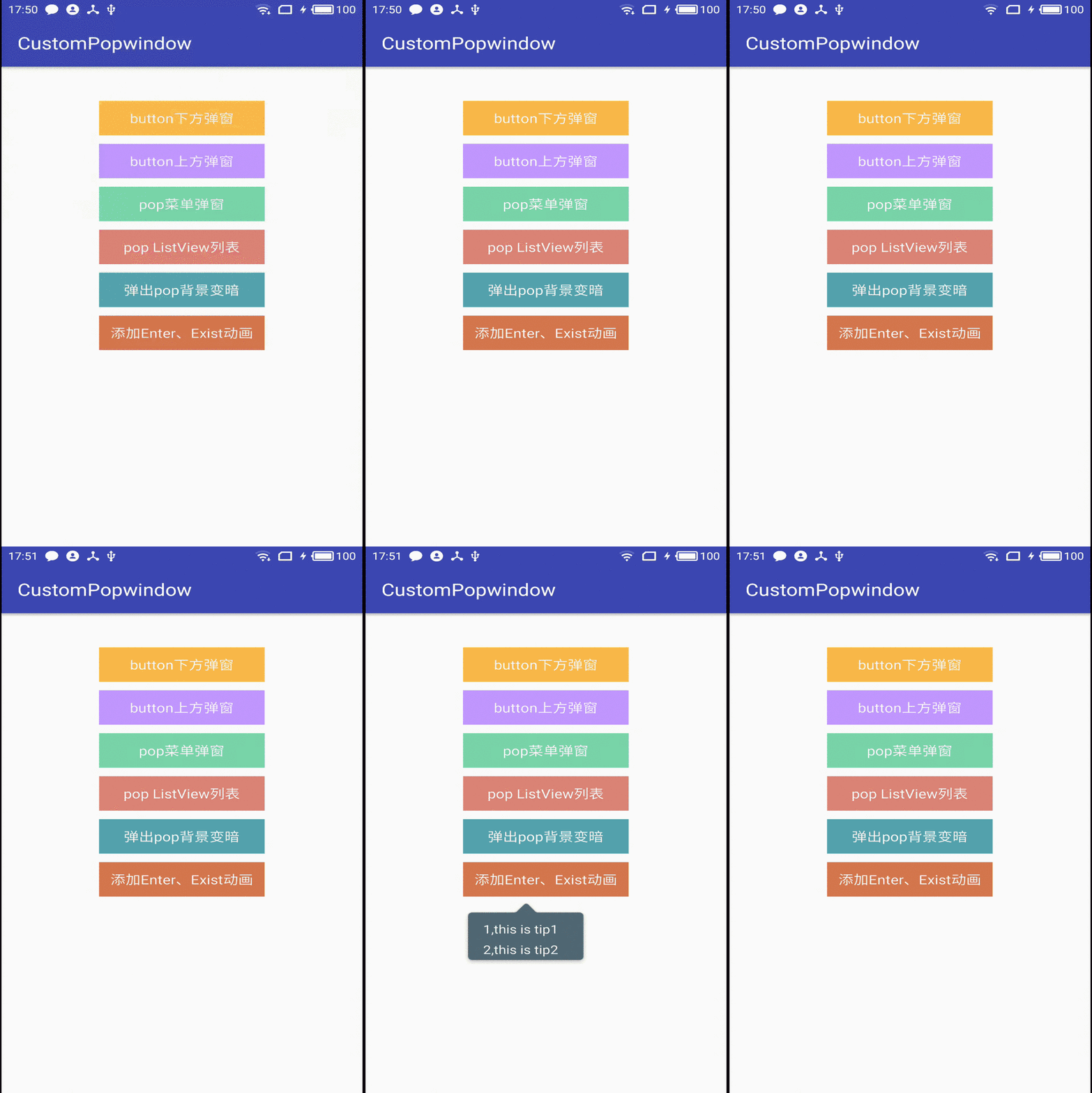
封装通用PopupWindow,CustomPopWindow,使用链式的方式配置并显示
由于每次写PopupWindow都要写很多重复代码,因此简单的封装了一个CustomPopWindow.封装了PopupWindow 的一些常用API,使用Builder模式,就像写AlertDialog 一样,链式配置。
相关博客
1,通用PopupWindow,几行代码搞定PopupWindow弹窗
2, 通用PopupWindow,几行代码搞定PopupWindow弹窗(续)
Usage
由于 1.0.0 版本 是托管到 Jcenter的,添加如下依赖:
Add the dependency to your build.gradle.
 dependencies {

     compile 'com.example.zhouwei.library:library:1.0.0'

 }
2.x 版本 代码托管到Jitpack, 需要如下依赖:
Add it in your root build.gradle :
 allprojects {

 repositories {        ...

         maven {

             url 'https://jitpack.io'

         }

 }
Add the dependency:
 dependencies {

     compile 'com.github.pinguo-zhouwei:CustomPopwindow:2.0.0'

 }
使用方法:
更新日志:(添加弹出PopupWindow同时背景变暗的配置,添加配置动画)
更新1: 背景变暗配置示例:
    //创建并显示popWindow

  mCustomPopWindow= new CustomPopWindow.PopupWindowBuilder(this)

                 .setView(contentView)

                 .enableBackgroundDark(true) //弹出popWindow时,背景是否变暗

                 .setBgDarkAlpha(0.7f) // 控制亮度

                 .create()

                 .showAsDropDown(mButton5,0,20);
更新2: 显示消失动画配置:
  CustomPopWindow popWindow = new CustomPopWindow.PopupWindowBuilder(this)

                 .setView(R.layout.pop_layout1)

                 .setFocusable(true)

                 .setOutsideTouchable(true)

                 .setAnimationStyle(R.style.CustomPopWindowStyle) // 添加自定义显示和消失动画

                 .create()

                 .showAsDropDown(mButton1,0,10);
1,简便写法
 CustomPopWindow popWindow = new CustomPopWindow.PopupWindowBuilder(this)

                 .setView(R.layout.pop_layout1)//显示的布局,还可以通过设置一个View

            //     .size(600,400) //设置显示的大小,不设置就默认包裹内容

                 .setFocusable(true)//是否获取焦点,默认为ture

                 .setOutsideTouchable(true)//是否PopupWindow 以外触摸dissmiss

                 .create()//创建PopupWindow

                 .showAsDropDown(mButton1,0,10);//显示PopupWindow
以上就是弹出一个简单的PopupWindow,是不是看起来很优雅和简单,还可以简单一点:
 CustomPopWindow popWindow = new CustomPopWindow.PopupWindowBuilder(this)

                 .setView(R.layout.pop_layout1)//显示的布局

                 .create()//创建PopupWindow

                 .showAsDropDown(mButton1,0,10);//显示PopupWindow
如果是一个简单的只展示文案的弹窗,就可以只设置一个View,就可以了,很简单吧!!!
2,展示一个PopupWindow 弹窗菜单(像手机QQ,微信的顶部菜单)
 View contentView = LayoutInflater.from(this).inflate(R.layout.pop_menu,null);//处理popWindow 显示内容

         handleLogic(contentView);        //创建并显示popWindow

         mCustomPopWindow= new CustomPopWindow.PopupWindowBuilder(this)

                 .setView(contentView)

                 .create()

                 .showAsDropDown(mButton3,0,20);
如果PopupWindow 展示的内容需要在程序代码中设置或者响应点击事件等,可以现获取到这个View,然后处理一些显示和点击事件逻辑,再交给CustomPopWindow 创建显示。比如响应菜单点击事件的逻辑处理:
     /**

      * 处理弹出显示内容、点击事件等逻辑     * @param contentView

      */

     private void handleLogic(View contentView) {

         View.OnClickListener listener = new View.OnClickListener() {

             @Override

             public void onClick(View v) {

                 if (mCustomPopWindow != null) {

                     mCustomPopWindow.dissmiss();

                 }

                 String showContent = "";

                 switch (v.getId()) {

                     case R.id.menu1:

                         showContent = "点击 Item菜单1";

                         break;

                     case R.id.menu2:

                         showContent = "点击 Item菜单2";

                         break;

                     case R.id.menu3:

                         showContent = "点击 Item菜单3";

                         break;

                     case R.id.menu4:

                         showContent = "点击 Item菜单4";

                         break;

                     case R.id.menu5:

                         showContent = "点击 Item菜单5";

                         break;

                 }

                 Toast.makeText(MainActivity.this, showContent, Toast.LENGTH_SHORT).show();

             }

         };

         contentView.findViewById(R.id.menu1).setOnClickListener(listener);

         contentView.findViewById(R.id.menu2).setOnClickListener(listener);

         contentView.findViewById(R.id.menu3).setOnClickListener(listener);

         contentView.findViewById(R.id.menu4).setOnClickListener(listener);

         contentView.findViewById(R.id.menu5).setOnClickListener(listener);

     }
3,展示一个ListView,其实跟上面是一样的,这里贴一下实例代码:
 private void showPopListView() {

         View contentView = LayoutInflater.from(this).inflate(R.layout.pop_list, null);//处理popWindow 显示内容

         handleListView(contentView);        //创建并显示popWindow

         mListPopWindow = new CustomPopWindow.PopupWindowBuilder(this)

                 .setView(contentView)

                 .size(ViewGroup.LayoutParams.MATCH_PARENT, ViewGroup.LayoutParams.MATCH_PARENT)//显示大小

                 .create()

                 .showAsDropDown(mButton4, 0, 20);

     }

     private void handleListView(View contentView) {

         RecyclerView recyclerView = (RecyclerView) contentView.findViewById(R.id.recyclerView);

         LinearLayoutManager manager = new LinearLayoutManager(this);

         manager.setOrientation(LinearLayoutManager.VERTICAL);

         recyclerView.setLayoutManager(manager);

         MyAdapter adapter = new MyAdapter();

         adapter.setData(mockData());

         recyclerView.setAdapter(adapter);

         adapter.notifyDataSetChanged();

     }
好久没写博客了,最近比较忙,但有好的东西还是忍不住写下来。一点点积累,总没有坏处。
PopupWindow 的常用api封装的更多相关文章
- Hbase关于Java常用API举例
1. HBase相关对Admin操作的的API封装在HBaseAdmin中,封装了HBase常用操作的API 使用方法: pom.xml <!-- https://mvnrepository.c ...
- request对象常用API 获取请求参数的值 request应用 MVC设计模式
1 request对象常用API 1)表示web浏览器向web服务端的请求 2)url表示访问web应用的完整路径:http://localhost:8080/day06/Demo1 ...
- 【OpenGL游戏开发之二】OpenGL常用API
OpenGL常用API 开发基于OpenGL的应用程序,必须先了解OpenGL的库函数.它采用C语言风格,提供大量的函数来进行图形的处理和显示.OpenGL库函数的命名方式非常有规律.所有OpenGL ...
- Java基础学习笔记十二 类、抽象类、接口作为方法参数和返回值以及常用API
不同修饰符使用细节 常用来修饰类.方法.变量的修饰符 public 权限修饰符,公共访问, 类,方法,成员变量 protected 权限修饰符,受保护访问, 方法,成员变量 默认什么也不写 也是一种权 ...
- Selenium Web 自动化 - Selenium常用API
Selenium Web 自动化 - Selenium常用API 2016-08-01 目录 1 对浏览器操作 1.1 用webdriver打开一个浏览器 1.2 最大化浏览器&关闭浏览器 ...
- jedis常用API
一.Redis Client介绍 1.1.简介 Jedis Client是Redis官网推荐的一个面向java客户端,库文件实现了对各类API进行封装调用. Jedis源码工程地址:https://g ...
- immutable.js 在React、Redux中的实践以及常用API简介
immutable.js 在React.Redux中的实践以及常用API简介 学习下 这个immutable Data 是什么鬼,有什么优点,好处等等 mark : https://yq.aliyu ...
- 16常用API
常用API 今日内容介绍 u 正则表达式 u Date u DateFormat u Calendar 第1章 正则表达式 1.1 正则表达式的概念 正则表达式(英语:Regular Expressi ...
- 常用API(包装类、System、Math、Arrays、大数据运算)
常用API 今日内容介绍 u 基本类型包装类 u System u Math u Arrays u BigInteger u BigDecimal 第1章 基本类型包装类 大家回想下,在第二天我们学习 ...
随机推荐
- POJ 2390
import java.util.*; public class Main { public static void main(String args[]){ double interest; Sca ...
- EF基础知识小记六(使用Code First建模自引用关系,常用于系统菜单、文件目录等有层级之分的实体)
日常开发中,经常会碰到一些自引用的实体,比如系统菜单.目录实体,这类实体往往自己引用自己,所以我们必须学会使用Code First来建立这一类的模型. 以下是自引用表的数据库关系图: ok,下面开始介 ...
- Win下Eclipse提交Hadoop程序出错:org.apache.hadoop.security.AccessControlException: Permission denied: user=D
描述:在Windows下使用Eclipse进行Hadoop的程序编写,然后Run on hadoop 后,出现如下错误: 11/10/28 16:05:53 INFO mapred.JobClient ...
- LNMT(Linux+Nginx+MySQL+Tomcat)常见性能参数调优
- Check类中的incl、union,excl,diff,intersect
定义一些类,这些类之间有父子关系,如下: class Father{} class Son1 extends Father{} class Son2 extends Father{} class To ...
- 关联更新 Update
Update a set a.Manage_FunctID=b.Manage_FunctID From Manage_PageUrl a Left join Manage_ButtonBar ...
- lucene源码分析(2)读取过程实例
1.官方提供的代码demo Analyzer analyzer = new StandardAnalyzer(); // Store the index in memory: Directory di ...
- rvm is not a function的解决方法
今天在使用rvm 1.9.3 --default设置默认的ruby的命令时出现 RVM is not a function, selecting rubies with 'rvm use ...' w ...
- Hive导入数据的四种方法
Hive的几种常见的数据导入方式这里介绍四种:(1).从本地文件系统中导入数据到Hive表:(2).从HDFS上导入数据到Hive表:(3).从别的表中查询出相应的数据并导入到Hive表中:(4).在 ...
- C语言——<计算>_较大两个数相乘
例题:9876543210*1234567890 的乘积 分析:正常的数据结构已经无法满足这么大的数相乘的结果.只能使用数组来进行操作. 1.两个数都用字符数组来接收. 2.接收后,因为每一位要乘以另 ...