
easyui-textbox
TextBox
扩展自 $.fn.validatebox.defaults. 重写 $.fn.textbox.defaults.
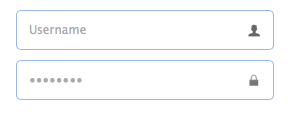
TextBox 是加强的输入控件,使我们建设表单更加快捷. 是一些复杂控件的基础控件,比如 combo,datebox,spinner,等等.
依赖
- validatebox
- linkbutton
实例
html创建方式
<input class="easyui-textbox" data-options="iconCls:'icon-search'" style="width:300px">
javascript创建方式
<input id="tb" type="text" style="width:300px">

$('#tb').textbox({

 buttonText:'Search',

 iconCls:'icon-man',

 iconAlign:'left'

})
属性
属性拓展自 validatebox 控件,下面是textbox新添加的属性:
| Name | Type | Description | Default |
|---|---|---|---|
| width | number | The width of the component. | auto |
| height | number | The height of the component. | 22 |
| prompt | string | The prompt message to be displayed in input box. | '' |
| value | string | The default value. | |
| type | string | The textbox type. Possible values are 'text' and 'password'. | text |
| multiline | boolean | Defines if this is a multiline textbox. | false |
| editable | boolean | Defines if user can type text directly into the field. | true |
| disabled | boolean | Defines if to disable the field. | false |
| readonly | boolean | Defines if the component is read-only. | false |
| icons | array | The icons attached to the textbox. Each item has the following properties: iconCls: string, the icon class. disabled: boolean, indicate if the icon is disabled. handler: function, the function to process the clicking action on this icon. Code example: $('#tb').textbox({
|
[] |
| iconCls | string | The background icon displayed on the textbox. | null |
| iconAlign | string | Position of the icons. Possible values are 'left','right'. | right |
| iconWidth | number | The icon width. | 18 |
| buttonText | string | The displaying text of button that attached to the textbox. | |
| buttonIcon | string | The displaying icon of button that attached to the textbox. | null |
| buttonAlign | string | Position of the button. Possible values are 'left','right'. | right |
事件
事件拓展自 validatebox 控件,下面是textbox新添加的事件:
| Name | Parameters | Description |
|---|---|---|
| onChange | newValue,oldValue | Fires when the field value is changed. |
| onResize | width,height | Fires when the textbox is resized. |
| onClickButton | none | Fires when the user click the button. |
| onClickIcon | index | Fires when the user click a icon. |
方法
方法拓展自 validatebox 控件,下面是textbox新添加的方法:
| Name | Parameter | Description |
|---|---|---|
| options | none | Return the options object. |
| textbox | none | Return the textbox object. |
| button | none | Return the button object. |
| destroy | none | Destroy the textbox component. |
| resize | width | Resize the component width. |
| disable | none | Disable the component. |
| enable | none | Enable the component. |
| readonly | mode | Enable/Disable readonly mode.
Code example: $('#tb').textbox('readonly'); // enable readonly mode
|
| clear | none | Clear the component value. |
| reset | none | Reset the component value. |
| setText | text | Set the displaying text value. |
| getText | none | Get the displaying text value. |
| setValue | value | Set the component value. |
| getValue | none | Get the component value. |
| getIcon | index | Get specified icon object. |
FileBox
拓展自 $.fn.textbox.defaults. 重写 $.fn.filebox.defaults.
由于浏览器安全问题, 一些方法 比如 'setValue' 不能使用filebox 组件.

依赖
- textbox
实例
html创建方式
<input class="easyui-filebox" style="width:300px">
javascript创建方式
<input id="fb" type="text" style="width:300px">

$('#fb').filebox({

 buttonText: 'Choose File',

 buttonAlign: 'left'

})
属性
属性拓展自 textbox, 下面是 filebox新增属性.
| Name | Type | Description | Default |
|---|---|---|---|
| buttonText | string | The displaying text of button that attached to the textbox. | Choose File |
| buttonIcon | string | The displaying icon of button that attached to the textbox. | null |
| buttonAlign | string | Position of the button. Possible values are 'left','right'. | right |
事件
事件拓展自 textbox.
方法
方法拓展自 textbox.
easyui-textbox的更多相关文章
- EasyUI TextBox的onkeypress事件
关于EasyUI TextBox的事件好像不多,像keypress,keydown在textbox的事件里都没有,所以要用这些事件要采取一些特殊的方法,今天用到了这些就记录一下,有两种方法 方法1: ...
- jquery easyui textbox onblur事件,textbox blur事件无效解决方案
jquery easyui textbox onblur事件,textbox blur事件无效解决方案 >>>>>>>>>>>> ...
- EasyUI TextBox的keypress
关于EasyUI TextBox的事件好像不多,像keypress,keydown在textbox的事件里都没有,所以要用这些事件要采取一些特殊的方法,今天用到了这些就记录一下,有两种方法, 第一种: ...
- easyui textbox 设置只读不可编辑状态
在使用easyul的时候,发现输入框内容及不容易获取与设置,用jQuery的方式大部分失效.依稀记得好像是因为easyul会在原页面的基础上,生成了一些新的独有样式,并且暂时覆盖掉使用了easyul的 ...
- easyui textbox 内容改变事件 增加oninpu 类似事件,
//======================利用easyui验证功能,进行内容变化监控=== =============$(function () { var CustomerService = ...
- easyui textbox 赋值
$('#fireInfo').textbox('setValue', tempData.fireInfo); $('#fireStartTime').datetimebox('setValue', t ...
- easyui textbox 添加 onblur 失去焦点事件
由于textbox不能触发onblur事件,需要换种方式解决问题,方案如下: <input type="text" class="easyui-textbox&qu ...
- easyui textbox event 添加
$('#tt').textbox({ inputEvents:$.extend({},$.fn.textbox.defaults.inputEvents,{ keyup:function(e){ co ...
- easyui textbox 获取焦点
function Admin_ListAdd() { $('#ListInfo').css({ display: "inherit" }); $("#Department ...
- easyui textbox 输入小写自动变大写,easyui textbox 绑定oninput事件 easyui textbox 绑定propertychange事件
<input id="id" class="easyui-textbox" name="id" value="@Model. ...
随机推荐
- 结构体dict_table_t
typedef struct dict_table_struct dict_table_t; /** Data structure for a database table. Most fields ...
- CH Round #17 舞动的夜晚
舞动的夜晚 CH Round #17 描述 L公司和H公司举办了一次联谊晚会.晚会上,L公司的N位员工和H公司的M位员工打算进行一场交际舞.在这些领导中,一些L公司的员工和H公司的员工之间是互相认识的 ...
- spring--处理器拦截器详解——跟着开涛学SpringMVC
5.1.处理器拦截器简介 Spring Web MVC的处理器拦截器(如无特殊说明,下文所说的拦截器即处理器拦截器) 类似于Servlet开发中的过滤器Filter,用于对处理器进行预处理和后处理. ...
- 开始同时在cnblog和BAE上写博客
研究生第一学期已过一半,开始理论学习,当然不能忘了实践学习. \[\frac{{ - b \pm \sqrt {{b^2} - 4ac} }}{{2a}}\]
- JavaScript下拉框去除重复内容
下拉框去除重复内容 <script type="text/javascript" src="http://www.joleye.com/libraries/java ...
- 经典sql总结(1)
1.表示info 信息,字段为Id和res,如何得到如下结果
- strust1.x中formbean的原理及作用
from: http://blog.csdn.net/tuiroger/article/details/3947896 今天张老师讲了一些比较重要的strust标签,<html:link ...
- mongodb的优化
1:使用索引 ,同时对索引排序,[比如mongodb对时间做索引都用-1降序哈,这样查询最新的速度很快],注意组合索引中字段的顺序要和查询时字段的顺序一致哈, 用find().explain()检查查 ...
- iOS的UILabel设置居上对齐,居中对齐,居下对齐
在iOS中默认的UILabel中的文字在竖直方向上只能居中对齐,博主参考国外网站,从UILabel继承了一个新类,实现了居上对齐,居中对齐,居下对齐.具体如下: // // myUILabel.h ...
- Ajax核心——XMLHttpRequest基础
XMLHttpRequest对象负责将用户信息以异步方式发送到服务器,并接受服务器返回的相应信息和数据.也就是可以在页面已经加载后从后从服务器请求.接收数据,这样使得用户的体验度更好,而同时提升了客户 ...