
在 vue cli3 的项目中配置双服务,模拟 ajax 分页请求
最近安装了下vue cli3版本,与 cli 2 相比,文件少了,以前配置方法也不管用了。demo 中的大量的数据,需要做成 ajax 请求的方式来展示数据,因此,需要启动两个服务,一个用作前端请求,一个用作后端发送。
双服务的配置方法在 build / webpack.dev.conf.js 中写入。
在安装成功 vue 后,是仅有一个 端口为 8080 的服务,默认的服务名称为:devServer,为了满足两个服务的需求,需要在这个文件中再配一个服务,服务名称为 : api-server
const devWebpackConfig = merge(baseWebpackConfig, {

  module: {

    rules: utils.styleLoaders({ sourceMap: config.dev.cssSourceMap, usePostCSS: true })

  },

  // cheap-module-eval-source-map is faster for development

  devtool: config.dev.devtool,

  // these devServer options should be customized in /config/index.js

  devServer: {

    clientLogLevel: 'warning',

    historyApiFallback: {

      rewrites: [

        { from: /.*/, to: path.posix.join(config.dev.assetsPublicPath, 'index.html') },

      ],

    },

    hot: true,

    contentBase: false, // since we use CopyWebpackPlugin.

    compress: true,

    host: HOST || config.dev.host,

    port: PORT || config.dev.port,

    open: config.dev.autoOpenBrowser,

    overlay: config.dev.errorOverlay

      ? { warnings: false, errors: true }

      : false,

    publicPath: config.dev.assetsPublicPath,

    proxy: config.dev.proxyTable,

    quiet: true, // necessary for FriendlyErrorsPlugin

    watchOptions: {

      poll: config.dev.poll,

    }

  },

  plugins: [

    new webpack.DefinePlugin({

      'process.env': require('../config/dev.env')

    }),

    new webpack.HotModuleReplacementPlugin(),

    new webpack.NamedModulesPlugin(), // HMR shows correct file names in console on update.

    new webpack.NoEmitOnErrorsPlugin(),

    // https://github.com/ampedandwired/html-webpack-plugin

    new HtmlWebpackPlugin({

      filename: 'index.html',

      template: 'index.html',

      inject: true

    }),

    // copy custom static assets

    new CopyWebpackPlugin([

      {

        from: path.resolve(__dirname, '../static'),

        to: config.dev.assetsSubDirectory,

        ignore: ['.*']

      }

    ])

  ]

})
api-server 的服务需要用到 express / body-parser / fs,除了 express 不用安装外,还需要安装 body-parser / fs
npm install body-parser

npm i fs
服务端的配置文件在 devServer 服务结束后:
/**新配置的 api-server,用来使用 axios 分页获取数据

 *

 * 1.需要使用 express 来新建并启动服务,需要安装 express / body-parser / fs /

 * 2.port 的设置从 PORT || config.dev.port 中解析,因为 port 的解析存在于 config/index.js的 dev 中

 * 3.数据的地址通过 readFile()读取,数据目录同 src 同级

 * 4.api-server 的请求地址为:http://localhost:8081/api/shop?page=1  必须加参数 page ,否则获取不到数据

 *

 * 5.请求的端口号为 8080 ,服务端的端口号为 8181

 */

const express=require('express')

const apiServer = express()

const bodyParser = require('body-parser')

apiServer.use(bodyParser.urlencoded({ extended: true }))

apiServer.use(bodyParser.json())

const apiRouter = express.Router()

const port = PORT || config.dev.port

const fs = require('fs')

apiRouter.route('/:apiName')

.all(function (req, res) {

  var page=req.query.page;

  //请求的数据地址

  fs.readFile('./db/data.json', 'utf8', function (err, data) {

    // if (err) throw err

    var data = JSON.parse(data)

    if (data[req.params.apiName]) {

      var result=data[req.params.apiName];

      //newData 为请求数据的参数

      var newData=result.slice((page-1)*10,page*10);

      res.json(newData);

    }

    else {

      res.send('no such api name')

    }

  })

})

apiServer.use('/api', apiRouter);

apiServer.listen(port + 1, function (err) {

  if (err) {

    console.log(err)

    return

  }

  //dev-server默认端口为8080,因此新建的server,端口号 +1 ,不会冲突

  console.log('Listening at http://localhost:' + (port + 1) + '\n')

});
当服务配置好后,需要重启 npm run dev.
当前的请求端口为8080,而服务端的端口为8081,如果直接用下面的地址请求,无疑会发生跨域而请求失败:
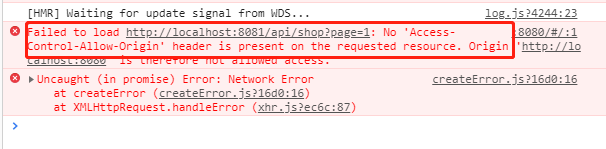
const url = "http://localhost:/api/shop?page=";
解决跨域的办法是,在 config / index.js / dev 的 proxyTable 对象中设置代理。当通过 8080 请求数据 /api/ 时,通过它指向数据来源 8081。
dev: {

    // Paths

    assetsSubDirectory: 'static',

    assetsPublicPath: '/',

    //设置代理,当请求 /api/ 时,指向 8081

    proxyTable: {

      '/api/':'http://localhost:8081/'

    },

}
重新启动服务:npm run dev,再次请求
export default {

    data () {

    return {

      list: [],

      page:0

    }

  },

  mounted(){

      //结构加载完后,这里写请求数据的方法

        this.page++;

        axios.get(url + this.page).then(res=>{

            console.log('shopList=' + res.data)

            this.list = res.data;

        })

  }

}
完。
在 vue cli3 的项目中配置双服务,模拟 ajax 分页请求的更多相关文章
- android项目中配置NDK自动编译生成so文件
1 下载ndk开发包 2 在android 项目中配置编译器(以HelloJni项目为例) 2.1 创建builer (a)Project->Properties->Builder ...
- ckeditor编辑器在java项目中配置
一.基本使用: 1.所需文件架包 A. Ckeditor基本文件包,比如:ckeditor_3.6.2.zip 下载地址:http://ckeditor.com/download 2.配置使用 A.将 ...
- C# 在项目中配置Log4net
我们介绍一下在项目中配置log4net,是Apache基金会旗下的. 无论在什么环境中,配置log4net的逻辑都一样. 1)文件配置 首先在项目加载文件中,配置log4net加载项. 在Web项目中 ...
- WebCollector2.7爬虫框架——在Eclipse项目中配置
WebCollector2.7爬虫框架——在Eclipse项目中配置 在Eclipse项目中使用WebCollector爬虫非常简单,不需要任何其他的配置,只需要导入相关的jar包即可. Netbea ...
- 在maven项目中 配置代理对象远程调用crm
1 在maven项目中配置代理对象远程调用crm 1.1 在项目的pom.xml中引入CXF的依赖 <dependency> <groupId>org.apache.cxf&l ...
- web项目中配置多个数据源
web项目中配置多个数据源 spring + mybatis 多数据源配置有两种解决方案 1.配置多个不同的数据源,使用一个sessionFactory,在业务逻辑使用的时候自动切换到不同的数据源, ...
- 如何在web项目中配置Spring的Ioc容器
在web项目中配置Spring的Ioc容器其实就是创建web应用的上下文(WebApplicationContext) 自定义要使用的IoC容器而不使用默认的XmlApplicationContext ...
- Spring-Boot项目中配置redis注解缓存
Spring-Boot项目中配置redis注解缓存 在pom中添加redis缓存支持依赖 <dependency> <groupId>org.springframework.b ...
- 在Vue&Element前端项目中,使用FastReport + pdf.js生成并展示自定义报表
在我的<FastReport报表随笔>介绍过各种FastReport的报表设计和使用,FastReport报表可以弹性的独立设计格式,并可以在Asp.net网站上.Winform端上使用, ...
随机推荐
- EIGRP 基础实验
一.环境准备 1. 软件:GNS3 2. 路由:c7200 二.实验操作 实验要求: 1.掌握EIGRP 的基本配置 2.掌握EIGRP 的通配符掩配置方法 3.掌握EIGRP 的自动汇总特性,理解E ...
- 服务端预渲染之Nuxt(介绍篇)
现在前端开发一般都是前后端分离,mvvm和mvc的开发框架,如Angular.React和Vue等,虽然写框架能够使我们快速的完成开发,但是由于前后台分离,给项目SEO带来很大的不便,搜索引擎在检索的 ...
- box-decoration-break属性
box-decoration-break属性可以指定元素片段在跨行.跨列或跨页(如打印)时候的样式渲染表现.默认情况下,元素的跨行或跨列渲染都是裁剪分割,各得一部分.举个例子<div class ...
- Proj.Net 投影介绍
Proj.Net是开源地图投影库Proj.4的.net版本,许多GIS开源软件的投影都直接或间接地使用Proj.4的库,Proj.4是用C语言编写..Net下的开源GIS项目NetTopologySu ...
- 8.使用aix拓展
本文拷贝自: http://aix.colintree.cn/zh/HowToInstallExtensions.html 并且强烈推荐 http://aix.colintree.cn 网站. 首先呢 ...
- Intellij idea 离线安装activiti工作流插件
想在Intellij idea上安装一个activiti插件玩玩,由于网络环境原因,不能使用网上已有的在线搜索acti bpm并安装的方式.也在网上找了好久没找到离线安装的方式.自己摸索了一下装好了, ...
- CI持续集成系列之(九)代码发布脚本模板书写
前言 前面我们介绍了Jenkins来发布项目通过nginx来展示流程,那里只是提供了一个简单的测试脚本,接下来呢介绍一下一个比较完善的发布脚本,该脚本可实现从gitlab服务器获取代码,打包,部署到W ...
- [ gczdac ] 20190213 开博客啦!
测试一下! 今天开了新博客! 还自己改了下首页! 开心!!!!! 访者必阅 https://www.cnblogs.com/gczdac/ https://blog.csdn.net/qq_43540 ...
- Unity的Mesh压缩:为什么我的内存没有变化?
0x00 前言 最近和朋友聊天,谈到了Mesh的内存优化问题,他发现开启Model Importer面板上的Mesh Compression选项之后,内存并没有什么变化.事实上,期望开启Mesh Co ...
- 阿里巴巴excel工具easyexcel 助你快速简单避免OOM
Java解析.生成Excel比较有名的框架有Apache poi.jxl.但他们都存在一个严重的问题就是非常的耗内存,poi有一套SAX模式的API可以一定程度的解决一些内存溢出的问题,但POI还是有 ...