
Springboot整合Elastic-Job(二)
上文我们讲到Springboot整合Elastic-Job整合的demo,只是简单的实现了主要功能。本文在上文基础上,进行新的调整。
事件追踪
Elastic-Job提供了事件追踪功能,可通过事件订阅的方式处理调度过程的重要事件,用于查询、统计和监控。Elastic-Job目前提供了基于关系型数据库两种事件订阅方式记录事件。我们只需要将添加如下配置即可
/**

     * 将作业运行的痕迹进行持久化到DB

     */

    @Bean

    public JobEventConfiguration jobEventConfiguration(){

        return new JobEventRdbConfiguration(dataSource);

    }
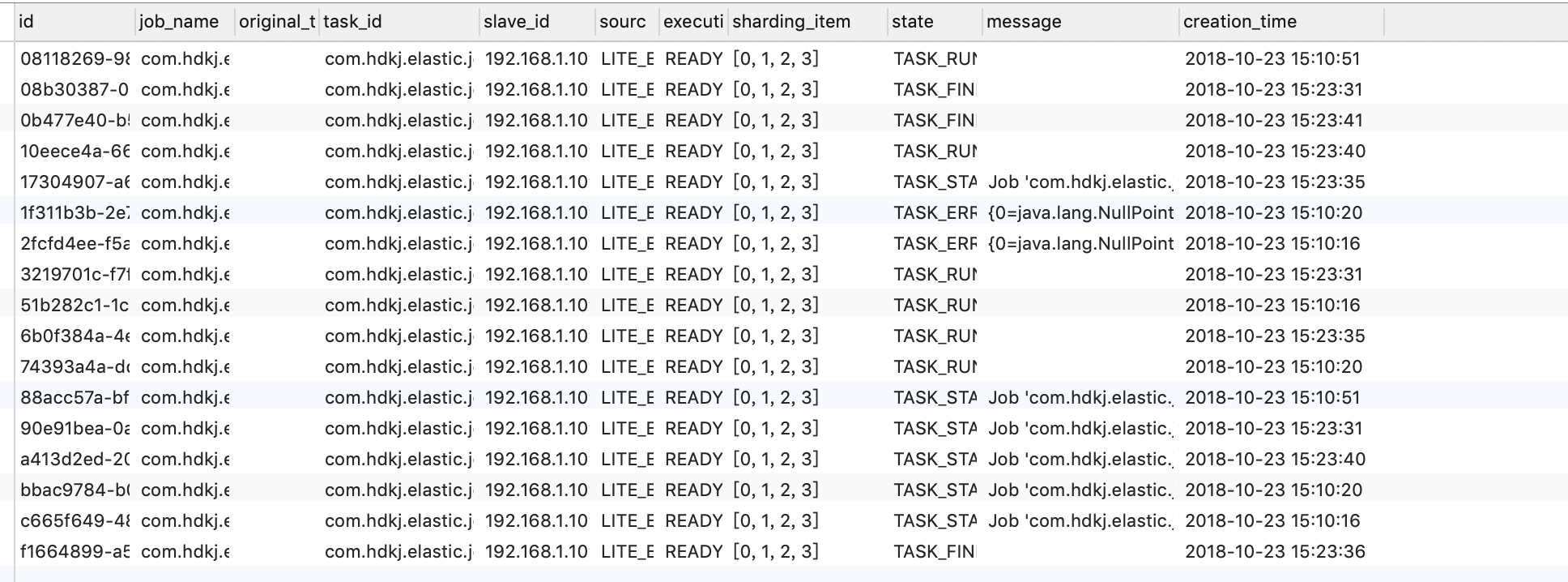
项目运行后,Elastic-Job会自动创建JOB_EXECUTION_LOG和JOB_STATUS_TRACE_LOG两张表以及若干索引。
使用注解
上文我们添加一个任务的步骤是,定义一个任务类,再在配置类中定义任务属性,并加入到SpringJobScheduler。如果我们有几百个任务,配置类基本就无法维护了。那怎么优化呢,我们可以参考@Schedual注解,在job上定义一个注解,每次启动的时候扫描注解自动将job加入到SpringJobScheduler中。
1.抽象添加job方法
@Component

public class ElasticJobHandler {

    @Autowired

    private ZookeeperRegistryCenter regCenter;

    @Resource

    private JobEventConfiguration jobEventConfiguration;

    @Resource

    private ElasticJobListener elasticJobListener;

    /**

     * @Description 任務配置類

     */

    private LiteJobConfiguration getLiteJobConfiguration(final Class<? extends SimpleJob> jobClass,

                                                         final String cron,

                                                         final int shardingTotalCount,

                                                         final String shardingItemParameters) {

        return LiteJobConfiguration.newBuilder(new SimpleJobConfiguration(

                JobCoreConfiguration.newBuilder(jobClass.getName(), cron, shardingTotalCount)

                        .shardingItemParameters(shardingItemParameters).build()

                        , jobClass.getCanonicalName())

        ).overwrite(true).build();

    }

    public void addJob(final SimpleJob simpleJob,

                       final String cron,

                       final Integer shardingTotalCount,

                       final String shardingItemParameters)

            throws IllegalAccessException, InstantiationException {

        LiteJobConfiguration jobConfig =

                getLiteJobConfiguration(simpleJob.getClass(), cron, shardingTotalCount, shardingItemParameters);

         new SpringJobScheduler(simpleJob, regCenter, jobConfig, jobEventConfiguration, elasticJobListener).init();

    }

}
2.添加ElasticScheduler注解
@Component

@Target({ ElementType.TYPE })

@Retention(RetentionPolicy.RUNTIME)

public @interface ElasticScheduler {

    /**

     * 任务名称

     * @return

     */

    String name();

    /**

     * cron表达式,用于控制作业触发时间

     * @return

     */

    String cron() default "";

    /**

     * 分片参数

     * @return

     */

    String shardingItemParameters() default "";

    /**

     * 总分片数

     * @return

     */

    int shardingTotalCount();

    /**

     * 任务描述信息

     * @return

     */

    String description() default "";

}
3.定义扫描方法
@Component

public class ElasticSchedulerAspect implements ApplicationContextAware, InitializingBean {

    private ApplicationContext applicationContext;

    @Autowired

    private ElasticJobHandler elasticJobHandler;

    @Override

    public void afterPropertiesSet() throws Exception {

        registrJob(applicationContext);

    }

    /**

     * 解析context信息,开始注册

     * @param applicationContext

     */

    private void registrJob(ApplicationContext applicationContext) {

        String[] beanNamesForAnnotation = applicationContext.getBeanNamesForAnnotation(ElasticScheduler.class);

        for (String beanName : beanNamesForAnnotation) {

            Class<?> handlerType = applicationContext.getType(beanName);

            Object bean = applicationContext.getBean(beanName);

            ElasticScheduler annotation = AnnotationUtils.findAnnotation(handlerType, ElasticScheduler.class);

            addJobToContext(annotation,bean);

        }

    }

    /**

     * 将任务添加到容器中

     * @param elasticScheduler

     * @param bean

     */

    private void addJobToContext(ElasticScheduler elasticScheduler, Object bean) {

        String cron = elasticScheduler.cron();

        String name = elasticScheduler.name();

        String description = elasticScheduler.description();

        String shardingItemParameters = elasticScheduler.shardingItemParameters();

        Integer shardingTotalCount = elasticScheduler.shardingTotalCount();

        try {

            elasticJobHandler.addJob((SimpleJob) bean,cron,shardingTotalCount,shardingItemParameters);

        } catch (IllegalAccessException e) {

            e.printStackTrace();

        } catch (InstantiationException e) {

            e.printStackTrace();

        }

    }

    @Override

    public void setApplicationContext(ApplicationContext applicationContext) throws BeansException {

        this.applicationContext=applicationContext;

    }

}
4.使用注解
@Component

@ElasticScheduler(cron = "0/5 * * * * ?",shardingTotalCount = 4,name = "测试注解",shardingItemParameters = "0=0,1=0,2=1,3=1")

public class StockSimpleJob implements SimpleJob {

    @Override

    public void execute(ShardingContext shardingContext) {

        System.out.println(String.format("------Thread ID: %s, 任務總片數: %s, " +

                        "當前分片項: %s.當前參數: %s," +

                        "當前任務名稱: %s.當前任務參數: %s"

                ,

                Thread.currentThread().getId(),

                shardingContext.getShardingTotalCount(),

                shardingContext.getShardingItem(),

                shardingContext.getShardingParameter(),

                shardingContext.getJobName(),

                shardingContext.getJobParameter()

        ));

    }

}
注意,该注解只为了不想引入太多外部依赖自己随手写的,只为给大家提供思路。git上已经有人对用注解整合Elastic-Job了,大家可自行搜索。
Springboot整合Elastic-Job(二)的更多相关文章
- springboot整合netty(二)
目录 前言 正文 代码 1. 新建一个springboot项目,在pom文件中添加netty依赖: 2.新建netty服务 3.netty调用所需的服务类 4 springboot启动类 5.测试 我 ...
- SpringBoot 整合 Elastic Stack 最新版本(7.14.1)分布式日志解决方案,开源微服务全栈项目【有来商城】的日志落地实践
一. 前言 日志对于一个程序的重要程度不用过多的言语修饰,本篇将以实战的方式讲述开源微服务全栈项目 有来商城 是如何整合当下主流日志解决方案 ELK +Filebeat . 话不多说,先看实现的效果图 ...
- springboot 整合 Redis 方法二
方法一请参考之前博文 spring boot 整合 redis 自己的版本 java8 + redis3.0 + springboot 2.0.0 1 spring boot已经支持集成 redis ...
- 十六、springboot整合Spring-data-jpa(二)之通用DAO接口与添加自定义方法
@NoRepositoryBean:Spring Data Jpa在启动时就不会去实例化BaseRepository这个接口 1.通用接口: import org.springframework.da ...
- SpringBoot整合JavaWeb
一.SpringBoot整合Servlet的两种方式 1.通过注解扫描完成Servlet组件的注册 编写Servlet package com.example.demo.servlet; import ...
- springBoot整合Listener
新建项目 这个是pom文件 <properties> <java.version>1.8</java.version> </properties> &l ...
- springboot整合filter
新建一个项目 新建Firstfilter类 Firstfliter.java package com.example.filter; import java.io.IOException; impor ...
- springboot整合servlet
在idea新建项目 这个是pom.xml文件需要添加的依赖包 <properties> <java.version>1.8</java.version> </ ...
- SpringBoot整合Lintener
1.通过扫描完成Lintener组件的注册 1.1编写Listener /** * springboot整合Lintener 方式一 * 在web.xml中如何配置Listener * <lis ...
- springboot整合mybatis,redis,代码(二)
一 说明: springboot整合mybatis,redis,代码(一) 这个开发代码的复制粘贴,可以让一些初学者直接拿过去使用,且没有什么bug 二 对上篇的说明 可以查看上图中文件: 整个工程包 ...
随机推荐
- instrument(2)
学习了instrument之后试着自己写点东西,上一篇的例子中使用的是asm,毕竟是面向字节码的,api还是比较复杂的.其实有时候的需求很简单,无非就是看下类里的方法啊之类的.javassist是基于 ...
- Go缓存DNS
Go里面的DNSclient没有带任何的缓存,语言层面没有任何的缓存,但是我们可以通过下面这样的代码来 这样当我们调用http.Client的时候就会采用这个缓存的ip了,里面用到的dnscache是 ...
- bzoj 1426 收集邮票
f[i]:当前已拥有i种邮票,还需要买的邮票数的期望值. g[i]:当前已拥有i种邮票,还需要的钱的期望值. 每张邮票初始都是1元钱,每买一张邮票,还没购买的邮票每张都涨价1元. f[i]=1+(n ...
- BZOJ_2946_[Poi2000]公共串_后缀数组+二分答案
BZOJ_2946_[Poi2000]公共串_后缀数组+二分答案 Description 给出几个由小写字母构成的单词,求它们最长的公共子串的长度. 任务: l 读入单 ...
- Applet web端对文件的读取方式
转载:http://www.exam8.com/computer/Java/zonghe/200708/659876.html ---- 我们知道,在Java Applet中出于安全性考虑,Apple ...
- 基于 Maven 的多模块 Java ( Spring ) 项目构建
索引: 开源Spring解决方案--lm.solution 参看代码 GitHub: solution/pom.xml pojo/pom.xml mapper/pom.xml common/pom.x ...
- hystrix隔离策略(4)
hystrix提供了两种隔离策略:线程池隔离和信号量隔离.hystrix默认采用线程池隔离. 1.线程池隔离 不同服务通过使用不同线程池,彼此间将不受影响,达到隔离效果. 例如: 我们可以通过andT ...
- 基于Orangpi Zero和Linux ALSA实现WIFI无线音箱(三)
作品已经完成,先上源码: https://files.cnblogs.com/files/qzrzq1/WIFISpeaker.zip 全文包含三篇,这是第三篇,主要讲述接收端程序的原理和过程. 第一 ...
- postman接口测试举例情况
http请求:http请求分为请求头和请求体,get请求只有请求头没有请求体. 1.get请求 是可以直接在浏览器访问,不需要借助任何工具.好看一些,可以打开postman测试接口 http://xx ...
- 移动通信最先进的音频编解码器EVS及用好要做的工作
语音通信从最初的只有有线通信变成后来的有线通信与无线通信(移动通信)的竞争,当移动语音通信价格下来后有线语音通信明显处于逆势.如今移动语音通信的竞争对手是OTT(On The Top)语音,OTT语音 ...