
lvs-dr 模式-piranha
系统: redhat 6.5 mini
|
机器名 |
ip |
vip |
|
lvs01(主lvs) |
192.168.20.10 |
192.168.20.254 |
|
lvs02(备lvs) |
192.168.20.20 |
|
|
rs01 (web) |
192.168.20.100 |
|
|
rs02 (web) |
192.168.20.200 |
1、 在各个机器上配置ip地址,机器名,关闭selinux,同步时间
[root@lvs01 ~]# hostname
lvs01
[root@lvs01 ~]# getenforce
Disabled
[root@lvs02 ~]# hostname
lvs02
[root@lvs02 ~]# getenforce
Disabled
[root@rs01 ~]# hostname
rs01
[root@rs01 ~]# getenforce
Disabled
[root@rs02 ~]# hostname
rs02
[root@rs02 ~]# getenforce
Disabled
[root@lvs01 yum.repos.d]# cat /etc/hosts
192.168.20.10 lvs01
192.168.20.20 lvs02
192.168.20.100 rs01
192.168.20.200 rs02
[root@lvs01 yum.repos.d]# ntpdate 0.rhel.pool.ntp.org
[root@lvs02 yum.repos.d]# ntpdate 0.rhel.pool.ntp.org
[root@rs01 yum.repos.d]# ntpdate 0.rhel.pool.ntp.org
[root@rs02 yum.repos.d]# ntpdate 0.rhel.pool.ntp.org
2、 在各个机器关闭防火墙,配置yum源
[root@lvs01 yum.repos.d]# service iptables stop
[root@lvs01 yum.repos.d]# chkconfig iptables off
[root@lvs02 ~]# service iptables stop
[root@lvs02 ~]# chkconfig iptables off
[root@rs01 ~]# service iptables stop
[root@rs01 ~]# chkconfig iptables off
[root@rs02 ~]# service iptables stop
[root@rs02 ~]# chkconfig iptables off
[root@lvs01 yum.repos.d]# service iptables stop
[root@lvs01 yum.repos.d]# chkconfig iptables off
[root@lvs01 yum.repos.d]# cat rhel-source.repo
[base]
name=base
baseurl=file:///mnt
enabled=1
gpgcheck=0
[LB]
name=LB
baseurl=file:///mnt/LoadBalancer
enabled=1
gpgcheck=0
[HA]
name=HA
baseurl=file:///mnt/HighAvailability
enabled=1
gpgcheck=0
[RS]
name=RS
baseurl=file:///mnt/ResilientStorage
enabled=1
gpgcheck=0
[root@lvs01 yum.repos.d]# scp rhel-source.repo lvs02:/etc/yum.repos.d/rhel-source.repo
3、 在rs01.rs02上部署web服务,设置arptables,添加vip
[root@rs01 ~]#ip addr add 192.168.20.254/24 dev eth0
[root@rs01 ~]# echo "ip addr add 192.168.20.254/24 dev eth0">>/etc/rc.d/rc.local
[root@rs01 ~]# arptables -A IN -d 192.168.20.254 -j DROP
[root@rs01 ~]# arptables -A OUT -s 192.168.20.254 -j mangle --mangle-ip-s 192.168.20.100
[root@rs01 ~]# service arptables_jf save
将当前规则保存到 /etc/sysconfig/arptables: [确定]
[root@rs01 ~]# chkconfig arptables_jf on
[root@rs01 ~]# yum install -y httpd
[root@rs01 ~]# echo "rs01">/var/www/html/index.html
[root@rs01 ~]# service httpd restart
[root@rs01 ~]# chkconfig httpd on
[root@rs02 ~]# arptables -A IN -d 192.168.20.254 -j DROP
[root@rs02 ~]# arptables -A OUT -s 192.168.20.254 -j mangle --mangle-ip-s 192.168.20.100
[root@rs02 ~]# service arptables_jf save
将当前规则保存到 /etc/sysconfig/arptables: [确定]
[root@rs02 ~]# chkconfig arptables_jf on
[root@rs02 ~]#ip addr add 192.168.20.254/24 dev eth0
[root@rs02 ~]# echo "ip addr add 192.168.20.254/24 dev eth0">>/etc/rc.d/rc.local
[root@rs02 ~]# yum install -y httpd
[root@rs02 ~]# echo "rs02">/var/www/html/index.html
[root@rs02 ~]# service httpd restart
[root@rs02 ~]# chkconfig httpd on
4、 在lvs01,lvs02安装LB,在lvs01上配置lvs集群登录用户和密码
[root@lvs01 yum.repos.d]# yum groupinstall "Load Balancer"
[root@lvs02 yum.repos.d]# yum groupinstall "Load Balancer"
[root@lvs01 yum.repos.d]# piranha-passwd
New Password:
Verify:
Adding password for user piranha
[root@lvs01 yum.repos.d]# /etc/init.d/piranha-gui start
[root@lvs01 yum.repos.d]# chkconfig piranha-gui on
5、通过浏览器配置lvs集群
5.1 在浏览器输入http://192.168.20.10:3636 输入用户名和密码

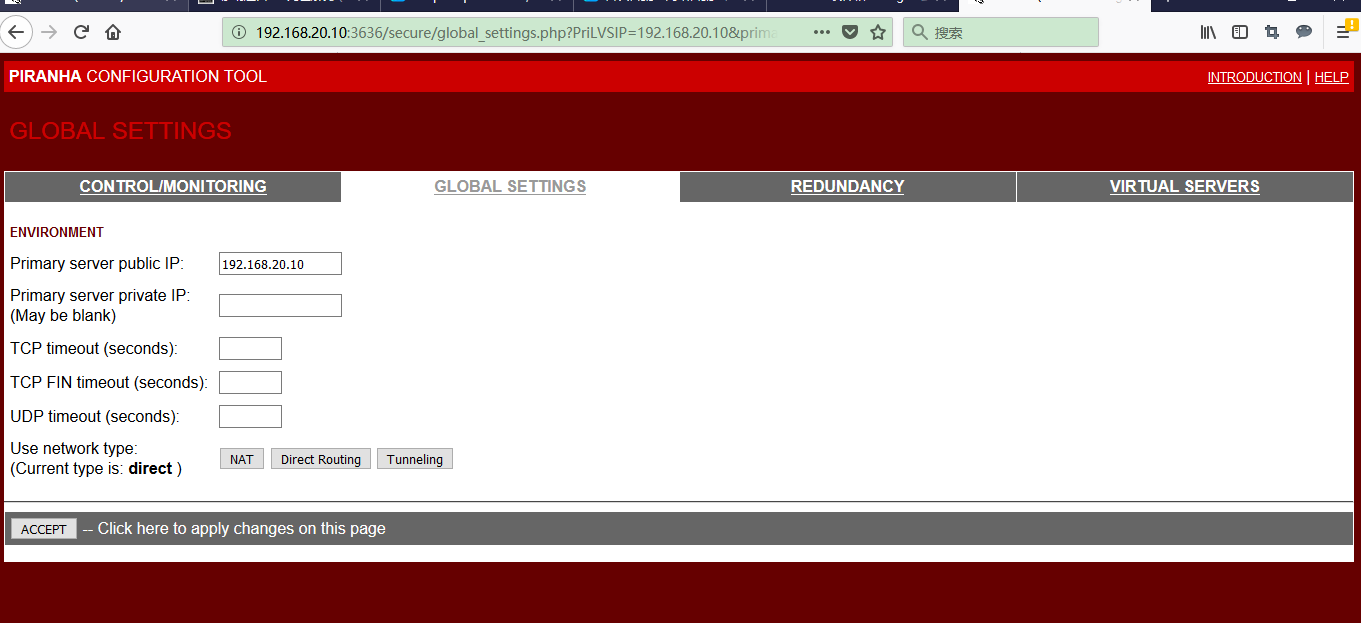
5.2 配置lvs01,ip地址,选direct
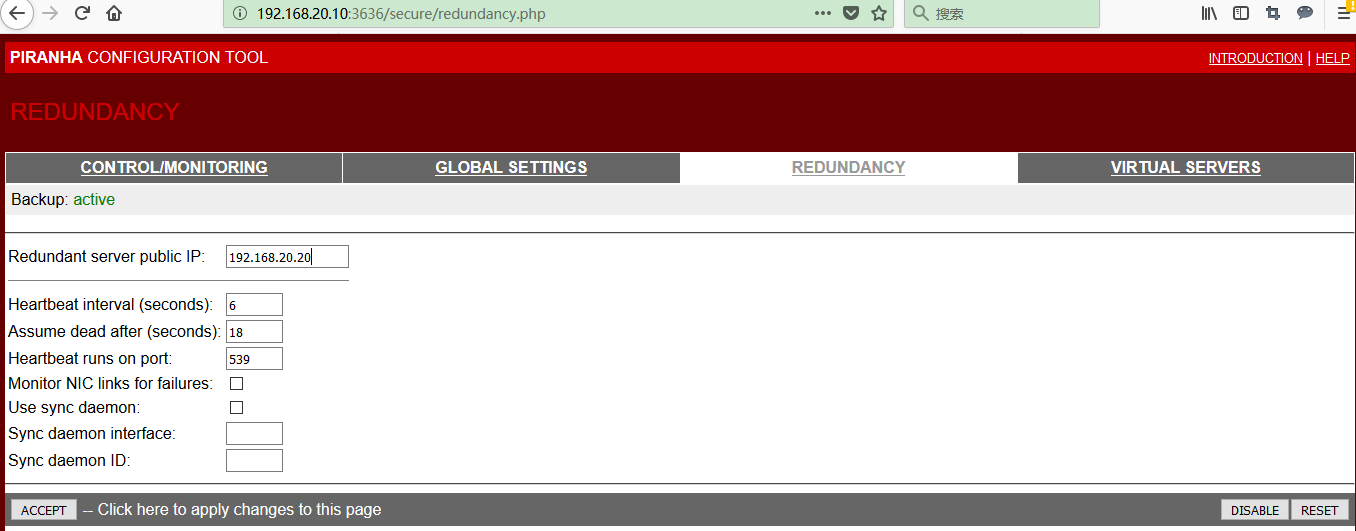
5.3 配置lvs02
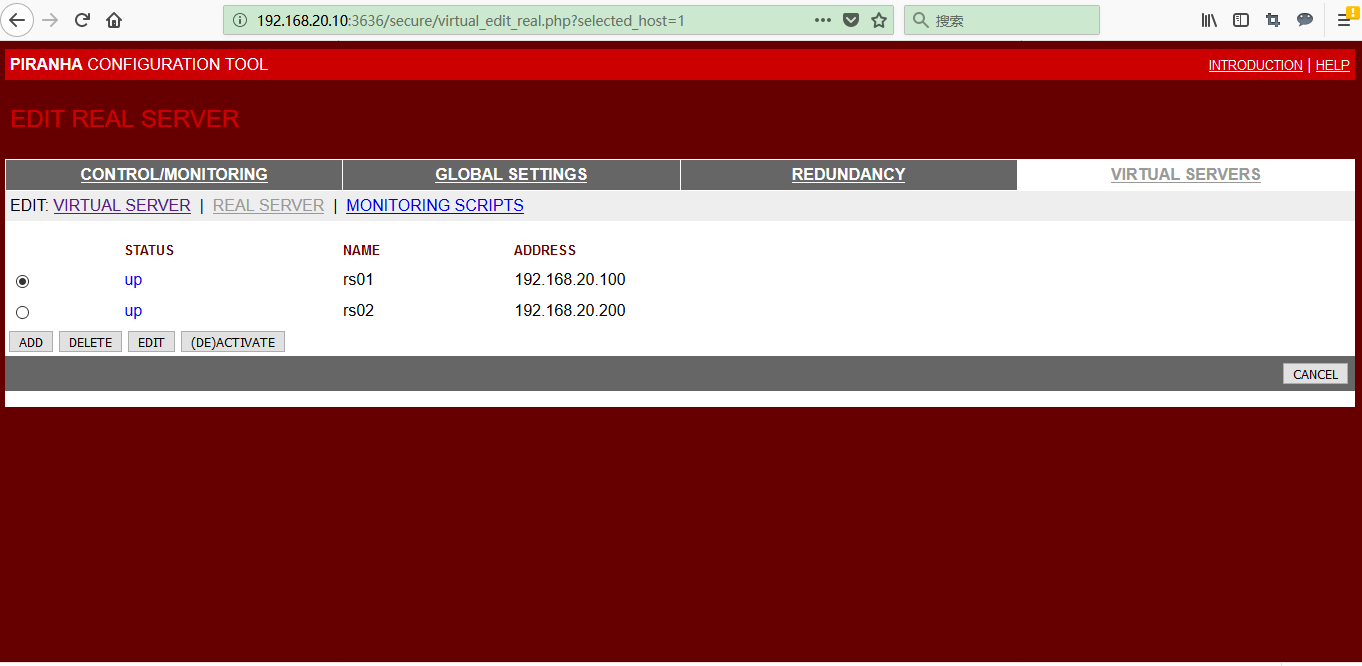
5.4 配置对外服务和真实服务器

5.5 将在lvs01 上的配置文件复制到lvs02 上,在lvs01,lvs02 上启动负载均衡的监控进程
[root@lvs01 ~]# scp /etc/sysconfig/ha/lvs.cf lvs02:/etc/sysconfig/ha/lvs.cf
root@lvs02's password:
lvs.cf 100% 865 0.8KB/s 00:00
[root@lvs01 ~]# /etc/init.d/pulse restart
Shutting down pulse: [失败]
Starting pulse: [确定]
[root@lvs01 ~]# chkconfig pulse on
[root@lvs02 ~]# /etc/init.d/pulse restart
Shutting down pulse: [失败]
Starting pulse: [确定]
[root@lvs02 ~]# chkconfig pulse on
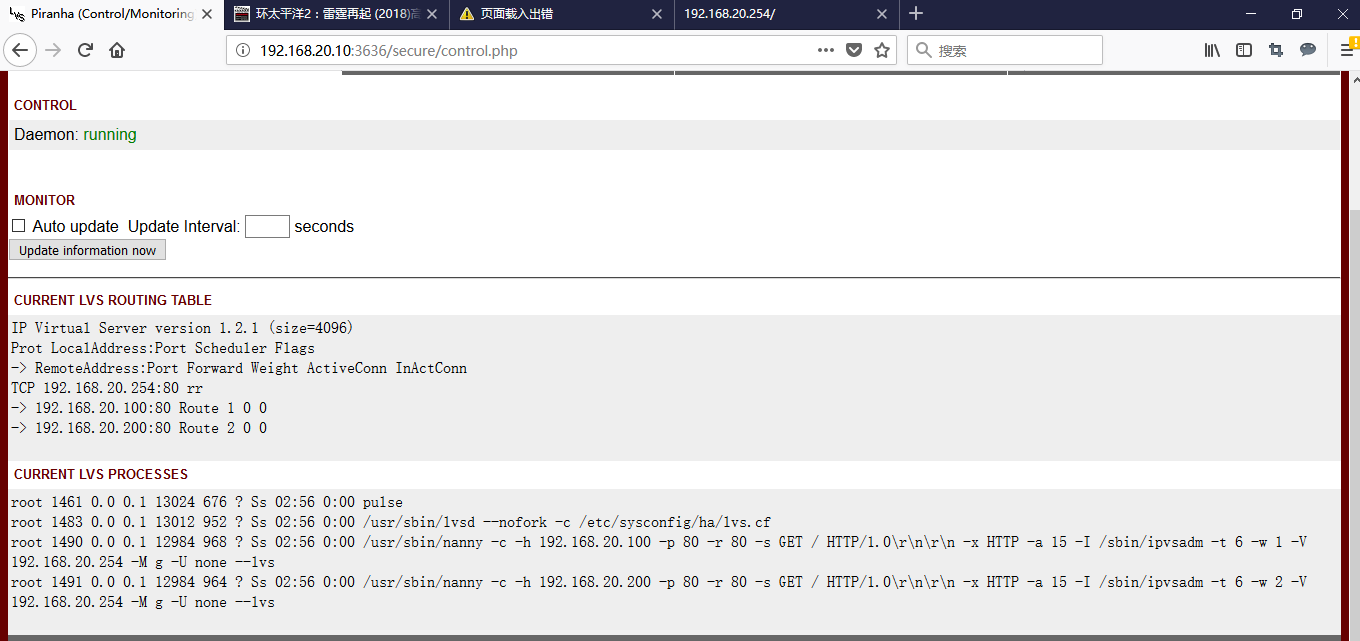
5.6 lvs 正常运行的状态
1、 测试
3.1 正常访问

3.2 lvs01 宕机了,可以正常访问

3.3 rs01 宕机了,也可正常访问

lvs-dr 模式-piranha的更多相关文章
- LVS DR模式 负载均衡服务搭建
LVS 负载均衡 最近在研究服务器负载均衡,阅读了网上的一些资料,发现主要的软件负载均衡方案有nginx(针对HTTP服务的负载均衡),LVS(针对IP层,MAC层的负载均衡).LVS模式工作在网络层 ...
- 一个公网地址部署LVS/DR模式
http://blog.chinaunix.net/uid-7411781-id-3436142.html 一个公网地址部署LVS/DR模式 网上看了很多关于LVS的文章,在选取2种模式LVS/D ...
- LVS DR模式搭建、keepalived+lvs
1.LVS DR模式搭建 条件: 即三台机器,在同一内网. 编辑脚本文件:/usr/local/sbin/lvs_dr.sh #! /bin/bashecho 1 > /proc/sys/net ...
- LVS DR模式搭建 keepalived lvs
LVS DR模式搭建• 三台机器 • 分发器,也叫调度器(简写为dir)172.16.161.130 • rs1 172.16.161.131 • rs2 172.16.161.132 • vip 1 ...
- lvs之 lvs+nginx+tomcat_1、tomcat_2+redis(lvs dr 模式)
前提:已经安装好 lvs+nginx+tomcat_1.tomcat_2+redis环境 ,可参考 (略有改动,比如tomcat_1.tomcat_2安装在两台机器上,而不是单机多实例 ,自行稍稍变动 ...
- CentOS下LVS DR模式负载均衡配置详解
一安装LVS准备: 1.准备4台Centos 6.2 x86_64 注:本实验关闭 SELinux和IPtables防火墙. 管理IP地址 角色 备注 192.168.1.101 LVS主调度器(Ma ...
- Keepalived+LVS DR模式高可用架构实践
Keepalived最初是为LVS设计,专门监控各服务器节点的状态(LVS不带健康检查功能,所以使用keepalived进行健康检查),后来加入了VRRP(虚拟路由热备协议(Virtual Route ...
- Linux centosVMware Linux集群架构LVS DR模式搭建、keepalived + LVS
一.LVS DR模式搭建 三台机器 分发器,也叫调度器(简写为dir) davery :1.101 rs1 davery01:1.106 rs2 davery02:11.107 vip 133.200 ...
- LVS DR模式实验
LVS DR模式实验 三台虚拟机,两个台节点机(Apache),一台DR实验调度机 一:关闭相关安全机制 systemctl stop firewalld iptables -F setenforce ...
- lvs dr 模式请求过程
一. lvs dr 模式请求过程 1.整个请求过程如下: client在发起请求之前,会发一个arp广播的包,在网络中找"谁是vip",由于所有的服务器,lvs和rs都有vip,为 ...
随机推荐
- valgrind安装与使用
1.得到源代码:http://valgrind.org/->source code 下载最新版的valgrind得到:valgrind-3.2.3.tar.bz2 2.解压安装包:tar -jx ...
- 安装RabbitMQ(一)
RabbitMQ简介 RabbitMQ 是由 LShift 提供的一个 Advanced Message Queuing Protocol (AMQP) 的开源实现,由以高性能.健壮以及可伸缩性出名的 ...
- 模板方法模式和JDBCTemplate(一)
本篇博客的目录: 一:模板方法模式介绍 二:模板方法模式的简单实现 三:总结 一:模板方法模式的介绍 1.1:模板方法模式的定义 定义:一个操作中的算法的骨架,而将一些步骤延迟到子类中.Templat ...
- window 下生成NodeJs(v8.9.3) 的 VS2015 解决方案node.sln
window 下生成NodeJs(v8.9.3) 的 VS2015 解决方案node.sln 使用步骤 也可以参照 github: https://github.com/nodejs/node/blo ...
- 解决java.lang.IllegalArgumentException: No converter found for return value of type: class java.util.ArrayList这个问题
今天使用SSM框架,用@ResponseBody注解,出现了这个问题 java.lang.IllegalArgumentException: No converter found for return ...
- OpenStack Ironic 常见问题
whole disk和partition 镜像 whole disk镜像部署可以支持windows,但是不能自定义分区(可以通过cloud-init实现),分区表是做镜像的人确定好的,partitio ...
- C语言中的sizeof函数总结
sizeof函数的结果: 变量:变量所占的字节数. ; printf( 数组:数组所占的字节数. ,,,,}; ] = {,,,,}; printf("size_arr1=%d\n" ...
- 使用wordpress搭建独立域名的个人博客或网站
最近抽空闲时间搭建了一个独立域名的个人博客站点,基本过程如下: 一.准备工作: 1.准备一个独立的域名,我是从万网中注册的cn结束的域名:tuzongxun.cn,价格29元,根据个人选择,也有更高更 ...
- PCI9054 DMA设置流程
1.设置方式寄存器:设置DMA通道的传输方式,寄存器DMAMODE0或者DMAMODE1的位9:0-表示块传输,1-表示散/聚传输: 2.设置PCI地址寄存器:设置PCI总线侧的地址空间. 3.设置L ...
- mysql常用基础操作语法(六)--对数据排序和限制结果数量的条件查询【命令行模式】
1.使用order by对查询的结果进行排序,asc升序,desc降序: 也可以在order by后指定多个字段名和排序方式进行多级排序: 2.使用limit限制查询结果的数量: 上图中的0,代表查询 ...