
IOS开发中绘制地图线路
地图应用经常会涉及到线路的绘制问题,ios下可以使用MKMapView进行地图开发,使用
MKOverlayView进行线路的绘制。
使用MKMapView添加MKMap.framework 和CoreLocation.framework并导入
MapKit.h头文件。
新建一个基于视图的工程,修改头文件:
 #import <UIKit/UIKit.h>

 #import <MapKit/MapKit.h>

 #import "CloMKAnnotation.h"

 @interface CloViewController : UIViewController<CLLocationManagerDelegate, MKMapViewDelegate, UIActionSheetDelegate>{

     MKMapView *cloMapView;

     MKPolyline *routeLine;

 }

 @property (nonatomic, strong)  NSMutableArray *locations;
修改实现代码,在.m中添加如下代码:
 #import "CloViewController.h"

 @interface CloViewController ()

 @end

 @implementation CloViewController

 @synthesize locations;

 - (void)viewDidLoad

 {

     [super viewDidLoad];

     // Do any additional setup after loading the view, typically from a nib.

     cloMapView = [[MKMapView alloc] initWithFrame:[self.view bounds]];

     [cloMapView setMapType:MKMapTypeHybrid];  //设置地图类型 地图/卫星/两者结合

     [cloMapView setShowsUserLocation:YES];      //显示当前位置

     [cloMapView setDelegate:self];

     CLLocationManager *locationManager = [[CLLocationManager alloc] init];

     //设置CLLocationManager实例委托和精度

     [locationManager setDelegate:self];

     [locationManager setDesiredAccuracy:kCLLocationAccuracyBest];

     //设置距离筛选器,表示至少移动100米才通知委托更新

     [locationManager setDistanceFilter:.f];

     //启动更新请求

 //    [locationManager startUpdatingLocation];

     locations = [[NSMutableArray alloc] init];

     float latitude = 39.8127;    //维度

     float longitude = 116.2967;  //经度

     for (int i = ; i < ; i++) {

         [locations addObject:[NSString stringWithFormat:@"%f,%f", latitude + 0.01*i, longitude + 0.01*i]];

 //            NSLog(@"locations:%i",locations.count);

     }

     //地图初始

     CLLocationCoordinate2D coords;

     coords.latitude = 39.9127;

     coords.longitude = 116.3967;

     float zoomlevel = 0.22;

     MKCoordinateRegion region = MKCoordinateRegionMake(coords, MKCoordinateSpanMake(zoomlevel, zoomlevel));

     [cloMapView setRegion:[cloMapView regionThatFits:region] animated:YES];

     [cloMapView addOverlay:[self makePolylineWithLocations:locations]];

     [self.view addSubview:cloMapView];

 }

 - (void)viewDidUnload

 {

     [super viewDidUnload];

     // Release any retained subviews of the main view.

     cloMapView = nil;

 }

 - (void)dealloc{

     [cloMapView release];

     [super dealloc];

 }

 - (BOOL)shouldAutorotateToInterfaceOrientation:(UIInterfaceOrientation)interfaceOrientation

 {

     return (interfaceOrientation != UIInterfaceOrientationPortraitUpsideDown);

 }

 //显示菜单选项

 - (void)showActionSheet :(id)sender{

     UIActionSheet * actionSheet = [[UIActionSheet alloc] initWithTitle:nil

                                                               delegate:self

                                                      cancelButtonTitle:@"取消"

                                                 destructiveButtonTitle:@"添加足迹"

                                                      otherButtonTitles:@"分享",@"详细",@"删除", nil];

     [actionSheet setDelegate:self];

     [actionSheet showInView:self.view];

     [actionSheet release];

 }

 //根据坐标点生成线路

 - (MKPolyline *)makePolylineWithLocations:(NSMutableArray *)newLocations{

     MKMapPoint *pointArray = malloc(sizeof(CLLocationCoordinate2D)* newLocations.count);

     for(int i = ; i < newLocations.count; i++)

     {

         // break the string down even further to latitude and longitude fields.

         NSString* currentPointString = [newLocations objectAtIndex:i];

         NSArray* latLonArr = [currentPointString componentsSeparatedByCharactersInSet:[NSCharacterSet characterSetWithCharactersInString:@","]];

         CLLocationDegrees latitude  = [[latLonArr objectAtIndex:] doubleValue];

         //        NSLog(@"latitude-> %f", latitude);

         CLLocationDegrees longitude = [[latLonArr objectAtIndex:] doubleValue];

         CLLocationCoordinate2D coordinate = CLLocationCoordinate2DMake(latitude, longitude);

         //        NSLog(@"point-> %f", point.x);

         if (i ==  || i == locations.count - ) {//这里只添加起点和终点作为测试

             CloMKAnnotation *ann = [[CloMKAnnotation alloc] init];

             [ann setCoordinate:coordinate];

             [ann setTitle:[NSString stringWithFormat:@"纬度:%f", latitude]];

             [ann setSubtitle:[NSString stringWithFormat:@"经度:%f", longitude]];

             [cloMapView addAnnotation:ann];

         }

         pointArray[i] = MKMapPointForCoordinate(coordinate);

     }

     routeLine = [MKPolyline polylineWithPoints:pointArray count:newLocations.count];

     free(pointArray);

     return routeLine;

 }

 #pragma mark-

 #pragma CLLocationManager delegate method

 //位置变化后会调用

 - (void)locationManager:(CLLocationManager *)manager didUpdateToLocation:(CLLocation *)newLocation fromLocation:(CLLocation *)oldLocation{

     //可在此处更新用户位置信息

 //    cloMapView.userLocation

     NSLog(@"oldLocation:%@", [oldLocation description]);

     NSLog(@"newLocation:%@", [newLocation description]);

     NSLog(@"distance:%@", [newLocation distanceFromLocation:oldLocation]);

     //位置变化添加新位置点

     [locations addObject:[NSString stringWithFormat:@"%f,%f", newLocation.coordinate.latitude, newLocation.coordinate.longitude]];

     //删除进线路,更新新轨迹

     [cloMapView removeOverlay:routeLine];

     [cloMapView addOverlay:[self makePolylineWithLocations:locations]];

 }

 #pragma MKMapView delegate method

 //添加坐标点大头针

 - (MKAnnotationView *)mapView:(MKMapView *)mapView viewForAnnotation:(id<MKAnnotation>)annotation{

     if (![annotation isKindOfClass:[CloMKAnnotation class]]) {

         return nil;

     }

     static NSString *identifier = @"Annotation";

     MKPinAnnotationView *pinAnnotationView = (MKPinAnnotationView *)[mapView dequeueReusableAnnotationViewWithIdentifier:identifier];

     if (pinAnnotationView == nil) {

         pinAnnotationView = [[[MKPinAnnotationView alloc] initWithAnnotation:annotation reuseIdentifier:identifier] autorelease];

     }

     pinAnnotationView.animatesDrop = YES;

     pinAnnotationView.canShowCallout = YES;

     pinAnnotationView.draggable = YES;

     UIButton *detailBtn = [UIButton buttonWithType:UIButtonTypeDetailDisclosure];

     [detailBtn addTarget:self action:@selector(showActionSheet:) forControlEvents:UIControlEventTouchUpInside];

     pinAnnotationView.rightCalloutAccessoryView = detailBtn;

     return pinAnnotationView;

 }

 - (void)mapView:(MKMapView *)mapView annotationView:(MKAnnotationView *)view didChangeDragState:(MKAnnotationViewDragState)newState fromOldState:(MKAnnotationViewDragState)oldState{

 }

 //画线

 - (MKOverlayView *)mapView:(MKMapView *)mapView viewForOverlay:(id<MKOverlay>)overlay{

     NSLog(@"return overLayView...");

     if ([overlay isKindOfClass:[MKPolyline class]]) {

         MKPolylineView *routeLineView = [[[MKPolylineView alloc] initWithPolyline:routeLine] autorelease];

         routeLineView.strokeColor = [UIColor blueColor];

         routeLineView.lineWidth = ;

         return routeLineView;

     }

     return nil;

 }

 @end
这里主要是为了测试,初始时 locations坐标点自定义的,实际中是根据用户的位置动态生成的一系列坐标点。具体可在下面方法中实现
- (void)locationManager:(CLLocationManager *)manager didUpdateToLocation:(CLLocation *)newLocation fromLocation:(CLLocation *)oldLocation
另外用户的实时位置可用
cloMapView.userLocation = newLocation进行设置,然后显示在地图上。
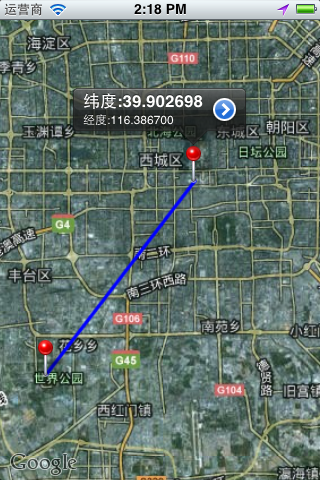
运行效果
IOS开发中绘制地图线路的更多相关文章
- iOS开发中的地图开发
显示地图: 1.导入头文件 #import <MapKit/MapKit.h> 如果同时需要用户定位的话还需要 #import <CoreLocation/CoreLocation. ...
- ios开发中如何调用苹果自带地图导航
前段时间一直在赶项目,在外包公司工作就是命苦,天天加班不说,工作都是和工期合同挂钩的,稍微逾期就有可能被扣奖金,不谈这些伤脑筋的事情了,让我们说说iOS开发中如何调用苹果手机自带的地图. 学习如逆水行 ...
- iOS开发——高级篇——地图 MapKit
一.简介 1.在移动互联网时代,移动app能解决用户的很多生活琐事,比如周边:找餐馆.找KTV.找电影院等等导航:根据用户设定的起点和终点,进行路线规划,并指引用户如何到达 在上述应用中,都用到了定位 ...
- iOS开发中静态库制作 之.a静态库制作及使用篇
iOS开发中静态库之".a静态库"的制作及使用篇 一.库的简介 1.什么是库? 库是程序代码的集合,是共享程序代码的一种方式 2.库的类型? 根据源代码的公开情况,库可以分为2种类 ...
- ios开发中的小技巧
在这里总结一些iOS开发中的小技巧,能大大方便我们的开发,持续更新. UITableView的Group样式下顶部空白处理 //分组列表头部空白处理 UIView *view = [[UIViewal ...
- [转]iOS开发中的火星坐标系及各种坐标系转换算法
iOS开发中的火星坐标系及各种坐标系转换算法 源:https://my.oschina.net/u/2607703/blog/619183 其原理是这样的:保密局开发了一个系统,能将实际的坐标转 ...
- iOS开发中使用[[UIApplication sharedApplication] openURL:]加载其它应用
iOS 应用程序之间(1) 在iOS开发中,经常需要调用其它App,如拨打电话.发送邮件等.UIApplication:openURL:方法是实现这一目的的最简单方法,该方法一般通过提供的u ...
- iOS开发中图片方向的获取与更改
iOS开发中 再用到照片的时候 或多或少遇到过这样的问题 就是我想用的照片有横着拍的有竖着排的 所以导致我选取图片后的效果也横七竖八的 显示效果不好 比如: 图中红圈选中的图片选取的是横着拍 ...
- iOS开发中关于UIImage的知识点总结
UIImage是iOS中层级比较高的一个用来加载和绘制图像的一个类,更底层的类还有 CGImage,以及iOS5.0以后新增加的CIImage.今天我们主要聊一聊UIImage的三个属性: image ...
随机推荐
- DOM手术台
CSS分类 排队: <div id="box" style="width:200px;border:1px solid red color:red;font-siz ...
- newlisp 接受jenkins带空格的参数
jenkins有一个参数text种类,它能够以文本的段落拷贝作为参数 newlispThe program receives parameters are separated by spaces, 更 ...
- POJ--2391--Ombrophobic Bovines【分割点+Floyd+Dinic优化+二分法答案】最大网络流量
联系:http://poj.org/problem?id=2391 题意:有f个草场,每一个草场当前有一定数目的牛在吃草,下雨时它能够让一定数量的牛在这里避雨,f个草场间有m条路连接,每头牛通过一条路 ...
- 物理卷操作命令:pvcreate,pvscan,pvdisplay.卷组操作命令:vgcreate,vgdisplay. (转)
新硬盘创建LVM系统过程. 物理卷操作命令:pvcreate,pvscan,pvdisplay. 卷组操作命令:vgcreate,vgdisplay. 逻辑卷操作命令:lvcreate,lvdispl ...
- Android应用UI架构
这个标题听起来可能有点大.事实上这里主要就是讨论一个应用程序的UI组件,是全用Activity还是全用Fragment.或者是二者皆有.以及使用Activity和Fragment的一些注意事项. A ...
- WPF学习(12)动画
本篇来学习WPF的动画.什么是动画?动画就是一系列帧.在WPF中,动画就是在一段时间内修改依赖属性值的行为,它是基于时间线Timeline的.有人会说,要动画干嘛,华而不实,而且添加了额外的资源消耗而 ...
- SQL Server 2008 /SQL Server 2008 R2 配置数据库邮件
原文:SQL Server 2008 /SQL Server 2008 R2 配置数据库邮件 从2005开始,就引入了"数据库邮件"功能.并且取代SQLMail.原有SQLMail ...
- android4.4组件分析--service组件-bindService源代码分析
6.1.1. bindService 由于有前面分析startService的代码实现过程,则对于bindService的代码分析就不用那么具体介绍,在介绍流程的同一时候更关注一些细节上的部分. ...
- 阿里巴巴2014研发project师实习生面试经历
java研发project师的初面是在上周三进行的,终于结果到了晚上才出,而没有通过的则是一结束网上就更新了状态.之后阿里通知这周三,也就是今天进行二面. 凑巧的是今早被舍友吵醒,中午那个困啊,但没时 ...
- BP简单的理解神经网络
先用3类样本训练,在測试.. 刚開始学习的人有错的 地方,,请大家多多指导.. 一些好的博客: http://blog.csdn.net/starxu85/article/details/314353 ...