
subversion-fundamental concepts
1.在使用svn 的时候,版本号version的问题一直困恼。
如在目录/app/controller上面右键选择查看该目录的 show log ,弹出的窗口显示的Revision log.单击每一条log, 都可以查看到这次修改/删除/新增了哪些文件和目录。

点击该目录,进去查看里面的某个文件, 查看 show log ,弹出的窗口显示的是, revision 的数字和目录的很不一样。
 另外一个文件show log
  ,再来一个文件的 show log
注意3810, 3609, 3606, 3604 , 3601这几个revision number.
下面的文档讲得不错:
http://svnbook.red-bean.com/en/1.6/svn.basic.in-action.html
Version Control the Subversion Way
We've mentioned already that Subversion is a modern, network-aware version control system. As we described in the section called “Version Control Basics” (our high-level version control overview), a repository serves as the core storage mechanism for Subversion's versioned data, and it's via working copies that users and their software programs interact with that data. In this section, we'll begin to introduce the specific ways in which Subversion implements version control.
Subversion Repositories
Subversion implements the concept of a version control repository much as any other modern version control system would. Unlike a working copy, a Subversion repository is an abstract entity, able to be operated upon almost exclusively by Subversion's own libraries and tools. As most of a user's Subversion interactions involve the use of the Subversion client and occur in the context of a working copy, we spend the majority of this book discussing the Subversion working copy and how to manipulate it. For the finer details of the repository, though, check out Chapter 5, Repository Administration.
Revisions
A Subversion client commits (that is, communicates the changes made to) any number of files and directories as a single atomic transaction. By atomic transaction, we mean simply this: either all of the changes are accepted into the repository, or none of them is. Subversion tries to retain this atomicity in the face of program crashes, system crashes, network problems, and other users' actions.
Each time the repository accepts a commit, this creates a new state of the filesystem tree, called a revision. Each revision is assigned a unique natural number, one greater than the number assigned to the previous revision. The initial revision of a freshly created repository is numbered 0 and consists of nothing but an empty root directory.
Figure 1.6, “Tree changes over time” illustrates a nice way to visualize the repository. Imagine an array of revision numbers, starting at 0, stretching from left to right. Each revision number has a filesystem tree hanging below it, and each tree is a “snapshot” of the way the repository looked after a commit.
Figure 1.6. Tree changes over time
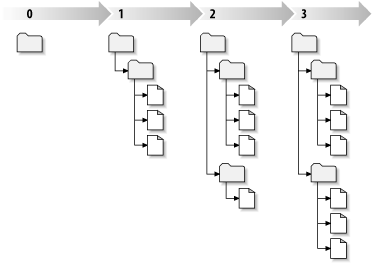
Global Revision Numbers
Unlike most version control systems, Subversion's revision numbers apply to the entire repository tree, not individual files. Each revision number selects an entire tree, a particular state of the repository after some committed change. Another way to think about it is that revision N represents the state of the repository filesystem after the Nth commit. When Subversion users talk about “revision 5 of foo.c,” they really mean “foo.c as it appears in revision 5.” Notice that in general, revisions N and M of a file do notnecessarily differ! Many other version control systems use per-file revision numbers, so this concept may seem unusual at first. (Former CVS users might want to see Appendix B, Subversion for CVS Users for more details.)
subversion-fundamental concepts的更多相关文章
- Deep Learning in a Nutshell: Core Concepts
Deep Learning in a Nutshell: Core Concepts This post is the first in a series I’ll be writing for Pa ...
- (转) Deep Learning in a Nutshell: Core Concepts
Deep Learning in a Nutshell: Core Concepts Share: Posted on November 3, 2015by Tim Dettmers 7 Comm ...
- Lucene的分析资料【转】
Lucene 源码剖析 1 目录 2 Lucene是什么 2.1.1 强大特性 2.1.2 API组成- 2.1.3 Hello World! 2.1.4 Lucene roadmap 3 索引文件结 ...
- Introduction of OpenCascade Foundation Classes
Introduction of OpenCascade Foundation Classes Open CASCADE基础类简介 eryar@163.com 一.简介 1. 基础类概述 Foundat ...
- <java基础学习>JAVA 对象和类
Java is an Object-Oriented Language. As a language that has the Object Oriented feature, Java suppor ...
- Introduction of Open CASCADE Foundation Classes
Open CASCADE Foundation Classes Open CASCADE基础类 eryar@163.com 一.简介 1. 基础类概述 Foundation Classes Overv ...
- Similarity-based Learning
Similarity-based approaches to machine learning come from the idea that the best way to make a predi ...
- Awesome (and Free) Data Science Books[转]
Post Date: September 3, 2014By: Stephanie Miller Marty Rose, Data Scientist in the Acxiom Product an ...
- WCF - Overview
WCF stands for Windows Communication Foundation. The elementary feature of WCF is interoperability. ...
- Learning WCF Chapter1 Summary
SummaryThis chapter covered a lot of ground,beginning with a look at the purpose of WCF,the problems ...
随机推荐
- 设计模式 装饰模式(Decorator)
设计模式 装饰模式(Decorator) @author ixenos 装饰模式是什么 1.装饰模式以对客户端透明的方式对象的功能,是继承关系的一个替代方案,但装饰模式可以在不创造更多子类的情况下,对 ...
- jquery实现页面内部的内容切换
html页面 .box-body-1-3 li{ margin: 20px; cursor: pointer; //实现鼠标放在上面是小手状态 } 点击列表 <div class=" ...
- 一步一步学EF系列【4、升级篇 实体与数据库的映射】live writer真坑,第4次补发
前言 之前的几篇文章,被推荐到首页后,又被博客园下了,原因内容太少,那我要写多点呢,还是就按照这种频率进行写呢?本身我的意图这个系列就是想已最简单最容易理解的方式进行,每篇内容也不要太多,这样初学者容 ...
- 隔一段时间应用就会挂掉(进程在,但停止响应,也无log输出),必须重启tomcat
此处是转载的 是给自己做的备注 问题:隔一段时间应用就会挂掉(进程在,但停止响应,也无log输出),必须重启tomcat 原因查找:由于tomcat自身log中并无错误产生,磁盘空间足够,读写也正常 ...
- python 实现excel转化成json文件
1.准备工作 python 2.7 安装 安装xlrd -- pip install xlrd 2. 直接上代码 import xlrd from collections import Ordered ...
- JSON理解
var txt = '{"employees":[' + //多段文字用'+'来组织在一起 '{"firstName":"Bill",&qu ...
- iOS 自定义导航栏笔记
一.UINavigationBar的结构 导航栏几乎是每个页面都会碰到的问题,一般两种处理方式:1.隐藏掉不显示 2.自定义 1. 添加导航栏 TestViewController * mainVC ...
- Git单独checkout子目录
http://schacon.github.io/git/git-read-tree.html#_sparse_checkout Existing Repository If you already ...
- HDU3371--Connect the Cities(最小生成树)
Problem Description In 2100, since the sea level rise, most of the cities disappear. Though some sur ...
- check2
//文件check.js //将方法句柄赋值给变量$,简化document.getElementById(); var $ = document.getElementById; //定义模拟类(定义C ...