
【HBase】HBase与MapReduce集成——从HDFS的文件读取数据到HBase
需求
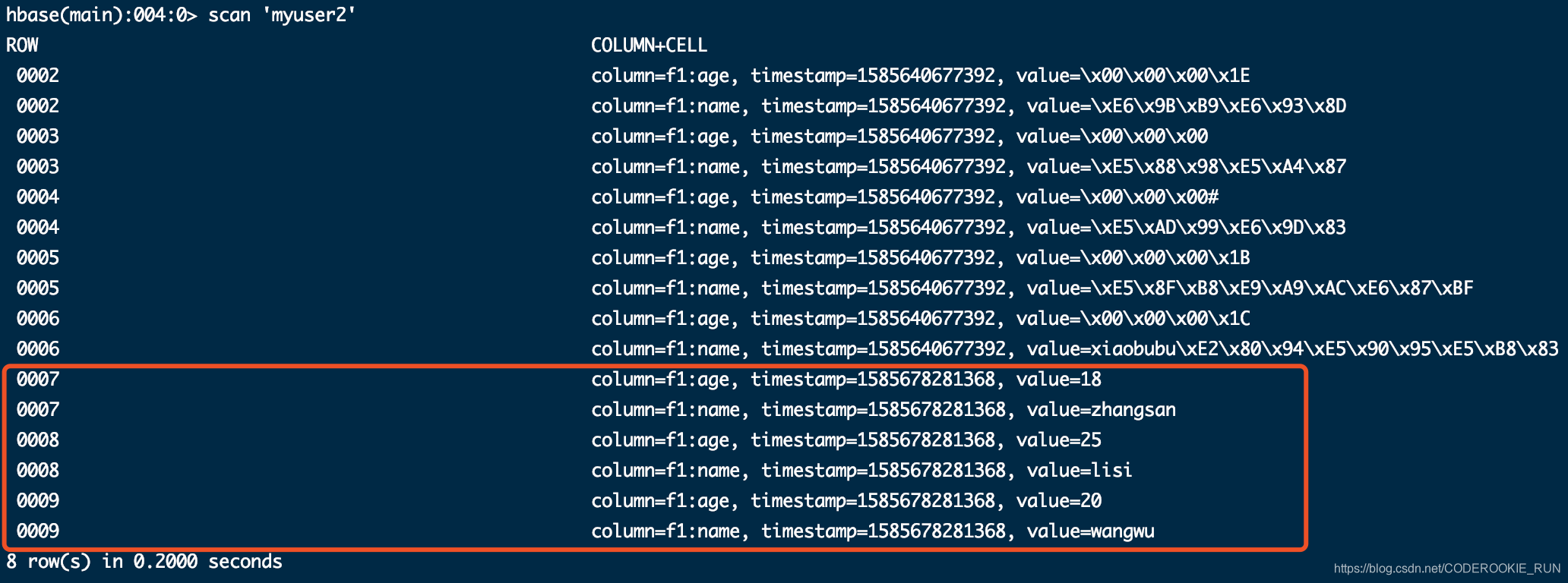
将HDFS路径 /hbase/input/user.txt 文件的内容读取并写入到HBase 表myuser2中
首先在HDFS上准备些数据让我们用
hdfs dfs -mkdir -p /hbase/input

cd /export/servers/

vim user.txt
填写一下数据,注意是用 \t 分隔的
0007	zhangsan	18

0008	lisi	25

0009	wangwu	20
保存后上传到HDFS上就行
hdfs dfs -put user.txt /hbase/input
步骤
一、创建maven工程,导入jar包
<repositories>

        <repository>

            <id>cloudera</id>

            <url>https://repository.cloudera.com/artifactory/cloudera-repos/</url>

        </repository>

    </repositories>

    <dependencies>

        <dependency>

            <groupId>org.apache.hadoop</groupId>

            <artifactId>hadoop-client</artifactId>

            <version>2.6.0-mr1-cdh5.14.0</version>

        </dependency>

        <dependency>

            <groupId>org.apache.hbase</groupId>

            <artifactId>hbase-client</artifactId>

            <version>1.2.0-cdh5.14.0</version>

        </dependency>

        <dependency>

            <groupId>org.apache.hbase</groupId>

            <artifactId>hbase-server</artifactId>

            <version>1.2.0-cdh5.14.0</version>

        </dependency>

        <dependency>

            <groupId>junit</groupId>

            <artifactId>junit</artifactId>

            <version>4.12</version>

            <scope>test</scope>

        </dependency>

        <dependency>

            <groupId>org.testng</groupId>

            <artifactId>testng</artifactId>

            <version>6.14.3</version>

            <scope>test</scope>

        </dependency>

    </dependencies>

    <build>

        <plugins>

            <plugin>

                <groupId>org.apache.maven.plugins</groupId>

                <artifactId>maven-compiler-plugin</artifactId>

                <version>3.0</version>

                <configuration>

                    <source>1.8</source>

                    <target>1.8</target>

                    <encoding>UTF-8</encoding>

                    <!--    <verbal>true</verbal>-->

                </configuration>

            </plugin>

            <plugin>

                <groupId>org.apache.maven.plugins</groupId>

                <artifactId>maven-shade-plugin</artifactId>

                <version>2.2</version>

                <executions>

                    <execution>

                        <phase>package</phase>

                        <goals>

                            <goal>shade</goal>

                        </goals>

                        <configuration>

                            <filters>

                                <filter>

                                    <artifact>*:*</artifact>

                                    <excludes>

                                        <exclude>META-INF/*.SF</exclude>

                                        <exclude>META-INF/*.DSA</exclude>

                                        <exclude>META-INF/*/RSA</exclude>

                                    </excludes>

                                </filter>

                            </filters>

                        </configuration>

                    </execution>

                </executions>

            </plugin>

        </plugins>

    </build>
二、开发MapReduce程序
定义一个Main方法类——HdfsReadHbaseWrite
package cn.itcast.mr.demo2;

import org.apache.hadoop.conf.Configuration;

import org.apache.hadoop.conf.Configured;

import org.apache.hadoop.fs.Path;

import org.apache.hadoop.hbase.HBaseConfiguration;

import org.apache.hadoop.hbase.mapreduce.TableMapReduceUtil;

import org.apache.hadoop.io.NullWritable;

import org.apache.hadoop.io.Text;

import org.apache.hadoop.mapreduce.Job;

import org.apache.hadoop.mapreduce.lib.input.TextInputFormat;

import org.apache.hadoop.util.Tool;

import org.apache.hadoop.util.ToolRunner;

public class HdfsReadHbaseWrite extends Configured implements Tool {

    @Override

    public int run(String[] args) throws Exception {

        //获取Job对象

        Job job = Job.getInstance(super.getConf(), "hdfs->hbase");

        //获取输入数据和路径

        job.setInputFormatClass(TextInputFormat.class);

        TextInputFormat.setInputPaths(job, new Path("hdfs://node01:8020/hbase/input"));

        //自定义Map逻辑

        job.setMapperClass(HDFSReadMapper.class);

        //获取k2,v2输出类型

        job.setMapOutputKeyClass(Text.class);

        job.setMapOutputValueClass(NullWritable.class);

        //自定义Reduce逻辑

        TableMapReduceUtil.initTableReducerJob("myuser2", HbaseWriteReducer.class, job);

        //设置reduceTask个数

        job.setNumReduceTasks(1);

        //提交任务

        boolean b = job.waitForCompletion(true);

        return b ? 0 : 1;

    }

    public static void main(String[] args) throws Exception {

        Configuration configuration = HBaseConfiguration.create();

        configuration.set("hbase.zookeeper.quorum", "node01:2181,node02:2181,node03:2181");

        int run = ToolRunner.run(configuration, new HdfsReadHbaseWrite(), args);

        System.exit(run);

    }

}
自定义Map逻辑,定义一个Mapper类——HDFSReadMapper
package cn.itcast.mr.demo2;

import org.apache.hadoop.io.LongWritable;

import org.apache.hadoop.io.NullWritable;

import org.apache.hadoop.io.Text;

import org.apache.hadoop.mapreduce.Mapper;

import java.io.IOException;

public class HDFSReadMapper extends Mapper<LongWritable, Text, Text, NullWritable> {

    @Override

    protected void map(LongWritable key, Text value, Context context) throws IOException, InterruptedException {

        /*

        0007	zhangsan	18

        0008	lisi	25

        0009	wangwu	20

        我们要读取的数据都直接封装到了value中,所以直接拿到以后输出就行

         */

        context.write(value, NullWritable.get());

    }

}
自定义Reduce逻辑,定义一个Reducer类——HbaseWriteReducer
package cn.itcast.mr.demo2;

import org.apache.hadoop.hbase.client.Put;

import org.apache.hadoop.hbase.io.ImmutableBytesWritable;

import org.apache.hadoop.hbase.mapreduce.TableReducer;

import org.apache.hadoop.io.NullWritable;

import org.apache.hadoop.io.Text;

import java.io.IOException;

public class HbaseWriteReducer extends TableReducer<Text, NullWritable, ImmutableBytesWritable> {

    @Override

    protected void reduce(Text key, Iterable<NullWritable> values, Context context) throws IOException, InterruptedException {

        /*

        0007	zhangsan	18

        0008	lisi	25

        0009	wangwu	20

         */

        //先把拿到的数据分割一下

        String[] split = key.toString().split("\t");

        //拿到rowKey

        byte[] rowKey = split[0].getBytes();

        //拿到nameValue

        byte[] nameValue = split[1].getBytes();

        //拿到ageValue

        byte[] ageValue = split[2].getBytes();

        //创建put对象

        Put put = new Put(rowKey);

        //添加数据

        put.addColumn("f1".getBytes(), "name".getBytes(), nameValue);

        put.addColumn("f1".getBytes(), "age".getBytes(), ageValue);

        //构建ImmutableBytesWritable

        ImmutableBytesWritable immutableBytesWritable = new ImmutableBytesWritable();

        immutableBytesWritable.set(rowKey);

        //转换成k3,v3输出

        context.write(immutableBytesWritable, put);

    }

}
三、结果
【HBase】HBase与MapReduce集成——从HDFS的文件读取数据到HBase的更多相关文章
- java实现服务端守护进程来监听客户端通过上传json文件写数据到hbase中
1.项目介绍: 由于大数据部门涉及到其他部门将数据传到数据中心,大部分公司采用的方式是用json文件的方式传输,因此就需要编写服务端和客户端的小程序了.而我主要实现服务端的代码,也有相应的客户端的测试 ...
- hbase 从hdfs上读取数据到hbase中
<dependencies> <dependency> <groupId>org.apache.hbase</groupId> <artifact ...
- Hbase对hive的支持没有hdfs的好的原因 及hbase什么时候使用 及rowkey设计技巧
hive-=mareduce 的 split 在 hbase就是 region了,,,,,,,访问region必须通过hregionserver 会造成regionser负担过大, 另外 reg ...
- MapReduce将HDFS文本数据导入HBase中
HBase本身提供了很多种数据导入的方式,通常有两种常用方式: 使用HBase提供的TableOutputFormat,原理是通过一个Mapreduce作业将数据导入HBase 另一种方式就是使用HB ...
- 批量导入数据到HBase
hbase一般用于大数据的批量分析,所以在很多情况下需要将大量数据从外部导入到hbase中,hbase提供了一种导入数据的方式,主要用于批量导入大量数据,即importtsv工具,用法如下: Us ...
- 大数据学习——Hbase
1. Hbase基础 1.1 hbase数据库介绍 1.简介 hbase是bigtable的开源java版本.是建立在hdfs之上,提供高可靠性.高性能.列存储.可伸缩.实时读写nosql的数据库系统 ...
- 简单通过java的socket&serversocket以及多线程技术实现多客户端的数据的传输,并将数据写入hbase中
业务需求说明,由于公司数据中心处于刚开始部署的阶段,这需要涉及其它部分将数据全部汇总到数据中心,这实现的方式是同上传json文件,通过采用socket&serversocket实现传输. 其中 ...
- HDFS写文件过程分析
转自http://shiyanjun.cn/archives/942.html HDFS是一个分布式文件系统,在HDFS上写文件的过程与我们平时使用的单机文件系统非常不同,从宏观上来看,在HDFS文件 ...
- HBase概念学习(七)HBase与Mapreduce集成
这篇文章是看了HBase权威指南之后,依据上面的解说搬下来的样例,可是略微有些不一样. HBase与mapreduce的集成无非就是mapreduce作业以HBase表作为输入,或者作为输出,也或者作 ...
随机推荐
- Linux常用命令01(文件和目录)
目标 查看目录内容 ls 切换目录 cd 创建和删除文件 touch rm mkdir 拷贝和移动文件 cp mv 查看文件内容 cat more grep 其他 echo 重定向 > 和 &g ...
- 弹幕有点逗比,用 Python 爬下来看看《民国奇探》的弹幕
电视剧<民国奇探>是一部充斥着逗比风的探案剧,剧中主要角色:三土.四爷.白小姐,三土这个角色类似于<名侦探柯南>中的柯南但带有搞笑属性,四爷则类似于毛利小五郎但有大哥范且武功高 ...
- A - Free DIY Tour HDU - 1224
题目大意:每一个城市都有一定的魅力值,然后有一个有向图,根据这个有向图从1到n+1所获得的魅力的最大值,并输出路径(要求只能从编号娇小的城市到编号较大的城市). 题解:很容易想到最短路+路径纪录.但是 ...
- python调用小豆机器人实现自己的机器人!
大家好,人工智能是不是很酷呢? 今天我们用python调用小豆机器人实现自己的机器人(可以结合往期的语音识别更酷哦) 好,废话不多说直接上代码 import requests i=input(&quo ...
- go的 三个点 ...
这三个点,比较任性,可前可后,可攻可守... 举2个栗子: 1.func sub(arg ...int) (total int){} 2.argsArr = apend(argsArr[:3], ar ...
- Python selenium Chrome正在受到自动软件的控制 disable-infobars无效 的解决方法
问题解决 前两天更新了google浏览器版本,今天运行以前的脚本,发现options一个参数的配置不生效了. 运行了几次都发现该参数没有生效,也检查了自己的代码参数,没有写错,于是就有了这一波“网中寻 ...
- [Batch脚本] if else 的格式
必须写成一行 ) else (,否则报错. if %abc%=="yes" ( ... ) else ( ... )
- Android:RelativeLayout 内容居中
Android RelativeLayout 内容居中解决办法: 使用Linearlayout本来利用父控件的gravity属性是很好解决的.但是对应RelativeLayout虽然有gravity属 ...
- 监控MySQL服务及httpd服务
一:监控MySQL服务 [root@server ~]# vim /usr/local/zabbix/etc/zabbix_agentd.conf PidFile=/tmp/zabbix_agentd ...
- jdbc批量插入数据
//插入很多书(批量插入用法) public void insertBooks(List<Book> book) { final List<Book> tempBook=b ...