
js-ajax方法详解以及封装
本文主要从使用ajax请求的步骤、ajax状态码和http响应状态码以及ajax封装三个方面阐述
一、使用ajax请求的步骤
// 一、创建 XMLHttpRequest 对象

var xhr = new XMLHttpRequest();

// 二、规定请求的类型、URL 以及是否异步处理请求。

// method:get/post

// url:请求地址

// async:true异步/false同步

xhr.open(method,url,async);

xhr.setRequestHeader("Content-type","application/x-www-form-urlencoded");//post方法必需

// 三、将请求发送到服务器

// string仅用于post请求

// get方法传参拼接在url后面即可

xhr.send(string);

// 四、接收响应有两种方法

// 1.新方法,只想要判断http的响应状态码

xhr.onload = function(){

    if(xhr.status == 4){

        console.log(xhr.responseText);

    }

}

// 2.旧方法,想要同时判断Ajax的状态码和http的状态码

xhr.onreadystatechange = function(){

    if(xhr.readyState == 200 && xhr.status == 4){

        console.log(xhr.responseText);

    }

}

二、ajax状态码(readystate)和http响应状态码(status)
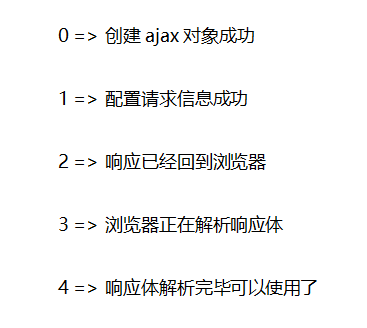
1、ajax状态码(readystate)
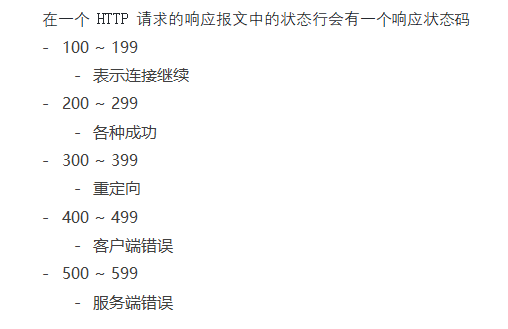
2、http响应状态码(status)
三、ajax封装
//ajax方法的调用

ajax({

     url:请求地址,

     success:(res)=>{

     //请求数据成功

     // console.log(res);

     }

})
// ajax封装的方法

function ajax({url,data,success,error,type}){

    type = type || "get"; //该参数可选

    data = data || {};    //该参数可选

    let str = "";

    //拼接参数

    for(let i in data){

        str += `${i}=${data[i]}&`;

    }

    str = str.slice(0,str.length-1);

    //如果请求为get方式则拼接在请求地址后面

    if(type === "get"){

        var d = new Date();

        url = url + "?" + str + "&__qft="+d.getTime();

    }

    let xhr = new XMLHttpRequest();

    xhr.open(type, url, true);

    //如果为post请求需要加入固定请求头部

    if(type === "get"){

        xhr.send();

    }else if(type === "post"){

        xhr.setRequestHeader("Content-type","application/x-www-form-urlencoded");

        xhr.send(str);

    }

    xhr.onload = function(){

        if(xhr.status === 200){

            success(xhr.responseText);

        }else{

            error && error(xhr.status);

        }

    }

}
js-ajax方法详解以及封装的更多相关文章
- Js apply 方法 详解
Js apply方法详解 我在一开始看到JavaScript的函数apply和call时,非常的模糊,看也看不懂,最近在网上看到一些文章对apply方法和call的一些示例,总算是看的有点眉目了,在这 ...
- $.ajax()方法详解 jquery
$.ajax()方法详解 jquery中的ajax方法参数总是记不住,这里记录一下. 1.url: 要求为String类型的参数,(默认为当前页地址)发送请求的地址. 2.type: 要求为Str ...
- jQuery中 $.ajax()方法详解
$.ajax()方法详解 jquery中的ajax方法参数总是记不住,这里记录一下. 1.url: 要求为String类型的参数,(默认为当前页地址)发送请求的地址. 2.type: 要求为Strin ...
- $.ajax()方法详解 ajax之async属性 【原创】详细案例解剖——浅谈Redis缓存的常用5种方式(String,Hash,List,set,SetSorted )
$.ajax()方法详解 jquery中的ajax方法参数总是记不住,这里记录一下. 1.url: 要求为String类型的参数,(默认为当前页地址)发送请求的地址. 2.type: 要求为Str ...
- Js apply方法详解,及其apply()方法的妙用
Js apply方法详解 我在一开始看到javascript的函数apply和call时,非常的模糊,看也看不懂,最近在网上看到一些文章对apply方法和call的一些示例,总算是看的有点眉目了,在这 ...
- js数组方法详解
Array对象的方法-25个 /*js数组方法详解 */ /* * 1 concat() 用于连接多个数组或者值-------------- * 2 copyWithin() 方法用于从数组的指定位置 ...
- jQuery - Ajax ajax方法详解
$.ajax()方法详解 jquery中的ajax方法参数总是记不住,这里记录一下. 1.url: 要求为String类型的参数,(默认为当前页地址)发送请求的地址. 2.type: 要求为Strin ...
- jquery中的ajax方法详解
定义和用法ajax() 方法通过 HTTP 请求加载远程数据.该方法是 jQuery 底层 AJAX 实现.简单易用的高层实现见 $.get, $.post 等.$.ajax() 返回其创建的 XML ...
- JS reduce()方法详解,使用reduce数组去重
壹 ❀ 引 稍微有了解JavaScript数组API的同学,对于reduce方法至少有过一面之缘,也许是for与forEach太强大,或者filter,find很实用,在实际开发中我至始至终没使用过 ...
随机推荐
- linux --vim 补充 .vimrc
1.今天发现了一个新的功能.vimrc 1.这个是一个个人配置文件,可以在这个里面首先对vim进行一些设置呢 如果系统没有.vimrc文件,可以自己创建一个,touch .vimrc 举个栗子,我在. ...
- 题解 洛谷P2959 【[USACO09OCT]悠闲漫步The Leisurely Stroll】
原题:洛谷P2959 不得不说这道题的图有点吓人,但实际上很多都没有用 通过题上说的“三岔路口”(对于每一个节点有三条连接,其中一条连接父节点,另外两条连接子节点)和数据,可以那些乱七八糟的路和牧场看 ...
- Docker之从零开始制作docker镜像
以前学习docker是直接docker pull命令直接拉取Linux中已有镜像,并创建容器,添加应用程序,但是docker镜像一开始是怎么来的呢?下面将从零开始介绍整个docker镜像的制作过程(初 ...
- 学习ASP.NET Core(06)-Restful与WebAPI
上一篇我们使用Swagger添加了接口文档,使用Jwt完成了授权,本章我们简答介绍一下RESTful风格的WebAPI开发过程中涉及到的一些知识点,并完善一下尚未完成的功能 .NET下的WebAPI是 ...
- vue 细节注意
*只有vm.$data这些被代理的属性是响应的,能够重新渲染视图 *注意,不要在实例属性或者回调函数中(如 vm.$watch('a', newVal => this.myMethod()))使 ...
- Kubernetes学习笔记(二):部署托管的Pod -- 存活探针、ReplicationController、ReplicaSet、DaemonSet、Job、CronJob
存活探针 Kubernetes可以通过存活探针(liveness probe)检查容器是否存活.如果探测失败,Kubernetes将定期执行探针并重新启动容器. 官方文档请见:https://kube ...
- strut2登陆注册验证码
1. 生成图片和验证码 package com.jmu.code; import java.awt.Color; import java.awt.Font; import java.awt.Graph ...
- 基于java的雷电游戏
基于java的雷电游戏基本功能包括:敌方飞机随机飞行.我方飞机手动控制飞行,射击比拼,游戏闯关等.本系统结构如下: (1)雷电游戏状态调整功能: 在游戏启动时,游戏会自动进行初始化的验证. 若初始化成 ...
- Java——读取和写入txt文件
package com.java.test.a; import java.io.BufferedReader; import java.io.BufferedWriter; import java.i ...
- vue 获取元素高度
1.html <div ref="getheight"></div> <br><br> 2.JavaScript // 获取高度值 ...