
pix三接口配置
拓扑
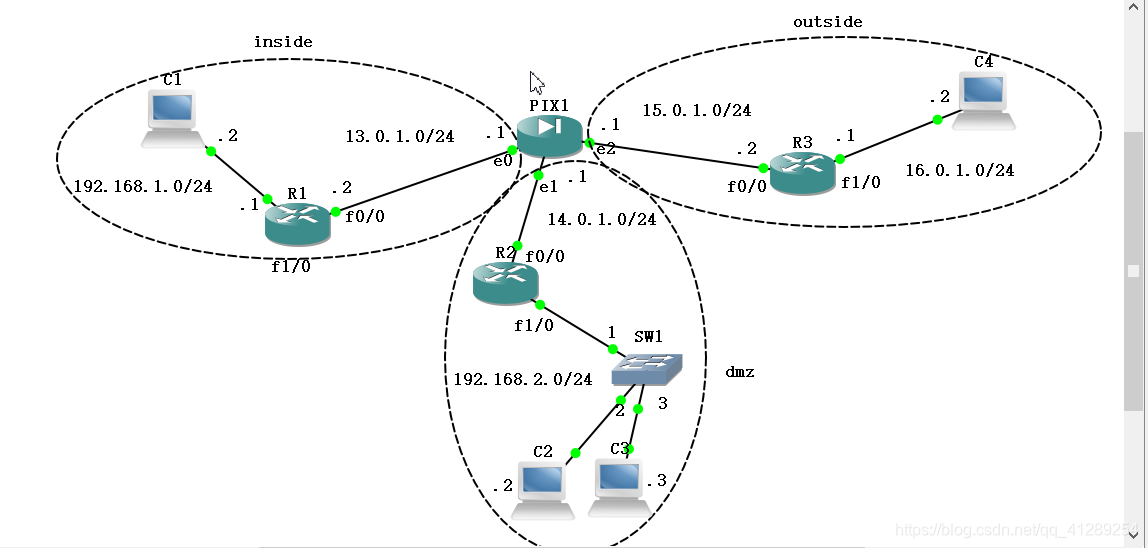
R1
R1#conf t

Enter configuration commands, one per line.  End with CNTL/Z.

R1(config)#int f0/0

R1(config-if)#ip address 13.0.1.2 255.255.255.0

R1(config-if)#no sh

R1(config-if)#

*Mar  1 00:01:44.059: %LINK-3-UPDOWN: Interface FastEthernet0/0, changed state to up

*Mar  1 00:01:45.059: %LINEPROTO-5-UPDOWN: Line protocol on Interface FastEthernet0/0, changed state to up

R1(config-if)#int f1/0

R1(config-if)#ip address 192.168.1.1 255.255.255.0

R1(config-if)#no sh

R1(config-if)#

*Mar  1 00:02:43.835: %LINK-3-UPDOWN: Interface FastEthernet1/0, changed state to up

*Mar  1 00:02:44.835: %LINEPROTO-5-UPDOWN: Line protocol on Interface FastEthernet1/0, changed state to up

R1(config-if)#end

R1#

*Mar  1 00:02:52.999: %SYS-5-CONFIG_I: Configured from console by console

//测试

R1#telnet 15.0.1.2

Trying 15.0.1.2 ...

% Destination unreachable; gateway or host down

//

R1#conf t

Enter configuration commands, one per line.  End with CNTL/Z.

R1(config)#ip route 15.0.1.0 255.255.255.0 13.0.1.1

R1(config)#ip route 14.0.1.0 255.255.255.0 13.0.1.1

R1(config)#ip route 16.0.1.0 255.255.255.0 13.0.1.1

R1(config)#end

R1#telnet 15.0.1.2

*Mar  1 00:08:50.839: %SYS-5-CONFIG_I: Configured from console by console

R1#telnet 15.0.1.2

Trying 15.0.1.2 ...

% Connection timed out; remote host not responding

R1#telnet 15.0.1.2

Trying 15.0.1.2 ... Open

User Access Verification

Password:

R3>exit

[Connection to 15.0.1.2 closed by foreign host]
R2
R2#conf t

Enter configuration commands, one per line.  End with CNTL/Z.

R2(config)#int f0/0

R2(config-if)#ip address 14.0.1.2 255.255.255.0

R2(config-if)#no sh

R2(config-if)#

*Mar  1 00:03:22.447: %LINK-3-UPDOWN: Interface FastEthernet0/0, changed state to up

*Mar  1 00:03:23.447: %LINEPROTO-5-UPDOWN: Line protocol on Interface FastEthernet0/0, changed state to up

R2(config-if)#int f1/0

R2(config-if)#ip address 192.168.2.1 255.255.255.0

R2(config-if)#no sh

R2(config-if)#

*Mar  1 00:03:48.779: %LINK-3-UPDOWN: Interface FastEthernet1/0, changed state to up

*Mar  1 00:03:49.779: %LINEPROTO-5-UPDOWN: Line protocol on Interface FastEthernet1/0, changed state to up

R2(config-if)#end

R2#

*Mar  1 00:03:56.151: %SYS-5-CONFIG_I: Configured from console by console

R2#conf t

Enter configuration commands, one per line.  End with CNTL/Z.

//这里将192.168.2.0网段的两台pc静态nat转换到14.0.1.0网段

R2(config)#int f0/0

R2(config-if)#ip nat outside

R2(config-if)#int

*Mar  1 01:24:40.823: %LINEPROTO-5-UPDOWN: Line protocol on Interface NVI0, changed state to up

R2(config-if)#int f1/0

R2(config-if)#ip nat inside

R2(config-if)#exit

R2(config)#ip nat outside source static 192.168.2.2 14.0.1.3

R2(config)#ip nat outside source static 192.168.2.3 14.0.1.4

//路由

R2(config)#ip route 13.0.1.0 255.255.255.0 14.0.1.1

R2(config)#end
R3
R3#conf t

Enter configuration commands, one per line.  End with CNTL/Z.

R3(config)#int f0/0

R3(config-if)#ip address 15.0.1.2 255.255.255.0

R3(config-if)#no sh

R3(config-if)#int f1/0

*Mar  1 00:04:19.427: %LINK-3-UPDOWN: Interface FastEthernet0/0, changed state to up

*Mar  1 00:04:20.427: %LINEPROTO-5-UPDOWN: Line protocol on Interface FastEthernet0/0, changed state to up

R3(config-if)#int f1/0

R3(config-if)#ip address 16.0.1.1 255.255.255.0

R3(config-if)#no sh

R3(config-if)#

*Mar  1 00:04:37.531: %LINK-3-UPDOWN: Interface FastEthernet1/0, changed state to up

*Mar  1 00:04:38.531: %LINEPROTO-5-UPDOWN: Line protocol on Interface FastEthernet1/0, changed state to up

R3(config-if)#exit

R3(config)#line vty 0 4

R3(config-line)#password zwish

R3(config-line)#end

R3#

*Mar  1 00:05:00.915: %SYS-5-CONFIG_I: Configured from console by console

//接R1的测试,再配置下面的

R3#conf t

Enter configuration commands, one per line.  End with CNTL/Z.

R3(config)#ip route 13.0.1.0 255.255.255.0 15.0.1.1

R3(config)#ip route 192.168.1.0 255.255.255.0 15.0.1.1
PIX
pixfirewall# conf t

pixfirewall(config)# int e0

pixfirewall(config-if)# ip address 13.0.1.1 255.255.255.0

pixfirewall(config-if)# no sh

pixfirewall(config-if)# nameif inside

INFO: Security level for "inside" set to 100 by default.

pixfirewall(config-if)# security-level 100

pixfirewall(config-if)# int e1

pixfirewall(config-if)# ip address 14.0.1.1 255.255.255.0

pixfirewall(config-if)# no sh

pixfirewall(config-if)# nameif dmz

INFO: Security level for "dmz" set to 0 by default.

pixfirewall(config-if)# security-level 50

pixfirewall(config-if)# int e2

pixfirewall(config-if)# ip address 15.0.1.1 255.255.255.0

pixfirewall(config-if)# no sh

pixfirewall(config-if)# nameif outside

INFO: Security level for "outside" set to 0 by default.

pixfirewall(config-if)# end

pixfirewall# show int ip b

Interface                  IP-Address      OK? Method Status                Protocol

Ethernet0                  13.0.1.1        YES manual up                    up

Ethernet1                  14.0.1.1        YES manual up                    up

Ethernet2                  15.0.1.1        YES manual up                    up

Ethernet3                  unassigned      YES unset  administratively down down

Ethernet4                  unassigned      YES unset  administratively down down

pixfirewall#

//下面接着配置ping,这里我搜了许久,还是只搜到any any这一种能真正实现ping,指定主机或者网段的扩展访问列表设置了之后发现不生效)

pixfirewall(config)# nat (inside) 1 13.0.1.0 255.255.255.0

pixfirewall(config)# global (outside) 1 15.0.1.3-15.0.1.6 netmask 255.255.255.0

pixfirewall(config)# show nat

NAT policies on Interface inside:

  match ip inside 13.0.1.0 255.255.255.0 inside any

    dynamic translation to pool 1 (No matching global)

    translate_hits = 0, untranslate_hits = 0

  match ip inside 13.0.1.0 255.255.255.0 dmz any

    dynamic translation to pool 1 (No matching global)

    translate_hits = 5, untranslate_hits = 0

  match ip inside 13.0.1.0 255.255.255.0 outside any

    dynamic translation to pool 1 (15.0.1.3 - 15.0.1.6)

    translate_hits = 25, untranslate_hits = 30

pixfirewall(config)# access-list test1 permit icmp any any

pixfirewall(config)# access-group test1 in int outside

//发布dmz区中的服务器14.0.1.2的telnet服务到公网ip 15.0.1.7

pixfirewall(config)# static (dmz,outside) 15.0.1.7 14.0.1.2

pixfirewall(config)# access-list test1 extended permit tcp any host 15.0.1.7 eq telnet

//发布dmz区中的14.0.1.3的www服务到公网15.0.1.8

pixfirewall(config)# static (dmz,outside) 15.0.1.8 14.0.1.3

pixfirewall(config)# access-list test1 extended permit tcp any host 15.0.1.8 eq www

//端口映射

pixfirewall(config)# static (dmz,outside) 15.0.1.9 110 14.0.1.4 110

//路由,这里就是192.168.1.0和16.0.1.0里的主机 ping时需要用到

pixfirewall(config)# route inside 192.168.1.0 255.255.255.0 13.0.1.2

pixfirewall(config)# route outside 16.0.1.0 255.255.255.0 15.0.1.2
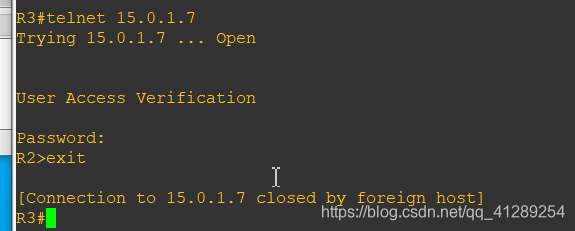
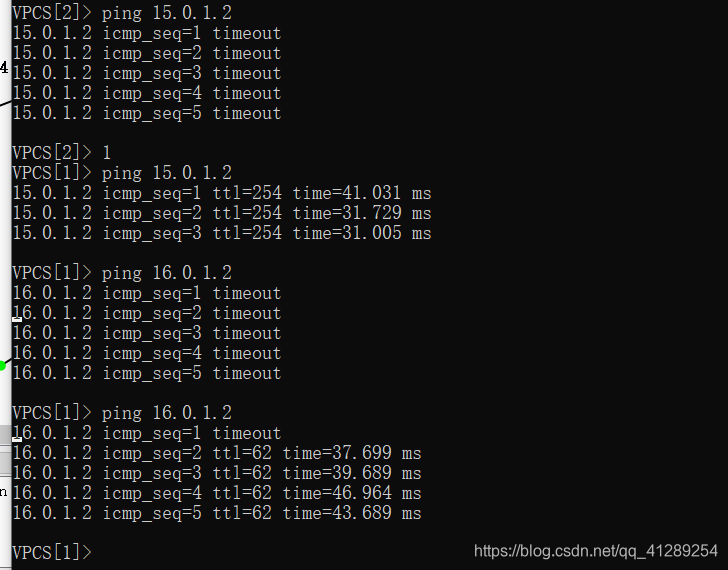
测试截图:
R3 telnet DMZ里的14.0.1.2
ping:
pix三接口配置的更多相关文章
- c3p0三种配置方式(automaticTestTable)
c3p0的配置方式分为三种,分别是http://my.oschina.net/lyzg/blog/551331.setters一个个地设置各个配置项2.类路径下提供一个c3p0.properties文 ...
- Midway-ModelProxy — 轻量级的接口配置建模框架
Midway-ModelProxy - 轻量级的接口配置建模框架 前言 使用Node做前后端分离的开发模式带来了一些性能及开发流程上的优势(见<前后端分离的思考与实践 一>), 但同时也面 ...
- tomcat下jndi的三种配置方式
jndi(Java Naming and Directory Interface,Java命名和目录接口)是一组在Java应用中访问命名和目录服务的API.命名服务将名称和对象联系起来,使得我们可以用 ...
- IIS下PHP的三种配置方式比较
在Windows IIS 6.0下配置PHP,通常有CGI.ISAPI和FastCGI三种配置方式,这三种模式都可以在IIS 6.0下成功运行,下面我就讲一下这三种方式配置的区别和性能上的差异. 1. ...
- 【转】tomcat下jndi的三种配置方式
jndi(Java Naming and Directory Interface,Java命名和目录接口)是一组在Java应用中访问命名和目录服务的API.命名服务将名称和对象联系起来,使得我们可以用 ...
- 【重新发布,代码开源】FPGA设计千兆以太网MAC(1)——通过MDIO接口配置与检测PHY芯片
原创博客,转载请注明出处:[重新发布,代码开源]FPGA设计千兆以太网MAC(1)——通过MDIO接口配置与检测PHY芯片 - 没落骑士 - 博客园 https://www.cnblogs.com/m ...
- Spring中三种配置Bean的方式
Spring中三种配置Bean的方式分别是: 基于XML的配置方式 基于注解的配置方式 基于Java类的配置方式 一.基于XML的配置 这个很简单,所以如何使用就略掉. 二.基于注解的配置 Sprin ...
- 使用亚马逊云服务器EC2做深度学习(三)配置TensorFlow
这是<使用亚马逊云服务器EC2做深度学习>系列的第三篇文章. (一)申请竞价实例 (二)配置Jupyter Notebook服务器 (三)配置TensorFlow (四)配置好的系统 ...
- 微信公众帐号开发教程第4篇-----开发模式启用及接口配置Java
欢迎加入群:347245650 345531810 进行讨论相互交流 我的微信号:572839485 我的微信公众账号 我的微社区欢迎关注 索取源码←请点击 图床:没有服务器 拖拽图片 外网即 ...
随机推荐
- LeetCode--Unique Morse Code Words && Flipping an Image (Easy)
804. Unique Morse Code Words (Easy)# International Morse Code defines a standard encoding where each ...
- 带你看看Java的锁(二)-Semaphore
前言 简介 Semaphore 中文称信号量,它和ReentrantLock 有所区别,ReentrantLock是排他的,也就是只能允许一个线程拥有资源,Semaphore是共享的,它允许多个线程同 ...
- ARM-Linux Gcc 交叉编译环境搭建
1 NFS网络文件系统搭建 测试宿主机与目标板ping通 目标板上某个文件夹(例如mnt)挂载到宿主机(192.168.1.111)的/home/nfs_dir文件夹下 mount –t nfs –o ...
- C# 9.0 新特性预览 - 空参数校验
C# 9.0 新特性预览 - 空参数校验 前言 随着 .NET 5 发布日期的日益临近,其对应的 C# 新版本已确定为 C# 9.0,其中新增加的特性(或语法糖)也已基本锁定,本系列文章将向大家展示它 ...
- vtk学习记录(三)——初识vtkRenderer
目录 前言 vtkRenderer 引入vtk窗口 小结 前言 一场疫情打乱了好多人的节奏,我也一样,一不留神半年都快过去了,这期间虽说一直在鼓捣东西吧,不过确实是没啥实质性的进展,索性就继续把vtk ...
- java8 新特性Stream流的应用
作为一个合格的程序员,如何让代码更简洁明了,提升编码速度尼. 今天跟着我一起来学习下java 8 stream 流的应用吧. 废话不多说,直入正题. 考虑以下业务场景,有四个人员信息,我们需要根据性 ...
- 记一次Oracle分区表全局索引重建的过程
1.查询数据库各个表空间利用率: SELECT Upper(F.TABLESPACE_NAME) "表空间名", D.TOT_GROOTTE_MB "表空间大小(M)&q ...
- 黑马程序员_毕向东_Java基础视频教程——if 语句(单条语句)(随笔)
if 语句(单条语句) 格式(三种) [注意]:如果 if 控制的语句只有一条,则 这个 { } 括号可以不写 if (条件表达式) { 执行语句; } class Test{ public stat ...
- Spring IoC createBean 方法详解
前言 本篇文章主要分析 Spring IoC 的 createBean() 方法的流程,以及 bean 的生命周期. 下面是一个大致的流程图: 正文 AbstractAutowireCapableBe ...
- 使用包时,报 xxx.default is not a function
最近做了一个导出功能,代码如下 import request from 'request-promise-native'; export default class Form { // 导出 @po ...