
Springboot启动流程简单分析
springboot启动的类为SpringApplication,执行构造函数初始化属性值后进入run方法:
然后返回ConfigurableApplicationContext(spring应用)。
ConfigurableApplicationContext结构图如下:
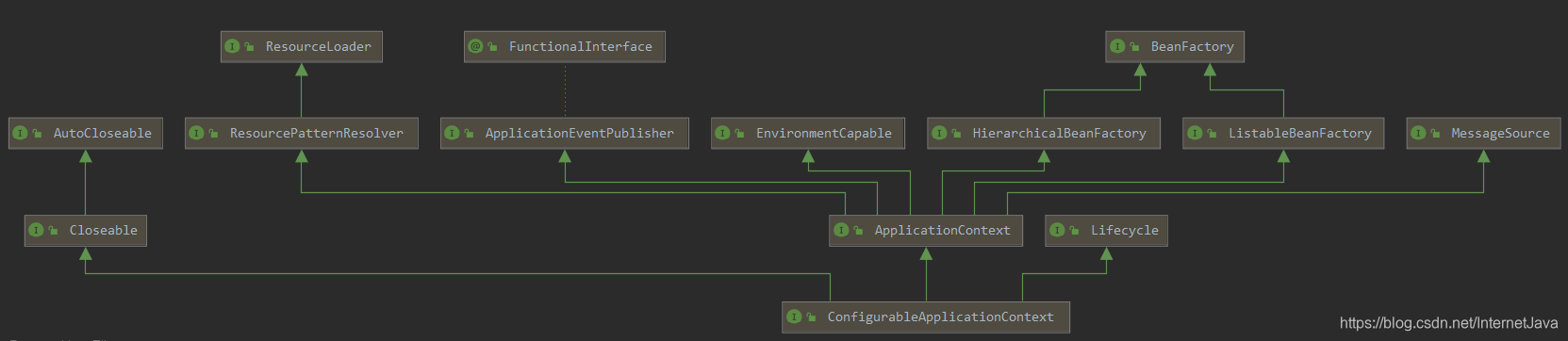
1.SpringApplicationRunListeners listeners = getRunListeners(args),获取springboot应用监听器,可以主要看SpringApplicationRunListener接口做的一些工作。
2.加载配置Spring环境信息
3.配置上下文信息
重点:SpringFactoriesLoader
getSpringFactoriesInstances在SpringApplication的构造方法中调用了两次
getRunListeners(args):
private SpringApplicationRunListeners getRunListeners(String[] args) {

		Class<?>[] types = new Class<?>[] { SpringApplication.class, String[].class };

		return new SpringApplicationRunListeners(logger,

				getSpringFactoriesInstances(SpringApplicationRunListener.class, types, this, args));

	}
getSpringFactoriesInstances
getSpringFactoriesInstances在第一次被调用时会将类路径下所有的META-INF/spring.factories的文件中的属性进行加载并缓存到SpringFactoriesLoader的缓存cache中,下次被调用的时候就直接从SpringFactoriesLoader的cache中取数据了。这次就是从SpringFactoriesLoader的cache中取SpringApplicationRunListener类型的类(全限定名),然后实例化后返回
  /**

	 * Run the Spring application, creating and refreshing a new

	 * {@link ApplicationContext}.

	 * @param args the application arguments (usually passed from a Java main method)

	 * @return a running {@link ApplicationContext}

	 */

	public ConfigurableApplicationContext run(String... args) {

		StopWatch stopWatch = new StopWatch();

		stopWatch.start();

		ConfigurableApplicationContext context = null;

		Collection<SpringBootExceptionReporter> exceptionReporters = new ArrayList<>();

		configureHeadlessProperty();

		SpringApplicationRunListeners listeners = getRunListeners(args);

		listeners.starting();

		try {

			ApplicationArguments applicationArguments = new DefaultApplicationArguments(args);

			ConfigurableEnvironment environment = prepareEnvironment(listeners, applicationArguments);

			configureIgnoreBeanInfo(environment);

			Banner printedBanner = printBanner(environment);

			context = createApplicationContext();

			exceptionReporters = getSpringFactoriesInstances(SpringBootExceptionReporter.class,

					new Class[] { ConfigurableApplicationContext.class }, context);

			prepareContext(context, environment, listeners, applicationArguments, printedBanner);

			refreshContext(context);

			afterRefresh(context, applicationArguments);

			stopWatch.stop();

			if (this.logStartupInfo) {

				new StartupInfoLogger(this.mainApplicationClass).logStarted(getApplicationLog(), stopWatch);

			}

			listeners.started(context);

			callRunners(context, applicationArguments);

		}

		catch (Throwable ex) {

			handleRunFailure(context, ex, exceptionReporters, listeners);

			throw new IllegalStateException(ex);

		}

		try {

			listeners.running(context);

		}

		catch (Throwable ex) {

			handleRunFailure(context, ex, exceptionReporters, null);

			throw new IllegalStateException(ex);

		}

		return context;

	}
未完…
Springboot启动流程简单分析的更多相关文章
- SpringBoot启动流程分析(六):IoC容器依赖注入
SpringBoot系列文章简介 SpringBoot源码阅读辅助篇: Spring IoC容器与应用上下文的设计与实现 SpringBoot启动流程源码分析: SpringBoot启动流程分析(一) ...
- SpringBoot启动流程分析(四):IoC容器的初始化过程
SpringBoot系列文章简介 SpringBoot源码阅读辅助篇: Spring IoC容器与应用上下文的设计与实现 SpringBoot启动流程源码分析: SpringBoot启动流程分析(一) ...
- SpringBoot启动流程分析(五):SpringBoot自动装配原理实现
SpringBoot系列文章简介 SpringBoot源码阅读辅助篇: Spring IoC容器与应用上下文的设计与实现 SpringBoot启动流程源码分析: SpringBoot启动流程分析(一) ...
- SpringBoot启动流程分析(一):SpringApplication类初始化过程
SpringBoot系列文章简介 SpringBoot源码阅读辅助篇: Spring IoC容器与应用上下文的设计与实现 SpringBoot启动流程源码分析: SpringBoot启动流程分析(一) ...
- SpringBoot启动流程分析(二):SpringApplication的run方法
SpringBoot系列文章简介 SpringBoot源码阅读辅助篇: Spring IoC容器与应用上下文的设计与实现 SpringBoot启动流程源码分析: SpringBoot启动流程分析(一) ...
- SpringBoot启动流程分析(三):SpringApplication的run方法之prepareContext()方法
SpringBoot系列文章简介 SpringBoot源码阅读辅助篇: Spring IoC容器与应用上下文的设计与实现 SpringBoot启动流程源码分析: SpringBoot启动流程分析(一) ...
- 深度好文,springboot启动原理详细分析
我们开发任何一个Spring Boot项目,都会用到如下的启动类 1 @SpringBootApplication 2 public class Application { 3 public stat ...
- (五)SpringBoot启动过程的分析-刷新ApplicationContext
-- 以下内容均基于2.1.8.RELEASE版本 紧接着上一篇[(四)SpringBoot启动过程的分析-预处理ApplicationContext] (https://www.cnblogs.co ...
- SpringBoot启动流程解析
写在前面: 由于该系统是底层系统,以微服务形式对外暴露dubbo服务,所以本流程中SpringBoot不基于jetty或者tomcat等容器启动方式发布服务,而是以执行程序方式启动来发布(参考下图ke ...
随机推荐
- hdu1224SPFA求最长路加上打印路径
题目链接:http://icpc.njust.edu.cn/Problem/Hdu/1224/ 无负环. 代码如下: #include<bits/stdc++.h> using names ...
- SSI服务器端包含注入
服务器端嵌入:Server Side Include,是一种类似于ASP的基于服务器的网页制作技术.大多数(尤其是基于Unix平台)的WEB服务器如Netscape Enterprise Server ...
- 【转载】因为我们是OIer
我们是OIer, 所以我们 不用在跑道上挥汗如雨: 不用在球场上健步如飞: 更不用在没事的时候, 经受非人的体能训练-- 但是, 我们却要把头脑 高速运转, 还要接受一大堆 大学生也只是 " ...
- Linux基本操作 ------ 文件处理命令
显示目录文件 ls //显示当前目录下文件 ls /home //显示home文件夹下文件 ls -a //显示当前目录下所有文件,包括隐藏文件 ls -l //显示当前目录下文件的详细信息 ls - ...
- 【多校】2019 Multi-University Training Contest 1官方题解
Blank 定义dp[i][j][k][t]dp[i][j][k][t]dp[i][j][k][t]代表填完前ttt个位置后,{0,1,2,3}\{0,1,2,3\}{0,1,2,3}这4个数字最后一 ...
- 一起了解 .Net Foundation 项目 No.22
.Net 基金会中包含有很多优秀的项目,今天就和笔者一起了解一下其中的一些优秀作品吧. 中文介绍 中文介绍内容翻译自英文介绍,主要采用意译.如与原文存在出入,请以原文为准. Windows Templ ...
- Java集合框架要点概括(Core Knowledge of Java Collection)
目录 有哪些集合类 Set类 Queue类 List类 Map类 HashMap的实现原理,是否线程安全,如何使其做到线程安全 HashMap的实现原理 HashMap的数据结构 HashMap的存取 ...
- python之序列化、OS、SYS、hashlib模块
一.序列化模块 1.序列化模块的用途 将一种数据结构转换成特殊的序列(特殊字符串,bytes),并且还可以转换回去 凡是数据通过网络传出去最终的格式必须bytes 2.json模块 json 是一种轻 ...
- office2010安装与破解,笔者亲测可用!!!!!!
我们首先需要准备office2010安装包与破相应的破解软件.软件包的获取方式:扫码关注[猿成长],,回复 office2010安装,即可获取,下载解压后文件目录结构如下图所示: 打开安装程序文件夹, ...
- 俩个对象的hashCode()相同,则equals()也一定为true,对吗?
不对,俩个对象的hashCode()相同,equals()不一定为true. 代码示例: 1 String str1 = "通话"; 2 String str2 = "重 ...