
Java HotSpot(TM) Client VM 与 server VM 的配置
在Linux 6.5 下安装Elasticsearch 出现错误:
    JVM is using the client VM [Java HotSpot(TM) Client VM] but should be using a server VM for the best performance
    JVM正在使用客户机VM [Java HotSpot(TM)客户机VM],但是为了获得最佳性能,应该使用服务器VM
解决方案:
将VM设置成 Server VM:

找到 jre安装目录 /lib /i386 /jvm.cfg 文件,JVM默认是client版本 :如图所示,第一行和第二行互换位置即可,谁在上面就是谁。目前是Server VM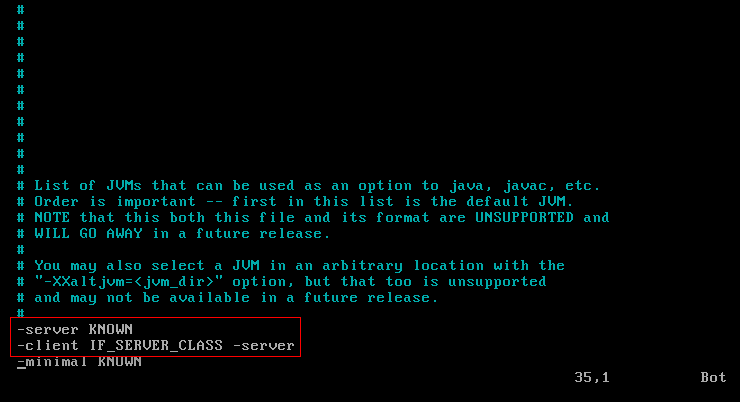
切换成功

tips :
xp 交换前后两个字符的位置
ddp 上下两行的位置交换
Java HotSpot(TM) Client VM 与 server VM 的配置的更多相关文章
- Java HotSpot(TM) 64-Bit Server VM warning
Java HotSpot(TM) 64-Bit Server VM warning: INFO: os::commit_memory(0x00000007e4200000, 467140608, 0) ...
- Tomcat7 JDK8 Java HotSpot(TM) 64-Bit Server VM warning: INFO: os::commit_memory(0x0000000540000000, 5368709120, 0) failed; error='Cannot allocate memory' (errno=12)
[root@crm-web- bin]# shutdown.sh bash: shutdown.sh: command not found [root@crm-web- bin]# sh shutdo ...
- 错误:Java HotSpot(TM) 64-Bit Server VM warning: Insufficient space for shared memory file
Java HotSpot(TM) 64-Bit Server VM warning: Insufficient space for shared memory file: /tmp/hsperfdat ...
- Java HotSpot(TM) 64-Bit Server VM warning: ignoring option MaxPermSize=128m; support was removed in 8.0
1 启动hbase的时候爆出警告 Java HotSpot(TM) 64-Bit Server VM warning: ignoring option MaxPermSize=128m; suppor ...
- 【转】Java HotSpot(TM) 64-Bit Server VM warning: Insufficient space for shared memory file:
使用命令:JPS #jps 报错了 $jps Java HotSpot(TM) Server VM warning: Insufficient space for shared memory fil ...
- Java HotSpot(TM) 64-Bit Server VM warning: INFO: os::commit_memory(0x0000000
启动程序报错: Java HotSpot(TM) 64-Bit Server VM warning: INFO: os::commit_memory(0x00000006fff80000, 28636 ...
- Java HotSpot(TM) 64-Bit Server VM warning: Insufficient space for shared memory file: /tmp/hsperfdata_hadoop/44512
早上登录hbase shell,出现异常: [hadoop@node002 ~]$ hbase shell Java HotSpot(TM) 64-Bit Server VM warning: Ins ...
- Java HotSpot(TM) 64-Bit Server VM warning: Insufficient space for shared memory file...
Java HotSpot(TM) 64-Bit Server VM warning: Insufficient space for shared memory file: 把tomcat中的日志删除, ...
- Java HotSpot(TM) 64-Bit Server VM warning: INFO: os::commit_memory(0x00000000fa980000, 59244544, 0) failed; error='Cannot allocate memory' (errno=12)
启动项目报错 Java HotSpot(TM) 64-Bit Server VM warning: INFO: os::commit_memory(0x00000000fa980000, 592445 ...
随机推荐
- 「题解」「2014 NOI模拟赛 Day7」冒泡排序
目录 题目 考场思考 正解 题目勾起了我对我蒟蒻时代的回忆,虽然我现在也蒟蒻 题目 点这里 可能链接会挂,在网上搜题目就有. 毕竟 \(BZOJ\) 有点老了... 考场思考 本来以为十分友善的一道题 ...
- /usr/lib64/libstdc++.so.6: version `GLIBCXX_3.4.15' not found的解决办法
#############################BEGIN############################# strings /usr/lib64/libstdc++.so.6.0. ...
- HDU5444 Elven Postman
按要求递归建树输出~ #include<cstdio> #include<algorithm> #include<cstring> using namespace ...
- windows 配置hadoop环境
在idea运行spark程序的时候报错:java.io.IOException: Could not locate executable null\bin\winutils.exe in the Ha ...
- IDEA中常用优化设置
1.设置鼠标悬浮提示 Editor->General 这里要勾选下,后面设置的是延迟时间 默认半秒:设置后,我们鼠标移动到类上看看: 2.显示方法分隔符 Editor->General - ...
- 添加COOKIE
HttpCookie userinfoCookie = new HttpCookie("userinfo"); JObject o = new JObject();//JObjec ...
- oracle 高级函数2
原 oracle 高级函数 2017年08月17日 16:44:19 阅读数:1731 版权声明:本文为博主原创文章,未经博主允许不得转载. https://blog.csdn.net/u013278 ...
- jackson处理日期异常
原 jackson处理日期异常 2018年01月09日 10:50:19 阅读数:70 1.异常信息 2.原因 默认情况下,fasterxml json只支持几种format,但是肯定不支持" ...
- hutoolJava工具类的使用
前言 安装 友情开源项目 Hutool相关博客(软文) 捐赠使用公开 核心(Hutool-core) 克隆 支持泛型的克隆接口和克隆类 类型转换 类型转换工具类-Convert 自定义类型转换-Con ...
- 【协作式原创】查漏补缺之Golang中mutex源码实现(预备知识)
预备知识 CAS机制 1. 是什么 参考附录3 CAS 是项乐观锁技术,当多个线程尝试使用 CAS 同时更新同一个变量时,只有其中一个线程能更新变量的值,而其它线程都失败,失败的线程并不会被挂起,而是 ...