
Android数据库(sqlite)之Room
说在前面:
1、使用Room需要添加的依赖:
dependencies {

  def room_version = "2.2.3"

  implementation "androidx.room:room-runtime:$room_version"

  annotationProcessor "androidx.room:room-compiler:$room_version" // For Kotlin use kapt instead of annotationProcessor

  // optional - Kotlin Extensions and Coroutines support for Room

  implementation "androidx.room:room-ktx:$room_version"

  // optional - RxJava support for Room

  implementation "androidx.room:room-rxjava2:$room_version"

  // optional - Guava support for Room, including Optional and ListenableFuture

  implementation "androidx.room:room-guava:$room_version"

  // Test helpers

  testImplementation "androidx.room:room-testing:$room_version"

}
2、数据库可视化工具安装及使用说明
3、涉及到的知识:
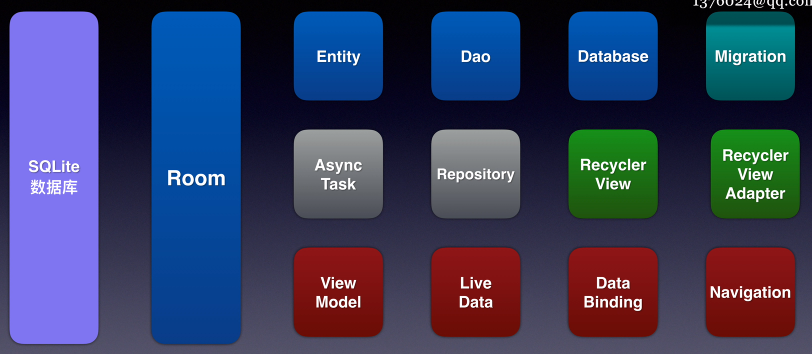
工程案例:
一、APP描述:对Word实体进行增删改
二、编写思路:
1、画界面:
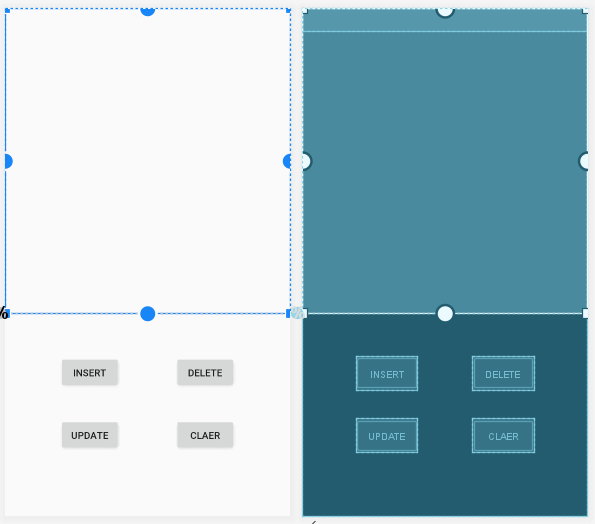
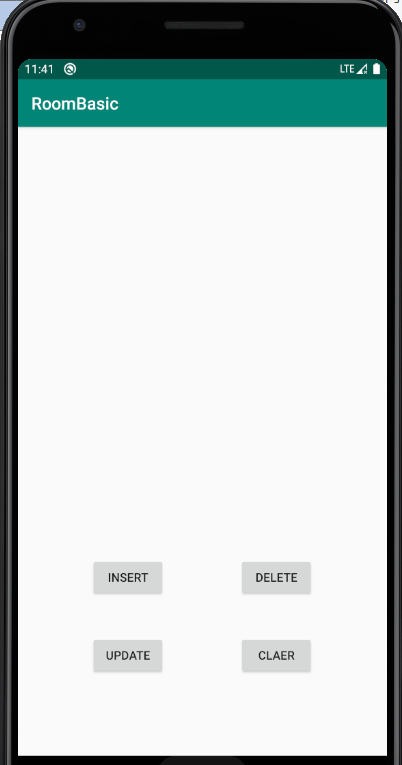
1)上边是一个ScrollView(数据多的时候可滑动),ScrollView内有一个TextView
2)下边是四个按键,分别代表,插入、删除、删除所有、修改。
2、创建实体(Entity):
package com.me.roombasic;

import androidx.room.ColumnInfo;

import androidx.room.Entity;

import androidx.room.PrimaryKey;

@Entity

public class Word {

    @PrimaryKey(autoGenerate = true)

    private int id;

    @ColumnInfo(name = "姓名")

    private String name;

    @ColumnInfo(name = "外号")

    private  String other;

    public Word(String name, String other) {

        this.name = name;

        this.other = other;

    }

    public int getId() {

        return id;

    }

    public void setId(int id) {

        this.id = id;

    }

    public String getName() {

        return name;

    }

    public void setName(String name) {

        this.name = name;

    }

    public String getOther() {

        return other;

    }

    public void setOther(String other) {

        this.other = other;

    }

}
3、创建dao
package com.me.roombasic;

import androidx.room.Dao;

import androidx.room.Delete;

import androidx.room.Insert;

import androidx.room.Query;

import androidx.room.Update;

import java.util.List;

@Dao

public interface WordDao {

    @Insert

    void  insertWord(Word ...words );

    @Update

    void updateWord(Word... words);

    @Delete

    void deleteWord(Word... words);

    @Query("DELETE FROM WORD")

    void deleteAllWords();

    @Query("SELECT * FROM WORD ORDER BY ID DESC")

    List<Word>  getAllWords();

}
4、创建database
package com.me.roombasic;

import androidx.room.Database;

import androidx.room.RoomDatabase;

@Database(entities = {Word.class},version = 1,exportSchema = false)

public abstract class WordDatabase extends RoomDatabase {

    public abstract WordDao getWordDao();

}
5、暂时在mainActive.java中为TextView、Button绑定数据和监听:
package com.me.roombasic;

import androidx.appcompat.app.AppCompatActivity;

import androidx.room.Room;

import android.os.Bundle;

import android.view.View;

import android.widget.Button;

import android.widget.TextView;

import java.util.List;

public class MainActivity extends AppCompatActivity {

    WordDao wordDao;

    WordDatabase wordDatabase;

    Button buttonInsert,buttonUpdate,buttonDelete,buttonQuery;

    TextView textView;

    @Override

    protected void onCreate(Bundle savedInstanceState) {

        super.onCreate(savedInstanceState);

        setContentView(R.layout.activity_main);

        textView = findViewById(R.id.textView);

        buttonInsert = findViewById(R.id.buttoninster);

        buttonUpdate = findViewById(R.id.buttonupdate);

        buttonDelete = findViewById(R.id.buttondelete);

        buttonQuery = findViewById(R.id.buttonquery);

        wordDatabase = Room.databaseBuilder(this,WordDatabase.class,"word_database")

                .allowMainThreadQueries()

                .build();

        wordDao = wordDatabase.getWordDao();

        updateView();

        buttonInsert.setOnClickListener(new View.OnClickListener() {

            @Override

            public void onClick(View v) {

                Word word1 = new Word("谷子腾","恶霸");

                Word word2 = new Word("张凯鑫","胖鑫");

                Word word3 = new Word("王正帅","笑天");

                wordDao.insertWord(word1,word2,word3);

                updateView();

            }

        });

        buttonUpdate.setOnClickListener(new View.OnClickListener() {

            @Override

            public void onClick(View v) {

                Word word2 = new Word("张凯鑫","bujv");

                word2.setId(2);

                wordDao.updateWord(word2);

                updateView();

            }

        });

        buttonDelete.setOnClickListener(new View.OnClickListener() {

            @Override

            public void onClick(View v) {

                Word word2 = new Word("张凯鑫","胖鑫");

                word2.setId(3);

                wordDao.deleteWord(word2);

                updateView();

            }

        });buttonQuery.setOnClickListener(new View.OnClickListener() {

            @Override

            public void onClick(View v) {

                wordDao.deleteAllWords();

                updateView();

            }

        });

    }

    void updateView(){

        List<Word> list = wordDao.getAllWords();

        String text = "";

        for(int i=0;i<list.size();i++){

            text += list.get(i).getId() + ":" + list.get(i).getName() + "=" + list.get(i).getOther() + "\n";

        }

        textView.setText(text);

    }

}
6、效果演示:
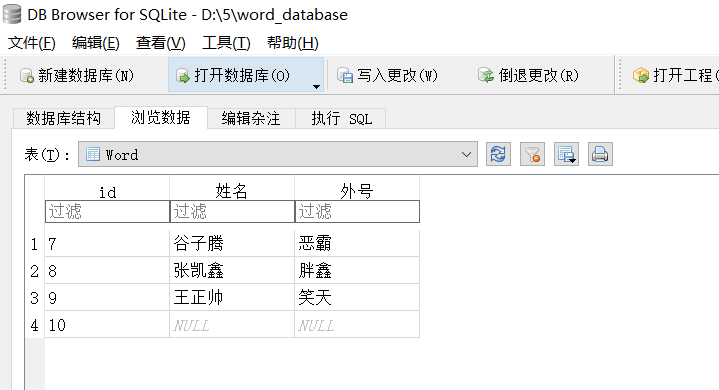
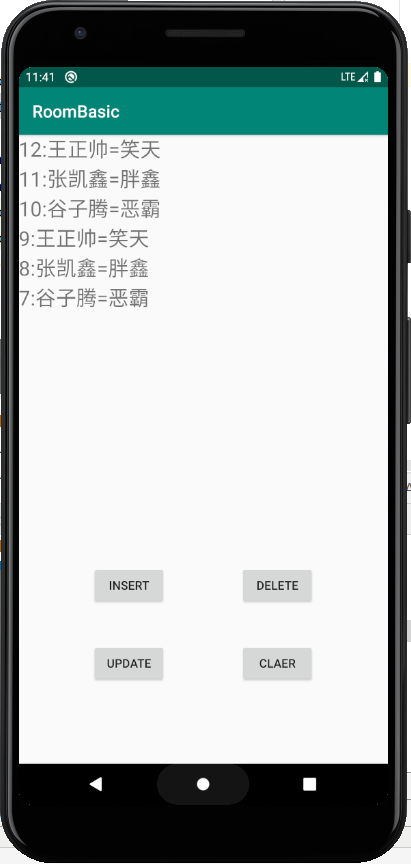
未完待续。。。。
Android数据库(sqlite)之Room的更多相关文章
- android数据库SQLite的设计模式
Dao设计模式可能是使用最多的数据库的设计模式其基本思路是将数据库操作的代码 与设计代码分离以便于维护和升级.具体的实现方法是使用包,然后在设计代码中调 用数据库的操作代码,dao设计模式需要创建5个 ...
- Android数据库(sqlite)加密方案
最近因为一些项目的安全性需要将数据库加密,一开始想到的就是先将数据库通过AES加密,然后运行时再解密,另一种是将数据库里的内容加密. 很快这两种方案都是不理想的,第一种加密方式形同虚设,第二种,如果加 ...
- Android 数据库SQLite 写入SD卡
如果手机没有root,数据库文件是无法查看到的,不方便调试. 最好的办法是把数据库写进SD卡. 修改的地方有两处: 1.在你的helper类中把数据库文件名称 DATABASE_NAME 由原来的一个 ...
- android数据库sqlite增加删改查
http://hi-beijing.iteye.com/blog/1322040 http://www.cnblogs.com/wenjiang/archive/2013/05/28/3100860. ...
- 深入解析Sqlite的完美替代者,android数据库新王者——Realm
写在前面: 又到一年一度七夕虐狗节,看着大家忍受着各种朋友圈和QQ空间还有现实生活中的轮番轰炸,我实在不忍心再在这里给大家补刀,所以我觉得今天不虐狗,继续给大家分享有用的. 如果你比较关心androi ...
- android安卓Sqlite数据库实现用户登录注册
看了很多别人写的安卓SQlite数据的操作代码,一点也不通俗易懂,我觉得我写的不错,而且安卓项目也用上了,所以在博客园里保存分享一下!建立一个类 并继承SQLiteOpenHelper public ...
- Android中SQLite数据库小计
2016-03-16 Android数据库支持 本文节选并翻译<Enterprise Android - Programing Android Database Applications for ...
- sqlite升级--浅谈Android数据库版本升级及数据的迁移
Android开发涉及到的数据库采用的是轻量级的SQLite3,而在实际开发中,在存储一些简单的数据,使用SharedPreferences就足够了,只有在存储数据结构稍微复杂的时候,才会使用数据库来 ...
- android 对sqlite数据库的增删改查等各种操作
转载:http://blog.csdn.net/vrix/article/details/6717090 package com.sqlite.main; import java.io.File; i ...
- Android学习---SQLite数据库的增删改查和事务(transaction)调用
上一篇文章中介绍了手工拼写sql语句进行数据库的CRUD操作,本文将介绍调用sqlite内置的方法实现CRUD操作,其实质也是通过拼写sql语句. 首先,创建一个新的android项目: 其次,查看代 ...
随机推荐
- 伪奢侈品iPhone大降价,肉搏国产手机胜算几何?
据国外媒体报道,苹果在中国降低iPhone价格的策略已收到明显的效果,自从1月11日正式调整价格以来,iPhone在苏宁电器平台上的销量飙升83%,而天猫上的销量也增长了76%,其中最受欢迎的机型是i ...
- 机器学习、深度学习中的信息熵、相对熵(KL散度)、交叉熵、条件熵
信息熵 信息量和信息熵的概念最早是出现在通信理论中的,其概念最早是由信息论鼻祖香农在其经典著作<A Mathematical Theory of Communication>中提出的.如今 ...
- SQL SERVER查询数据库所有的表名/字段
SELECT * FROM INFORMATION_SCHEMA.COLUMNS WHERE TABLE_NAME='subject' --表名 1.利用sysobjects系统表 在这个表中,在数据 ...
- jdk环境变量、maven环境变量、Mysql环境变量配置
jdk官网地址:http://www.oracle.com/index.htmlhttp://www.java.sun.com 一.配置 jdk环境变量1.新建JAVA_HOME,在变量值复制JDK安 ...
- 吴裕雄 Bootstrap 前端框架开发——Bootstrap 辅助类:显示和隐藏内容
<!DOCTYPE html> <html> <head> <meta charset="utf-8"> <title> ...
- CF 1198 A. MP3 模拟+滑动窗口
A. MP3 题意:给你n个数,一个大小为8*I的容量,保存一个数需要多少容量取决于给定n个数的种类k,用公式 log2 k 计算,如果给定的容量不能保存所有数,选择减少数的种类来降低保存一个 ...
- NO21 Llinux的文件种类与扩展名--文件权限--软硬链接--Linux删除文件原理
Linux的文件种类与扩展名 一.文件种类:1.普通文件(regular file)第一个字符为[ - ]包括:①纯文本档(ASCII):这是Linux系统中最多的一种文件类型,称为纯文本档.是因为内 ...
- metasploit扫描
实验目的: 一. 基于TCP协议收集主机信息 二. 基于SNMP协议收集主机信息 三. 基于SMB协议收集信息 四. 基于SSH协议收集信息 五. 基于FTP协议收集信息 实验环境: ...
- HiBench成长笔记——(3) HiBench测试Spark
很多内容之前的博客已经提过,这里不再赘述,详细内容参照本系列前面的博客:https://www.cnblogs.com/ratels/p/10970905.html 创建并修改配置文件conf/spa ...
- Java提升四:Stream流
1.Stream流的定义 Stream是Java中的一个接口.它的作用类似于迭代器,但其功能比迭代器强大,主要用于对数组和集合的操作. Stream中的流式思想:每一步只操作,不存储. 2.Strea ...