
R语言实战(二) 创建数据集
2.1 数据集的概念
2.2 数据结构
2.2.1 向量
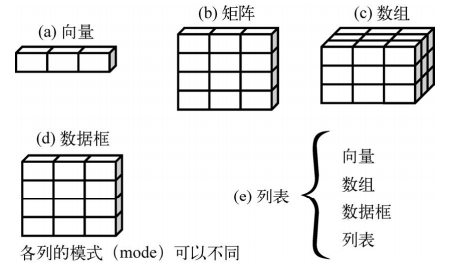
- 通过在方括号中给定元素所处位置的数值,访问向量中的元素
a <- c("k", "j", "h", "a", "c", "m")

a[3]

## [1] "h"

a[c(1, 3, 5)]

## [1] "k" "h" "c"
2.2.2 矩阵
- matrix creates a matrix from the given set of values.
- as.matrix attempts to turn its argument into a matrix.
- is.matrix tests if its argument is a (strict) matrix.
matrix(data = NA, nrow = 1, ncol = 1, byrow = FALSE, dimnames = list(char_vector_rownames, char_vector_colnames))
nrow: the desired number of rows.
ncol: the desired number of columns.
byrow: logical. If FALSE (the default) the matrix is filled by columns, otherwise the matrix is filled by rows.
dimnames:A dimnames attribute for the matrix: NULL or a list of length 2 giving the row and column names respectively. An empty list is treated as NULL, and a list of length one as row names. The list can be named, and the list names will be used as names for the dimensions.
- as.matrix(x, rownames.force = NA, ...)
rownames.force:logical indicating if the resulting matrix should have character (rather than NULL) rownames. The default, NA, uses NULL rownames if the data frame has ‘automatic’ row.names or for a zero-row data frame.
- is.matrix(x)
is.matrix returns TRUE if x is a vector and has a "dim" attribute of length 2 and FALSE otherwise. Note that a data.frame is not a matrix by this test.
rnames <- c("R1", "R2")

cnames <- c("C1", "C2")

y <- matrix(1:4, nrow=2, ncol=2, byrow=TRUE,dimnames=list(rnames, cnames))

y

##    C1 C2

## R1  1  2

## R2  3  4

is.matrix(y)

## [1] TRUE
as.matrix is a generic function. The method for data frames will return a character matrix if there is only atomic columns and any non-(numeric/logical/complex) column, applying as.vector to factors and format to other non-character columns. Otherwise, the usual coercion hierarchy (logical < integer < double < complex) will be used, e.g., all-logical data frames will be coerced to a logical matrix, mixed logical-integer will give a integer matrix, etc.
da <- data.frame(

    lot1 = c(1,2),

    lot2 = c("a","b"))

ma<-as.matrix(da)

da

##   lot1 lot2

## 1    1    a

## 2    2    b

ma

##      lot1 lot2

## [1,] "1"  "a"

## [2,] "2"  "b"

str(da[1,1])

##  num 1

str(ma[1,1])

##  Named chr "1"

##  - attr(*, "names")= chr "lot1"
如上例所示,数值型被转换为了字符型。
If you just want to convert a vector to a matrix, something like
- dim(x) <- c(nx, ny)
- dimnames(x) <- list(row_names, col_names)
x<-1:6

dim(x)<-c(2,3)

dimnames(x)<-list(c("a","b"),c("c","d","e"))

x

##   c d e

## a 1 3 5

## b 2 4 6
- 使用下标和方括号来选择矩阵中的行、列或元素
如x[2,]或者x[1,4],不需要像MATLAB用冒号表示整行或整列。
2.2.3 数组
- myarray <- array(vector, dimensions, dimnames)
2.2.4 数据框
- mydata <- data.frame(col1, col2, col3,...)
patientID <- c(1, 2, 3, 4)

age <- c(25, 34, 28, 52)

diabetes <- c("Type1", "Type2", "Type1", "Type1")

status <- c("Poor", "Improved", "Excellent", "Poor")

patientdata <- data.frame(patientID, age, diabetes, status)

patientdata

##   patientID age diabetes    status

## 1         1  25    Type1      Poor

## 2         2  34    Type2  Improved

## 3         3  28    Type1 Excellent

## 4         4  52    Type1      Poor

table(patientdata$diabetes, patientdata$status)

##

##         Excellent Improved Poor

##   Type1         1        0    2

##   Type2         0        1    0
引用方法可以用列号patientdata[1:2],也可以用列名patientdata[c("diabetes", "status")],可以用$符号patientdata$age。
table用来生成列联表。
attach()
例如:
attach(mtcars)

    summary(mpg)

##    Min. 1st Qu.  Median    Mean 3rd Qu.    Max.

##   10.40   15.43   19.20   20.09   22.80   33.90

    plot(mpg, disp)

detach(mtcars)

datach()(将数据框从搜索路径中移除。
注意这样可能出现同名对象之间的屏蔽(mask)。
with()
with(mtcars, {

    print(summary(mpg))

    plot(mpg, disp)

})
花括号{ }之间的语句都针对数据框mtcars执行,无需担心名称冲突。

实例标识符
patientdata <- data.frame(patientID, age, diabetes,

 status, row.names=patientID)
2.2.5 因子
- 名义型变量是没有顺序之分的类别变量。
- 有序型变量表示一种顺序关系,而非数量关系。
- 连续型变量可以呈现为某个范围内的任意值,并同时表示了顺序和数量。
- factor() 以一个整数向量的形式存储类别值,由字符串(原始值)组成的内部向量将映射到这些整数上
- 要表示有序型变量,需要为函数factor()指定参数ordered=TRUE
factor(x = character(), levels, labels = levels, exclude = NA, ordered = is.ordered(x), nmax = NA)
levels: an optional vector of the unique values (as character strings) that x might have taken. The default is the unique set of values taken by as.character(x), sorted into increasing order of x. Note that this set can be specified as smaller than sort(unique(x)).
labels: either an optional character vector of labels for the levels (in the same order as levels after removing those in exclude), or a character string of length 1. Duplicated values in labels can be used to map different values of x to the same factor level.
exclude: a vector of values to be excluded when forming the set of levels. This may be factor with the same level set as x or should be a character.
ordered: logical flag to determine if the levels should be regarded as ordered (in the order given), TRUE or FALSE.
nmax: an upper bound on the number of levels.
diabetes <- c("Type1", "Type2", "Type1", "Type1")

x<-factor(diabetes)

x

## [1] Type1 Type2 Type1 Type1

## Levels: Type1 Type2

str(x)

##  Factor w/ 2 levels "Type1","Type2": 1 2 1 1

is.factor(x)

## [1] TRUE

as.integer(x)

## [1] 1 2 1 1

y<-factor(diabetes,levels=c("Type2","Type1"))

y

## [1] Type1 Type2 Type1 Type1

## Levels: Type2 Type1

z<-factor(diabetes,labels=c(2,1))

z

## [1] 2 1 2 2

## Levels: 2 1

ex<-factor(diabetes,exclude=c("Type1"))

ex

## [1] <NA>  Type2 <NA>  <NA>

## Levels: Type2
.nav-tabs {
display: inline-table;
max-height: 500px;
min-height: 44px;
overflow-y: auto;
background: white;
border: 1px solid #ddd;
border-radius: 4px;
}
.tabset-dropdown > .nav-tabs > li.active:before {
content: "";
font-family: 'Glyphicons Halflings';
display: inline-block;
padding: 10px;
border-right: 1px solid #ddd;
}
.tabset-dropdown > .nav-tabs.nav-tabs-open > li.active:before {
content: "";
border: none;
}
.tabset-dropdown > .nav-tabs.nav-tabs-open:before {
content: "";
font-family: 'Glyphicons Halflings';
display: inline-block;
padding: 10px;
border-right: 1px solid #ddd;
}
.tabset-dropdown > .nav-tabs > li.active {
display: block;
}
.tabset-dropdown > .nav-tabs > li > a,
.tabset-dropdown > .nav-tabs > li > a:focus,
.tabset-dropdown > .nav-tabs > li > a:hover {
border: none;
display: inline-block;
border-radius: 4px;
}
.tabset-dropdown > .nav-tabs.nav-tabs-open > li {
display: block;
float: none;
}
.tabset-dropdown > .nav-tabs > li {
display: none;
}
-->
R语言实战(二) 创建数据集的更多相关文章
- R语言实战(一)介绍、数据集与图形初阶
本文对应<R语言实战>前3章,因为里面大部分内容已经比较熟悉,所以在这里只是起一个索引的作用. 第1章 R语言介绍 获取帮助函数 help(), ? 查看函数帮助 exampl ...
- R语言实战(二)数据管理
本文对应<R语言实战>第4章:基本数据管理:第5章:高级数据管理 创建新变量 #建议采用transform()函数 mydata <- transform(mydata, sumx ...
- R语言实战(七)图形进阶
本文对应<R语言实战>第11章:中级绘图:第16章:高级图形进阶 基础图形一章,侧重展示单类别型或连续型变量的分布情况:中级绘图一章,侧重展示双变量间关系(二元关系)和多变量间关系(多元关 ...
- R 语言实战-Part 4 笔记
R 语言实战(第二版) part 4 高级方法 -------------第13章 广义线性模型------------------ #前面分析了线性模型中的回归和方差分析,前提都是假设因变量服从正态 ...
- R 语言实战-Part 3 笔记
R 语言实战(第二版) part 3 中级方法 -------------第8章 回归------------------ #概念:用一个或多个自变量(预测变量)来预测因变量(响应变量)的方法 #最常 ...
- R 语言实战-Part 5-1笔记
R 语言实战(第二版) part 5-1 技能拓展 ----------第19章 使用ggplot2进行高级绘图------------------------- #R的四种图形系统: #①base: ...
- R语言实战(三)基本图形与基本统计分析
本文对应<R语言实战>第6章:基本图形:第7章:基本统计分析 =============================================================== ...
- R语言实战(四)回归
本文对应<R语言实战>第8章:回归 回归是一个广义的概念,通指那些用一个或多个预测变量(也称自变量或解释变量)来预测响应变量(也称因变量.效标变量或结果变量)的方法.通常,回归分析可以用来 ...
- R语言实战(八)广义线性模型
本文对应<R语言实战>第13章:广义线性模型 广义线性模型扩展了线性模型的框架,包含了非正态因变量的分析. 两种流行模型:Logistic回归(因变量为类别型)和泊松回归(因变量为计数型) ...
- R语言实战(第二版)-part 1笔记
说明: 1.本笔记对<R语言实战>一书有选择性的进行记录,仅用于个人的查漏补缺 2.将完全掌握的以及无实战需求的知识点略去 3.代码直接在Rsudio中运行学习 R语言实战(第二版) pa ...
随机推荐
- Linux文件与目录管理,常用命令总结
绝对路径: 以根目录 / 开始的相对路径: 相对于当前路径的写法 $PATH: 可执行文件路径的变量(出现在该变量下的文件可以在系统的任何目录下都可以执行) 获取路径的文件名: basen ...
- HTTP-web服务器接收到client请求后的处理过程(很详细)
1. 客户发起情况到服务器网卡: 2. 服务器网卡接受到请求后转交给内核处理: 3. 内核根据请求对应的套接字,将请求交给工作在用户空间的Web服务器进程 4. Web服务器进程根据用户请求,向内核进 ...
- 使用Cron表达式创建定时任务
CronTriggerCronTrigger功能非常强大,是基于日历的作业调度,而SimpleTrigger是精准指定间隔,所以相比SimpleTrigger,CroTrigger更加常用.CroTr ...
- [LC] 240. Search a 2D Matrix II
Write an efficient algorithm that searches for a value in an m x n matrix. This matrix has the follo ...
- 查看pip安装的包的位置
- 三分钟学会使用Derby数据库
Derby数据库是一个纯用Java实现的内存数据库,属于Apache的一个开源项目.由于是用Java实现的,所以可以在任何平台上运行:另外一个特点是体积小,免安装,java1.6开始集成了derby数 ...
- 关于HTTP协议与HTTP状态码的简要介绍
在互联网时代HTTP协议的重要性无需多言,对于技术岗位的同学们来说理解掌握HTTP协议是必须的.本篇博客就从HTTP协议的演进.特性.重要知识点和工作中常见问题的总结等方面进行简单的介绍.理解掌握了这 ...
- Maximum Value(CodeForces - 484B)
Maximum Value Time limit 1000 ms Memory limit 262144 kB You are given a sequence a consisting of n i ...
- Docker Container开机自动启动
重启策略: 使用在Docker run的时候使用--restart参数来设置. no - Container不重启 on-failure - container推出状态非0时重启 always - 始 ...
- ubuntu采用apt方式安装多个版本php-fpm
适用系统:Ubuntu 16.04 LTS / Ubuntu 14.04 LTS 安装 PHP Ondřej Surý 的 PHP PPA 为 Ubuntu 16.04/14.04 提供了 PHP7. ...