
Java锁这样用,从单机到分布式一步到位
Java锁这样用,从单机到分布式一步到位
单机锁已经不够用了?分布式系统中如何保证数据安全?今天我们来聊聊从单机锁到分布式锁的完整解决方案,最后用一个注解就能搞定所有锁的问题!
为什么需要锁?
在多线程或多进程环境中,多个操作同时访问同一资源时可能出现数据不一致的问题。锁就是用来保证同一时间只有一个操作能访问共享资源。
锁的作用:
- 保证数据一致性
- 防止并发冲突
- 确保操作的原子性
简单理解: 就像厕所门上的锁,同一时间只能有一个人使用,其他人必须等待。
单机锁的局限性
synchronized关键字
Java最简单的锁机制。
public class CounterService {

    private int count = 0;

    public synchronized void increment() {

        count++;

    }

    public synchronized int getCount() {

        return count;

    }

}
ReentrantLock可重入锁
更灵活的锁机制。
public class CounterService {

    private int count = 0;

    private final ReentrantLock lock = new ReentrantLock();

    public void increment() {

        lock.lock();

        try {

            count++;

        } finally {

            lock.unlock();

        }

    }

}
单机锁的问题:
- 只能在单个JVM内生效
- 多个服务实例之间无法互斥
- 分布式环境下失效
分布式环境的挑战
当应用部署在多台服务器上时,单机锁就不够用了。
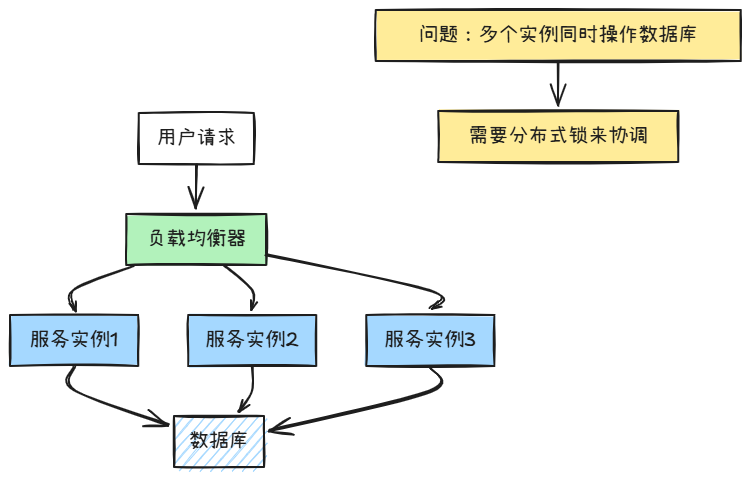
分布式环境下的问题:
- 多个服务实例可能同时执行相同操作
- 库存扣减、订单生成等场景容易出现数据不一致
- 需要跨JVM的锁机制
基于Redis的分布式锁
简单的Redis分布式锁
使用Redis的SET命令实现。
@Component

public class SimpleRedisLock {

    @Autowired

    private StringRedisTemplate redisTemplate;

    public boolean tryLock(String key, String value, long expireTime) {

        Boolean result = redisTemplate.opsForValue()

            .setIfAbsent(key, value, expireTime, TimeUnit.SECONDS);

        return Boolean.TRUE.equals(result);

    }

    public void releaseLock(String key, String value) {

        String script = "if redis.call('get', KEYS[1]) == ARGV[1] then " +

                       "return redis.call('del', KEYS[1]) else return 0 end";

        redisTemplate.execute(new DefaultRedisScript<>(script, Long.class),

                            Arrays.asList(key), value);

    }

}
使用示例
@Service

public class OrderService {

    @Autowired

    private SimpleRedisLock redisLock;

    public void createOrder(Long userId) {

        String lockKey = "order:user:" + userId;

        String lockValue = UUID.randomUUID().toString();

        if (redisLock.tryLock(lockKey, lockValue, 30)) {

            try {

                // 执行订单创建逻辑

                doCreateOrder(userId);

            } finally {

                redisLock.releaseLock(lockKey, lockValue);

            }

        } else {

            throw new RuntimeException("获取锁失败,请稍后重试");

        }

    }

    private void doCreateOrder(Long userId) {

        // 具体的订单创建逻辑

    }

}
基于Redisson的分布式锁
Redisson提供了更完善的分布式锁实现。
引入依赖
<dependency>

    <groupId>org.redisson</groupId>

    <artifactId>redisson-spring-boot-starter</artifactId>

    <version>3.20.1</version>

</dependency>
配置Redisson
@Configuration

public class RedissonConfig {

    @Bean

    public RedissonClient redissonClient() {

        Config config = new Config();

        config.useSingleServer()

              .setAddress("redis://localhost:6379")

              .setDatabase(0);

        return Redisson.create(config);

    }

}
使用Redisson锁
@Service

public class OrderService {

    @Autowired

    private RedissonClient redissonClient;

    public void createOrder(Long userId) {

        String lockKey = "order:user:" + userId;

        RLock lock = redissonClient.getLock(lockKey);

        try {

            if (lock.tryLock(10, 30, TimeUnit.SECONDS)) {

                // 执行订单创建逻辑

                doCreateOrder(userId);

            } else {

                throw new RuntimeException("获取锁失败,请稍后重试");

            }

        } catch (InterruptedException e) {

            Thread.currentThread().interrupt();

            throw new RuntimeException("获取锁被中断");

        } finally {

            if (lock.isHeldByCurrentThread()) {

                lock.unlock();

            }

        }

    }

}
Redisson的优势:
- 自动续期机制
- 可重入锁支持
- 公平锁、读写锁等多种锁类型
- 异常处理更完善
注解式分布式锁工具
手动加锁解锁容易出错,我们可以通过注解来简化使用。
自定义锁注解
@Target(ElementType.METHOD)

@Retention(RetentionPolicy.RUNTIME)

public @interface DistributedLock {

    String key() default "";

    long waitTime() default 10;

    long leaseTime() default 30;

    TimeUnit timeUnit() default TimeUnit.SECONDS;

    String errorMessage() default "获取锁失败,请稍后重试";

}
AOP切面实现
@Aspect

@Component

public class DistributedLockAspect {

    @Autowired

    private RedissonClient redissonClient;

    @Around("@annotation(distributedLock)")

    public Object around(ProceedingJoinPoint joinPoint, DistributedLock distributedLock) throws Throwable {

        String lockKey = generateLockKey(joinPoint, distributedLock.key());

        RLock lock = redissonClient.getLock(lockKey);

        try {

            boolean acquired = lock.tryLock(

                distributedLock.waitTime(),

                distributedLock.leaseTime(),

                distributedLock.timeUnit()

            );

            if (!acquired) {

                throw new RuntimeException(distributedLock.errorMessage());

            }

            return joinPoint.proceed();

        } catch (InterruptedException e) {

            Thread.currentThread().interrupt();

            throw new RuntimeException("获取锁被中断");

        } finally {

            if (lock.isHeldByCurrentThread()) {

                lock.unlock();

            }

        }

    }

    private String generateLockKey(ProceedingJoinPoint joinPoint, String key) {

        if (StringUtils.hasText(key)) {

            return parseKey(key, joinPoint);

        }

        String className = joinPoint.getTarget().getClass().getSimpleName();

        String methodName = joinPoint.getSignature().getName();

        return className + ":" + methodName;

    }

    private String parseKey(String key, ProceedingJoinPoint joinPoint) {

        if (key.contains("#")) {

            // 支持SpEL表达式解析参数

            return parseSpEL(key, joinPoint);

        }

        return key;

    }

    private String parseSpEL(String key, ProceedingJoinPoint joinPoint) {

        // SpEL表达式解析实现

        // 这里简化处理,实际项目中可以使用Spring的SpEL解析器

        return key.replace("#userId", String.valueOf(joinPoint.getArgs()[0]));

    }

}
使用注解式分布式锁
@Service

public class OrderService {

    @DistributedLock(key = "order:user:#userId", waitTime = 5, leaseTime = 30)

    public void createOrder(Long userId) {

        // 方法执行时自动加锁

        doCreateOrder(userId);

        // 方法执行完成后自动释放锁

    }

    @DistributedLock(key = "inventory:product:#productId")

    public void decreaseInventory(Long productId, Integer quantity) {

        // 库存扣减逻辑

        doDecreaseInventory(productId, quantity);

    }

    private void doCreateOrder(Long userId) {

        // 具体的订单创建逻辑

    }

    private void doDecreaseInventory(Long productId, Integer quantity) {

        // 具体的库存扣减逻辑

    }

}
分布式锁的注意事项
1. 锁超时时间设置
锁的超时时间要根据业务执行时间合理设置。
// 根据业务复杂度设置合适的超时时间

@DistributedLock(key = "complex:task:#taskId", leaseTime = 60) // 复杂任务60秒

public void executeComplexTask(String taskId) {

    // 复杂业务逻辑

}

@DistributedLock(key = "simple:task:#taskId", leaseTime = 10) // 简单任务10秒

public void executeSimpleTask(String taskId) {

    // 简单业务逻辑

}
2. 锁的粒度控制
锁的粒度要合适,既要保证安全性,又要避免性能问题。
// 细粒度锁 - 针对具体用户

@DistributedLock(key = "user:operation:#userId")

public void userOperation(Long userId) {

    // 只锁定特定用户的操作

}

// 粗粒度锁 - 全局锁(慎用)

@DistributedLock(key = "global:operation")

public void globalOperation() {

    // 全局操作,会影响所有用户

}
3. 异常处理
确保在异常情况下锁能正确释放。
@DistributedLock(key = "order:#orderId", errorMessage = "订单正在处理中,请勿重复操作")

public void processOrder(Long orderId) {

    try {

        // 业务逻辑

        doProcessOrder(orderId);

    } catch (Exception e) {

        // 记录日志

        log.error("订单处理失败: {}", orderId, e);

        throw e; // 重新抛出异常,确保事务回滚

    }

    // 锁会在方法结束时自动释放

}
性能优化建议
1. 连接池配置
@Configuration

public class RedissonConfig {

    @Bean

    public RedissonClient redissonClient() {

        Config config = new Config();

        config.useSingleServer()

              .setAddress("redis://localhost:6379")

              .setConnectionPoolSize(50)    // 连接池大小

              .setConnectionMinimumIdleSize(10); // 最小空闲连接

        return Redisson.create(config);

    }

}
2. 锁等待策略
// 快速失败策略

@DistributedLock(key = "quick:#id", waitTime = 0)

public void quickOperation(String id) {

    // 不等待,立即返回

}

// 适度等待策略

@DistributedLock(key = "normal:#id", waitTime = 3)

public void normalOperation(String id) {

    // 等待3秒

}
总结
Java锁的演进过程:
单机锁:
- synchronized、ReentrantLock
- 只能在单个JVM内使用
分布式锁:
- 基于Redis实现
- 支持跨JVM协调
注解式分布式锁:
- 使用简单,一个注解搞定
- 减少重复代码,降低出错概率
选择建议:
- 单机应用:使用synchronized或ReentrantLock
- 分布式应用:使用Redisson分布式锁
- 追求简洁:使用注解式分布式锁
掌握这套锁的升级方案,让你的应用在任何环境下都能保证数据安全!
如果这篇文章对你有帮助,请不要忘记:
- 点赞支持一下
- 关注我,获取更多Java技术干货
- 推荐给你的朋友同事
关注微信公众号【划水的程序猿】,专注于Java技术分享。让我们一起在技术的海洋中成长!

Java锁这样用,从单机到分布式一步到位的更多相关文章
- java就业指南 zookeeper分布式系统 zookeeper实现分布式锁 有用
目前几乎很多大型网站及应用都是分布式部署的,分布式场景中的数据一致性问题一直是一个比较重要的话题.分布式的CAP理论告诉我们“任何一个 分布式系统都无法同时满足一致性(Consistency).可用性 ...
- 分布式锁(2) ----- 基于redis的分布式锁
分布式锁系列文章 分布式锁(1) ----- 介绍和基于数据库的分布式锁 分布式锁(2) ----- 基于redis的分布式锁 分布式锁(3) ----- 基于zookeeper的分布式锁 代码:ht ...
- 转载:Hadoop安装教程_单机/伪分布式配置_Hadoop2.6.0/Ubuntu14.04
原文 http://www.powerxing.com/install-hadoop/ 当开始着手实践 Hadoop 时,安装 Hadoop 往往会成为新手的一道门槛.尽管安装其实很简单,书上有写到, ...
- Hadoop安装教程_单机/伪分布式配置_Hadoop2.6.0/Ubuntu14.04
摘自: http://www.cnblogs.com/kinglau/p/3796164.html http://www.powerxing.com/install-hadoop/ 当开始着手实践 H ...
- hbase 0.96 单机伪分布式配置文件及遇到的问题 find命令
http://www.apache.org/dyn/closer.cgi/hbase/ 国外的站点下载速度慢,可以考虑国内的镜像网站~ 前面已经部署好了hadoop2.2.0单机伪分布式.必须先安装h ...
- [大数据]-Elasticsearch5.3.1+Kibana5.3.1从单机到分布式的安装与使用<1>
一.Elasticsearch,Kibana简介: Elasticsearch是一个基于Apache Lucene(TM)的开源搜索引擎.无论在开源还是专有领域, Lucene可以被认为是迄今为止最先 ...
- Hadoop:Hadoop单机伪分布式的安装和配置
http://blog.csdn.net/pipisorry/article/details/51623195 因为lz的linux系统已经安装好了很多开发环境,可能下面的步骤有遗漏. 之前是在doc ...
- 【HADOOP】| 环境搭建:从零开始搭建hadoop大数据平台(单机/伪分布式)-下
因篇幅过长,故分为两节,上节主要说明hadoop运行环境和必须的基础软件,包括VMware虚拟机软件的说明安装.Xmanager5管理软件以及CentOS操作系统的安装和基本网络配置.具体请参看: [ ...
- Hadoop安装教程_单机/伪分布式配置_Hadoop2.6.0/Ubuntu14.04(转)
http://www.powerxing.com/install-hadoop/ http://blog.csdn.net/beginner_lee/article/details/6429146 h ...
- Hadoop安装教程_单机/伪分布式配置_CentOS6.4/Hadoop2.6.0
Hadoop安装教程_单机/伪分布式配置_CentOS6.4/Hadoop2.6.0 环境 本教程使用 CentOS 6.4 32位 作为系统环境,请自行安装系统.如果用的是 Ubuntu 系统,请查 ...
随机推荐
- 将本地库上传到 GitHub
4.4.1 上传本地库 在 GitHub 网站上创建仓库 复制仓库地址 在 Idea 中的模块上右键 设置远程地址别名 点击 Push 推送到 GitHub 仓库 上传成功 4.4.2 正常情况下是合 ...
- mac 系统软件推荐
幕布: https://mubu.com/home 石墨文档: https://shimo.im
- AI Agent离我们有多远?认知革命的开始(上篇)
认知是成本最低的对冲. --张三思维进化论 深夜3点,我与AI Agent的惊人对话 2025年的一个深夜,我习惯性地打开电脑处理一些工作.身为一个从大厂转型的自由职业者,夜晚往往是我效率最高的时段. ...
- 分享5款开源、美观的 WinForm UI 控件库
前言 今天大姚给大家分享5款开源.美观的 WinForm UI 控件库,助力让我们的 WinForm 应用更好看. WinForm WinForm是一个传统的桌面应用程序框架,它基于 Windows ...
- AtCoder Beginner Contest 404 C-G(无F)题解
C. Cycle Graph? 题意 给你一个 \(N\) 个顶点 \(M\) 条边的简单(无重边.自环)无向图,第 \(i\) 条边连接节点 \(A_i\) 和 \(B_i\),判断这个图是不是一个 ...
- WSL 安装配置 MySQL
在 WSL 安装并配置 MySQL 与在 Ubuntu Server 安装配置 MySQL 一样的步骤.简要记录一下配置的过程. 安装 MySQL 参考微软官方文档[1]安装MySQL. sudo a ...
- 如何医治一条慢SQL?
前言 "苏工,订单列表又崩了!" 接到电话时,我对着监控大屏上999ms的SQL响应时间哭笑不得. 几年来,我发现一个定律:所有SQL问题都是在凌晨三点爆发! 今天抽丝剥茧,教你用 ...
- kubernetes service 原理精讲
--- # 介绍 Kubernetes Service 用于流量的负载均衡和反向代理,其通过 kube-proxy 组件实现.从服务的角度来看,kube-controller-manager 实现了服 ...
- c语言笔记(翁凯男神
哼,要记得好好学习去泡帅哥吖 一.快速入门 %p 输出地址 #include <stdio.h> void f(int *p); int main(){ int i = 1; printf ...
- B1014 福尔摩斯的约会 && A1061 Dating
描述 大侦探福尔摩斯接到一张奇怪的字条: 我们约会吧! 3485djDkxh4hhGE 2984akDfkkkkggEdsb s&hgsfdk d&Hyscvnm 大侦探很快就明白了, ...