
Depthwise Separable Convolution(深度可分离卷积)的实现方式
按照普通卷积-深度卷积-深度可分离卷积的思路总结。
depthwise_conv2d来源于深度可分离卷积,如下论文:
Xception: Deep Learning with Depthwise Separable Convolutions
函数定义如下:
tf.nn.depthwise_conv2d(input,filter,strides,padding,rate=None,name=None,data_format=None)
除去name参数用以指定该操作的name,data_format指定数据格式,与方法有关的一共五个参数:
input:
指需要做卷积的输入图像,要求是一个4维Tensor,具有[batch, height, width, in_channels]这样的shape,具体含义是[训练时一个batch的图片数量, 图片高度, 图片宽度, 图像通道数]
filter:
相当于CNN中的卷积核,要求是一个4维Tensor,具有[filter_height, filter_width, in_channels, channel_multiplier]这样的shape,具体含义是[卷积核的高度,卷积核的宽度,输入通道数,输出卷积乘子],同理这里第三维in_channels,就是参数value的第四维
strides:
卷积的滑动步长。
padding:
string类型的量,只能是”SAME”,”VALID”其中之一,这个值决定了不同边缘填充方式。
rate:
这个参数的详细解释见【Tensorflow】tf.nn.atrous_conv2d如何实现空洞卷积?
结果返回一个Tensor,shape为[batch, out_height, out_width, in_channels * channel_multiplier],注意这里输出通道变成了in_channels * channel_multiplier
自定义卷积信息做实例:
img1 = tf.constant(value=[[[[1],[2],[3],[4]],[[1],[2],[3],[4]],[[1],[2],[3],[4]],[[1],[2],[3],[4]]]],dtype=tf.float32)
img2 = tf.constant(value=[[[[1],[1],[1],[1]],[[1],[1],[1],[1]],[[1],[1],[1],[1]],[[1],[1],[1],[1]]]],dtype=tf.float32)
img = tf.concat(values=[img1,img2],axis=3)
filter1 = tf.constant(value=0, shape=[3,3,1,1],dtype=tf.float32)
filter2 = tf.constant(value=1, shape=[3,3,1,1],dtype=tf.float32)
filter3 = tf.constant(value=2, shape=[3,3,1,1],dtype=tf.float32)
filter4 = tf.constant(value=3, shape=[3,3,1,1],dtype=tf.float32)
filter_out1 = tf.concat(values=[filter1,filter2],axis=2)
filter_out2 = tf.concat(values=[filter3,filter4],axis=2)
filter = tf.concat(values=[filter_out1,filter_out2],axis=3)
做普通卷积:
out_img = tf.nn.conv2d(input=img, filter=filter, strides=[1,1,1,1], padding='VALID')
普通卷积的实现过程如下系列图:
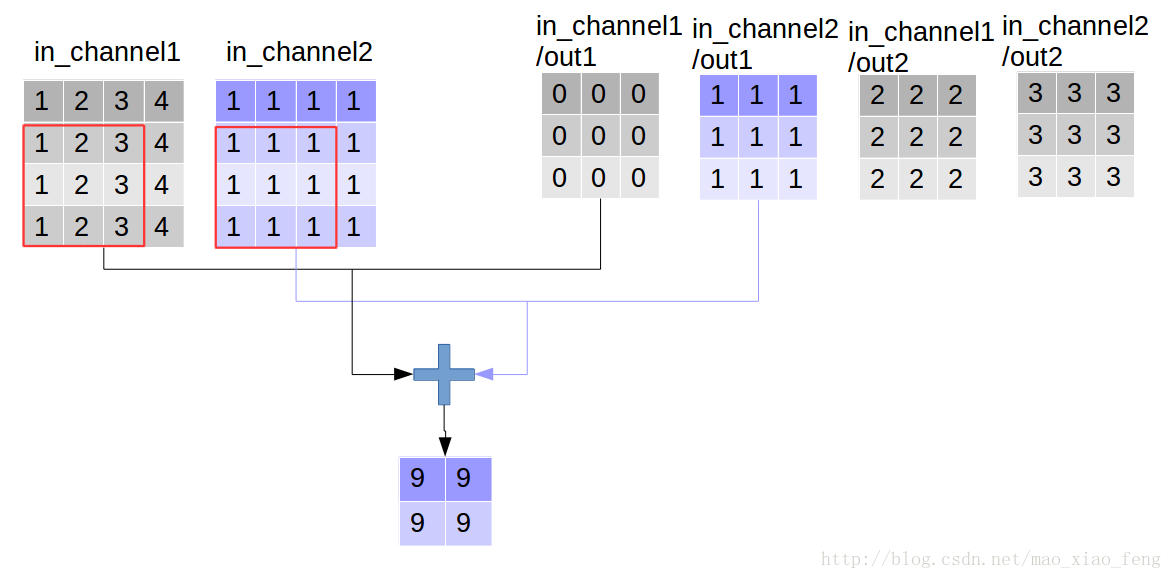
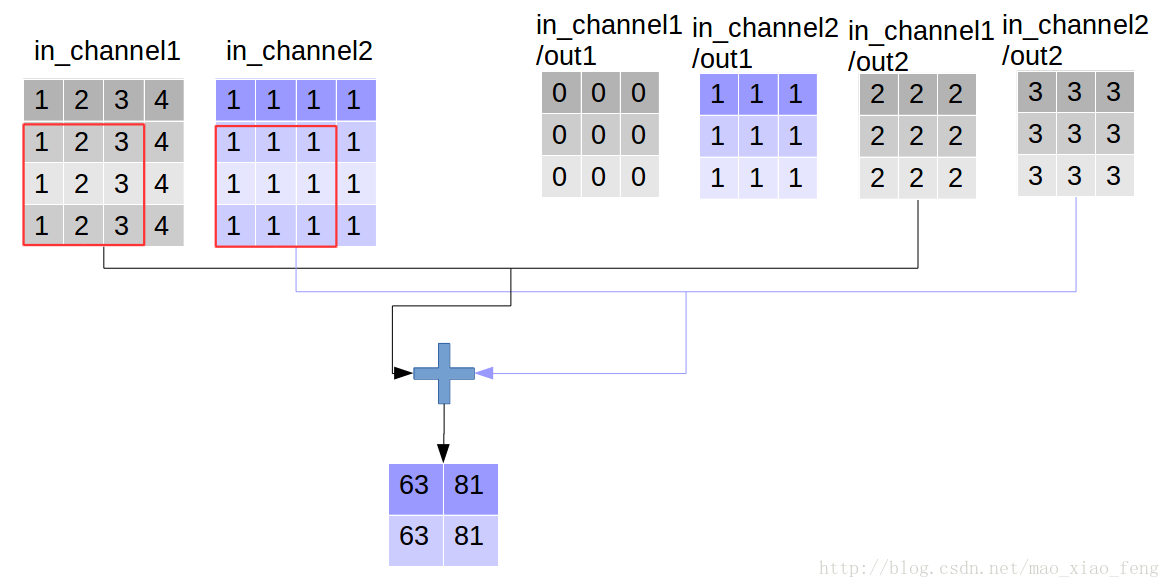
做深度卷积:
out_img = tf.nn.depthwise_conv2d(input=img, filter=filter, strides=[1,1,1,1], rate=[1,1], padding='VALID')
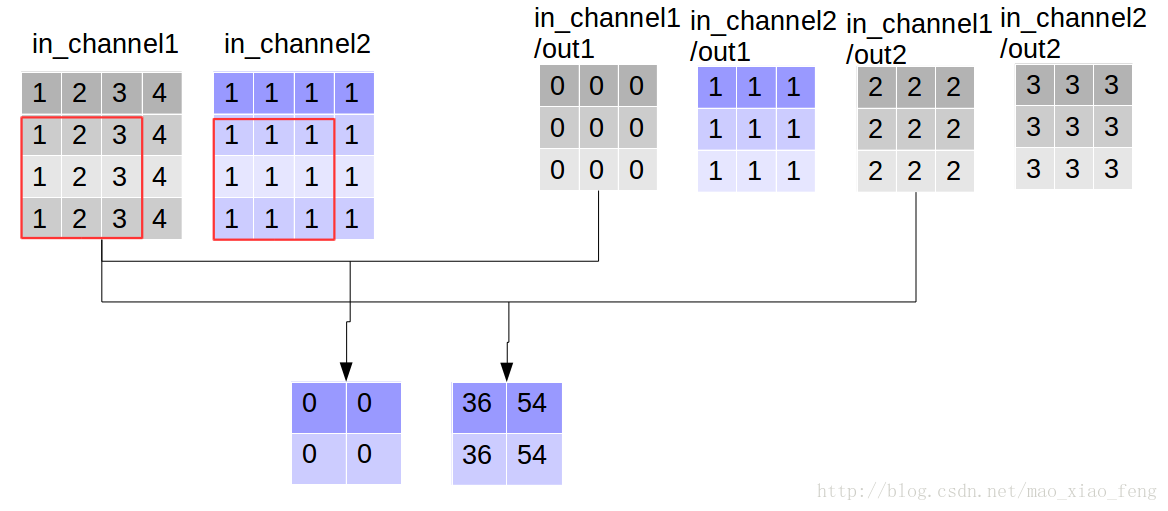

形象的解释一下depthwise_conv2d卷积了。看普通的卷积,我们对卷积核每一个out_channel的两个通道分别和输入的两个通道做卷积相加,得到feature map的一个channel,而depthwise_conv2d卷积,我们对每一个对应的in_channel,分别卷积生成两个out_channel,所以获得的feature map的通道数量可以用in_channel* channel_multiplier来表达,这个channel_multiplier,就可以理解为卷积核的第四维。
做深度可分离卷积:
如下,增加定义了point_filter 核。
import tensorflow as tf
img1 = tf.constant(value=[[[[1],[2],[3],[4]],[[1],[2],[3],[4]],[[1],[2],[3],[4]],[[1],[2],[3],[4]]]],dtype=tf.float32)
img2 = tf.constant(value=[[[[1],[1],[1],[1]],[[1],[1],[1],[1]],[[1],[1],[1],[1]],[[1],[1],[1],[1]]]],dtype=tf.float32)
img = tf.concat(values=[img1,img2],axis=3)
filter1 = tf.constant(value=0, shape=[3,3,1,1],dtype=tf.float32)
filter2 = tf.constant(value=1, shape=[3,3,1,1],dtype=tf.float32)
filter3 = tf.constant(value=2, shape=[3,3,1,1],dtype=tf.float32)
filter4 = tf.constant(value=3, shape=[3,3,1,1],dtype=tf.float32)
filter_out1 = tf.concat(values=[filter1,filter2],axis=2)
filter_out2 = tf.concat(values=[filter3,filter4],axis=2)
filter = tf.concat(values=[filter_out1,filter_out2],axis=3)
point_filter = tf.constant(value=1, shape=[1,1,4,4],dtype=tf.float32)
out_img = tf.nn.depthwise_conv2d(input=img, filter=filter, strides=[1,1,1,1],rate=[1,1], padding='VALID')
做深度分层卷积=做深度卷积,然后做pointwise卷积,因此在上代码添加做pointwise卷积代码即可完成,如下:
out_img = tf.nn.conv2d(input=out_img, filter=point_filter, strides=[1,1,1,1], padding='VALID')
输出:

使用官方函数编码查看结果,即:
out_img = tf.nn.separable_conv2d(input=img, depthwise_filter=filter, pointwise_filter=point_filter,strides=[1,1,1,1], rate=[1,1], padding='VALID')
输出:

ok,愉快地结束。
Depthwise Separable Convolution(深度可分离卷积)的实现方式的更多相关文章
- 深度可分离卷积结构(depthwise separable convolution)计算复杂度分析
https://zhuanlan.zhihu.com/p/28186857 这个例子说明了什么叫做空间可分离卷积,这种方法并不应用在深度学习中,只是用来帮你理解这种结构. 在神经网络中,我们通常会使用 ...
- 深度学习之depthwise separable convolution,计算量及参数量
目录: 1.什么是depthwise separable convolution? 2.分析计算量.flops 3.参数量 4.与传统卷积比较 5.reference
- 深度可分卷积(Depthwise Separable Conv.)计算量分析
上次读到深度可分卷积还是去年暑假,各种细节都有些忘了.记录一下,特别是计算量的分析过程. 1. 标准卷积和深度可分卷积 标准卷积(MobileNet论文中称为Standard Convolution, ...
- 可分离卷积详解及计算量 Basic Introduction to Separable Convolutions
任何看过MobileNet架构的人都会遇到可分离卷积(separable convolutions)这个概念.但什么是“可分离卷积”,它与标准的卷积又有什么区别?可分离卷积主要有两种类型: 空间可分离 ...
- 『高性能模型』深度可分离卷积和MobileNet_v1
论文原址:MobileNets v1 TensorFlow实现:mobilenet_v1.py TensorFlow预训练模型:mobilenet_v1.md 一.深度可分离卷积 标准的卷积过程可以看 ...
- Paper | Xception: Deep Learning with Depthwise Separable Convolutions
目录 故事 Inception结构和思想 更进一步,以及现有的深度可分离卷积 Xception结构 实验 这篇论文写得很好.只要你知道卷积操作或公式,哪怕没看过Inception,也能看懂. 核心贡献 ...
- CNN中各类卷积总结:残差、shuffle、空洞卷积、变形卷积核、可分离卷积等
CNN从2012年的AlexNet发展至今,科学家们发明出各种各样的CNN模型,一个比一个深,一个比一个准确,一个比一个轻量.我下面会对近几年一些具有变革性的工作进行简单盘点,从这些充满革新性的工作中 ...
- Spark MLlib Deep Learning Convolution Neural Network (深度学习-卷积神经网络)3.1
3.Spark MLlib Deep Learning Convolution Neural Network (深度学习-卷积神经网络)3.1 http://blog.csdn.net/sunbow0 ...
- Spark MLlib Deep Learning Convolution Neural Network (深度学习-卷积神经网络)3.2
3.Spark MLlib Deep Learning Convolution Neural Network(深度学习-卷积神经网络)3.2 http://blog.csdn.net/sunbow0 ...
随机推荐
- 算法-图(2)Bellman-Ford算法求最短路径
template <class T,class E> void Bellman-Ford(Graph<T,E>&G, int v, E dist[], int path ...
- Federated Optimization for Heterogeneous Networks
郑重声明:原文参见标题,如有侵权,请联系作者,将会撤销发布! arXiv:1812.06127v3 [cs.LG] 11 Jul 2019 目录: Abstract 1 Introduction 2 ...
- Solr的原理及使用
1.Solr的简介Solr是一个独立的企业级搜索应用服务器,它对外提供类似于Web-service的API接口.用户可以通过http请求,向搜索引擎服务器提交一定格式的XML文件,生成索引:也可以通过 ...
- Oracle - Flashback standby after resetlogs on primary
一.概述 本文将给大家介绍主库使用rman做不完全恢复后,备库如何通过flashback,继续同步 二.正式实验 本次实验采用的是oracle 11g 单实例 + oracle 11g 单实例dg 1 ...
- qt exe文件添加图标
Qt 怎样生成带图标的exe(转载) 一.问题描述 当我们在 Windows 下用 VS 生成 exe 程序时,如果窗口程序指定了图标,那么生成的 exe 程序便是指定的图标模样. 但是,当使用 Qt ...
- Golang | 简介channel常见用法,完成goroutin通信
今天是golang专题的第14篇文章,大家可以点击上方的专辑回顾之前的内容. 今天我们来看看golang当中另一个很重要的概念--信道.我们之前介绍goroutine的时候曾经提过一个问题,当我们启动 ...
- 漏洞重温之sql注入(六)
漏洞重温之sql注入(六) sqli-labs通关之旅 Less-26 进入第26关,首先我们可以从网页的提示看出本关是get型注入. 我们给页面添加上id参数后直接去查看源码. 需要关注的东西我已经 ...
- Android开发之SDCardUtils工具类。java工具详细代码,附源代码。判断SD卡是否挂载等功能
package com.xiaobing.zhbj.utils; import java.io.BufferedInputStream; import java.io.BufferedOutputSt ...
- android开发之当设置textview多少字后以省略号显示。限制TextView的字数
设置多少字后以省略号显示 <TextView android:id="@+id/tv" android:layout_width="wrap_conten ...
- ARouter使用
1. androidstudio3.0配置 javaCompileOptions { annotationProcessorOptions { arguments = [AROUTER_MODULE_ ...