
003.Nginx配置解析
一 Nginx配置文件
1.1 Nginx主配置
- Main位于nginx.conf配置文件的最高层;
- Main层下可以有Event、HTTP层;
- Http层下面允许有多个Server层,用于对不同的网站做不同的配置;
- Server层下面允许有多个Location,用于对不同的路径进行不同模块的配置。
  1 user  nginx;

  2 worker_processes  1;

  3

  4 error_log  /var/log/nginx/error.log warn;

  5 pid        /var/run/nginx.pid;
  1 events {

  2     worker_connections  1024;

  3 }
  1 http {

  2     include       /etc/nginx/mime.types;

  3     default_type  application/octet-stream;

  4     log_format  main  '$remote_addr - $remote_user [$time_local] "$request" '

  5                       '$status $body_bytes_sent "$http_referer" '

  6                       '"$http_user_agent" "$http_x_forwarded_for"';

  7     access_log  /var/log/nginx/access.log  main;

  8     sendfile        on;

  9     #tcp_nopush     on;

 10     keepalive_timeout  65;

 11     #gzip  on;

 12     include /etc/nginx/conf.d/*.conf;

 13 }
  1 server {

  2     listen       80;

  3     server_name  localhost;

  4     location / {

  5         root   /usr/share/nginx/html;

  6         index  index.html index.htm;

  7     }

  8     error_page   500 502 503 504  /50x.html;

  9     location = /50x.html {

 10         root   /usr/share/nginx/html;

 11     }

 12 }
1.2 Nginx全局配置
  1 user  nginx;					#进程用户

  2 worker_processes  1;				#工作进程,配合和CPU个数保持一致

  3 error_log  /var/log/nginx/error.log warn;	        #错误日志路径及级别

  4 pid        /var/run/nginx.pid;			#Nginx服务启动的pid
1.3 Nginx events事件配置
  1 events {

  2     worker_connections  1024;			#每个worker进程支持的最大连接数

  3     use epoll;					#内核模型,select、poll、epoll

  4 }
1.4 Nginx公共配置
  1 http {

  2     include       /etc/nginx/mime.types;	#指定在当前文件中包含另一个文件的指令

  3     default_type  application/octet-stream;	#指定默认处理的文件类型可以是二进制

  4

  5     log_format  main  '$remote_addr - $remote_user [$time_local] "$request" '

  6                       '$status $body_bytes_sent "$http_referer" '

  7                       '"$http_user_agent" "$http_x_forwarded_for"';	#日志格式

  8

  9     access_log  /var/log/nginx/access.log  main;			#访问日志

 10

 11     sendfile        on;		#优化静态资源

 12     #tcp_nopush     on;		#nginx不要缓存数据,而是一段一段发送

 13

 14     keepalive_timeout  65;	        #给客户端分配连接超时时间,服务器会在这个时间过后关闭连接。

 15

 16     #gzip  on;			#压缩
1.5 Nginx server配置
  1     server {

  2         listen       80;			        #监听端口,默认80

  3         server_name  localhost;			#提供服务的域名或主机名

  4

  5         #charset koi8-r;

  6

  7         #access_log  logs/host.access.log  main;

  8

  9         location / {				#控制网站访问路径

 10             root   /usr/share/nginx/html;	        #存放网站的路径

 11             index  index.html index.htm;	        #默认访问的首页

 12         }

 13         #error_page  404              /404.html;	#错误页面

 14

 15         # redirect server error pages to the static page /50x.html

 16         #

 17         error_page   500 502 503 504  /50x.html;	#定义请求错误,指定错误代码

 18         location = /50x.html {			#错误代码重定向到新的location

 19             root   html;

 20         }

 21     # another virtual host using mix of IP-, name-, and port-based configuration

 22     #

 23     #server {					#server段配置

 24     #    listen       8000;

 25     #    listen       somename:8080;

 26     #    server_name  somename  alias  another.alias;

 27

 28     #    location / {

 29     #        root   html;

 30     #        index  index.html index.htm;

 31     #    }

 32     #}

 33

 34

 35     # HTTPS server

 36     #

 37     #server {					#server段配置

 38     #    listen       443 ssl;

 39     #    server_name  localhost;

 40

 41     #    ssl_certificate      cert.pem;

 42     #    ssl_certificate_key  cert.key;		#SSL证书配置

 43

 44     #    ssl_session_cache    shared:SSL:1m;

 45     #    ssl_session_timeout  5m;

 46

 47     #    ssl_ciphers  HIGH:!aNULL:!MD5;

 48     #    ssl_prefer_server_ciphers  on;

 49

 50     #    location / {

 51     #        root   html;

 52     #        index  index.html index.htm;

 53     #    }

 54     #}

 55 }
二 Nginx网站配置
2.1 Nginx配置网站
  1 [root@nginx ~]# vi /etc/nginx/conf.d/base.conf

  2 server {

  3     server_name  base.linuxds.com;

  4     location / {

  5         root   /usr/share/nginx/base;

  6         index  index.html;

  7     }

  8 }

  9

 10 server {

 11     server_name  blog.linuxds.com;

 12     location / {

 13         root    /usr/share/nginx/blog;

 14         index   index.html;

 15     }

 16     location /ok {

 17         alias   /usr/share/nginx/yes;

 18         index   index.html;

 19     }

 20 }

 21 [root@nginx01 ~]# mkdir -p /usr/share/nginx/{base,blog,yes}

 22 [root@nginx01 ~]# echo '<h1>www</h1>' > /usr/share/nginx/base/index.html

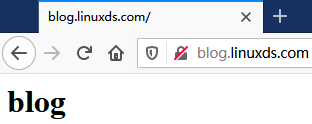
 23 [root@nginx01 ~]# echo '<h1>blog</h1>' > /usr/share/nginx/blog/index.html

 24 [root@nginx01 ~]# echo '<h1>love</h1>' > /usr/share/nginx/blog/love.html

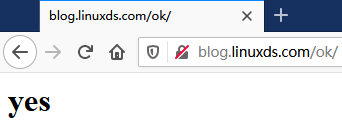
 25 [root@nginx01 ~]# echo '<h1>yes</h1>' > /usr/share/nginx/yes/index.html

 26 [root@nginx01 ~]# nginx -t -c /etc/nginx/nginx.conf		#检查配置文件

 27 [root@nginx01 ~]# nginx -s reload				#重载配置文件
2.2 测试访问


2.3 Nginx配置错误页面
  1 [root@nginx01 ~]# vi /etc/nginx/conf.d/base.conf

  2 server {

  3     server_name  base.linuxds.com;

  4     location / {

  5         root   /usr/share/nginx/base;

  6         index  index.html;

  7     }

  8 }

  9

 10 server {

 11     server_name  blog.linuxds.com;

 12

 13     error_page  404 403 500 502 503 504  /baseerror.html;	#配置错误页

 14     location /baseerror.html {

 15         root    /usr/share/nginx/html;

 16     }

 17

 18     location / {

 19         root    /usr/share/nginx/blog;

 20         index   index.html;

 21     }

 22     location /ok {

 23         alias   /usr/share/nginx/yes;

 24         index   index.html;

 25     }

 26 }

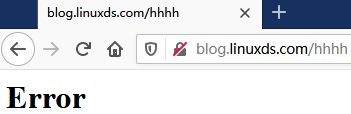
 27 [root@nginx01 ~]# echo '<h1>Error</h1>' > /usr/share/nginx/html/baseerror.html

 28 [root@nginx01 ~]# nginx -t -c /etc/nginx/nginx.conf		#检查配置文件

 29 [root@nginx01 ~]# nginx -s reload				#重载配置文件
2.4 测试Error
三 Nginx相关安全策略
3.1 禁止htaccess
  1 location ~/\.ht {

  2     deny all;

  3 }
3.2 禁止多个目录
  1 location ~ ^/(picture|move)/ {

  2     deny all;

  3     break;

  4 }
3.3 禁止/data开头的文件
  1 location ~ ^/data {

  2     deny all;

  3 }
3.4 禁止单个目录
  1 location /imxhy/images/ {

  2     deny all;

  3 }
3.5 特定允许访问
  1 root /usr/share/nginx/rewrite/;

  2 allow 208.97.167.194;

  3 allow 222.33.1.2;

  4 allow 231.152.49.4;

  5 deny all;

  6 auth_basic "xhy";

  7 auth_basic_user_file htpasswd;
003.Nginx配置解析的更多相关文章
- 初识nginx——配置解析篇
一.nginx的介绍 nginx是由俄罗斯人开发的一款高性能的http和反向代理服务器,也可以用来作为邮件代理.相比较于其他的服务器,具有占用内存少,稳定性高等优势 二.nginx的配置 nginx的 ...
- Nginx 配置解析
概述:本篇文章主要对Nginx配置文件中一些常用配置进行了讲解,和如何使用Docker进行安装Nginx.因为该文章是回首在工作闲暇之余整理的,还有待完善,如果有疑义和更好的建议的朋友可以留言给我. ...
- Nginx配置解析
#运行用户,默认即是nginx,可不设置 #user nobody; #nginx进程,一般设置为和cpu核数一样 worker_processes 1; #;单个后台worker process进程 ...
- nginx配置解析之客户端真实IP的传递
前后端分离之后,采用nginx作为静态服务器,并通过反向代理的方式实现接口跨域的方式,在降低开发成本的同时也带来了诸多问题,例如客户端真实IP的获取. 在一些特殊场景下,比如风控和支付流程,往往需要获 ...
- NGINX(四)配置解析
前言 nginx配置解析是在初始化ngx_cycle_t数据结构时,首先解析core模块,然后core模块依次解析自己的子模块. 配置解析过程 nginx调用ngx_conf_parse函数进行配置文 ...
- php php-fpm安装 nginx配置php
centos 6.2 linux下安装php5.6.6源码 PHP在 5.3.3 之后已经把php-fpm并入到php的核心代码中了. 所以php-fpm不需要单独的下载安装.要想php支持php-f ...
- Nginx 原理解析和配置摘要
前言 Nginx 作为高性能的 http 服务器,知名度不必多言,相似产品中无出其右.本篇随笔记录我认为较为重要的原理和配置. 1. 原理解析 1.1 结构 以上是 Nginx 的结构图,其包含一个 ...
- [Linux.NET]Nginx 泛解析配置请求映射到多端口实现二级域名访问
由于想实现一个域名放置多个应用运行的目的,而不想通过域名后加端口号方式处理,这种方式处理记起来太麻烦,偷懒党简直不能忍,故而考虑了使用二级域名来处理多个应用同时运行.Google了一番资料并进行了尝试 ...
- Nginx 泛解析配置请求映射到多端口实现二级域名访问
由于想实现一个域名放置多个应用运行的目的,而不想通过域名后加端口号方式处理,这种方式处理记起来太麻烦,偷懒党简直不能忍,故而考虑了使用二级域名来处理多个应用同时运行.Google了一番资料并进行了尝试 ...
随机推荐
- 第七章:Android动画深入分析
7.1 View动画 View动画的作用对象是View,它支持四种动画效果,分别是平移动画,缩放动画,旋转动画和透明动画. 帧动画也属于View动画,但是帧动画的表现形式和上面的四种变换效果不太一样. ...
- Ethical Hacking - NETWORK PENETRATION TESTING(8)
WEP Cracking Basic case Run airdump-ng to log all traffic from the target network. airodump-ng --cha ...
- 【工具】- HttpClient篇
简介 对于httpclient,相信很多人或多或少接触过,对于httpclient的使用姿势,相信很多人会有疑问?下面这边会通过代码说明 package xxx; import org.apache. ...
- 题解 CF576D 【Flights for Regular Customers】
对每条边来说,可以走这条边的限制解除是按\(d\)的顺序,所以先对每条边按\(d\)排序. 然后考虑每两条边之间的处理,用一个矩阵表示当前走\(d\)步是否可以从一个点到另一个点,称其为状态矩阵,用另 ...
- WebApi部署多服务器配置Nginx负载均衡
01PARTCoreWebApi教程本地演示环境 Visual Studio2019 --- Vsersion:16.4.4 + NetCore3.1.2 02PARTNginx快速搭建配置负载均衡 ...
- Mysql5.7前后修改用户密码变化
本文主要强调修改密码的sql语句变化.如果是root密码忘记了,请参考Mysql忘记root密码怎么解决 Mysql 5.7以前修改密码 update mysql.user set password= ...
- Error: no such table: device;的问题的解决,去掉表名device后面的分号;
sqlite> .mode csvsqlite> .import device.txt device;Error: no such table: device;sqlite> .im ...
- Spring学习之——手写Mini版Spring源码
前言 Sping的生态圈已经非常大了,很多时候对Spring的理解都是在会用的阶段,想要理解其设计思想却无从下手.前些天看了某某学院的关于Spring学习的相关视频,有几篇讲到手写Spring源码,感 ...
- Django学习路35_视图使用方法(复制的代码) + 简单总结
from django.shortcuts import render,redirect from django.http import HttpResponse,JsonResponse from ...
- More JOIN operations -- SQLZOO
The JOIN operation 注意:where语句中对表示条件的需要用单引号, 下面的译文使用的是有道翻译如有不正确,请直接投诉有道 01.List the films where the y ...