
CSS过渡约束的计算
CSS过度约束性质
什么是CSS过度约束
简单的来说就是,父子元素的情况下,子元素的位置是依据一定条件进行计算的,以下则对这些条件进行详细的说明
当没有开启绝对定位或固定定位时
水平布局必须要满足以下等式
子元素在父元素中的水平布局必须要满足以下等式

margin-left + border-left + padding-left + width + paddind-right + border-right + margin-right = 包含块的内容区的width
探寻能够设置成auto的CSS属性
这里七个值在中能设置auto的属性有
width: auto;

margin-left: auto;

margin-right: auto;
等式不成立(过度约束)时的几种情况
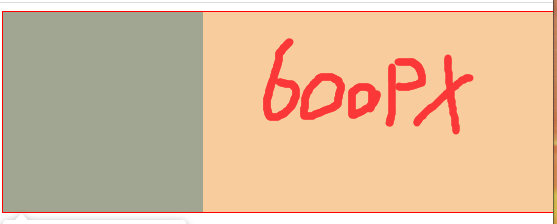
当margin与width都没有设置为auto
浏览器自动计算margin-right
<style>

    .box1{

        width: 800px;

        height: 200px;

        border: 1px red solid;

    }

    .box2{

        width: 200px;

        height: 200px;

        background-color: orange;

        /* margin-right无论设置多少都没用,因为浏览器会自动计算此值 */

        margin-right: 2000px;

        /* 此时margin-right = 600px

        margin-left + border-left + padding-left + width + paddind-right + border-right + margin-right = 包含块的内容区的width

        0 + 0 + 0 + 200 + 0 + 0 + margin-right = 800

        */

    }

</style>

<body>

    <div class="box1">

        <div class="box2"></div>

    </div>

</body>
当margin或width中有一个被设置为auto
会自动调整那个被设置为auto的属性
<style>

    .box1{

        width: 800px;

        height: 200px;

        border: 1px red solid;

    }

    .box2{

        width: 200px;

        height: 200px;

        background-color: orange;

        margin-left: auto;

        /* 此时margin-right = 0px

        margin-left + border-left + padding-left + width + paddind-right + border-right + margin-right = 包含块的内容区的width

        auto + 0 + 0 + 200 + 0 + 0 + margin-right = 800

        会自动调整那个被设置为auto的属性

        600px + 0 + 0 + 200 + 0 + 0 + margin-right = 800

        */

    }

</style>

<body>

    <div class="box1">

        <div class="box2"></div>

    </div>

</body>

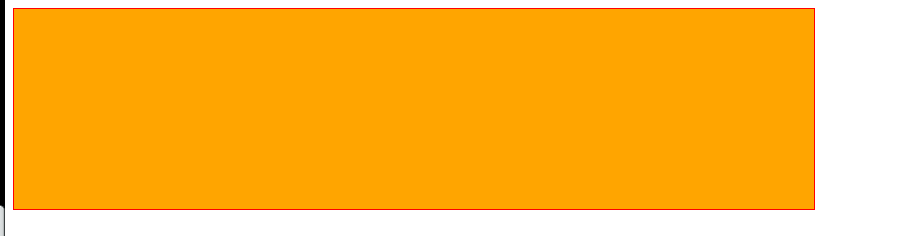
当margin与width都被设置为auto
宽度会被调整到最大,外边距为0
<style>

    .box1{

        width: 800px;

        height: 200px;

        border: 1px red solid;

    }

    .box2{

        width: auto;

        height: 200px;

        background-color: orange;

        margin-left: auto;

        margin-right: auto;

        /* 此时width会是800px

        margin-left + border-left + padding-left + width + paddind-right + border-right + margin-right = 包含块的内容区的width

        auto + 0 + 0 + auto + 0 + 0 + auto = 800

        宽度会被调整到最大,外边距为0

        0 + 0 + 0 + width=auto=>800px + 0 + 0 + 0 = 800

        */

    }

</style>

<body>

    <div class="box1">

        <div class="box2"></div>

    </div>

</body>
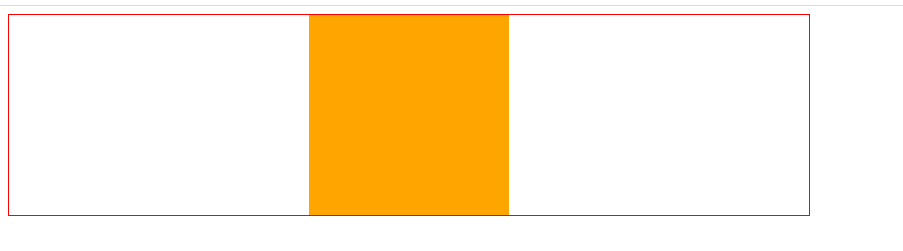
当margin都被设置为auto,width是固定值时
会自动平均分配给两个为auto的margin
这也是元素水平居中的原理
<style>

    .box1{

        width: 800px;

        height: 200px;

        border: 1px red solid;

    }

    .box2{

        width: 200px;

        height: 200px;

        background-color: orange;

        margin-left: auto;

        margin-right: auto;

        /* margin-left = margin-right = 300px

        margin-left + border-left + padding-left + width + paddind-right + border-right + margin-right = 包含块的内容区的width

        auto + 0 + 0 + 200 + 0 + 0 + auto = 800

        */

    }

</style>

<body>

    <div class="box1">

        <div class="box2"></div>

    </div>

</body>
当开启绝对定位或固定定位时
水平布局必须要满足以下等式
子元素在父元素中的水平布局必须要满足以下等式

left + margin-left + border-left + padding-left + width + paddind-right + border-right + margin-right + right = 包含块的内容区的width
垂直布局必须要满足以下等式(没开定位时垂直布局不受约束)
子元素在父元素中的垂直布局必须要满足以下等式

top + margin-top + border-top + padding-top + height + paddind-bottom + border-bottom + margin-bottom + bottom = 包含块的内容区的height
垂直布局的情况与水平布局一致
探寻可以设置为auto的CSS属性
left: auto;

right: auto;

margin-left: auto;

margin-right: auto;

width: auto;
当都没有设置auto时
会自动调整right值以使等式满足,注意: 没开启定位时,是自动调整margin-right
<style>

    .box1{

        width: 500px;

        height: 500px;

        background-color: #bfa;

        position: relative;

    }

    .box2{

        width: 200px;

        height: 200px;

        background-color: orange;

        position: absolute;

        /* 水平布局必须要满足以下等式

            left + margin-left + border-left + padding-left + width + paddind-right + border-right + margin-right + right = 包含块的内容区的width

        */

        left: 0;

        right: 0;   /* right将不会生效,因为需要满足过度约束*/

        /* 0 + 0 + 0 + 0 + 200px + 0 + 0 + 0 + right = 500px

            right => 300px

         */

    }

</style>

<body>

    <div class="box1">

        <div class="box2"></div>

    </div>

</body>
当其中有一个属性被设置auto时
自动调整auto的值使等式成立
<style>

    .box1{

        width: 500px;

        height: 500px;

        background-color: #bfa;

        position: relative;

    }

    .box2{

        width: auto;

        height: 200px;

        background-color: orange;

        position: absolute;

        /* 水平布局必须要满足以下等式

            left + margin-left + border-left + padding-left + width + paddind-right + border-right + margin-right + right = 包含块的内容区的width

        */

        left: 0;

        right: 0;

        /* 0 + 0 + 0 + 0 + auto + 0 + 0 + 0 + 0 = 500px

            auto => 500px

         */

    }

</style>

<body>

    <div class="box1">

        <div class="box2"></div>

    </div>

</body>
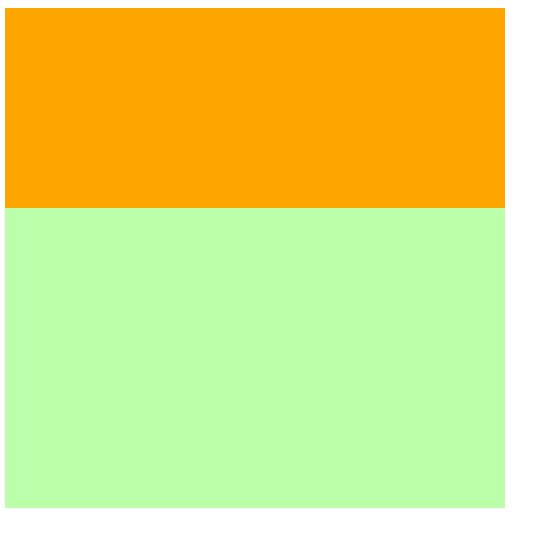
当width和margin被设置auto时(与其他水平布局一样当同时存在总是优先调整width)
会调整width,并将margin设置为0
<style>

    .box1{

        width: 500px;

        height: 500px;

        background-color: #bfa;

        position: relative;

    }

    .box2{

        width: auto;

        height: 200px;

        background-color: orange;

        position: absolute;

        margin-left: auto;

        margin-right: auto;

        /* 水平布局必须要满足以下等式

            left + margin-left + border-left + padding-left + width + paddind-right + border-right + margin-right + right = 包含块的内容区的width

        */

        left: 0;

        right: 0;

        /* 0 + auto + 0 + 0 + width + 0 + 0 + auto + 0 = 500px

            auto => 0px

            width => 500px

            当width和margin被设置auto时只会调整width

         */

    }

</style>

<body>

    <div class="box1">

        <div class="box2"></div>

    </div>

</body>

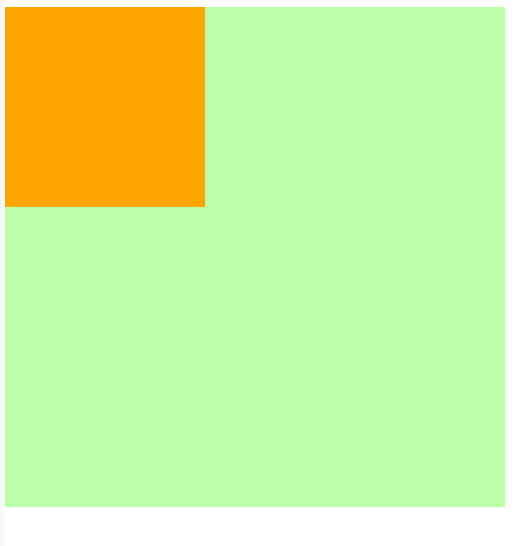
当margin left right被设置auto时
因为left,right两个属性的默认值是auto,所以会优先调整left和right
<style>

    .box1{

        width: 500px;

        height: 500px;

        background-color: #bfa;

        position: relative;

    }

    .box2{

        width: 200px;

        height: 200px;

        background-color: orange;

        position: absolute;

        margin-left: auto;

        margin-right: auto;

        /* 水平布局必须要满足以下等式

            left + margin-left + border-left + padding-left + width + paddind-right + border-right + margin-right + right = 包含块的内容区的width

        */

        /* 不指定时left与right默认值就是auto*/

        /* left: auto;

        right: auto; */

        /* auto + auto + 0 + 0 + 200px + 0 + 0 + auto + auto = 500px

            优先调整left或right(相当于回到第一种情况==>优先调整right)

            0 + 0 + 0 + 0 + 200px + 0 + 0 + 0 + 300px = 500px

        */

    }

</style>

<body>

    <div class="box1">

        <div class="box2"></div>

    </div>

</body>
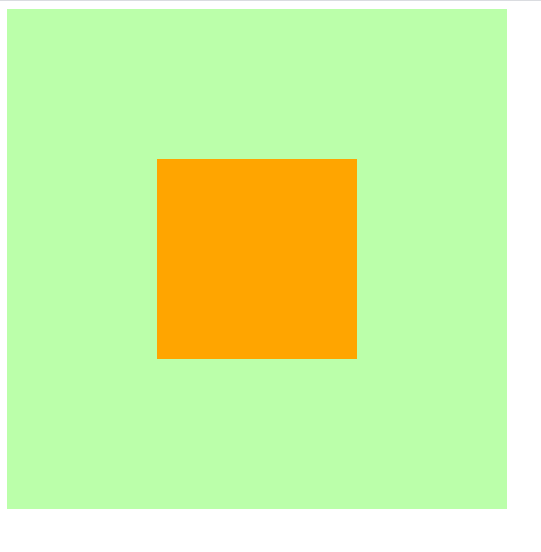
所以实现水平居中时需要显式的指定left和right的值
<style>

    .box1{

        width: 500px;

        height: 500px;

        background-color: #bfa;

        position: relative;

    }

    .box2{

        width: 200px;

        height: 200px;

        background-color: orange;

        position: absolute;

        margin-left: auto;

        margin-right: auto;

        /* 水平布局必须要满足以下等式

            left + margin-left + border-left + padding-left + width + paddind-right + border-right + margin-right + right = 包含块的内容区的width

        */

        /* 水平居中时需要显式的指定left和right的值*/

        left: 0;

        right: 0;

        /* 0 + auto + 0 + 0 + 200px + 0 + 0 + auto + 0 = 500px

            调整margin-left和margin-right

            0 + 150px + 0 + 0 + 200px + 0 + 0 + 0 + 150px = 500px

        */

    }

</style>

<body>

    <div class="box1">

        <div class="box2"></div>

    </div>

</body>

集合开启定位后水平与垂直方向的过度约束的知识实现在父元素中垂直水平居中
<style>

    .father{

        width: 500px;

        height: 500px;

        background-color: #bfa;

    }

    .son{

        width: 200px;

        height: 200px;

        background-color: orange;

    }

    /* 实现在父元素中垂直水平居中 */

    /* ====================水平居中样式开始================= */

    .father{

        position: relative; /* 确定father为包含块,不然定位就会以html为原点 */

    }

    .son{

        position: absolute;

        left: 0;

        right: 0;

        margin-left: auto;

        margin-right: auto;

    }

    /*

        此时条件约束等式为

        left + margin-left + border-left + padding-left + width + paddind-right + border-right + margin-right + right = 包含块的内容区的width

        0 + auto + 0 + 0 + 200px + 0 + 0 + auto + 0 = 500px

        auto => 150px

    */

    /* ====================水平居中样式结束================= */

    /* ====================垂直居中样式开始================= */

    .father{

        position: relative;

    }

    .son{

        position: absolute;     /* 只有开启定位才受过度约束 */

        top: 0;

        bottom: 0;

        margin-top: auto;

        margin-bottom: auto;

    }

    /*

        此时条件约束等式为

        top + margin-top + border-top + padding-top + height + paddind-bottom + border-bottom + margin-bottom + bottom = 包含块的内容区的height

        0 + auto + 0 + 0 + 200px + 0 + 0 + auto + 0 = 500px

        auto => 150px

    */

    /* ====================垂直居中样式结束================= */

    /* 实现在父元素中垂直水平居中 */

</style>

<body>

    <div class="father">

        <div class="son"></div>

    </div>

</body>
CSS过渡约束的计算的更多相关文章
- 深入理解CSS过渡transition
× 目录 [1]定义 [2]过渡属性 [3]持续时间[4]延迟时间[5]时间函数[6]多值[7]阶段[8]触发[9]API 前面的话 通过过渡transition,可以让web前端开发人员不需要jav ...
- Vue过渡效果之CSS过渡
前面的话 Vue 在插入.更新或者移除 DOM 时,提供多种不同方式的应用过渡效果.本文将从CSS过渡transition.CSS动画animation及配合使用第三方CSS动画库(如animate. ...
- 047——VUE中css过渡动作实例
<!DOCTYPE html> <html lang="en"> <head> <meta charset="UTF-8&quo ...
- css过渡和2d详解及案例
css过渡和2d详解及案例(案例在下方,不要着急) 本文重点: 1.在2D变化使用过程中,有些需求需要两种或两种以上的变化同时使用, 值得注意的是尽量把位移变化放在最前面,把其他变化放在最后面,属性值 ...
- Vue css过渡 和 js 钩子过渡
css过渡 <transition name="slide"> <div v-show="!showChatInput" class=&quo ...
- 看完就懂--CSS选择器优先级的计算
CSS选择器优先级的计算 什么是选择器的优先级 优先级的计算与比较(一) - 优先级具有可加性 - 选择器优先级不会超过自身最大数量级 - 同等优先级情况下,后写的覆盖前写的 - 并集选择器之间的优先 ...
- CSS过渡、CSS动画
<!DOCTYPE html> <html> <head> <meta charset="utf-8"/> <script s ...
- CSS特异性(CSS Specificity)的细节之CSS样式权重的计算与理解(CSS样式覆盖规则)
本篇讲解CSS特异性(CSS Specificity)的细节,也就是CSS样式选择器的权重计算 通过计算选择器的权重(weight)最终决定哪个选择器将获得优先权去覆盖其他选择器的样式设定,即“优先原 ...
- 深入理解CSS选择器优先级的计算
选择器的优先级关系到元素应用哪个样式.在CSS2.1的规范(http://www.w3.org/TR/2009/CR-CSS2-20090908/cascade.html#specificity)中是 ...
随机推荐
- 2019 Multi-University Training Contest 2 Harmonious Army(最小割)
题意:给你n个点 每个点都有两种选择 成为战士或者法师 现在给你m个关系 对应这两个人的对应关系的权值A,B,C 思路:按照下面的思路建图跑最小割(要注意权值要乘2 可能存在不整除的情况) #incl ...
- 【bzoj 3433】{Usaco2014 Jan} Recording the Moolympics(算法效率--贪心)
题意:给出n个区间[a,b),有2个记录器,每个记录器中存放的区间不能重叠.求2个记录器中最多可放多少个区间. 解法:贪心.只有1个记录器的做法详见--关于贪心算法的经典问题(算法效率 or 动态规划 ...
- windows下进程间通信方法
摘 要 随着人们对应用程序的要求越来越高,单进程应用在许多场合已不能满足人们的要求.编写多进程/多线程程序成为现代程序设计的一个重要特点,在多进程程序设计中,进程间的通信是不可避免的.Microsof ...
- PowerShell随笔1---背景
既然是随笔,那就想到什么说什么,既会分享主题知识,也会分享一些其他技巧和个人学习方法,供交流. 我一般学习一个东西,我都会问几个问题: 这东西是什么? 这东西有什么用,为什么会出现,出现是为了解决什么 ...
- Git管理远程仓库
一:使用远程仓库的目的 作用:备份,实现代码共享集中化管理: 二:将git本地仓库同步到远程仓库流程图 三:Git克隆操作 目的: 将远程仓库(github远程仓库项目代码)克隆到本地 如何克隆 1. ...
- 使用DTK创建模糊背景窗口并自定义阴影效果
DTK是deepin开发的基于Qt的开发套件,提供了大量的具有独特风格的美化控件,也提供了很多非常方便的API,下边我们用DTK实现一个模糊窗口,并设置其阴影效果. 使用场景 一切需要模糊窗口作为美化 ...
- 左神算法第一节课:复杂度、排序(冒泡、选择、插入、归并)、小和问题和逆序对问题、对数器和递归(Master公式)
第一节课 复杂度 排序(冒泡.选择.插入.归并) 小和问题和逆序对问题 对数器 递归 1. 复杂度 认识时间复杂度常数时间的操作:一个操作如果和数据量没有关系,每次都是固定时间内完成的操作,叫做常数 ...
- SQL优化汇总
今天面某家公司,然后问我SQL优化,感觉有点忘了,今天特此总结一下: 总结得是分两方面:索引优化和查询优化: 一. 索引优化: 1. 独立的列 在进行查询时,索引列不能是表达式的一部分,也不能是函数的 ...
- Oh My Zsh All In One
Oh My Zsh All In One https://ohmyz.sh/ install # CURL $ sh -c "$(curl -fsSL https://raw.github. ...
- CSS Grid Layout In Action
CSS Grid Layout In Action CSS 异形网格布局实战 refs https://static-nginx-online.fbcontent.cn/tutor/tutor-ybc ...