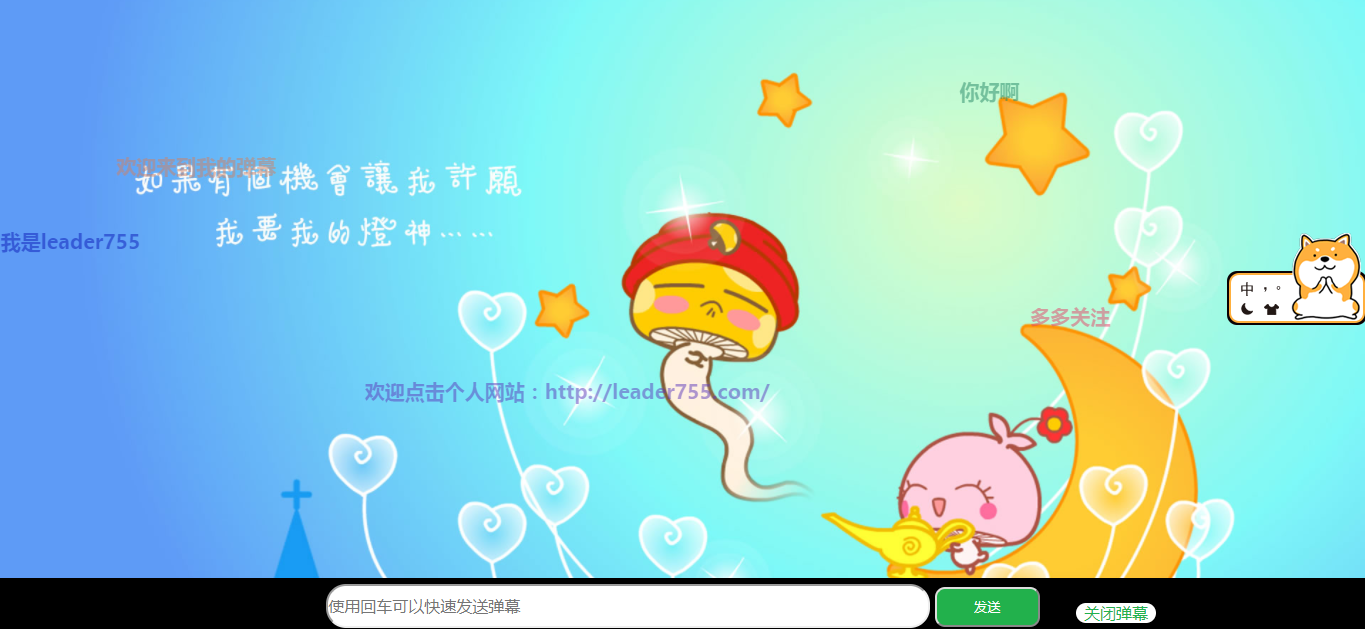
1.首先上图看下效果

2.废话不多说,直接上代码

1>html代码

<div class="barrage">

<div class="screen">
<div class="content">
<!--内容在这里显示-->
</div>
</div>
<!--发送对话框-->
<div class="send">
<input type="text" class="s_text" placeholder="使用回车可以快速发送弹幕"/>
<input type="button" class="s_btn" value="发送" />
<!--关闭弹幕功能-->
<span class="barrage_close">关闭弹幕</span>
</div>
</div>
 
 
2>css部分
*{

padding: 0;
margin: 0;
}
input{
outline: none;
}
.barrage .screen {
width: 100%;
height: 100%;
position: absolute;
top: 0px;
right: 0px;
background: url(../img/1.jpg);
background-size: cover;
}
.barrage .screen .content {
position: relative;
width: 100%;
height: 100%;
background: #000;
opacity:0.5;
/* filter: alpha(opacity=100); *//***针对ie8以上或者更早的浏览器****/
background-color: transparent;
z-index: 1;
}
.barrage {
 
width: 100%;
height: 100%;
}
.barrage .screen .content div {
position: absolute;
font-size: 20px;
font-weight: bold;
white-space: nowrap;
line-height: 40px;
z-index: 40;
}
.barrage .send {
z-index: 1;
width: 100%;
height: 55px;
line-height: 55px;
background: #000;
position: absolute;
bottom: 0px;
text-align: center;
}
.barrage .send .s_text {
width: 600px;
height: 40px;
line-height: 40px;
font-size: 16px;
font-family: "微软雅黑";
border-radius:20px;;
}
.barrage .send .s_btn {
width: 105px;
height: 40px;
background: #22B14C;
color: #fff;
border-radius: 10px;
}
.barrage_close {
position: absolute;
right:210px;
bottom:10px;
width: 80px;
height: 20px;
border-radius: 10px;
text-align: center;
line-height: 20px;
color: #22B14C;
background: #fff;
z-index: 99;
}
.barrage_close1{
color: #fff;
background: #fff;
}
/* css动画 */
.content div{
animation:Text 15s infinite normal;
}
@keyframes Text{
0%{
left:100%;
}
20%{
left:75%;
}
80%{
left:0%;
}
100%{
left:-30%;
}
}
3.js部分
    $(function () {

// $(".s_close").click(function () {
// $(".barrage").toggle("slow");
// });
// $(".barrage_close").toggle(function(){
// })
// init_animated();
init_barrage();
})
//将弹幕内容放进数组贮存起来
//var arr=[];
//var h=arr.push()
// 监听发送,按enter发送
document.onkeydown=function(event){
var e = event || window.event;
if(e && e.keyCode==13){
// console.log(11111);
$(".send .s_btn").click();
}
}
//提交评论
$(".send .s_btn").click(function () {
var text = $(".s_text").val();
if (text == "") {
alert('你的内容为空,请填写评论在再发送');
return false;
};
var _lable = $("<div style='right:20px;top:0px;opacity:1;color:" + getColor() + ";'class='content_text'>" + text + "</div>");
$(".content").append(_lable.show());
init_barrage();
$(".s_text").val('');
})
//初始化弹幕技术
function init_barrage() {
var _top = 0;
$(".content div").show().each(function () {
var _left = $(window).width() - $(this).width();//浏览器最大宽度,作为定位left的值
var _height = $(window).height();//浏览器最大高度
_top += 75;
if (_top >= (_height - 130)) {
_top = 0;
}
$(this).css({ left: _left, top: _top, color: getColor() });
//定时弹出文字
// var time = 10000;
// if ($(this).index() % 2 == 0) {
// time = 15000;
// }
// $(this).animate({ left: "-" + _left + "px" }, time, function () {
// $(this).remove();
// });
});
}
//获取随机颜色
function getColor() {
return '#' + (function (h) {
return new Array(7 - h.length).join("0") + h
})
((Math.random() * 0x1000000 << 0).toString(16))
}


利用css和jquery制成弹幕的更多相关文章

  1. 利用js和JQuery定义一个导航条菜单

    利用js和JQuery定义一个导航条 效果: 一.html代码: <div class="Maintenance"> <div class="Title ...

  2. 利用HTML5与jQuery技术创建一个简单的自动表单完成

    来源:GBin1.com 在线演示   在线下载 谷歌快速搜索自带大量自动完成插件——库中甚至还有一个附带的jQuery UI共享选项.然而今天我要寻找一个替代的解决方案.由DevBridge开发的j ...

  3. css与jquery、图标字体

    *)还能这样选择 header #search input[type="text"] *)按钮常用颜色:#008cBA(字母大小写没有区别) *)清除浮动后,text-align没 ...

  4. CSS与JQuery的相关问题

    文字隐藏:p div里面的文字过长时隐藏文字: overflow:hidden; text-overflow:ellipsis; white-space:nowrap; --------------- ...

  5. 利用CSS实现带相同间隔地无缝滚动动画

    说明:因为在移动上主要利用CSS来做动画,所以没有考虑其他浏览器的兼容性,只有-webkit这个前缀,如果需要其他浏览器,请自行补齐. 首先解释一下什么是无缝滚动动画, 例如下面的例子 See the ...

  6. 使用CSS和jQuery实现对话框

    因为项目中要显示一些对话框,但用alert显得太丑,后从网上找了一些插件,但有觉得不好用,因此自己试用CSS和jQuery写了一个对话框,代码如下: <!DOCTYPE html> < ...

  7. 使用CSS和jQuery实现tab页

    使用jquery来操作DOM是极大的方便和简单,这儿只是简单的用一个使用css和jquery来实现的tab页来简单介绍一些jQuery的一些方便使用的方法,下面是html文件: <!DOCTYP ...

  8. 如何利用CSS代码使图片和文字在同一行显示且对齐

    对于初学css的新手朋友来说,经常会遇到这样一个问题,当文字和图片出现在同一行或者同一个div里面的时候,在浏览器中运行出来的显示效果往往是在不同的行,那么,我们怎么才能利用CSS代码使图片和文字在同 ...

  9. Web前端开发如何利用css样式来控制Html中的h1/h2/h3标签不换行

      H1/H2/H3/H4标题标签常常使用在一个网页中唯一标题.重要栏目.重要标题等情形下. H1在一个网页中最好只使用一次,如对一个网页唯一标题使用.H2.H3.H4标签则可以在一个网页中多次出现, ...

随机推荐

  1. Codeforces Edu Round 58 A-E

    A. Minimum Integer 如果\(d < l\),则\(d\)满足条件 否则,输出\(d * (r / d + 1)\)即可. #include <cstdio> #in ...

  2. github内的一些操作

    github远程仓库的克隆操作 1,找到你想要克隆的地址,复制下来 2,切入到git所在目录下,输入 git clone 复制的地址 设置过滤文件不纳入git管理 1,在git目录下创建一个.giti ...

  3. PHP字符串你不知道的事

    PHP常见的定义字符串的方式有那些? 1.单引号 在单引号中,任何特殊字符都会按原样输出[除\.\'将会被转义输出],不是什么都不解析的,这是很多人的误解 echo 'this is a var!'. ...

  4. 事件修饰符 阻止冒泡 .stop 阻止默认事件 .prevent

    stop修饰符 阻止冒泡行为 可以在函数中利用$event传参通过stopPropagation()阻止冒泡 通过直接在元素中的指令中添加 .stop prevent修饰符 阻止默认行为 可以在函数中 ...

  5. IIS应用程序池配置详解及优化

    参数说明 1.常规 属性名称 属性详解 NET CLR 版本 配置应用程序池,以加载特定版本的 .NET CLR.选定的 CLR版本应与应用程序所使用的相应版本的 .NET Framework 对应. ...

  6. Docker跑项目中常见的中间件

    声明: 本章只作为记录 前端时间跑项目,发现每次都需要启动大量的中间件.在Windows 上启动特别麻烦 就想着写篇文章总结一下,把所有的 中间件全放服务器上启动 ,下次 直接复制黏贴命令就好了. 例 ...

  7. 【剑指offer】03 从尾到头打印链表

    题目地址:从尾到头打印链表 题目描述                                    输入一个链表,按链表从尾到头的顺序返回一个ArrayList. 时间限制:C/C++ 1秒, ...

  8. C#中RDLC合并两个列的值

    使用 & 符号连接 =Fields!ID.Value & Fields!Name.Value

  9. 使用aspnet_compiler对web程序进行预编译

    前言 本例使用的是asp.net中的webform项目,使用.net框架为.net3.5 操作步骤 正常的web项目发布步骤 发布方法:文件系统 目标位置:发布后的项目文件的路径,可自定义. 打开wi ...

  10. Python--批量修改文件名称

    Dr. he 最近忙着毕业论文的事情,需要将一千多张超声切面图的文件名后缀名去掉,例如:剔除文件名"1802014223FAMFIBAI.jpg"的第11个字符至第18个字符&qu ...