
Androi Studio 之 LinearLayout
LinearLayout
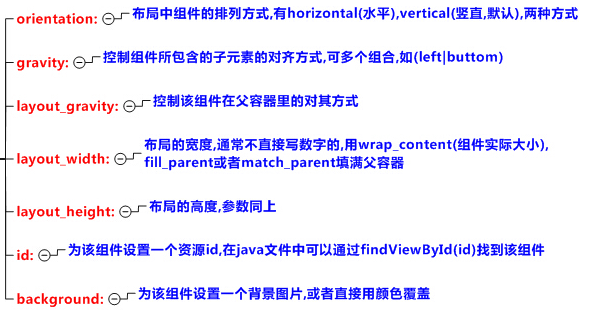
•常用属性
•注意事项
当 android:orientation="vertical" 时, 只有水平方向的设置才起作用,垂直方向的设置不起作用
- android:layout_gravity="left"
- android:layout_gravity="right"
- android:layout_gravity="center_horizontal"
当 android:orientation="horizontal" 时, 只有垂直方向的设置才起作用,水平方向的设置不起作用
- 即: top , bottom , center_vertical 是生效的
Weight(转载)
•概念
Indicates how much of the extra space in the LinearLayout is allocated to the view associated with these LayoutParams. Specify 0 if the view should not be stretched. Otherwise the extra pixels will be pro-rated among all views whose weight is greater than 0.说明:
- 指示LinearLayout中多少额外空间分配给与这些LayoutParams关联的视图
- 如果视图不应被拉伸,请指定0
- 否则,额外空间将在权重大于0的所有视图中按比例分配。
剩余布局大小(额外空间) = 父布局大小 - 子布局大小之和;
•详解
1.额外空间,指的是剩余空闲空间, 额外空间将在权重大于0的所有视图中按比例分配。
如下,总权重为1+1=2;
第一个控件是比第二个控件占的空间小的,即w(12345)+1/2空闲空间< w(123456)+1/2控件;
<LinearLayout

  android:orientation="horizontal">

  <TextView

      android:layout_width="wrap_content"

      android:layout_height="wrap_height"

      android:layout_weight="1"

      android:text="12345"/>

  <TextView

      android:layout_width="wrap_content"

      android:layout_height="wrap_height"

      android:layout_weight="1"

      android:text="123456"/>

</LinearLayout>
如果我们让控件的宽度定义为layout_width="0dp" ,这样比如2个控件的 layout_weight="1" 就可以各自50%平分整个空间了;
因为:0 + 1/2空闲空间 = 0 + 1/2空闲空间。
2.默认layout_weight为0,所以如果这么写:
<LinearLayout

    android:orientation="horizontal">

    <TextView

        android:layout_width="40dp"

        android:layout_height="match_parent"

        android:background="#000" />

    <Button

        android:layout_width="0dp"

        android:layout_height="match_parent"

        android:layout_weight="1"/>

    <TextView

        android:layout_width="40dp"

        android:layout_height="match_parent"

        android:background="#888" />

</LinearLayout>
则总权重为1,即Button占了所有剩余空闲空间,无论它在哪个位置。
3.在排列方向上设置了match_parent, 如下,权重为2,1,2
    <LinearLayout

        android:layout_width="match_parent"

        android:layout_height="match_parent"

        android:orientation="horizontal">

        <Button

            android:layout_width="match_parent"

            android:layout_height="wrap_content"

            android:text="1"

            android:layout_weight="2"/>

        <Button

            android:layout_width="match_parent"

            android:layout_height="wrap_content"

            android:text="2"

            android:layout_weight="1"/>

        <Button

            android:layout_width="match_parent"

            android:layout_height="wrap_content"

            android:text="3"

            android:layout_weight="2"/>
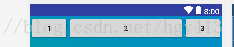
运行结果如下:
分析:
- 因为设置的都是match_parent,所以如果没有设置权重,三个Button只会显示第一个,其他会被覆盖
- 但是设置了权重后, 我们就按三个 Button 给定的 width=match_parent 计算剩余空间
- 剩余空间=1个match_parent空间-3个match_parent空间= -2个match_parent空间(负2)
- 所以
- Button1所占空间 = 1个match_parent空间+(-2个match_parent空间)*2/5 = 1/5个match_parent空间
- Button2所占空间 = 1个match_parent空间+(-2个match_parent空间)*1/5 = 3/5个match_parent空间
- Button3所占空间 = 1个match_parent空间+(-2个match_parent空间)*2/5 = 1/5个match_parent空间
所以在统一设置match_parent时,会有这么一个特性,权重越大,空间越小。
而且在某个控件权重刚好为另外的所有控件权重之和时,这个控件会消失。
如权重变为1,2,3;
    <LinearLayout

        android:layout_width="match_parent"

        android:layout_height="match_parent"

        android:orientation="horizontal">

        <Button

            android:layout_width="match_parent"

            android:layout_height="wrap_content"

            android:text="1"

            android:layout_weight="2"/>

        <Button

            android:layout_width="match_parent"

            android:layout_height="wrap_content"

            android:text="2"

            android:layout_weight="1"/>

        <Button

            android:layout_width="match_parent"

            android:layout_height="wrap_content"

            android:text="3"

            android:layout_weight="2"/>
运行结果如下:

同样的算法:
- Button1所占空间 = 1个match_parent空间+(-2个match_parent空间)*1/6 = 2/3个match_parent空间
- Button2所占空间 = 1个match_parent空间+(-2个match_parent空间)*2/6 = 1/3个match_parent空间
- Button3所占空间 = 1个match_parent空间+(-2个match_parent空间)*3/6 = 0个match_parent空间
divider(转载)
•为LinearLayout设置分割线
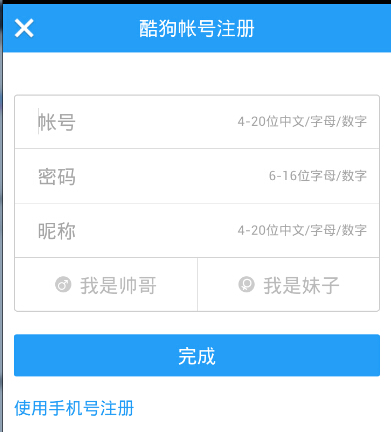
很多界面开发中都会设置一些下划线,或者分割线,从而使得界面更加整洁美观,比如下面的酷狗 音乐的注册页面:
对于这种线,我们通常的做法有两种:
- 直接在布局中添加一个view,这个view的作用仅仅是显示出一条线,代码也很简单:
android:layout_width="match_parent"
android:layout_height="1px"
android:background="#000000" />- 这个是水平方向上的黑线,当然你也可以改成其他颜色,或者使用图片
- 使用LinearLayout的一个divider属性
- 1)divider : 设置作为分割线的图片
2)showDividers : 设置分割线的位置
- none(无)
- beginning(开始)
- end(结束)
- middle(每两个组件间)
- 3)dividerPadding : 设置分割线的 Padding
本次内容转载自:LinearLayout(线性布局)
Androi Studio 之 LinearLayout的更多相关文章
- Androi Studio 之 RelativeLayout
RelativeLayout简介 •基本属性 •根据父容器定位 •父容器定位属性示意图 •根据兄弟组件定位 •根据兄弟组件定位 •margin(偏移) •padding(填充) •margin与pad ...
- Ubuntu16.04 install android-studio-ide-162.4069837-linux
本文讲解如何在Ununtu 16.04上安装jdk.Android Sdk.Anroid Studio.Genymotion.AndroidStudio与Genymotion绑定. 由于第一次装了双系 ...
- 从.NET看微软的焦虑
节日没事,就像聊聊微软的NET. 1.孩子静悄悄,必定在作妖 截止目前,微软的市值达到1.85万亿美元,按说,这样一个宙斯级的巨无霸应该过的非常舒坦, 但是,和微软市值成鲜明的反差,我们从.NET的发 ...
- 将Android Studio默认布局ConstraintLayout切换成LinearLayout
将Android Studio默认布局ConstraintLayout切换成LinearLayout 大部分人初次使用google android 扁平化布局ConstraintLayout都 ...
- Android Studio [水平布局LinearLayout]
<?xml version="1.0" encoding="utf-8"?> <LinearLayout xmlns:android=&quo ...
- android studio 使用 jni 编译 opencv 完整实例 之 图像边缘检测!从此在andrid中自由使用 图像匹配、识别、检测
目录: 1,过程感慨: 2,运行环境: 3,准备工作: 4,编译 .so 5,遇到的关键问题及其解决方法 6,实现效果截图. (原创:转载声明出处:http://www.cnblogs.com/lin ...
- android studio你可能忽视的细节——启动白屏?drawable和mipmap出现的意义?这里都有!!!
android studio用了很久了,也不知道各位小伙伴有没有还在用eclipse的,如果还有,楼主真心推荐转到android studio来吧,毕竟亲儿子,你会知道除了启动速度稍微慢些,你找不到一 ...
- Intellij idea 和android studio 代码给混淆
Intellij idea 和android studio 代码给混淆 一.指令说明-optimizationpasses 5 # 指定代码的压缩级别 -dontusemixedcaseclassna ...
- Android APK瘦身之Android Studio Lint (代码审查)
******** ******** 第一部分: 瘦身内容介绍 ******** ******** 项目新版本的迭代接近尾声, 因为历史累积问题, 导致有很多无效的资源让已经臃肿的APK变得更肿, 因此 ...
随机推荐
- Self-XSS All In One
Self-XSS All In One Self-XSS(自跨站脚本)攻击 警告! 使用此控制台可能会给攻击者可乘之机,让其利用 Self-XSS(自跨站脚本)攻击来冒充您并窃取您的信息.请勿输入或粘 ...
- Flutter: OrientationBuilder 根据方向更新UI
文档 api class _HomePageState extends State<HomePage> { @override Widget build(BuildContext cont ...
- Renice INC:全球经济危机持续,2021年红酒市场走向如何?
2021年,全球经济危机仍在持续,很多国家的经济出现了严重的下滑,不得不以降低利率维持经济.那么,全球经济危机对于红酒市场有什么影响?2021年,红酒市场走势如何呢?近日,美国知名红酒公司伦尼斯公司对 ...
- Dyno-queues 分布式延迟队列 之 生产消费
Dyno-queues 分布式延迟队列 之 生产消费 目录 Dyno-queues 分布式延迟队列 之 生产消费 0x00 摘要 0x01 前情回顾 1.1 设计目标 1.2 选型思路 0x02 产生 ...
- 微信小程序(一)-工具创建和结构配置说明 Stable Build
按装前特别说明: windows最好下载32位的,不然用到用到后面就出现"网络连接失败",然后就登录不上去了,打不开编辑器了! 问题 : 微信开发者工具网络连接失败, " ...
- python类的内部方法
目录 一.绑定方法与非绑定方法 1.绑定方法 2.非绑定方法 二.property 1.什么是property? 2.为什么要用property? 3.如何使用property? 三.isinstan ...
- 注册 Amazon Web Services(AWS) 账号,助园一臂之力
感谢大家去年的大力支持,今年园子继续和 Amazon Web Services(AWS) 合作,只要您通过 博客园专属链接 注册一个账号(建议使用手机4G网络注册),亚马逊就会给园子收入,期待您的支持 ...
- es6 快速入门 系列 —— 变量声明:let和const
其他章节请看: es6 快速入门 系列 变量声明:let和const 试图解决的问题 经典的 var 声明让人迷惑 function demo1(v){ if(v){ var color='red' ...
- 【Azure 云服务】Azure Cloud Service在发布新部署后遇见不能RDP(远程连接)到实例时如何处理?
Azure 云服务是PaaS 的一个示例. 与 Azure 应用服务一样,此技术设计用于支持可缩放.可靠且运营成本低廉的应用程序. 同样,应用服务托管在虚拟机 (VM) 上,Azure 云服务也是如此 ...
- 2020年12月-第02阶段-前端基础-CSS Day03
CSS Day03 盒子模型(CSS重点) css学习三大重点: css 盒子模型 . 浮动 . 定位 主题思路: 理解: 1.能说出盒子模型有那四部分组成 2.能说出内边距的作用以及对盒子的影响 3 ...