
Spring Boot自定义错误视图
Spring Boot缺省错误视图解析器
Web应用在处理请求的过程中发生错误是非常常见的情况,SpringBoot中为我们实现了一个错误视图解析器(DefaultErrorViewResolver)。它基于一些常见的约定,尝试根据HTTP错误状态码解析出错误处理视图。它会在目录/error下针对提供的HTTP错误状态码搜索模板或者静态资源,比如,给定了HTTP状态码404,它会尝试搜索如下模板或者静态资源:
- /<templates>/error/404.<ext> - 这里<templates>表示所配置的模板所在目录,<ext>表示所用的模板的文件名
- /<static>/error/404.html - 这里<static>表示静态资源文件所在路径、
- /<templates>/error/4xx.<ext>
- /<static>/error/4xx.html
如果找不到就用默认的白标错误视图,如下图所示:
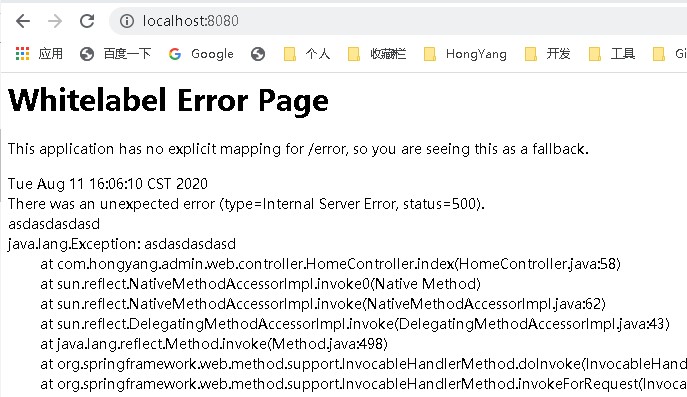
因此,为了给用户最佳的使用体验,404等常见错误需要我们自定义页面来处理。以下是几种自定义错误页面的方式。
方式1. 定义静态的错误页面
在 resources 下的 static 目录下,新建 error 目录,在其中新建各种静态错误页面,如 404、500,也可以模糊处理,如4xx、5xx 等,当程序运行出错时,会自动根据错误代码(如500)找到相应的错误页面(如/static/error/500.html),给予展示。
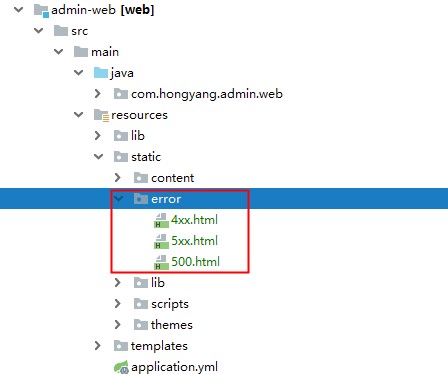
方式2. 定义动态的错误页面(有采用模板引擎)
在有使用模板的情况下,SpringBoot缺省的错误视图解析器也会在/<templates>/error下搜索错误展示视图。我们可以使用项目中的视图模板引擎在错误页面来定制展示我们的错误消息。
1) 在 resources 下的 templates 目录下,新建 error 目录,在其中新建各种静态错误页面,如 404、500,也可以模糊处理,如4xx、5xx 等(与方式1一致)+
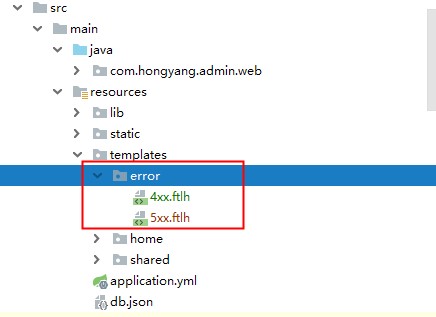
在模板引擎的支持下可以取到错误的一些信息,并定制化显示在页面上,如下(freemarker模板):
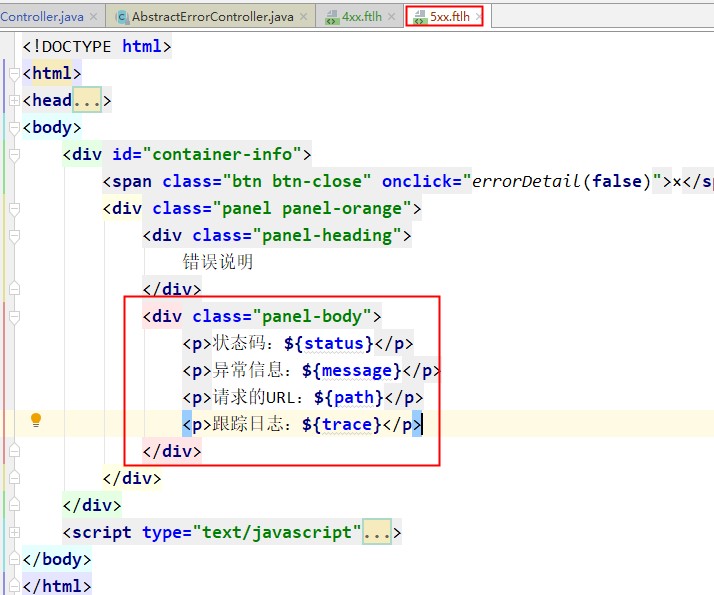
错误信息定制:
- timestamp:时间戳
- status:状态码
- error:错误提示
- exception:异常对象
- trace:跟踪流程日志,404状态下无
- message:异常消息
- path:请求路径
方式3. 自定义实现错误视图解析,统一错误处理
如果不想要使用缺省的错误处理视图解析器,想要定制一些自己的东西(比如说:错误引导信息等),按照官方文档的建议我们可以自定义实现错误视图解析接口来处理。
下面就是通过实现错误视图解析接口ErrorViewResolver,将4xx、5xx 的错误页面集中在一个自定义视图上:
1)实现 ErrorViewResolver 接口
package com.hongyang.admin.web;

import org.springframework.boot.autoconfigure.web.servlet.error.ErrorViewResolver;

import org.springframework.http.HttpStatus;

import org.springframework.stereotype.Component;

import org.springframework.web.servlet.ModelAndView;

import javax.servlet.http.HttpServletRequest;

import java.util.Map;

/**

 * 实现自定义的错误视图解析器

 */

@Component

public class AdminErrorViewResolver implements ErrorViewResolver {

    /**

     * 实现ErrorViewResolver约定方法,

     * 返回统一的错误视图.

     * @param request

     * @param status

     * @param model

     * @return

     */

    @Override

    public ModelAndView resolveErrorView(HttpServletRequest request, HttpStatus status, Map<String, Object> model) {

        return new ModelAndView("/error/index", model);

    }

}
2)完成错误视图,在templates/error下添加index.ftlh视图(freemarker模板)
<!DOCTYPE html>

<html>

<head >

    <link href="/content/public/images/logo-small.png" rel="shortcut icon" />

    <meta http-equiv="Content-Type" content="text/html; charset=UTF-8">

    <title>${status}</title>

    <meta name="renderer" content="webkit">

    <meta http-equiv="X-UA-Compatible" content="IE=edge,chrome=1">

    <meta name="viewport" content="width=device-width, initial-scale=1, maximum-scale=1">

    <meta name="apple-mobile-web-app-status-bar-style" content="black">

    <meta name="apple-mobile-web-app-capable" content="yes">

    <meta name="format-detection" content="telephone=no">

    <style>

        body {

            position: fixed;

            z-index: 10;

            top: 0;

            left: 0;

            right: 0;

            bottom: 0;

            width: 100%;

            padding: 0;

            margin: 0px;

            font-size: 14px;

            background: #fff;

            word-wrap: break-word;

        }

        p {

            padding: 0 15px;

        }

        .btn {

            border: 0px;

            color: #fff;

            cursor: pointer;

            text-align: center;

            background-color: #ff7a5f\0;

            box-shadow: #cccccc 0 2px 15px 0;

            -webkit-box-shadow: 0 2px 7px 0 rgba(0,0,0,0.2);

            background: radial-gradient(circle at 300% 50%, rgb(255, 195, 114) 50%, rgb(255, 105, 90) 100%);

            transition: all .2s ease-out,box-shadow .2s ease-out;

        }

        .btn:hover {

            color: #FFFFFF;

            transform: scale(1.1);

        }

        .btn:focus {

            outline: none;

        }

        .container {

            margin: 8% auto;

        }

        .container p {

            margin: 35px auto;

            text-align: center;

        }

        .container img {

            width: 20%;

        }

        .container .font {

            color: #848484;

        }

        .container .btn-back {

            width: 180px;

            height: 35px;

            border-radius: 6px;

        }

        #container-info {

            display: none;

            position: fixed;

            z-index: 11;

            top: 5%;

            left: 0;

            right: 0;

            margin: 0 auto;

            width: 65%;

            height: 85%;

            overflow: hidden;

            border-radius: 4px;

            border: 1px solid #f1986e;

            background-color: #fff;

            box-shadow: inset 0 1px 1px rgba(0,0,0,.075), 0 0 8px rgb(242, 154, 110);

        }

        #container-info .btn-close {

            position: absolute;

            right: 5px;

            top: 5px;

            width: 25px;

            height: 25px;

            line-height: 25px;

            font-size: 22px;

            padding: 2px;

            border-radius: 50%;

            text-align: center;

        }

        #container-info p {

            font-size: 12px;

            line-height: 20px;

        }

        .show {

            display: block !important;

        }

        .cor-r {

            color: red;

        }

        @media (max-width: 767px) {

            .container img {

                width: 50%;

            }

            #container-info {

                width: 85%;

            }

        }

        .panel-heading {

            height: 32px;

            line-height: 32px;

            padding: 5px 15px;

        }

        .panel-body {

            height: calc(85vh - 40px);

            overflow: auto;

        }

        .panel-orange .panel-heading {

            background-color: #ffa0681f;

            color: #ff6f5c;

        }

    </style>

</head>

<body>

<form id="form1" >

    <div class="container">

        <p><img src="/content/public/images/error_${status}.png"/></p>

        <p class="font">${error},<a onclick="errorDetail(true)" href="javascript: void(0)">点击查看明细</a>!</p>

        <p><button type="button" class="btn btn-back" id="btnBack" >返回</button></p>

    </div>

    <div id="container-info">

        <span class="btn btn-close" onclick="errorDetail(false)">×</span>

        <div class="panel panel-orange">

            <div class="panel-heading">

                错误说明

            </div>

            <div class="panel-body">

                <#if path??>

                    <p><b>请求的URL:</b>${path}</p>

                </#if>

                <#if message??>

                    <p><b>异常信息:</b><span class="cor-r">${message}</span></p>

                </#if>

                <#if trace??>

                    <p><b>StackTrace:</b><br>${trace}</p>

                </#if>

            </div>

        </div>

    </div>

    <script type="text/javascript">

        window.onload = function () {

            var btn = document.getElementById("btnBack");

            btn.onclick = function () {

                var url = document.referrer;

                if (url.indexOf("home/main") > 0) {

                    window.parent.tabDelete();

                    return;

                }

                window.history.back(-1);

            }

        }

        function errorDetail(isShow) {

            var con = document.getElementById("container-info");

            con.className = isShow ? "show" : ""; // 兼容IE8

        }

    </script>

</form>

</body>

</html>
3)最后效果

错误页面的展示优先级
1、精确大于模糊
2、动态大于静态

Spring Boot自定义错误视图的更多相关文章
- Spring Boot自定义错误页面,Whitelabel Error Page处理方式
我已经是Spring Framework框架的忠实粉丝.对于企业软件开发者来说它提供了对常见问题的通用解决方案,包括那些你在未来开发中没有意识到的问题.但是,它构建的J2EE项目变得比较臃肿,需要被一 ...
- (后端)Spring Boot自定义错误页面,Whitelabel Error Page处理方式(转)
我已经是Spring Framework框架的忠实粉丝.对于企业软件开发者来说它提供了对常见问题的通用解决方案,包括那些你在未来开发中没有意识到的问题.但是,它构建的J2EE项目变得比较臃肿,需要被一 ...
- spring boot 自定义视图路径
boot 自定义访问视图路径 . 配置文件 目录结构 启动类: html页面 访问: 覆盖boot默认路径引用. 如果没有重新配置,则在pom引用模板. 修改配置文件. 注意一定要编译工程
- Spring Boot自定义配置与加载
Spring Boot自定义配置与加载 application.properties主要用来配置数据库连接.日志相关配置等.除了这些配置内容之外,还可以自定义一些配置项,如: my.config.ms ...
- Spring Boot 2.X(四):Spring Boot 自定义 Web MVC 配置
0.准备 Spring Boot 不仅提供了相当简单使用的自动配置功能,而且开放了非常自由灵活的配置类.Spring MVC 为我们提供了 WebMvcConfigurationSupport 类和一 ...
- Spring Boot 自定义kafka 消费者配置 ContainerFactory最佳实践
Spring Boot 自定义kafka 消费者配置 ContainerFactory最佳实践 本篇博文主要提供一个在 SpringBoot 中自定义 kafka配置的实践,想象这样一个场景:你的系统 ...
- Spring Boot自定义starter必知必会条件
前言 在目前的Spring Boot框架中,不管是Spring Boot官方还是非官方,都提供了非常多的starter系列组件,助力开发者在企业应用中的开发,提升研发人员的工作效率,Spring Bo ...
- spring boot自定义线程池以及异步处理
spring boot自定义线程池以及异步处理@Async:什么是线程池?线程池是一种多线程处理形式,处理过程中将任务添加到队列,然后在创建线程后自动启动这些任务.线程池线程都是后台线程.每个线程都使 ...
- Spring Boot自定义Redis缓存配置,保存value格式JSON字符串
Spring Boot自定义Redis缓存,保存格式JSON字符串 部分内容转自 https://blog.csdn.net/caojidasabi/article/details/83059642 ...
随机推荐
- P4017 最大食物链计数 (拓扑排序)
看到拓扑排序感觉非常遥远的复杂,不喜欢图.看了拓扑排序的原理,很像广搜. 以本题样例为例: 了解一下 出度 和 入度 5的出度为3 入度为 0 ,3的出度为2 入度为2…… for循环 找到秃头 5 ...
- 地图热点 jquery.image-maps.js 的使用
在我悠闲了几天之后,我们后端给了我个任务,地图热点问题.简单来说,就是后台划出热点区域,设置链接,前端拿到数据渲染页面,显示热点区域.我主要使用了jquery.image-maps.js,并且添加了一 ...
- 深入理解JVM(③)Java的锁优化
前言 从JDK5到JDK6HotSpot虚拟机开发团队花费了大量的资源实现了各种锁优化技术,如适应性自旋(Adaptive Spinning).锁消除(Lock Elimination).锁膨胀(Lo ...
- three.js 制作一个三维的推箱子游戏
今天郭先生发现大家更喜欢看我发的three.js小作品,今天我就发一个3d版本推箱子的游戏,其实webGL有很多框架,three.js并不合适做游戏引擎,但是可以尝试一些小游戏.在线案例请点击博客原文 ...
- JavaScript高级程序设计(第三版) 7/25
第七章 函数表达式 1.定义函数的方式有两种,一种是函数声明,一种是函数表达式. //函数声明 function fuc (a){ } //函数表达式 var fuc = function(a){ } ...
- GitHub 热点速览 Vol.30:那些提升效率的小工具们
摘要:虽然 GitHub 是一个学习技术的好去处,但是除了学习,它还集提高"搬砖"效率于一身.GitHub 上散落着各式各样的小工具,比如本周特推的 Adobe 开源的 React ...
- 《Python测试开发技术栈—巴哥职场进化记》—初来乍到,请多关照
上文<巴哥职场进化记-Python测试开发技术栈>开篇讲到巴哥毕业初到深圳,见到了来自五湖四海的室友.一番畅聊之后,抱着对未来职场生活的期待,大家都进入了梦乡.今天我们来看看巴哥第一天上班 ...
- PHP rmdir() 函数
定义和用法 rmdir() 函数删除空的目录. 如果成功,该函数返回 TRUE.如果失败,则返回 FALSE. 语法 rmdir(dir,context) 参数 描述 dir 必需.规定要删除的目录. ...
- 7.28 NOI模拟赛 H2O 笛卡尔树 并查集 贪心 长链剖分
LINK:H2O 这场比赛打的稀烂 爆蛋. 只会暴力.感觉暴力细节比较多不想写. 其实这道题的难点就在于 采取什么样的策略放海绵猫. 知道了这一点才能确定每次放完海绵猫后的答案. 暴力枚举是不行的.而 ...
- C/C++编程笔记:C语言写推箱子小游戏,大一学习C语言练手项目
C语言,作为大多数人的第一门编程语言,重要性不言而喻,很多编程习惯,逻辑方式在此时就已经形成了.这个是我在大一学习 C语言 后写的推箱子小游戏,自己的逻辑能力得到了提升,在这里同大家分享这个推箱子小游 ...