
pyspider architecture--官方文档
原文地址:http://docs.pyspider.org/en/latest/Architecture/
Architecture
This document describes the reason why I made pyspider and the architecture.
Why
Two years ago, I was working on a vertical search engine. We are facing following needs on crawling:
collect 100-200 websites, they may on/offline or change their templates at any time
We need a really powerful monitor to find out which website is changing. And a good tool to help us write script/template for each website.
data should be collected in 5min when website updated
We solve this problem by check index page frequently, and use something like 'last update time' or 'last reply time' to determine which page is changed. In addition to this, we recheck pages after X days in case to prevent the omission.
pyspider will never stop as WWW is changing all the time
Furthermore, we have some APIs from our cooperators, the API may need POST, proxy, request signature etc. Full control from script is more convenient than some global parameters of components.
Overview
The following diagram shows an overview of the pyspider architecture with its components and an outline of the data flow that takes place inside the system.
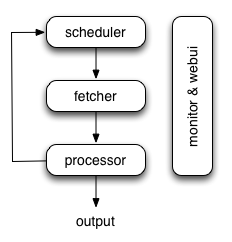
Components are connected by message queue. Every component, including message queue, is running in their own process/thread, and replaceable. That means, when process is slow, you can have many instances of processor and make full use of multiple CPUs, or deploy to multiple machines. This architecture makes pyspider really fast. benchmarking.
Components
Scheduler
The Scheduler receives tasks from newtask_queue from processor. Decide whether the task is new or requires re-crawl. Sort tasks according to priority and feeding them to fetcher with traffic control (token bucket algorithm). Take care of periodic tasks, lost tasks and failed tasks and retry later.
All of above can be set via self.crawl API.
Note that in current implement of scheduler, only one scheduler is allowed.
Fetcher
The Fetcher is responsible for fetching web pages then send results to processor. For flexible, fetcher support Data URI and pages that rendered by JavaScript (via phantomjs). Fetch method, headers, cookies, proxy, etag etc can be controlled by script via API.
Phantomjs Fetcher
Phantomjs Fetcher works like a proxy. It's connected to general Fetcher, fetch and render pages with JavaScript enabled, output a general HTML back to Fetcher:
scheduler -> fetcher -> processor

                |

            phantomjs

                |

             internet
Processor
The Processor is responsible for running the script written by users to parse and extract information. Your script is running in an unlimited environment. Although we have various tools(like PyQuery) for you to extract information and links, you can use anything you want to deal with the response. You may refer to Script Environment and API Reference to get more information about script.
Processor will capture the exceptions and logs, send status(task track) and new tasks to scheduler, send results to Result Worker.
Result Worker (optional)
Result worker receives results from Processor. Pyspider has a built-in result worker to save result to resultdb. Overwrite it to deal with result by your needs.
WebUI
WebUI is a web frontend for everything. It contains:
- script editor, debugger
- project manager
- task monitor
- result viewer, exporter
Maybe webui is the most attractive part of pyspider. With this powerful UI, you can debug your scripts step by step just as pyspider do. Starting or stop a project. Finding which project is going wrong and what request is failed and try it again with debugger.
Data flow
The data flow in pyspider is just as your seen in diagram above:
- Each script has a callback named
on_start, when you press theRunbutton on WebUI. A new task ofon_startis submitted to Scheduler as the entries of project. - Scheduler dispatches this
on_starttask with a Data URI as a normal task to Fetcher. - Fetcher makes a request and a response to it (for Data URI, it's a fake request and response, but has no difference with other normal tasks), then feeds to Processor.
- Processor calls the
on_startmethod and generated some new URL to crawl. Processor send a message to Scheduler that this task is finished and new tasks via message queue to Scheduler (here is no results foron_startin most case. If has results, Processor send them toresult_queue). - Scheduler receives the new tasks, looking up in the database, determine whether the task is new or requires re-crawl, if so, put them into task queue. Dispatch tasks in order.
- The process repeats (from step 3) and wouldn't stop till WWW is dead ;-). Scheduler will check periodic tasks to crawl latest data.
pyspider architecture--官方文档的更多相关文章
- Spring 4 官方文档学习 Spring与Java EE技术的集成
本部分覆盖了以下内容: Chapter 28, Remoting and web services using Spring -- 使用Spring进行远程和web服务 Chapter 29, Ent ...
- OGR 官方文档
OGR 官方文档 http://www.gdal.org/ogr/index.html The OGR Simple Features Library is a C++ open source lib ...
- cassandra 3.x官方文档(5)---探测器
写在前面 cassandra3.x官方文档的非官方翻译.翻译内容水平全依赖本人英文水平和对cassandra的理解.所以强烈建议阅读英文版cassandra 3.x 官方文档.此文档一半是翻译,一半是 ...
- Cuda 9.2 CuDnn7.0 官方文档解读
目录 Cuda 9.2 CuDnn7.0 官方文档解读 准备工作(下载) 显卡驱动重装 CUDA安装 系统要求 处理之前安装的cuda文件 下载的deb安装过程 下载的runfile的安装过程 安装完 ...
- hbase官方文档(转)
FROM:http://www.just4e.com/hbase.html Apache HBase™ 参考指南 HBase 官方文档中文版 Copyright © 2012 Apache Soft ...
- HBase官方文档
HBase官方文档 目录 序 1. 入门 1.1. 介绍 1.2. 快速开始 2. Apache HBase (TM)配置 2.1. 基础条件 2.2. HBase 运行模式: 独立和分布式 2.3. ...
- Spring Cloud官方文档中文版-服务发现:Eureka客户端
官方文档地址为:http://cloud.spring.io/spring-cloud-static/Dalston.SR2/#_spring_cloud_netflix 文中例子我做了一些测试在:h ...
- Akka Typed 官方文档之随手记
️ 引言 近两年,一直在折腾用FP与OO共存的编程语言Scala,采取以函数式编程为主的方式,结合TDD和BDD的手段,采用Domain Driven Design的方法学,去构造DDDD应用(Dom ...
- Lagom 官方文档之随手记
引言 Lagom是出品Akka的Lightbend公司推出的一个微服务框架,目前最新版本为1.6.2.Lagom一词出自瑞典语,意为"适量". https://www.lagomf ...
- 【AutoMapper官方文档】DTO与Domin Model相互转换(上)
写在前面 AutoMapper目录: [AutoMapper官方文档]DTO与Domin Model相互转换(上) [AutoMapper官方文档]DTO与Domin Model相互转换(中) [Au ...
随机推荐
- 12) 十分钟学会android--APP通信传递消息之简单数据传输
程序间可以互相通信是Android程序中最棒的功能之一.当一个功能已存在于其他app中,且并不是本程序的核心功能时,完全没有必要重新对其进行编写. 本章节会讲述一些通在不同程序之间通过使用Intent ...
- Wireshark抓本地回环
最近正好要分析下本机两个端口之间通信状况.于是用wireshark抓包分析.对于本地回环要进行一些特殊的设置. 1.通过“运行”---“cmd” 输入“route add [本机IP]mask 255 ...
- 理解题意后的UVa340
之前理解题意错误,应该是每一次game,只输入一组答案序列,输入多组测试序列,而之前的错误理解是每一次输入都对应一组答案序列和一组测试序列,下面是理解题意后的代码,但是还是WA,待修改 #includ ...
- 11.05 选择前n个记录
select ename,salfrom(select (select count(distinct b.sal)from emp bwhere a.sal<=b.sal) as rnk,a.s ...
- sql_2
编辑表结构ALTER TABLE `sp_account_trans` MODIFY COLUMN `TRANS_DESC` varchar(81) CHARACTER SET utf8 CO ...
- Nuget包含css\js等资源文件
<Project Sdk="Microsoft.NET.Sdk"> <PropertyGroup> <TargetFramework>netst ...
- Day 08 字符编码
字符编码 计算机基础 启动应用程序 1.双击QQ 2.操作系统接受指定然后把该操作转化为0和1发送给CPU 3.CPU接受指令然后把指令发给内存 4.内存接受指令把指令发送给硬盘获取数据 5.QQ在内 ...
- Tab 切换效果
今天写的两个小效果都是为了测试我写的单参函数,结果还是有点成功的~~此处是不是想发表情包! Tab效果很简单,这里我就不赘述了,直接上代码: html代码: <div class="c ...
- javaScript原型、闭包和异步操作
同学们,这篇博客有点水了,并不是说我不想写这块的内容,是因为查了很多资料,看了很多帖子之后,发现园内王福朋老师写的这系列文章真的很好,他的这系列的博客我已经看了3.4遍了,每一次都有新的收获,我可写不 ...
- nyoj181-小明的难题
小明的难题时间限制:3000 ms | 内存限制:65535 KB难度:2描述课堂上小明学会了用计算机求出N的阶乘,回到家后就对妹妹炫耀起来.为了不让哥哥太自满,妹妹给小明出了个问题"既 ...