
centOS 7安装mysql5.6
方法二:官网下载安装mysql-server
# wget http://dev.mysql.com/get/mysql-community-release-el7-5.noarch.rpm

# rpm -ivh mysql-community-release-el7-5.noarch.rpm

# yum install mysql-community-server
安装成功后重启mysql服务。
# service mysqld restart
初次安装mysql,root账户没有密码。

[root@yl-web yl]# mysql -u root

Welcome to the MySQL monitor.  Commands end with ; or \g.

Your MySQL connection id is 3

Server version: 5.6.26 MySQL Community Server (GPL)

Copyright (c) 2000, 2015, Oracle and/or its affiliates. All rights reserved.

Oracle is a registered trademark of Oracle Corporation and/or its

affiliates. Other names may be trademarks of their respective

owners.

Type 'help;' or '\h' for help. Type '\c' to clear the current input statement.

mysql> show databases;

+--------------------+

| Database           |

+--------------------+

| information_schema |

| mysql              |

| performance_schema |

| test               |

+--------------------+

4 rows in set (0.01 sec)

mysql>
设置密码
mysql> set password for 'root'@'localhost' =password('password');

Query OK, 0 rows affected (0.00 sec)

mysql>
不需要重启数据库即可生效。
在mysql安装过程中如下内容:
Installed:
  mysql-community-client.x86_64 0:5.6.26-2.el7                mysql-community-devel.x86_64 0:5.6.26-2.el7
  mysql-community-libs.x86_64 0:5.6.26-2.el7                  mysql-community-server.x86_64 0:5.6.26-2.el7

Dependency Installed:
  mysql-community-common.x86_64 0:5.6.26-2.el7

Replaced:
  mariadb.x86_64 1:5.5.41-2.el7_0          mariadb-devel.x86_64 1:5.5.41-2.el7_0   mariadb-libs.x86_64 1:5.5.41-2.el7_0
  mariadb-server.x86_64 1:5.5.41-2.el7_0
所以安装完以后mariadb自动就被替换了,将不再生效。
[root@yl-web yl]# rpm -qa |grep mariadb

[root@yl-web yl]#
三、配置mysql
1、编码
mysql配置文件为/etc/my.cnf
最后加上编码配置
[mysql]

default-character-set =utf8
这里的字符编码必须和/usr/share/mysql/charsets/Index.xml中一致。
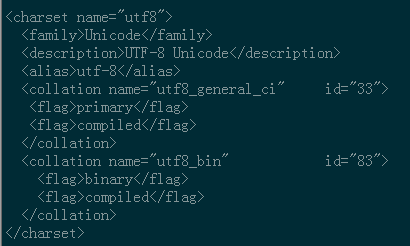
2、远程连接设置
把在所有数据库的所有表的所有权限赋值给位于所有IP地址的root用户。
mysql> grant all privileges on *.* to root@'%'identified by 'password';
如果是新用户而不是root,则要先新建用户
mysql>create user 'username'@'%' identified by 'password';
此时就可以进行远程连接了。
centOS 7安装mysql5.6的更多相关文章
- 在centos上安装mysql5.7的三种方法
带OS信息的是已编译的二进制文件,不带OS信息的是源码包 mysql-5.7.14-linux-glibc2.5-x86_64.tar.gz 二进制包 mysql-5.5.51.tar.gz 源码包 ...
- centos 7安装mysql5.5
首先centos7 已经不支持mysql,因为收费了你懂得,所以内部集成了mariadb,而安装mysql的话会和mariadb的文件冲突,所以需要先卸载掉mariadb,以下为卸载mariadb,安 ...
- centOS上安装MySQL5.7
在centos上安装mysql,前提得有sudo的权限.没有的话先去跟管理员申请一个. STEP 1 - 安装MySQL 首先打开浏览器访问下 https://dev.mysql.com/downlo ...
- CentOS RPM安装MySQL-5.6
1.检查是否有安装 安装之前应该先查询系统是否自在了mysql的软件包 rpm -qa|grep -i mysql 如果有的话需要先删除 rpm -e 软件名 --nodeps 2.下载安装包 cd/ ...
- centos 下安装mysql-5.6.11
这次是在centos6.4下安装mysql,在安装之前,你要先确定你的linux已经安装了这些包: wget, gcc-c++, ncurses-devel ,cmake, make ,perl 如果 ...
- Centos 7 安装 mysql5.7
1.需要下载mysql 下载地址:http://dev.mysql.com/downloads/mysql/ 2.将下载的rpm包上传到centos 7上(我是放在根下面的opt目录) 3. 安装my ...
- centos下安装Mysql5.7.20
0.环境 本文操作系统: CentOS 7.2.1511 x86_64MySQL 版本: 5.7.16 1.卸载系统自带的 mariadb-lib [root@centos-linux ~]# rpm ...
- CentOS RPM 安装 MySQL5.7
环境 CentOS 7 64位 MySQL 5.7 64位 1.卸载系统自带的 mariadb [root@localhost /]# rpm -qa|grep mariadb mariadb-lib ...
- CentOS 编译安装 MySQL5.7
下载 所有版本下载地址: http://dev.mysql.com/downloads/mysql/ 此处用 5.7.10 wget http://dev.mysql.com/get/Download ...
- CentOS在线安装Mysql5.7
一.通过Yum命令安装 1.下载rpm安装源 官方地址:https://dev.mysql.com/downloads/repo/yum/ rpm文件地址:https://dev.mysql.com/ ...
随机推荐
- JavaScript实现网页换肤
<html> <head> <meta charset="utf-8"> <title>无标题文档</title> &l ...
- Windows Server2008上安装VS2008出错及解决办法
作者:朱金灿 来源:http://blog.csdn.net/clever101 win server 2008安装vs2008后报错,如下图: 然后到网上找了一种解决办法: (1)打开服务器管理器 ...
- mindmanager 2018 中文破解版_注册码_免激活
MindManager 2018是一个可视化的工具,可以用在脑力风暴(brainstorm)和计划(plan)当中.为商务人士提供更有效的.电子化手段捕捉.组织和联系信息(information)和想 ...
- Mysql重复数据查询置为空
前两天产品有个需求,相同的商品因为价格不同而分开展示,但是明细还是算一条明细,具体区分展示出商品的价格和数量信息,其他重复的商品信息要置空. 需求并不难,用程序代码循环处理就可以了.但是后面涉及到打印 ...
- 微信二次认证 C#
using Senparc.Weixin.Entities; using Senparc.Weixin.HttpUtility; using Senparc.Weixin.QY.AdvancedAPI ...
- tomcat-manager 设置
tomcat默认是没有用户登录控制的,需要登录manager,则需要配置角色与用户 1. 在conf/tomcat-users.xml中添加 <role rolename="manag ...
- Project Euler 23 Non-abundant sums( 整数因子和 )
题意: 完全数是指真因数之和等于自身的那些数.例如,28的真因数之和为1 + 2 + 4 + 7 + 14 = 28,因此28是一个完全数. 一个数n被称为亏数,如果它的真因数之和小于n:反之则被称为 ...
- HDU-1695 GCD(求一个区间内与一个数互质的个数)
题意: 给你一个T,是样例的个数,接下来是五个数l1,r1,l2,r2,k 前四个数代表两个区间(l1,r1),(l2,r2)这个题l1=1,l2=1; 取x1属于(1,r1),x2属于(1,r2) ...
- oracle 禁用外键约束
1.ORACLE数据库中的外键约束名都在表user_constraints中可以查到.其中constraint_type='R'表示是外键约束.2.启用外键约束的命令为:alter table tab ...
- 【Codeforces Round #507 (Div. 2, based on Olympiad of Metropolises) B】Shashlik Cooking
[链接] 我是链接,点我呀:) [题意] 在这里输入题意 [题解] 翻转一次最多影响2k+1个地方. 如果n<=k+1 那么放在1的位置就ok.因为能覆盖1..k+1 如果n<=2k+1 ...