
centOS 7安装mysql5.6
方法二:官网下载安装mysql-server
# wget http://dev.mysql.com/get/mysql-community-release-el7-5.noarch.rpm

# rpm -ivh mysql-community-release-el7-5.noarch.rpm

# yum install mysql-community-server
安装成功后重启mysql服务。
# service mysqld restart
初次安装mysql,root账户没有密码。

[root@yl-web yl]# mysql -u root

Welcome to the MySQL monitor.  Commands end with ; or \g.

Your MySQL connection id is 3

Server version: 5.6.26 MySQL Community Server (GPL)

Copyright (c) 2000, 2015, Oracle and/or its affiliates. All rights reserved.

Oracle is a registered trademark of Oracle Corporation and/or its

affiliates. Other names may be trademarks of their respective

owners.

Type 'help;' or '\h' for help. Type '\c' to clear the current input statement.

mysql> show databases;

+--------------------+

| Database           |

+--------------------+

| information_schema |

| mysql              |

| performance_schema |

| test               |

+--------------------+

4 rows in set (0.01 sec)

mysql>
设置密码
mysql> set password for 'root'@'localhost' =password('password');

Query OK, 0 rows affected (0.00 sec)

mysql>
不需要重启数据库即可生效。
在mysql安装过程中如下内容:
Installed:
  mysql-community-client.x86_64 0:5.6.26-2.el7                mysql-community-devel.x86_64 0:5.6.26-2.el7
  mysql-community-libs.x86_64 0:5.6.26-2.el7                  mysql-community-server.x86_64 0:5.6.26-2.el7

Dependency Installed:
  mysql-community-common.x86_64 0:5.6.26-2.el7

Replaced:
  mariadb.x86_64 1:5.5.41-2.el7_0          mariadb-devel.x86_64 1:5.5.41-2.el7_0   mariadb-libs.x86_64 1:5.5.41-2.el7_0
  mariadb-server.x86_64 1:5.5.41-2.el7_0
所以安装完以后mariadb自动就被替换了,将不再生效。
[root@yl-web yl]# rpm -qa |grep mariadb

[root@yl-web yl]#
三、配置mysql
1、编码
mysql配置文件为/etc/my.cnf
最后加上编码配置
[mysql]

default-character-set =utf8
这里的字符编码必须和/usr/share/mysql/charsets/Index.xml中一致。
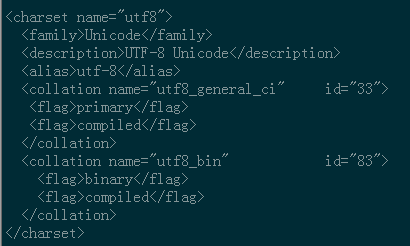
2、远程连接设置
把在所有数据库的所有表的所有权限赋值给位于所有IP地址的root用户。
mysql> grant all privileges on *.* to root@'%'identified by 'password';
如果是新用户而不是root,则要先新建用户
mysql>create user 'username'@'%' identified by 'password';
此时就可以进行远程连接了。
centOS 7安装mysql5.6的更多相关文章
- 在centos上安装mysql5.7的三种方法
带OS信息的是已编译的二进制文件,不带OS信息的是源码包 mysql-5.7.14-linux-glibc2.5-x86_64.tar.gz 二进制包 mysql-5.5.51.tar.gz 源码包 ...
- centos 7安装mysql5.5
首先centos7 已经不支持mysql,因为收费了你懂得,所以内部集成了mariadb,而安装mysql的话会和mariadb的文件冲突,所以需要先卸载掉mariadb,以下为卸载mariadb,安 ...
- centOS上安装MySQL5.7
在centos上安装mysql,前提得有sudo的权限.没有的话先去跟管理员申请一个. STEP 1 - 安装MySQL 首先打开浏览器访问下 https://dev.mysql.com/downlo ...
- CentOS RPM安装MySQL-5.6
1.检查是否有安装 安装之前应该先查询系统是否自在了mysql的软件包 rpm -qa|grep -i mysql 如果有的话需要先删除 rpm -e 软件名 --nodeps 2.下载安装包 cd/ ...
- centos 下安装mysql-5.6.11
这次是在centos6.4下安装mysql,在安装之前,你要先确定你的linux已经安装了这些包: wget, gcc-c++, ncurses-devel ,cmake, make ,perl 如果 ...
- Centos 7 安装 mysql5.7
1.需要下载mysql 下载地址:http://dev.mysql.com/downloads/mysql/ 2.将下载的rpm包上传到centos 7上(我是放在根下面的opt目录) 3. 安装my ...
- centos下安装Mysql5.7.20
0.环境 本文操作系统: CentOS 7.2.1511 x86_64MySQL 版本: 5.7.16 1.卸载系统自带的 mariadb-lib [root@centos-linux ~]# rpm ...
- CentOS RPM 安装 MySQL5.7
环境 CentOS 7 64位 MySQL 5.7 64位 1.卸载系统自带的 mariadb [root@localhost /]# rpm -qa|grep mariadb mariadb-lib ...
- CentOS 编译安装 MySQL5.7
下载 所有版本下载地址: http://dev.mysql.com/downloads/mysql/ 此处用 5.7.10 wget http://dev.mysql.com/get/Download ...
- CentOS在线安装Mysql5.7
一.通过Yum命令安装 1.下载rpm安装源 官方地址:https://dev.mysql.com/downloads/repo/yum/ rpm文件地址:https://dev.mysql.com/ ...
随机推荐
- 定义maven的项目结构
创建一个Maven 的父项目 新建一个maven项目,选中create a simple project 填写以下内容: 如下内容: Group Id :edu.zipcloud.cloudstree ...
- 【华科考研机试题】最长&最短文本
题目 输入多行字符串,请按照原文本中的顺序输出其中最短和最长的字符串,如果最短和最长的字符串不止一个,请全部输出. 解题思路 1.输入所有字符串(有空格不另算字符串). 2.将char*字符串转换成s ...
- 7.5.5编程实例-Bezier曲线曲面绘制
(a)Bezier曲线 (b) Bezier曲面 1. 绘制Bezier曲线 #include <GL/glut.h> GLfloat ct ...
- (转)RabbitMQ学习之集群部署
http://blog.csdn.net/zhu_tianwei/article/details/40931971 我们先搭建一个普通集群模式,在这个模式基础上再配置镜像模式实现高可用,Rabbit集 ...
- Dynamics 365 CRM 部署 Connected Field Service
微软 Connected Field Service 是一个提供Azure IoT 和 Dynamics 365 连接的这样一个框架 有两种方式部署CFS, 一种是用IoT Hub PaaS, 一种是 ...
- 微信二次认证 C#
using Senparc.Weixin.Entities; using Senparc.Weixin.HttpUtility; using Senparc.Weixin.QY.AdvancedAPI ...
- python tips:生成器的小问题
在Python中,生成器和函数很像,都是在运行的过程中才会去确定各种变量的值,所以在很多情况下,会导致各种各样的问题. def generator_test1(): # 0...9 generator ...
- DB2解决死锁
方法一.查看db2diag.log文件 找到DeadLock or Lock timeout搜索 死锁或锁超时信息db2 force application(句柄ID)直接结束进程即可. 方法二.DB ...
- USACO 2008 Nov Gold 3.Light Switching 线段树
Code: #include<cstdio> #include<algorithm> #include<cstring> using namespace std; ...
- XSS Chanllenges 16-19
Stage #16 同样为DOM 型XSS ,document.write() 方法 插入代码 \x3cscript\x3ealert(document.domain)\x3c/script\x3e ...