
微信小程序获取登录手机号
小程序获取登录用户手机号。
因为需要用户主动触发才能发起获取手机号接口,所以该功能不由 API 来调用,需用 <button> 组件的点击来触发。
首先,放置一个 button 按钮,将 button 的 open-type 的属性值设为 getPhoneNumber 。
当用户点击并通过之后,通过绑定的事件获取微信服务器返回过来的加密数据,再根据 session_key 和 app_id 通过后台解密就可以获取手机号啦。
说到这,就上码吧!!!
 <!--index.wxml-->

 <view class="container">

   <view class="userinfo">

     <button wx:if="{{!hasUserInfo && canIUse}}" open-type="getUserInfo" bindgetuserinfo="getUserInfo"> 获取头像昵称 </button>

     <block wx:else>

       <image bindtap="bindViewTap" class="userinfo-avatar" src="{{userInfo.avatarUrl}}" mode="cover"></image>

       <text class="userinfo-nickname">{{userInfo.nickName}}</text>

     </block>

   </view>

   <view class="usermotto">

     <text class="user-motto">{{motto}}</text>

   </view>

   <button open-type="getPhoneNumber" bindgetphonenumber="getPhoneNumber">获取手机号</button>

 </view>
  //index.js

  //获取应用实例

  const app = getApp()

  Page({

    data: {

      motto: 'Hello World',

      userInfo: {},

      hasUserInfo: false,

      canIUse: wx.canIUse('button.open-type.getUserInfo')

    },

    onLoad: function() {

    },

    getPhoneNumber: function(e) {

      console.log(e);

      wx.request({

        url:'http://host:port/local',//此处Ip就不暴露咯

        data: {

          "tel": e.detail,//微信小程序服务器返回的信息

          "openId":"openId" //openId  注意此处的openId 是我们通过 code(用户登录凭证) 去后台获取到的 openId

        },

        method: "GET",

        dataType: "json",

        success: function(result) {

          //无区号的手机号

          console.log(result.data+"-------手机号");

        }

      })

    }

  })
package cn.byzt.controller;

import cn.byzt.service.impl.WeChatService;

import cn.byzt.util.Constants;

import io.swagger.annotations.Api;

import io.swagger.annotations.ApiOperation;

import io.swagger.annotations.ApiParam;

import org.springframework.beans.factory.annotation.Autowired;

import org.springframework.web.bind.annotation.GetMapping;

import org.springframework.web.bind.annotation.RequestMapping;

import org.springframework.web.bind.annotation.RequestParam;

import org.springframework.web.bind.annotation.RestController;

/************************

 *author : Damon

 *createTime : 2018/12/11

 *微信相关操作

 ************************/

@Api(tags = "微信相关操作")

@RestController

@RequestMapping("/we/chat")

public class WeChatController {

    @Autowired

    private WeChatService service;

    @ApiOperation("将微信获取的加密手机号解密")

    @GetMapping("/decrypt/tel")

    public String decryptTel(@ApiParam("微信小程序授权之后获取电话(加密字符串,json对象)") @RequestParam("tel") String tel,

                             @ApiParam("openid") @RequestParam("openId") String openId) {

        return service.decryptTel(tel, openId);

    }

}
package cn.byzt.service.impl;

import cn.byzt.util.AesUtil;

import cn.byzt.util.Constants;

import cn.byzt.util.HttpUtil;

import com.alibaba.fastjson.JSONObject;

import com.google.gson.Gson;

import org.apache.http.HttpEntity;

import org.apache.http.client.methods.CloseableHttpResponse;

import org.apache.http.client.methods.HttpPost;

import org.apache.http.impl.client.CloseableHttpClient;

import org.apache.http.impl.client.HttpClients;

import org.apache.http.util.EntityUtils;

import org.springframework.beans.factory.annotation.Autowired;

import org.springframework.beans.factory.annotation.Value;

import org.springframework.data.redis.core.StringRedisTemplate;

import org.springframework.http.MediaType;

import org.springframework.stereotype.Service;

import java.io.*;

import java.net.HttpURLConnection;

import java.net.URL;

import java.util.Base64;

import java.util.HashMap;

import java.util.Map;

import java.util.concurrent.TimeUnit;

/************************

 *author : Damon

 *createTime : 2018/12/11

 *微信相关操作业务实现

 ************************/

@Service

public class WeChatService {

    @Autowired

    private Gson gson;
   @Autowired
   private StringRedisTemplate redisTemplate;
/** * 解密手机号(微信返回的) * * @param tel * @return */
  public String decryptTel(String tel, String openId) {
    Map<String, String> map = gson.fromJson(tel, Map.class);
    map = gson.fromJson(AesUtil.aes_decrypt_cbc(Base64.getDecoder().decode(map.get("encryptedData")), Base64.getDecoder().decode(redisTemplate.opsForHash().get(openId, "session_key").toString()), Base64.getDecoder().decode(map.get("iv"))), Map.class); return map.get("purePhoneNumber");
  }
}
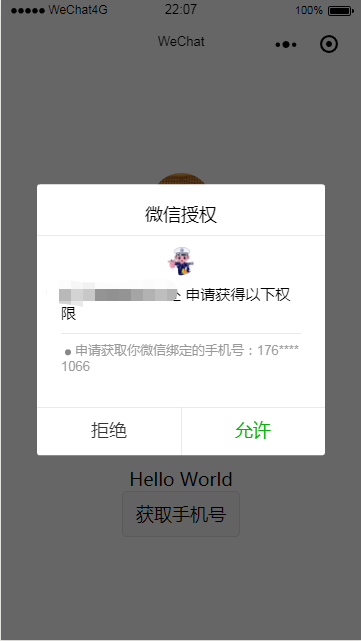
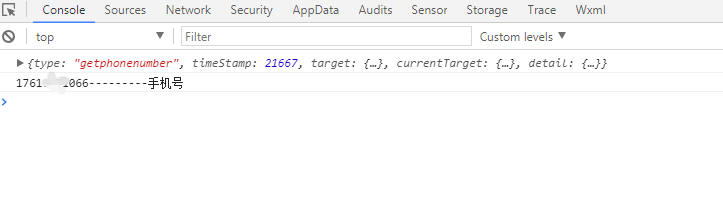
小编温馨提示,获取微信绑定手机号时需要通过短信验证,不然是拿不到的!!
但是验证之后如何取消授权,小编还未搞明白!!还请大神指教下
完美。
微信小程序获取登录手机号的更多相关文章
- 微信小程序获取用户手机号详解
最近在做一款微信小程序,需要获取用户手机号,具体步骤如下: 流程图: 1.首先,客户端调用wx.login,回调数据了包含jscode,用于获取openid(用户唯一标识)和sessionkey(会话 ...
- 微信小程序获取用户手机号
获取微信用户绑定的手机号,需先调用wx.login接口. 小程序获取code. 后台得到session_key,openid. 组件触发getPhoneNumber 因为需要用户主动触发才能发起获取手 ...
- 微信小程序获取用户手机号,服务器解码demo
原理:通过微信登陆接口wx.login得到encryptedData . iv .code.经过接口处理code得到sessionkey.最后官方demo得到解密后的手机号.(接口处理这一步也可以在 ...
- 微信小程序获取用户手机号 记录 (PHP)
1. 用户登录时需要获取 openid ,同时可以获取 session_key, 二者同时返回, 此时我们要将二者存储在服务端. 2. 小程序端 button 按钮拉起授权, 向api 传递 iv 和 ...
- 微信小程序 获取用户信息并保存登录状态
微信小程序 获取用户信息并保存登录状态:http://www.360doc.com/content/18/0124/11/9200790_724662071.shtml
- uni-app 微信小程序授权登录
1.微信小程序 获取用户信息 与获取手机号 详细信息看官方公告:https://developers.weixin.qq.com/community/develop/doc/000cacfa20ce8 ...
- php(ThinkPHP)实现微信小程序的登录过程
源码也在我的github中给出 https://github.com/wulongtao/think-wxminihelper 下面结合thinkPHP框架来实现以下微信小程序的登录流程,这些流程是结 ...
- C# 微信小程序获取openid sessionkey
项目介绍 1.微信小程序获取openid和session_key 2.后台使用C#开发 项目流程 准备工作 1 获取appid 1.1 下载微信web开发工具 https://developers.w ...
- JavaScript和微信小程序获取IP地址的方法
最近公司新加了一个需求,根据用户登录的IP地址判断是否重复登录,重复登录就进行逼退,那么怎么获取到浏览器的IP地址呢?最后发现搜狐提供了一个JS接口,可以通过它获取到客户端的IP. 接口地址如下: h ...
随机推荐
- 对扩展openflow协议的一点思考
软件定义X变得越来越火,正所谓,Software is eating the world. 软件定义网络也是如此.不论是在工业界还是学术界都将是一次伟大的革命,都在紧随着这个行业的方向,找自 ...
- mongoDB学习笔记——安装及启动
WINDOWS环境下: 一.安装 步骤一: 下载MongoDB url下载地址: http://downloads.mongodb.org/win32/ 步骤二: 设置MongoDB程序存放目 ...
- 心跳机制tcp keepalive的讨论、应用及“断网”、"断电"检测的C代码实现(Windows环境下)
版权声明:本文为博主原创文章,转载时请务必注明本文地址, 禁止用于任何商业用途, 否则会用法律维权. https://blog.csdn.net/stpeace/article/details/441 ...
- 时序数据库深入浅出之存储篇——本质LSMtree,同时 metric(比如温度)+tags 分片
什么是时序数据库 先来介绍什么是时序数据.时序数据是基于时间的一系列的数据.在有时间的坐标中将这些数据点连成线,往过去看可以做成多纬度报表,揭示其趋势性.规律性.异常性:往未来看可以做大数据分析,机器 ...
- 【概念的辨异】—— ISO C 与 POSIX C(C standard library 与 C POSIX library)
ISO C 表示 C Standard Library,也就是 C 标准库. 二者的主要区别在于: POSIX 是 C 标准库的超集(也即是从内容上,C 标准库是 POSIX 库的一部分,POSIX ...
- (Go)08.time示例
package main import ( "fmt" "time" ) func test() { ) } func main() { now := time ...
- Arbitrage(floyd)
http://poj.org/problem?id=2240 #include <stdio.h> #include <string.h> <<; ][]; ][] ...
- C# 标准命名规范
笔者从事开发多年,有这样一种感觉,查看一些开源项目,如Spring.Apache Common等源码是一件赏心悦目的事情,究其原因,无外两点:1)代码质量非常高:2)命名特别规范(这可能跟老外的英语水 ...
- NYOJ999 师傅又被妖怪抓走了
只记得当下的眼疼 , ok 各种数据也试了 , 就是 他娘的不对 , 我也是醉了 . 也是日了最野的狗 附上日了哮天犬的代码 , 这个题 先放放, 一段时间后再试试 , 明天开始状态压缩吧 .为期两天 ...
- EditPlus 4:设置字体
打开软件上面菜单栏点击Tools,在此下拉栏点击Configure User Tools,在弹出的设置框在左边框框中找到General->Fonts,显示的左边框即为字体框,具体如图: