
Activiti脚本任务(ScriptTask)
Activiti脚本任务(ScriptTask)
作者:Jesai
你一直问为什么到不了远方,请停下数数你的脚步,是不是还没迈开腿
对于没有接触过groovy脚本语言的人来说,可能比较难使用
应用场景:
Activiti脚本任务比较少用,脚本任务一般是用在当前的监听器或者监听服务类都不能满足的情形下面,或者说后期系统维护,突然在不想改动系统的情况下需要对流程做一些适当的改变。仅仅是几个变量或者仅仅是一个计算公式等等。这个时候可以使用脚本任务。至于还用其他的作用,我暂时没去多了解。
官方解释:
Script Task(脚本服务)
A script task is an automatic activity. When a process execution arrives at the script task, the corresponding script is executed.
脚本任务是一个自动化活动。当一个流程执行到达脚本任务时,执行相应的脚本。
Graphical Notation(图形)
A script task is visualized as a typical BPMN 2.0 task (rounded rectangle), with a small 'script' icon in the top-left corner of the rectangle.
d的的脚本任务可视化为一个典型的BPMN 2.0 任务(圆角矩形),在矩形的左上角带有一个小的‘脚本’图标。
A script task is defined by specifying the script and the scriptFormat.
通过指定脚本(script )和脚本格式(scriptFormat)定义一个脚本任务。
<scriptTask id="theScriptTask" name="Execute script" scriptFormat="groovy">
<script>
sum = 0
for ( i in inputArray ) {
sum += i
}
</script>
</scriptTask>
The value of the scriptFormat attribute must be a name that is compatible with the JSR-223 (scripting for the Java platform). The Groovy jar is shipped by default with the Activiti distribution. If you want to use another (JSR-223 compatible) scripting engine, it is sufficient to add the corresponding jar to the classpath and use the appropriate name.
scriptFormat属性的值必须是一个和JSR-223 兼容的名称(Java平台上的脚本系统)。发布包缺省带有Groovy jar包。如果你想使用另外的脚本引擎,将相应的jar包加入classpath里。
Variables in scripts(脚本里的变量)
All process variables that are accessible through the execution that arrives in the script task, can be used within the script. In the example, the script variable 'inputArray' is in fact a process variable (an array of integers).
通过到达在脚本任务里的执行,所有可以访问的流程变量也能够在脚本里面使用。在本例中,脚本变量'inputArray'事实上是一个流程变量(一个整数数组)。
<script>
sum = 0
for ( i in inputArray ) {
sum += i
}
</script>
It's also possible to set process variables in a script, simply by using an assignment statement. In the example above, the 'sum' variable will be stored as a process variable after the script task has been executed. To avoid this behavior, script-local variables can be used. In Groovy, the keyword 'def' must then be used: 'def sum = 0'. In that case, no process variable will be stored.
简单地通过使用一个赋值语句,也可能在一个脚本里设置流程变量。在上例,在脚本任务已经执行之后, 'sum'变量将保存为一个流程变量。为了避免这个行为,能够使用脚本局部变量。在Groovy里面,必须使用关键字 'def' : 'def sum = 0'。在那种情况下,将不保存任何流程变量。
An alternative is to set variables through the current execution, which is available as a reserved variable called 'execution'.
通过当前执行,有另外设置变量的可选方式,作为叫做 'execution'的保留变量可以获得。
<script>
def scriptVar = "test123"
execution.setVariable("myVar", scriptVar)
</script>
Note: the following names are reserved and cannot be used as variable names: out, out:print, lang:import, context, elcontext.
注意:下列名称将要保留并且不能作为变量名被使用(cannot be used):out, out:print, lang:import, context, elcontext。
Script results(脚本结果)
The return value of a script task can be assigned to an already existing or to a new process variable by specifying the process variable name as a literal value for the'activiti:resultVariableName' attribute of a script task definition. Any existing value for a specific process variable will be overwritten by the result value of the script execution. When not specifying a result variable name, the script result value gets ignored.
为了一个脚本任务定义的属性 'activiti:resultVariableName' ,通过指定流程变量名称为一个字面值,脚本任务的返回值能够分配给已经存在的或者一个新的流程变量。对于一个特定的流程变量的任何存在的值将被脚本执行的结果值复写。当没有指定一个结果变量值,脚本结果值被忽视。
<scriptTask id="theScriptTask" name="Execute script" scriptFormat="juel" activiti:resultVariableName="myVar">
<script>#{echo}</script>
</scriptTask>
In the above example, the result of the script execution (the value of the resolved expression '#{echo}') is set to the process variable named 'myVar' after the script completes.
的在上例里,在脚本完成之后,脚本执行(解析变量 '#{echo}'的值)的结果被设置为名叫'myVar'的流程变量。
我们将会使用Groovy脚本来实现脚本任务。
什么是Groovy脚本?
Groovy是一种基于JVM(Java虚拟机)的敏捷开发语言,它结合了Python、Ruby和Smalltalk的许多强大的特性,Groovy 代码能够与 Java 代码很好地结合,也能用于扩展现有代码。由于其运行在 JVM 上的特性,Groovy 可以使用其他 Java 语言编写的库。
需要的jar包:
groovy-all-2.4.3.jar
ScriptTask实现:
流程图设计:
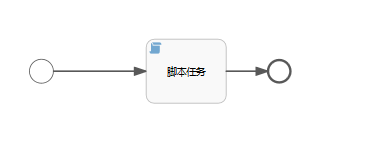
制定脚本的语言scriptformat=”groovy”

流程设计的代码:
 <?xml version="1.0" encoding="UTF-8"?>

 <definitions xmlns="http://www.omg.org/spec/BPMN/20100524/MODEL" xmlns:xsi="http://www.w3.org/2001/XMLSchema-instance" xmlns:xsd="http://www.w3.org/2001/XMLSchema" xmlns:activiti="http://activiti.org/bpmn" xmlns:bpmndi="http://www.omg.org/spec/BPMN/20100524/DI" xmlns:omgdc="http://www.omg.org/spec/DD/20100524/DC" xmlns:omgdi="http://www.omg.org/spec/DD/20100524/DI" typeLanguage="http://www.w3.org/2001/XMLSchema" expressionLanguage="http://www.w3.org/1999/XPath" targetNamespace="http://www.activiti.org/processdef">

   <process id="process" isExecutable="true">

     <startEvent id="sid-42267A2F-38D1-4A65-A383-6E74430FACC1" activiti:initiator="admin"></startEvent>

     <scriptTask id="sid-2E17D24E-A933-48E8-8A86-7A05DD363386" name="脚本任务" scriptFormat="groovy" activiti:autoStoreVariables="false">

       <script><![CDATA[import  light.mvc.workflow.scriptTask.ScriptTask;

 public class GPerson {

     public void say(String name){

         println "Hello, $name! ";

     }

     def foo(){

         ScriptTask p = new ScriptTask();

         p.ScriptTaskWriteToConsole();

     }

     static void main(args) {

         GPerson gp = new GPerson();

                 gp.say("jesai!");

         gp.foo();

     }

 }

 def gp = new GPerson()

 gp.say("jesai!")

 gp.foo()]]></script>

     </scriptTask>

     <endEvent id="sid-315AF00C-DE1A-4390-89B9-F33640B62AAF"></endEvent>

     <sequenceFlow id="sid-19DCED8B-09E1-4E5C-B81C-4B02B09ED6E9" sourceRef="sid-2E17D24E-A933-48E8-8A86-7A05DD363386" targetRef="sid-315AF00C-DE1A-4390-89B9-F33640B62AAF"></sequenceFlow>

     <sequenceFlow id="sid-A0230878-472D-4D2B-8FF9-8D7CC9DC5621" sourceRef="sid-42267A2F-38D1-4A65-A383-6E74430FACC1" targetRef="sid-2E17D24E-A933-48E8-8A86-7A05DD363386"></sequenceFlow>

   </process>

   <bpmndi:BPMNDiagram id="BPMNDiagram_process">

     <bpmndi:BPMNPlane bpmnElement="process" id="BPMNPlane_process">

       <bpmndi:BPMNShape bpmnElement="sid-42267A2F-38D1-4A65-A383-6E74430FACC1" id="BPMNShape_sid-42267A2F-38D1-4A65-A383-6E74430FACC1">

         <omgdc:Bounds height="30.0" width="30.0" x="106.75" y="97.0"></omgdc:Bounds>

       </bpmndi:BPMNShape>

       <bpmndi:BPMNShape bpmnElement="sid-2E17D24E-A933-48E8-8A86-7A05DD363386" id="BPMNShape_sid-2E17D24E-A933-48E8-8A86-7A05DD363386">

         <omgdc:Bounds height="80.0" width="100.0" x="252.75" y="72.0"></omgdc:Bounds>

       </bpmndi:BPMNShape>

       <bpmndi:BPMNShape bpmnElement="sid-315AF00C-DE1A-4390-89B9-F33640B62AAF" id="BPMNShape_sid-315AF00C-DE1A-4390-89B9-F33640B62AAF">

         <omgdc:Bounds height="28.0" width="28.0" x="405.0" y="98.0"></omgdc:Bounds>

       </bpmndi:BPMNShape>

       <bpmndi:BPMNEdge bpmnElement="sid-19DCED8B-09E1-4E5C-B81C-4B02B09ED6E9" id="BPMNEdge_sid-19DCED8B-09E1-4E5C-B81C-4B02B09ED6E9">

         <omgdi:waypoint x="352.75" y="112.0"></omgdi:waypoint>

         <omgdi:waypoint x="405.0" y="112.0"></omgdi:waypoint>

       </bpmndi:BPMNEdge>

       <bpmndi:BPMNEdge bpmnElement="sid-A0230878-472D-4D2B-8FF9-8D7CC9DC5621" id="BPMNEdge_sid-A0230878-472D-4D2B-8FF9-8D7CC9DC5621">

         <omgdi:waypoint x="136.75" y="112.0"></omgdi:waypoint>

         <omgdi:waypoint x="252.75" y="112.0"></omgdi:waypoint>

       </bpmndi:BPMNEdge>

     </bpmndi:BPMNPlane>

   </bpmndi:BPMNDiagram>

 </definitions>
脚本语言的编写:
import  light.mvc.workflow.scriptTask.ScriptTask;

public class GPerson {

public void say(String name){

println "Hello, $name! ";

}

def foo(){

ScriptTask p = new ScriptTask();

p.ScriptTaskWriteToConsole();

}

static void main(args) {

GPerson gp = new GPerson();

                gp.say("jesai!");

gp.foo();

}

}

def gp = new GPerson()

gp.say("jesai!")

gp.foo()
这是一段groovy的脚本语言,也许有得人很多人并没有接触过groovy这个脚本。
需要调用的java方法:
 package light.mvc.workflow.scriptTask;

 /**

  *

  * 项目名称:lightmvc

  * 类名称:ScriptTask

  * 类描述:

  * 创建人:邓家海

  * 创建时间:2017年6月4日 下午8:02:29

  * 修改人:deng

  * 修改时间:2017年6月4日 下午8:02:29

  * 修改备注:

  * @version

  *

  */

 public class ScriptTask {

   public void ScriptTaskWriteToConsole(){

   System.out.println("hellow,It is ScriptTask Running!test success!");

   }

 }
最后部署流程,运行:

Activiti交流QQ群:634320089
Activiti脚本任务(ScriptTask)的更多相关文章
- activiti 清库脚本(转)
在使用activiti 的时候会经常遇到需要清空数据库中的数据,因此本文重点讲解如何解决该问题. 再删除数据的时候,需要注意有主外键约束的问题?下面罗列的DDL可以结合自身的业务需求进行灵活改造. D ...
- activiti学习总结
Activiti界面元素的使用总结 一.图形设计中元素的使用 1.SequenceFlow:连接线,可以连接两个任务,来管理流程实例的流向 -----General -----id:流程的id,用与程 ...
- Activiti工作流学习笔记
先从工作流的启动开始讲,Activiti提供了四种工作流的启动方式 1.空启动事件 2.定时启动事件 3.异常启动事件 4.消息启动事件 空启动事件中标签内没有任何其他元素的定义 <startE ...
- 最近学习工作流 推荐一个activiti 的教程文档
全文地址:http://www.mossle.com/docs/activiti/ Activiti 5.15 用户手册 Table of Contents 1. 简介 协议 下载 源码 必要的软件 ...
- Activiti实战04_简单流程
在Activiti实战03_Hello World中我们介绍了一个中间没有任何任务的流程,实现了流程的部署与查阅,而在本章中,将会为流程添加任务节点,是流程能够像个流程,变得更加丰满起来. 在上一节的 ...
- 【Activiti工作流引擎】官方快速入门demo
Activiti官方快速入门demo 地址: https://www.activiti.org/quick-start 0. 版本 activiti 5.22.0 JDK 1.8 1. 介绍 这个快速 ...
- Activiti Exploer工作流控制台使用指南!使用Activiti Explorer定义部署执行工作流
Activiti Explorer简介 Activiti Explorer: Activiti控制台,是一个web应用程序 从Activiti的官方网站下载Activiti的压缩zip文件时,Acti ...
- activiti入门
一.Activiti简介 Activiti 是一个针对商务人士. 开发人员和系统管理员的轻量级的工作流和业务流程管理 (BPM) 平台.它的核心是Java的高速和可靠的 BPMN 2 流程引擎.它是开 ...
- Activiti 学习笔记记录
官方在线用户手册(英文版):http://activiti.org/userguide/index.html 中文用户手册:http://www.mossle.com/docs/activiti/in ...
随机推荐
- Java中getBytes()方法--使用详解
getBytes()方法详解 在Java中,String的getBytes()方法是得到一个操作系统默认的编码格式的字节数组.这表示在不同的操作系统下,返回的东西不一样! 1. str.getByte ...
- Linux 内核SBus连接
当大部分计算机配备有 PCI 或 ISA 接口总线, 大部分老式的基于 SPARC 的工作站使用 SBus 来连接它们的外设. SBus 使一个非常先进的设计, 尽管它已出现很长时间. 它意图是处理器 ...
- sqlyog提示:没有执行查询。请在 SQL 窗口中输入查询或将光标放在一个查询上。
以下内容纯属猜测: sqlyog 在执行输入的sql语句时,对已经执行过的语句,是不会再执行的,所以出现这个问题,很可能是sql语句没有修改,就试图执行第二遍.
- C++ 图片格式转化和压缩
在做人脸识别底库图片导入的时候,需要支持主流的图片的格式,如jpeg.bmp.png等格式.所以需要对图片进行格式转化.图片过大的话,还有进行缩放等.本文介绍的是利用cximage开源库,来进行对图片 ...
- VUE事件修饰符.passive、.capture、.once实现原理——重新认识addEventListener方法
https://www.jianshu.com/p/b12d0d3ad4c1 .passive的作用与使用场景 https://juejin.im/post/5ad804c1f265da504547f ...
- 第二阶段:2.商业需求分析及BRD:4.产品需求分析总结
产品的需求筛选 战略定位要考虑公司的战略问题.产品定位要分阶段,各个阶段的需求不同. 其实现在需求分析跟筛选都是非常快的. 不把需要当成需求,意思就是不要用户说需要什么就是什么,用户需要引导. 先分类 ...
- flask配置详解
直接修改config对象 flask会有一个可用的配置对象保存着载入的配置值: Flask 对象的 config 属性,这是 Flask 自己放置特定配置值的地方,也是扩展可以存储配置值的地方.但是, ...
- appium启动app(android)
android Appium 启动APP至少需要5个参数 'platformVersion','deviceName'.'appPackage'.'appActivity'.'platform ...
- centos批量创建用户并发送邮件,(修订版)
# cat user_create.sh echo -n "创建用户输入C,删除用户输入D!" read name function monitor() { if [ " ...
- 20191017-6 alpha week 2/2 Scrum立会报告+燃尽图 05
此作业要求参见https://edu.cnblogs.com/campus/nenu/2019fall/homework/9802 小组名称:“组长”组 组长:杨天宇 组员:魏新,罗杨美慧,王歆瑶,徐 ...