
【spring boot】SpringBoot初学(3)– application配置和profile隔离配置
前言
github: https://github.com/vergilyn/SpringBootDemo
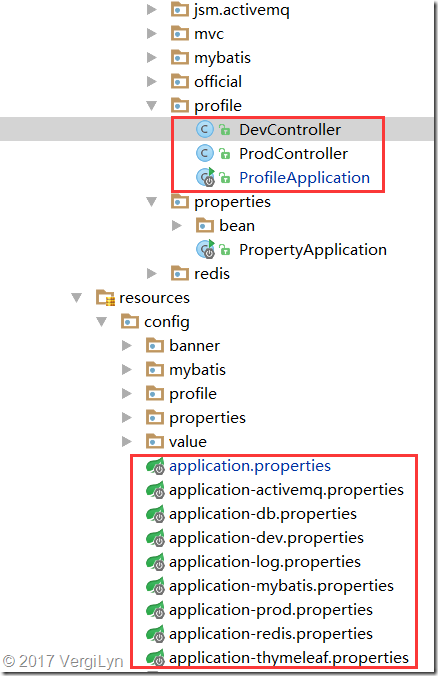
说明:我代码的结构是用profile来区分/激活要加载的配置,从而在一个project中写各种spring boot的demo。所以很多时候可能在*Application.class中指定了特殊的profile。
这种方式可能很糟糕(在细看理解application.properties的加载顺序后,感觉在*Application.class目录下写application.properties应该更好。)
代码位置:
一、application.properties
1. 1 application.properties的加载顺序 (重要)
SpringApplication将从以下位置加载application.properties文件,并把它们添加到Spring Environment中:
(1) 当前目录下的一个/config子目录;
(2) 当前目录;
(3) 一个classpath下的/config包;
(4) classpath根路径(root);
这个列表是按优先级排序的(列表中位置高的将覆盖位置低的)。
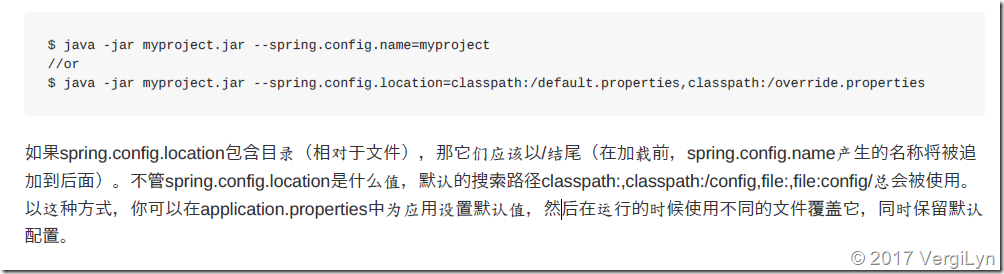
1.2 application.properties 加载目录/文件名 修改
如果不喜欢将application.properties作为配置文件名,可以通过指定spring.config.name环境属性来切换其他的名称。
也可以使用spring.config.location环境属性来引用一个明确的路径(目录位置或文件路径列表以逗号分割)。(并不是在config/application.properties中指定)
二、spring boot的profile指定
2.1 什么是profile,怎么理解profile?
Spring Profiles提供了一种隔离应用程序配置的方式,并让这些配置只能在特定的环境下生效。
任何@Component或@Configuration都能被@Profile标记,从而限制加载它的时机。
比如:开发环境与正式环境的数据库连接配置文件不一样,在开发服务器指定为开发配置文件,在正式环境时切换正式的配置文件。(多看代码去理解)
2.2 profile的加载顺序、格式
格式:application-{profile}.properties
加载顺序:与application.properties一样。
profile中的配置会覆盖默认的配置,包括application.properties中的配置。
2.3 profile在spring boot中的配置
(1) application.properties中指定属性配置
#### 特定配置profile,多个可用逗号(,),ex:spring.profiles.active=dev,prod

## 特定Profile属性从跟标准application.properties相同的路径加载,并且特定profile文件会覆盖默认的配置。

spring.profiles.active=dev

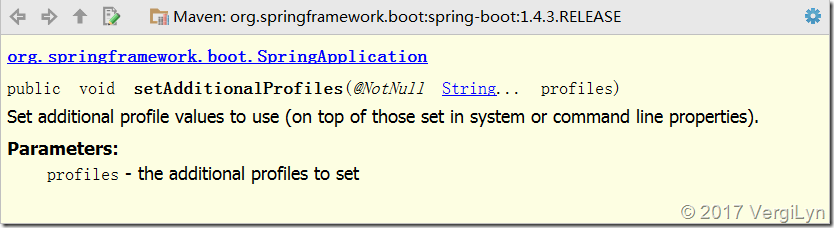
## 用来无条件的添加生效的配置。或 SpringApplication.setAdditionalProfiles(String... profiles)

## 可能在pom中依赖了部分jar,所以可能必须使用手动配置(否则spring boot会用jar中的自动配置,比如database)

spring.profiles.include=log,thymeleaf,db
(问题: active与include有什么区别?)
(2) 用SpringApplication中的API配置
(3) 代码中限制加载及demo
@Controller

//@Profile注解可以实现不同环境下配置参数的切换,任何@Component或@Configuration注解的类都可以使用@Profile注解。

@Profile("dev")

public class DevController {

	@Value("${app.name}")

	private String appName;

	@Value("${app.description}")

	private String appDesc;

	@RequestMapping("/profile")

	public String greeting(

			@RequestParam(value = "name", required = false, defaultValue = "VergiLyn") String name,

			Model model) {

		model.addAttribute("appDesc", appDesc);

		model.addAttribute("name", appName);

		return "greeting";

	}

}
@Controller

@Profile("prod")

public class ProdController {

	@Value("${app.name}")

	private String appName;

	@Value("${app.description}")

	private String appDesc;

	@RequestMapping("/profile")

	public String greeting(

			@RequestParam(value = "name", required = false, defaultValue = "VergiLyn") String name,

			Model model) {

		model.addAttribute("appDesc", appDesc);

		model.addAttribute("name", appName);

		return "greeting";

	}

}
@SpringBootApplication

public class ProfileApplication {

	public static void main(String[] args) {

		SpringApplication app = new SpringApplication(ProfileApplication.class);

		app.setAdditionalProfiles("dev");	// dev 或prod

		app.run(args);

	}

}
application-dev.properties
## 属性占位符

app.name=dev_spring_boot
application-prod.properties
## 属性占位符

app.name=prod_spring_boot
application.properties
 app.name=default_spring_boot

app.description=${app.name} is a Spring Boot application

## thymeleaf 配置spring.thymeleaf.prefix=classpath:/templates/spring.thymeleaf.suffix=.htmlspring.thymeleaf.mode=HTML5spring.thymeleaf.encoding=UTF-8spring.thymeleaf.content-type=text/html# set to false for hot refreshspring.thymeleaf.cache=false

## dev/prod,此demo在java代码中指定

# spring.profiles.active=dev

# spring.profiles.include=...
greeting.html
<!DOCTYPE HTML>

<html xmlns:th="http://www.thymeleaf.org">

<head>

    <title>Getting Started: Serving Web Content</title>

    <meta http-equiv="Content-Type" content="text/html; charset=UTF-8" />

</head>

<body>

<p th:text="'Hello, ' + ${name} + '!'" />

</body>

</html>
结果:
如果profile启用”dev”,则app.name=dev_spring_boot,访问localhost:8080/profile被加载注入的bean是DevController。
【spring boot】SpringBoot初学(3)– application配置和profile隔离配置的更多相关文章
- application配置和profile隔离配置(转)
前言 github: https://github.com/vergilyn/SpringBootDemo 说明:我代码的结构是用profile来区分/激活要加载的配置,从而在一个project中写各 ...
- application配置和profile隔离配置
前言 github: https://github.com/vergilyn/SpringBootDemo 说明:我代码的结构是用profile来区分/激活要加载的配置,从而在一个project中写各 ...
- 【spring boot】12.spring boot对多种不同类型数据库,多数据源配置使用
2天时间,终于把spring boot下配置连接多种不同类型数据库,配置多数据源实现! ======================================================== ...
- Spring Boot]SpringBoot四大神器之Actuator
论文转载自博客: https://blog.csdn.net/Dreamhai/article/details/81077903 https://bigjar.github.io/2018/08/19 ...
- Spring Boot 核心配置文件 bootstrap & application
Spring Boot 核心配置文件 bootstrap & application 1.SpringBoot bootstrap配置文件不生效问题 2.bootstrap/ applicat ...
- Spring Boot中的缓存支持(一)注解配置与EhCache使用
Spring Boot中的缓存支持(一)注解配置与EhCache使用 随着时间的积累,应用的使用用户不断增加,数据规模也越来越大,往往数据库查询操作会成为影响用户使用体验的瓶颈,此时使用缓存往往是解决 ...
- Spring boot 工具类静态属性注入及多环境配置
由于需要访问MongoDB,但是本地开发环境不能直接连接MongoDB,需要通过SecureCRT使用127.0.0.2本地IP代理.但是程序部署到线上生产环境后,是可以直接访问MongoDB的,因此 ...
- Spring Boot 静态资源映射与上传文件路由配置
默认静态资源映射目录 默认映射路径 在平常的 web 开发中,避免不了需要访问静态资源,如常规的样式,JS,图片,上传文件等;Spring Boot 默认配置对静态资源映射提供了如下路径的映射 /st ...
- Spring Boot 集成 Mybatis(druid 数据库连接池 以及 分页配置)
MyBatis 是一款优秀的持久层框架,它支持定制化 SQL.存储过程以及高级映射,目前很大一部分互联网.软件公司都在使用这套框架 关于Mybatis-Generator的下载可以到这个地址:http ...
随机推荐
- 关于Icon,Image,ImageIcon的简单的对比参考
Icon: Icon位于javax.swing包中,它是一个接口 public interface Icon,介绍为:一个小的固定大小的图片,通常用于装饰组件 有三个方法: int getIconHe ...
- Java DTO(data transfer object)的理解
首先明白springboot每层 model层 model层即数据库实体层,也被称为entity层,pojo层. 一般数据库一张表对应一个实体类,类属性同表字段一一对应. Model层是数据层: Ta ...
- Github 小白简单教学
Git和Github简单教程 原文链接:Git和Github简单教程 网络上关于Git和GitHub的教程不少,但是这些教程有的命令太少不够用,有的命令太多,使得初期学习的时候需要额外花不少时间在 ...
- 2020年,手把手教你如何在CentOS7上一步一步搭建LDAP服务器的最新教程
同步滚动:关 什么是LDAP 什么是LDAP? 要想知道一个概念,最简单的办法就是wikipedia,当然也可以百科. LDAP全称是轻型目录访问协议(Lightweight Directory Ac ...
- hive on spark 编译时遇到的问题
1.官方网站下载spark 1.5.0的源码 2.根据官方编译即可. export MAVEN_OPTS="-Xmx2g -XX:MaxPermSize=512M -XX:ReservedC ...
- FastDFS 原理介绍
1 功能简介 FastDFS是一个开源的轻量级分布式文件系统,它对文件进行管理,功能包括:文件存储.文件同步.文件访问(文件上传.文件下载)等,解决了大容量存储和负载均衡的问题.特别适 ...
- ASP.NET Core ResponseCache进行缓存操作
前言 本章将介绍客户端缓存将介绍浏览器缓存和服务端缓存,使用浏览器缓存将减少对web服务器的请求次数,同时可以提升性能,避免重复的运算浪费. ASP.NET Core对于HTTP缓存分为两种: 客户端 ...
- JS求1到100的累计值
sum=0 for(i=1;i<=100;i++) { sum+=i } alert(sum) 作者:kerwin-chyl 文章链接:https:////www.cnblogs.com/k ...
- 利用预测分析改进欠款催收策略,控制欺诈风险和信贷风险—— Altair Knowledge Studio 预测分析和机器学习
前提摘要 在数字经济新时代,金融服务主管正在寻求方法去细分他们的产品和市场,保持与客户的联系,寻找能够推动增长和收入的新市场,并利用可以增加优势和降低风险的新技术. 在拥有了众多可用数据之后,金融机构 ...
- VUE中集成echarts时 getAttribute of null错误
错误 错误场景一: 错误提示: 在运行Vue项目时出现了上述错误,出现该错误的原因是Echarts的图形容器还未生成就对其进行了初始化所造成的,代码如下: // 基于准备好的dom,初始化echart ...