
React-FlipOver-Counter(日历翻页)
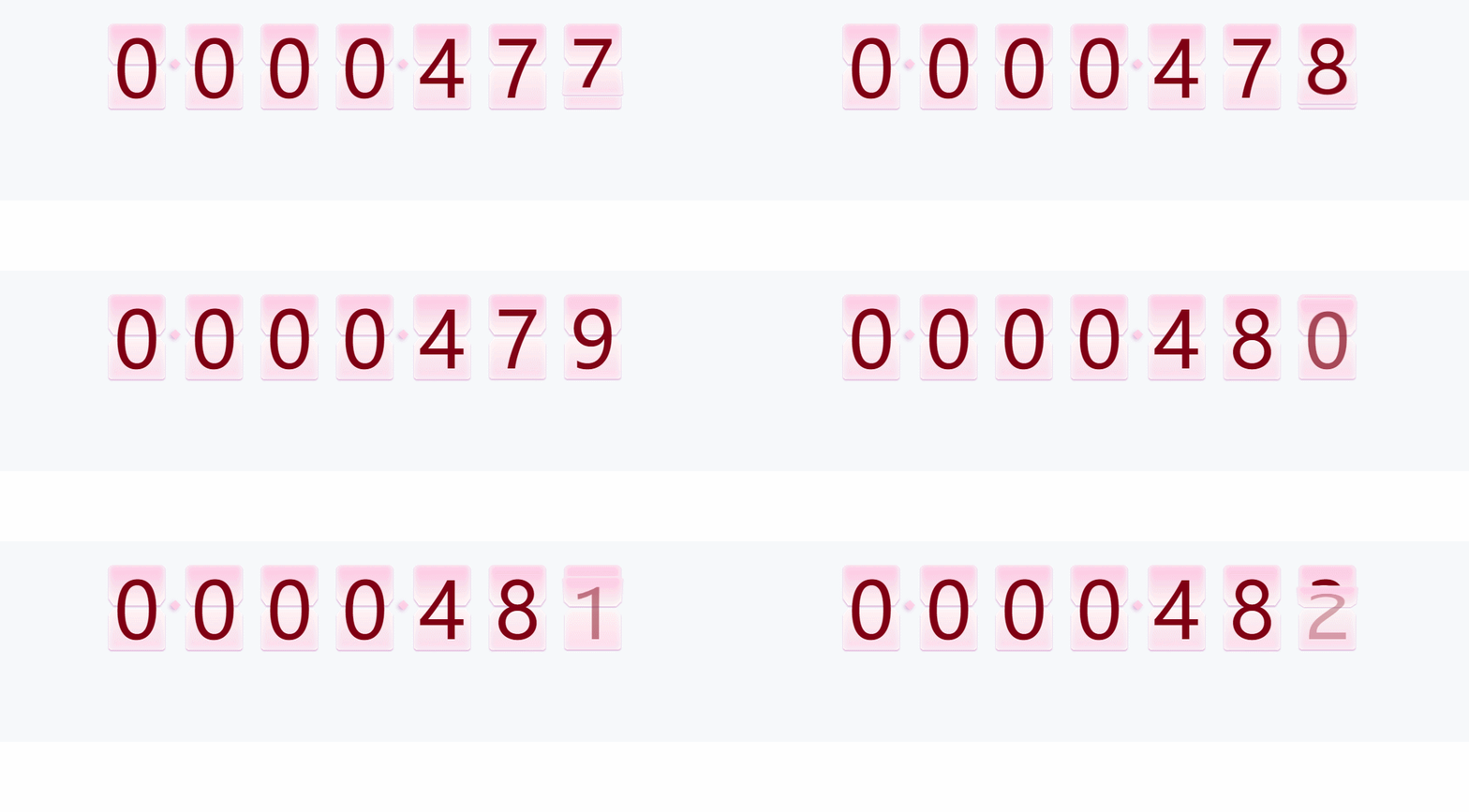
跟窝一起学习鸭~~
//index.js

import React from 'react';

import ReactDOM from 'react-dom';

import './index.css';

import App from './App.jsx';

import registerServiceWorker from './registerServiceWorker';

ReactDOM.render( < App / > , document.getElementById('root'));

registerServiceWorker();
//app.jsx根App

import React, {

    Component

} from 'react';

import TotalQty from './components/TotalQty'

class App extends Component {

    render() {

        return (

            <TotalQty />

        )

    }

}

export default App;
//TotalQty.jsx

import React, { Component } from 'react'

import './totalQty.less'

import FlipOverCounter from './flipOver/FlipOverCounter'

export class TotalQty extends Component {

// 父组件先定义state通过props传值

    constructor(props) {

        super(props)

        //定义初始的值最小为50 长度这个日历是7位数

        // 时间是60000ms更新一次吗?

        this.state = {

            min: 50,

            max: 0,

            time: 60000,

            len: 7

        }

    }

    componentDidMount() {

        const a = 100;

        //a是什么东西,为了设置最大值为50+100吗?

        const ths = this;

        ths.setState({

            max: ths.state.max + a

        })

        //每这个时间60000就清除一次定时器

        this.time1 = setInterval(function () {

            ths.setState({

                max: ths.state.max + a,

                min: ths.state.max

            })

        }, 60000)

    }

    render() {

        const { min, max, time, len } = this.state;

        return (

            <div className='totalQty'>

                <div className='box'>

                    <FlipOverCounter

                        min={min}

                        max={max}

                        time={time}

                        len={len}

                    />

                </div>

            </div>

        )

    }

}

export default TotalQty
//翻页FlipOverCounter.jsx

//有些代码不是很懂,但是小姐姐很赞,我很喜欢写这个代码的小姐姐

//FlipOverCounter.jsx

import React, { Component } from 'react'

import PropTypes from 'prop-types'

import './flipOverCounter.less'

export class FlipOverCounter extends Component {

    constructor(props) {

        super(props)

        //通过props接收父组件传过来的值

        this.state = {

            min: props.min,

            max: props.max,

            time: props.time,

            len: props.len,

            currentNums: this.zfill(props.min)

        }

        this.resetNo = this.resetNo.bind(this)

        this.run = this.run.bind(this)

    }

    componentDidMount() {

        //页面挂载就挂载resetNo

        this.resetNo()

    }

    //补0zfill传入值

    zfill(num) {

        var s = "000000000" + num;

        // 当长度到什么的时候就传入的值?

        return s.toString().substr(s.length - this.props.len).split("");

    }

    //初始化数值填入

    resetNo() {

        const { min } = this.state;

        // 当前的值

        const currentNums = this.zfill(min)

        this.setState({ currentNums }, function () {

            this.run()

        })

    }

    //初始化执行

    run() {

        const { min, max, time, currentNums } = this.state;

        const difference = max - min;

        if (difference < 1) return;

        //每次要执行动画的时间

        let t = Math.round(time / difference);

        let speedTyp = 'normal'

        //执行速度class  定义了2种不同程度的速度控制样式

        if (t >= 300) {

            if (t > 1500) t = 1500;

            speedTyp = 'normal'

        } else {

            if (t < 100) t = 100;

            speedTyp = 'quick'

        }

        let newCount = min;

        //翻页

        function increase() {

            if (newCount === max || newCount > max) {

                clearInterval(this.timer1);

                return false;

            }

            //慢速一页页翻

            if (speedTyp === 'normal') {

                newCount++;

            } else {

                if (difference > 800 && t <= 200) {

                    t = 200;

                    //直接设置数字

                    newCount = newCount + Math.floor(difference / (time / 200))

                } else {

                    //快速翻

                    newCount = newCount + 2

                }

            }

            const newNums = this.zfill(newCount)

            this.setState({ speedTyp, currentNums: newNums })

        }

        //执行翻页

        if (this.timer1) clearInterval(this.timer1);

        this.timer1 = setInterval(increase.bind(this), t);

    }

    componentWillReceiveProps(props) {

        //resetNo()重新

        if (Object.keys(props)) {

            //props值改变,重新在setState

            if (props.max !== this.state.max) {

                this.setState({

                    min: props.min,

                    max: props.max,

                    time: props.time,

                    len: props.len

                }, function () {

                    this.resetNo()

                })

            }

        }

    }

    render() {

        const { len, currentNums } = this.state;

         // 这边看不懂

        const flipItems = currentNums.map((value, idx) => {

            let preIndx = value === "0" ? 9 : value * 1 - 1;

            return (

                <div key={idx} className='focount_box'>

                    <div className="focount_set" >

                        {Array.from({ length: 10 }, (key, j) => j.toString()).map((sval, sdx) => {

                            return (

                                <div key={sdx} className={value === sval ? 'active focount' : sval === preIndx.toString() ? 'previous focount' : 'focount'}>

                                    <div className="focount_top">

                                        <span className="focount_wrap">{sdx}</span>

                                    </div>

                                    <div className="shadow_top"></div>

                                    <div className="focount_bottom">

                                        <span className="focount_wrap">{sdx}</span>

                                    </div>

                                    <div className="shadow_bottom"></div>

                                </div>

                            )

                        })

                        }

                    </div>

                    {

                        (len - idx - 1) % 3 === 0 && (len - idx - 1) !== 0 ?

                            <div className='dotBox'>

                                <div className='dot'>

                                </div>

                            </div> : ''

                    }

                </div>)

        })

        return (

            <div className='flipOverCounter normal'>

                {flipItems}

            </div>

        )

    }

}

//静态类型检验

FlipOverCounter.propTypes = {

    min: PropTypes.number, //初始数值

    max: PropTypes.number, //最大数字

    time: PropTypes.number, //翻页总时长

    len: PropTypes.number //数字是几位数

}

FlipOverCounter.defaultProps = {

    min: 0,

    max: 0,

    time: 120000,

    len: 6

}

export default FlipOverCounter
这个是我很喜欢的小姐姐的github地址,大家快快关注小姐姐哇~~
React-FlipOver-Counter(日历翻页)的更多相关文章
- jq数字翻页效果,随机数字显示,实现上下翻动效果
最近在做一个项目,需要实时展示一串数字,要有类似于日历翻页的效果,在网上找寻了一番,发现dataStatistics这个插件http://www.jq22.com/jquery-info8141能实现 ...
- vue10行代码实现上拉翻页加载更多数据,纯手写js实现下拉刷新上拉翻页不引用任何第三方插件
vue10行代码实现上拉翻页加载更多数据,纯手写js实现下拉刷新上拉翻页不引用任何第三方插件/库 一提到移动端的下拉刷新上拉翻页,你可能就会想到iScroll插件,没错iScroll是一个高性能,资源 ...
- webapp应用--模拟电子书翻页效果
前言: 现在移动互联网发展火热,手机上网的用户越来越多,甚至大有超过pc访问的趋势.所以,用web程序做出仿原生效果的移动应用,也变得越来越流行了.这种程序也就是我们常说的单页应用程序,它也有一个英文 ...
- jquery css3问卷答题卡翻页动画效果
这个选项调查的特效以选项卡的形式,每答完一道题目自动切换到下一条,颇具特色.使用jQuery和CSS3,适合HTML5浏览器. 效果展示 http://hovertree.com/texiao/jqu ...
- 采用cocos2d-x lua 的listview 实现pageview的翻页效果之上下翻页效果
--翻页滚动效果local function fnScrollViewScrolling( sender,eventType) -- body if eventType == 10 the ...
- HTML5翻页电子书
体验效果:http://hovertree.com/texiao/jquery/60/ 图片请用正方形的 参考:http://hovertree.com/h/bjaf/d339euw9.htmhttp ...
- [原创]纯CSS3打造的3D翻页翻转特效
刚接触CSS3动画,心血来潮实现了一个心目中自己设计的翻页效果的3D动画,页面纯CSS3,目前只能在Chrome中玩,理论上可以支持Safari. 1. 新建HTML,代码如下(数据和翻页后的数据都是 ...
- Web jquery表格组件 JQGrid 的使用 - 5.Pager翻页、搜索、格式化、自定义按钮
系列索引 Web jquery表格组件 JQGrid 的使用 - 从入门到精通 开篇及索引 Web jquery表格组件 JQGrid 的使用 - 4.JQGrid参数.ColModel API.事件 ...
- css实现翻页效果
如图,鼠标移动到图上,实现右上角翻页的效果,本例主要border边框的设置. 一.基本概念 <html> <head> <style> #demo{ width:0 ...
随机推荐
- linux查看磁盘大小,使用量等等信息
第一:统一磁盘整体情况 1.查看当前目录命令 df -h 结果: 统一每个目录下磁盘的整体情况 2.查看指定目录在命令后直接放目录名,比如查看“usr”目录使用情况: df -h /usr/结果: 统 ...
- PAT甲级——A1031 Hello World for U
Given any string of N (≥) characters, you are asked to form the characters into the shape of U. For ...
- 原型模式(Prototype)(对象、克隆广告邮件)
有些对象创建过程较为复杂,而且有些时候需要频繁的创建,原型模式通过给出一个原型对象来指明所要创建的对象的类型,然后复制这个原型对象的方法创建更多同类型的对象.这就是原型模式的动机. 原型模式的主要思想 ...
- [转]SQLserver字符串分割函数
一.按指定符号分割字符串,返回分割后的元素个数,方法很简单,就是看字符串中存在多少个分隔符号,然后再加一,就是要求的结果. CREATE function Get_StrArrayLength ( ) ...
- 两周的业余时间,写了个简单的shell
Linux下的,环境是 Fedora 实现了基本的内部命令功能,及比较完善的内部命令框架. 类似于MFC消息映射表的方式,写完一个内部命令,只需要向这个头文件中,导入一个头文件,再写入命令处理函数,就 ...
- Vue.之.回到顶部
Vue.之.回到顶部 当页面出现上下滚动条时,页面右下角出现回到顶部功能. 在页面上添加如下DIV(写的CSS内部样式),这个DIV功能:出现滚动条往下滑动,就显示出来,反之隐藏.点击DIV快速回到顶 ...
- LINUX对超级用户和普通用户的理解
什么是超级用户 在所有Linux系统中,系统都是通过UID来区分用户权限级别的,而UID为0的用户被系统约定为是具有超级权限.超级用户具有在系统约定的最高权限满园内操作,所以说超级用户可以完成系统管理 ...
- JDBC连接整个过程
1.导入驱动(放在lib下) connector-java-5.0.8-bin.jar 2.导入配置文件(放在src下) jdbc.properties driverClass=com.mysql.j ...
- less基础引用
1.介绍: Less 是一门 CSS 预处理语言,它扩充了 CSS 语言,增加了诸如变量.混合(mixin).函数等功能,让 CSS 更易维护.方便制作主题.扩充.Less 可以运行在 Node 或浏 ...
- Could not parse mapping document from resource com/hs/model/StudentModel.hbm.xml
网上出现这个问题的 lei.hbm.xml配置写错的,文件头应该改为如下,并不是这个问题 <?xml version="1.0"?> <!DOCTYPE hibe ...