
C# WinForm MessageBox.Show显示在窗体中间
一、新建MessageBoxEx类,并添加以下代码。
using System;

using System.Windows.Forms;

using System.Text;

using System.Drawing;

using System.Runtime.InteropServices;

namespace WinFormDemo.Helper

{

    /// <summary>

    /// 重写MessageBox,目的:将MessageBox.Show显示在窗体中间

    /// </summary>

    public class MessageBoxEx

    {

        private static IWin32Window _owner;

        private static HookProc _hookProc;

        private static IntPtr _hHook;

        public static DialogResult Show(string text)

        {

            Initialize();

            return MessageBox.Show(text);

        }

        public static DialogResult Show(string text, string caption)

        {

            Initialize();

            return MessageBox.Show(text, caption);

        }

        public static DialogResult Show(string text, string caption, MessageBoxButtons buttons)

        {

            Initialize();

            return MessageBox.Show(text, caption, buttons);

        }

        public static DialogResult Show(string text, string caption, MessageBoxButtons buttons, MessageBoxIcon icon)

        {

            Initialize();

            return MessageBox.Show(text, caption, buttons, icon);

        }

        public static DialogResult Show(string text, string caption, MessageBoxButtons buttons, MessageBoxIcon icon, MessageBoxDefaultButton defButton)

        {

            Initialize();

            return MessageBox.Show(text, caption, buttons, icon, defButton);

        }

        public static DialogResult Show(string text, string caption, MessageBoxButtons buttons, MessageBoxIcon icon, MessageBoxDefaultButton defButton, MessageBoxOptions options)

        {

            Initialize();

            return MessageBox.Show(text, caption, buttons, icon, defButton, options);

        }

        public static DialogResult Show(IWin32Window owner, string text)

        {

            _owner = owner;

            Initialize();

            return MessageBox.Show(owner, text);

        }

        public static DialogResult Show(IWin32Window owner, string text, string caption)

        {

            _owner = owner;

            Initialize();

            return MessageBox.Show(owner, text, caption);

        }

        public static DialogResult Show(IWin32Window owner, string text, string caption, MessageBoxButtons buttons)

        {

            _owner = owner;

            Initialize();

            return MessageBox.Show(owner, text, caption, buttons);

        }

        public static DialogResult Show(IWin32Window owner, string text, string caption, MessageBoxButtons buttons, MessageBoxIcon icon)

        {

            _owner = owner;

            Initialize();

            return MessageBox.Show(owner, text, caption, buttons, icon);

        }

        public static DialogResult Show(IWin32Window owner, string text, string caption, MessageBoxButtons buttons, MessageBoxIcon icon, MessageBoxDefaultButton defButton)

        {

            _owner = owner;

            Initialize();

            return MessageBox.Show(owner, text, caption, buttons, icon, defButton);

        }

        public static DialogResult Show(IWin32Window owner, string text, string caption, MessageBoxButtons buttons, MessageBoxIcon icon, MessageBoxDefaultButton defButton, MessageBoxOptions options)

        {

            _owner = owner;

            Initialize();

            return MessageBox.Show(owner, text, caption, buttons, icon,

                                   defButton, options);

        }

        public delegate IntPtr HookProc(int nCode, IntPtr wParam, IntPtr lParam);

        public delegate void TimerProc(IntPtr hWnd, uint uMsg, UIntPtr nIDEvent, uint dwTime);

        public const int WH_CALLWNDPROCRET = 12;

        public enum CbtHookAction : int

        {

            HCBT_MOVESIZE = 0,

            HCBT_MINMAX = 1,

            HCBT_QS = 2,

            HCBT_CREATEWND = 3,

            HCBT_DESTROYWND = 4,

            HCBT_ACTIVATE = 5,

            HCBT_CLICKSKIPPED = 6,

            HCBT_KEYSKIPPED = 7,

            HCBT_SYSCOMMAND = 8,

            HCBT_SETFOCUS = 9

        }

        [DllImport("user32.dll")]

        private static extern bool GetWindowRect(IntPtr hWnd, ref Rectangle lpRect);

        [DllImport("user32.dll")]

        private static extern int MoveWindow(IntPtr hWnd, int X, int Y, int nWidth, int nHeight, bool bRepaint);

        [DllImport("User32.dll")]

        public static extern UIntPtr SetTimer(IntPtr hWnd, UIntPtr nIDEvent, uint uElapse, TimerProc lpTimerFunc);

        [DllImport("User32.dll")]

        public static extern IntPtr SendMessage(IntPtr hWnd, int Msg, IntPtr wParam, IntPtr lParam);

        [DllImport("user32.dll")]

        public static extern IntPtr SetWindowsHookEx(int idHook, HookProc lpfn, IntPtr hInstance, int threadId);

        [DllImport("user32.dll")]

        public static extern int UnhookWindowsHookEx(IntPtr idHook);

        [DllImport("user32.dll")]

        public static extern IntPtr CallNextHookEx(IntPtr idHook, int nCode, IntPtr wParam, IntPtr lParam);

        [DllImport("user32.dll")]

        public static extern int GetWindowTextLength(IntPtr hWnd);

        [DllImport("user32.dll")]

        public static extern int GetWindowText(IntPtr hWnd, StringBuilder text, int maxLength);

        [DllImport("user32.dll")]

        public static extern int EndDialog(IntPtr hDlg, IntPtr nResult);

        [StructLayout(LayoutKind.Sequential)]

        public struct CWPRETSTRUCT

        {

            public IntPtr lResult;

            public IntPtr lParam;

            public IntPtr wParam;

            public uint message;

            public IntPtr hwnd;

        };

        static MessageBoxEx()

        {

            _hookProc = new HookProc(MessageBoxHookProc);

            _hHook = IntPtr.Zero;

        }

        private static void Initialize()

        {

            if (_hHook != IntPtr.Zero)

            {

                throw new NotSupportedException("multiple calls are not supported");

            }

            if (_owner != null)

            {

                _hHook = SetWindowsHookEx(WH_CALLWNDPROCRET, _hookProc, IntPtr.Zero, AppDomain.GetCurrentThreadId());

            }

        }

        private static IntPtr MessageBoxHookProc(int nCode, IntPtr wParam, IntPtr lParam)

        {

            if (nCode < 0)

            {

                return CallNextHookEx(_hHook, nCode, wParam, lParam);

            }

            CWPRETSTRUCT msg = (CWPRETSTRUCT)Marshal.PtrToStructure(lParam, typeof(CWPRETSTRUCT));

            IntPtr hook = _hHook;

            if (msg.message == (int)CbtHookAction.HCBT_ACTIVATE)

            {

                try

                {

                    CenterWindow(msg.hwnd);

                }

                finally

                {

                    UnhookWindowsHookEx(_hHook);

                    _hHook = IntPtr.Zero;

                }

            }

            return CallNextHookEx(hook, nCode, wParam, lParam);

        }

        private static void CenterWindow(IntPtr hChildWnd)

        {

            Rectangle recChild = new Rectangle(0, 0, 0, 0);

            bool success = GetWindowRect(hChildWnd, ref recChild);

            int width = recChild.Width - recChild.X;

            int height = recChild.Height - recChild.Y;

            Rectangle recParent = new Rectangle(0, 0, 0, 0);

            success = GetWindowRect(_owner.Handle, ref recParent);

            Point ptCenter = new Point(0, 0);

            ptCenter.X = recParent.X + ((recParent.Width - recParent.X) / 2);

            ptCenter.Y = recParent.Y + ((recParent.Height - recParent.Y) / 2);

            Point ptStart = new Point(0, 0);

            ptStart.X = (ptCenter.X - (width / 2));

            ptStart.Y = (ptCenter.Y - (height / 2));

            ptStart.X = (ptStart.X < 0) ? 0 : ptStart.X;

            ptStart.Y = (ptStart.Y < 0) ? 0 : ptStart.Y;

            int result = MoveWindow(hChildWnd, ptStart.X, ptStart.Y, width, height, false);

        }

    }

}
二、窗体上添加一个按钮并添加以下代码。
private void MessageBoxShow(string message)

        {

            try

            {

                MessageBoxEx.Show(this, message, "提示", MessageBoxButtons.OK, MessageBoxIcon.Information, MessageBoxDefaultButton.Button2);

            }

            catch (Exception ex)

            {

                LogHelper.Error(ex);

            }

        }

        private void btnConfirm_Click(object sender, EventArgs e)

        {

            MessageBoxShow("弹窗确定");

        }
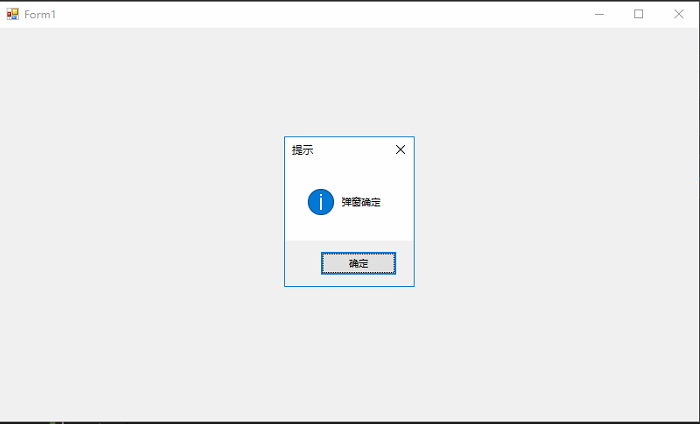
三、运行结果
C# WinForm MessageBox.Show显示在窗体中间的更多相关文章
- WinForm开发,窗体显示和窗体传值相关知识总结
主窗体中代码: public partial class Form1 : Form { public Form1() { InitializeComponent(); } private void b ...
- 【转】WinForm窗体显示和窗体间传值
以前对WinForm窗体显示和窗体间传值了解不是很清楚 最近做了一些WinForm项目,把用到的相关知识整理如下 A.WinForm中窗体显示 显示窗体可以有以下2种方法: Form.ShowDial ...
- C#(WinForm)上传图片保存到数据库和从数据库读取图片显示到窗体
//浏览图片 private void btnUp_Click(object sender, EventArgs e) { OpenFileDialog ofd = new OpenFileDialo ...
- WinForm 之 程序启动不显示主窗体
在 WinForm 程序启动时,不显示主窗体的实现方法主要有以下5种,第五种最简单,而且效果也不错,第四种方法也值得推荐. 实例代码如下: //隐藏窗体的方法1/5:不指定任何窗体为主窗体 //注意: ...
- (转)C# WinForm中 获得当前鼠标所在控件 或 将窗体中鼠标所在控件名显示在窗体标题上
原文地址:http://www.cnblogs.com/08shiyan/archive/2011/04/14/2015758.html /********************** * 课题:将窗 ...
- C#:控制WinForm界面的显示
控制WinForm界面在屏幕的四个角落显示,具体代码中有说明: using System; using System.Collections.Generic; using System.Drawing ...
- Winform中如何实现父窗体传递数据到子窗体并刷新子窗体
原理:利用委托和事件,本文将以图文并茂的例子讲述,告诉我们So Easy --------------------------------------------------------------- ...
- C# 关闭登录窗体,显示主窗体
首先在programm.cs里设置登录窗体显示 static class Program { /// <summary> /// The main ent ...
- WPF 子窗体关闭时显示父窗体
这个问题纠结了两天,今天在一个朋友的帮助下,解决了,其实很简单,但是可能作为新手,接触WPF时间还是短,因此作为一个问题困扰了我. 父窗体部分代码 private void EditInformati ...
随机推荐
- vue 插槽 ------ slot 简单理解
solt 插槽 内容分发 什么是插槽 Vue 实现了一套内容分发的 API,将 `` 元素作为承载分发内容的出口. 插槽显示的位置却由子组件自身决定,槽写在组件模板的什么位置,父组件传过来的模板将来就 ...
- Oracle 12C In-Memory特性研究
Oracle 12C In-Memory特性研究一.Oracle In-Memory1.1 In-Memory 开启方法1.2 开启与关闭IM column store1.3 inmemory优先级调 ...
- 自定义属性的访问 - Customizing attribute access
自定义属性的访问 - Customizing attribute access 在 python 中, 下列方法可以实现类实例属性 instance.attribute 的 使用,设置,删除. obj ...
- 达梦数据库-RAC-DMDSC部署的关键点
达梦数据库-RAC-DMDSC部署的关键点 环境准备 网络准备(ip地址分配).共享磁盘准备和挂载 ifconfig enp0s8 10.1.2.101;ifconfig enp0s9 192.168 ...
- 集智学院 “Deep X:Deep Learning with Deep Knowledge”的公开讲座---总结
人工智能旨在了解人类智能的本质,并创造出能模仿人类智能做出反应的智能机器,目前在一些领域已经取得显著的成功,如AI玩游戏.问答系统.自动驾驶.无人机.机器人.翻译.人脸识别.语音识别等领域.深度学习的 ...
- k8s系列---dns部署
1:首先创建kube-dns和dnsmasq这两个yaml,然后生成相应的pod.svc等. 2:然后在去创建其他的验证pod和svc 3:验证nslookup解析的是其他pod的svc的name,而 ...
- cdh集群hive升级,数据不丢失
1.下载hive-1.2.1安装包 http://archive.apache.org/dist/hive/hive-1.2.1/apache-hive-1.2.1-bin.tar.gz 2.将安装包 ...
- Unable to update index for nexus-publish | http://ip:port/repository/maven-public/
问题描述:Unable to update index for nexus-publish | http://ip:port/repository/maven-public/ 解决方案:进入工作空间. ...
- git rm -r --cached解决已提交的文件在.gitignore中加入忽略后无效的问题。
有时候,发现有不该提交的文件已经提交后,仅仅在.gitignore中加入忽略是不行的.这个时候需要执行: git rm -r --cached 文件/文件夹名字 去掉已经托管的文件,然后重新提交: g ...
- ElasticSearch集群-Windows
概述 ES集群是一个P2类型的分布式系统,除了集群状态管理以外,其他所有的请求都可以发送到集群内任意一台节点上,这个节点可以自己找到需要转发给哪些节点,并且直接跟这些节点通信.所以,从网络架构及服务配 ...