
python3爬取全站美眉图片
爬取网站:https://www.169tp.com/xingganmeinv
该网站美眉图片有数百页,每页24张,共上万张图片,全部爬取下来
 import urllib.request

 import re

 import os

 from bs4 import BeautifulSoup

 page_flag = 0

 base_url = "https://www.169tp.com/xingganmeinv/"

 first_url ="https://www.169tp.com/xingganmeinv/list_1_1.html"

 Imgnums = 0

 def get_html(url):

     response = urllib.request.urlopen(url)

     html = response.read().decode('gb18030')

     return html

 def get_Imgurl_list(html):

     img_urllist = re.findall('src=["\']{1}(.+?\.jpg)["\']{1}', html)

     return img_urllist

 def Download(img_urllist,page_flag,final_path,Imgnums):

     num = 1

     for imgurl in img_urllist:

         imgname = "{}{}{}{}.jpg".format(final_path,page_flag,'_',num)

         urllib.request.urlretrieve(imgurl,imgname)

         print("已经爬取图片名:",imgname)

         Imgnums += 1

         num += 1

 def makedir(path):

     path = path.strip()

     isExists = os.path.exists(path)

     if not isExists:

         print("创建了路径为 ",path," 的文件夹")

         os.makedirs(path)

         return True

     else:

         print("路径为 ",path," 的文件夹已经存在")

         return False

 filepath = input("请输入保持图片的文件夹路径:")

 print(filepath)

 name = input("请输入保存图片的文件夹名:")

 print(name)

 finalpath = filepath + name

 makedir(finalpath)

 finalpath += '\\'

 print(f"图片保存路径: {finalpath}")

 Download(get_Imgurl_list(first_url),page_flag,finalpath,Imgnums)

 mysoup = BeautifulSoup(get_html(first_url),'html.parser')

 next_page = mysoup.find('div',attrs = {'class':'page'}).find('li',text = '下一页').find('a')

 while next_page:

     new_url = base_url + next_page['href']

     page_flag += 1

     Download(get_Imgurl_list(get_html(new_url)),page_flag,finalpath,Imgnums)

     mysoup = BeautifulSoup(get_html(new_url),'html.parser')

     next_page = mysoup.find('div',attrs = {'class':'page'}).find('li',text = '下一页').find('a')

 print(f"下载完成,共下载了 {Imgnums} 张图片!")
运行截图:
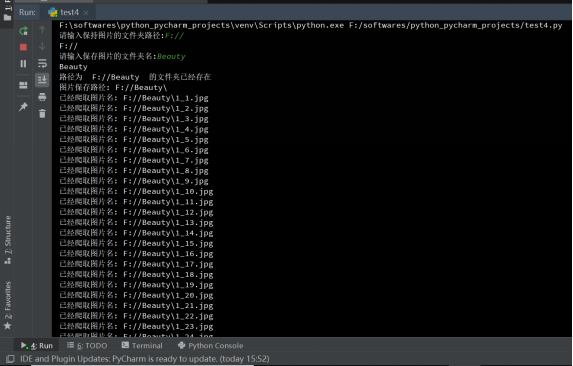
图片名命名规则:存储路径+页码+下划线+图片号+.jpg
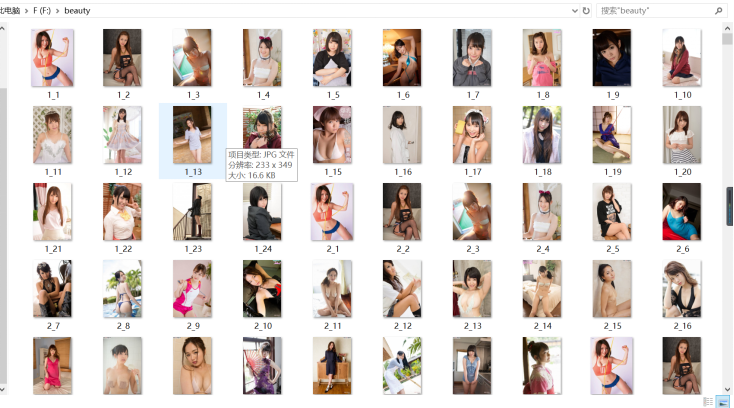
图片文件夹截图:
python3爬取全站美眉图片的更多相关文章
- Python爬取全站妹子图片,差点硬盘走火了!
在这严寒的冬日,为了点燃我们的热情,今天小编可是给大家带来了偷偷收藏了很久的好东西.大家要注意点哈,我第一次使用的时候,大意导致差点坏了大事哈! 1.所需库安装 2.网站分析 首先打开妹子图的官网(m ...
- Python3爬取美女妹子图片转载
# -*- coding: utf-8 -*- """ Created on Sun Dec 30 15:38:25 2018 @author: 球球 "&qu ...
- python3爬取动态网站图片
思路: 1.图片放在<image>XXX</image>标签中 2.利用fiddler抓包获取存放图片信息的js文件url 3.利用requests库获取html内容,然后获取 ...
- python3爬取1024图片
这两年python特别火,火到博客园现在也是隔三差五的出现一些python的文章.各种开源软件.各种爬虫算法纷纷开路,作为互联网行业的IT狗自然看的我也是心痒痒,于是趁着这个雾霾横行的周末瞅了两眼,作 ...
- python3爬取女神图片,破解盗链问题
title: python3爬取女神图片,破解盗链问题 date: 2018-04-22 08:26:00 tags: [python3,美女,图片抓取,爬虫, 盗链] comments: true ...
- 如何用python爬虫从爬取一章小说到爬取全站小说
前言 文的文字及图片来源于网络,仅供学习.交流使用,不具有任何商业用途,版权归原作者所有,如有问题请及时联系我们以作处理. PS:如有需要Python学习资料的小伙伴可以加点击下方链接自行获取http ...
- python 爬虫入门----案例爬取上海租房图片
前言 对于一个net开发这爬虫真真的以前没有写过.这段时间学习python爬虫,今天周末无聊写了一段代码爬取上海租房图片,其实很简短就是利用爬虫的第三方库Requests与BeautifulSoup. ...
- Python3 爬取微信好友基本信息,并进行数据清洗
Python3 爬取微信好友基本信息,并进行数据清洗 1,登录获取好友基础信息: 好友的获取方法为get_friends,将会返回完整的好友列表. 其中每个好友为一个字典 列表的第一项为本人的账号信息 ...
- 使用Python爬虫爬取网络美女图片
代码地址如下:http://www.demodashi.com/demo/13500.html 准备工作 安装python3.6 略 安装requests库(用于请求静态页面) pip install ...
随机推荐
- Java BeanUtils 组件 使用
1. BeanUtils组件 1.1 简介 程序中对javabean的操作很频繁, 所以apache提供了一套开源的api,方便对javabean的操作!即BeanUtils组件. BeanUtils ...
- 001Java锁之synchronized
01.synchronized & Lock synchronized锁同步 软件层面依赖JVM Lock锁同步 硬件层面依赖cpu指令 02.synchronized作用域 方法:锁住对象实 ...
- Python爬虫教程-27-Selenium Chrome版本与chromedriver兼容版本对照表
我们使用Selenium+Chrome时,版本不一样, 会导致 chromedriver 停止运行 chromedriver 所有版本下载链接:http://npm.taobao.org/mirror ...
- c++ inline 的位置不当导致的 无法解析的外部符号
这几天编写代码碰到 无法解析的外部符号 visual studio. 在类中 inline 修饰符应该放在类函数定义的时候而不是声明的地方 即 // test.h 头文件 class A { publ ...
- leetcode-surrounded regions-ZZ
Problem Statement (link): Given a 2D board containing 'X' and 'O', capture all regions surrounded by ...
- mysql 免安装版文件含义及作用
相信很多同学在首次安装mysql 免安装版时,对其中的文件不解,下面以 5.6.24为例讲解这里个文件代表什么: bin: 存放编译好的工具 data:存放数据库数据的位置(就是我们数据库存放的地方) ...
- java excel转pdf 工具类
package com.elitel.hljhr.comm.web.main.controller; import java.io.File; import java.io.FileOutputStr ...
- 大数据学习---大数据的学习【all】
大数据介绍 什么是大数据以及有什么特点 大数据:是指无法在一定时间内用常规软件工具对其内容进行抓取.管理和处理的数据集合. 大数据是一种方法论:“一切都被记录,一切都被数字化,从数据中寻找需求,寻找知 ...
- 杨氏矩阵C++实现
何为杨氏矩阵?这个网上的介绍很多,下面给出杨氏矩阵搜索算法: #include <iostream> using namespace std; // 杨氏矩阵查找算法 ], int N, ...
- ZT C,C++表达式求值顺序 裘老的解释。 [问题点数:300分]
http://bbs.csdn.net/topics/370153775 [置顶] [推荐] C,C++表达式求值顺序 裘老的解释. [问题点数:300分] 最近这问题有从日经变时经的趋势,这里贴出裘 ...