
Exercise:Sparse Autoencoder
斯坦福deep learning教程中的自稀疏编码器的练习,主要是参考了 http://www.cnblogs.com/tornadomeet/archive/2013/03/20/2970724.html,没有参考肯定编不出来。。。Σ( ° △ °|||)︴ 也当自己理解了一下
这里的自稀疏编码器,练习上规定是64个输入节点,25个隐藏层节点(我实验中只有20个),输出层也是64个节点,一共有10000个训练样本
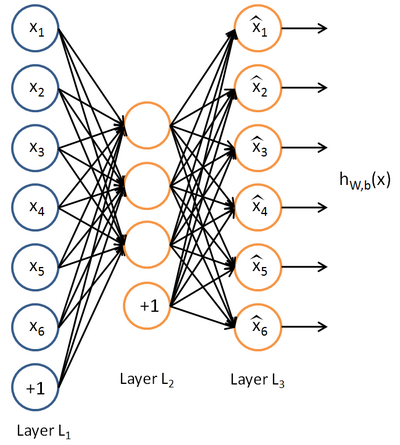
具体步骤:
首先在页面上下载sparseae_exercise.zip
Step 1:构建训练集
要求在10张图片(图片数据存储在IMAGES中)中随机的选取一张图片,在再这张图片中随机的选取10000个像素点,最终构建一个64*10000的像素矩阵。从一张图片中选取10000个像素点的好处是,只有copy一次IMAGES,速度更快,但是要注意每张图片的像素是512*512的,所以随机选取像素点最好是分行和列各选取100,最终组合成100*100,这样不容易导致越界。验证step 1可以运行train.m中的第一步,结果图如下:

(只展示了200个sample,所以有4个缺口)
需要自行编写sampleIMAGES中的部分code
function patches = sampleIMAGES()

% sampleIMAGES

% Returns  patches for training

load IMAGES;    % load images from disk

patchsize = ;  % we'll use 8x8 patches

numpatches = ;

% Initialize patches with zeros.  Your code will fill in this matrix--one

% column per patch,  columns.

patches = zeros(patchsize*patchsize, numpatches);

%% ---------- YOUR CODE HERE --------------------------------------

%  Instructions: Fill in the variable called "patches" using data

%  from IMAGES.

%

%  IMAGES is a 3D array containing  images

%  For instance, IMAGES(:,:,) is a 512x512 array containing the 6th image,

%  and you can type "imagesc(IMAGES(:,:,6)), colormap gray;" to visualize

%  it. (The contrast on these images look a bit off because they have

%  been preprocessed using using "whitening."  See the lecture notes for

%  more details.) As a second example, IMAGES(:,:,) is an image

%  patch corresponding to the pixels in the block (,) to (,) of

%  Image

imageNum = randi([,]);     %随机的选择一张图片

[rowNum colNum] = size(IMAGES(:,:,imageNum));

xPos = randperm(rowNum-patchsize+,);

yPos = randperm(colNum-patchsize+,);

for ii = :                %在图片中选取100*100个像素点

    for jj = :

        patchNum = (ii-)* + jj;

        patches(:,patchNum) = reshape(IMAGES(xPos(ii):xPos(ii)+,yPos(jj):yPos(jj)+,...

                                      imageNum),,);

    end

end

%% ---------------------------------------------------------------

% For the autoencoder to work well we need to normalize the data

% Specifically, since the output of the network is bounded between [,]

% (due to the sigmoid activation function), we have to make sure

% the range of pixel values is also bounded between [,]

patches = normalizeData(patches);

end

%% ---------------------------------------------------------------

function patches = normalizeData(patches)

% Squash data to [0.1, 0.9] since we use sigmoid as the activation

% function in the output layer

% Remove DC (mean of images).

patches = bsxfun(@minus, patches, mean(patches));

% Truncate to +/- standard deviations and scale to - to

pstd =  * std(patches(:));

patches = max(min(patches, pstd), -pstd) / pstd;

% Rescale from [-,] to [0.1,0.9]

patches = (patches + ) * 0.4 + 0.1;

end
Step 2:求解自稀疏编码器的参数
这一步就是要运用BP算法求解NN中各层的W,b(W1,W2,b1,b2)参数。 Backpropagation Algorithm算法在教程的第二节中有介绍,但要注意的是自稀疏编码器的误差函数除了有参数的正则化项,还有稀疏性规则项,BP算法推导公式中要加上,这里需要自行编写sparseAutoencoderCost.m
function [cost,grad] = sparseAutoencoderCost(theta, visibleSize, hiddenSize, ...

                                             lambda, sparsityParam, beta, data)

% visibleSize: the number of input units (probably )

% hiddenSize: the number of hidden units (probably )

% lambda: weight decay parameter

% sparsityParam: The desired average activation for the hidden units (denoted in the lecture

%                           notes by the greek alphabet rho, which looks like a lower-case "p").

% beta: weight of sparsity penalty term

% data: Our 64x10000 matrix containing the training data.  So, data(:,i) is the i-th training example.

% The input theta is a vector (because minFunc expects the parameters to be a vector).

% We first convert theta to the (W1, W2, b1, b2) matrix/vector format, so that this

% follows the notation convention of the lecture notes.

W1 = reshape(theta(:hiddenSize*visibleSize), hiddenSize, visibleSize);

W2 = reshape(theta(hiddenSize*visibleSize+:*hiddenSize*visibleSize), visibleSize, hiddenSize);

b1 = theta(*hiddenSize*visibleSize+:*hiddenSize*visibleSize+hiddenSize);

b2 = theta(*hiddenSize*visibleSize+hiddenSize+:end);

% Cost and gradient variables (your code needs to compute these values).

% Here, we initialize them to zeros.

cost = ;

W1grad = zeros(size(W1));

W2grad = zeros(size(W2));

b1grad = zeros(size(b1));

b2grad = zeros(size(b2));

%% ---------- YOUR CODE HERE --------------------------------------

%  Instructions: Compute the cost/optimization objective J_sparse(W,b) for the Sparse Autoencoder,

%                and the corresponding gradients W1grad, W2grad, b1grad, b2grad.

%

% W1grad, W2grad, b1grad and b2grad should be computed using backpropagation.

% Note that W1grad has the same dimensions as W1, b1grad has the same dimensions

% as b1, etc.  Your code should set W1grad to be the partial derivative of J_sparse(W,b) with

% respect to W1.  I.e., W1grad(i,j) should be the partial derivative of J_sparse(W,b)

% with respect to the input parameter W1(i,j).  Thus, W1grad should be equal to the term

% [(/m) \Delta W^{()} + \lambda W^{()}] in the last block of pseudo-code in Section 2.2

% of the lecture notes (and similarly for W2grad, b1grad, b2grad).

%

% Stated differently, if we were using batch gradient descent to optimize the parameters,

% the gradient descent update to W1 would be W1 := W1 - alpha * W1grad, and similarly for W2, b1, b2.

%

Jcost = ;%直接误差

Jweight = ;%权值惩罚

Jsparse = ;%稀疏性惩罚

[n m] = size(data);%m为样本的个数,n为样本的特征数

%前向算法计算各神经网络节点的线性组合值和active值

z2 = W1*data+repmat(b1,,m);%注意这里一定要将b1向量复制扩展成m列的矩阵

a2 = sigmoid(z2);

z3 = W2*a2+repmat(b2,,m);

a3 = sigmoid(z3);

% 计算预测产生的误差

Jcost = (0.5/m)*sum(sum((a3-data).^));

%计算权值惩罚项

Jweight = (/)*(sum(sum(W1.^))+sum(sum(W2.^)));

%计算稀释性规则项

rho = (/m).*sum(a2,)  ;%求出第一个隐含层的平均值向量

Jsparse = sum(sparsityParam.*log(sparsityParam./rho)+ ...

        (-sparsityParam).*log((-sparsityParam)./(-rho)));

%损失函数的总表达式

cost = Jcost+lambda*Jweight+beta*Jsparse;

%反向算法求出每个节点的误差值

d3 = -(data-a3).*(a3.*(-a3));

sterm = beta*(-sparsityParam./rho+(-sparsityParam)./(-rho));%因为加入了稀疏规则项,所以

                                                             %计算偏导时需要引入该项

d2 = (W2'*d3+repmat(sterm,1,m)).*(a2.*(1-a2));

%计算W1grad

W1grad = W1grad+d2*data';

W1grad = (/m)*W1grad+lambda*W1;

%计算W2grad

W2grad = W2grad+d3*a2';

W2grad = (/m).*W2grad+lambda*W2;

%计算b1grad

b1grad = b1grad+sum(d2,);

b1grad = (/m)*b1grad;%注意b的偏导是一个向量,所以这里应该把每一行的值累加起来

%计算b2grad

b2grad = b2grad+sum(d3,);

b2grad = (/m)*b2grad;

%-------------------------------------------------------------------

% After computing the cost and gradient, we will convert the gradients back

% to a vector format (suitable for minFunc).  Specifically, we will unroll

% your gradient matrices into a vector.

grad = [W1grad(:) ; W2grad(:) ; b1grad(:) ; b2grad(:)];

end

%-------------------------------------------------------------------

% Here's an implementation of the sigmoid function, which you may find useful

% in your computation of the costs and the gradients.  This inputs a (row or

% column) vector (say (z1, z2, z3)) and returns (f(z1), f(z2), f(z3)).

function sigm = sigmoid(x)        % 定义sigmoid函数

    sigm =  ./ ( + exp(-x));

end
Step 3:求解的 梯度检验
验证梯度下降是否正确,这个在教程第三节也有介绍,比较简单,在computeNumericalGradient.m中返回梯度检验后的值即可,computeNumericalGradient.m是在checkNumericalGradient.m中调用的,而checkNumericalGradient.m已经给出,不需要我们自己编写。
function numgrad = computeNumericalGradient(J, theta)

% numgrad = computeNumericalGradient(J, theta)

% theta: a vector of parameters

% J: a function that outputs a real-number. Calling y = J(theta) will return the

% function value at theta.

% Initialize numgrad with zeros

numgrad = zeros(size(theta));

%% ---------- YOUR CODE HERE --------------------------------------

% Instructions:

% Implement numerical gradient checking, and return the result in numgrad.

% (See Section 2.3 of the lecture notes.)

% You should write code so that numgrad(i) is (the numerical approximation to) the

% partial derivative of J with respect to the i-th input argument, evaluated at theta.

% I.e., numgrad(i) should be the (approximately) the partial derivative of J with

% respect to theta(i).

%

% Hint: You will probably want to compute the elements of numgrad one at a time.

epsilon = 1e-;

n = size(theta,);

E = eye(n,1);

for i = :n
   E(i) = 1;

    delta = E*epsilon;

    numgrad(i) = (J(theta+delta)-J(theta-delta))/(epsilon*2.0);
   E(i) = 0;

end

%% ---------------------------------------------------------------

end
Step 4:训练自稀疏编码器
整个训练过程使用的是L-BFGS求解,比教程中介绍的主要介绍批量SGD要快很多,具体原理我也不知道,而且训练过程已经给出,这一段不需要我们自己编写
Step 5:输出可视化结果
训练结束后,输出训练得到的权重矩阵W1,结果同时也会保存在weights.jpg中,这一段也不需要我们编写( 第一次)
结果图如下:

(感觉自己训练出来的这个没有标准的那么明显的线条,看就了还有点类似错误示例的第3个,不过重新仔细看还是有线条感的,可能是因为隐藏层只有20个,训练的也没有25个的彻底)
另外,查了一下内存不足的解决方法,据说在matlab命令行输入pack,可以释放一些内存。但是我觉得还是终究治标不治本,最好的方法还是升级64位操作系统,去添加内存条吧~
剩下的.m文件都不需要我们自己编写(修改隐藏层的节点数在train.m中),不过也顺带附上吧
function [] = checkNumericalGradient()

% This code can be used to check your numerical gradient implementation

% in computeNumericalGradient.m

% It analytically evaluates the gradient of a very simple function called

% simpleQuadraticFunction (see below) and compares the result with your numerical

% solution. Your numerical gradient implementation is incorrect if

% your numerical solution deviates too much from the analytical solution.

% Evaluate the function and gradient at x = [; ]; (Here, x is a 2d vector.)

x = [; ];

[value, grad] = simpleQuadraticFunction(x);

% Use your code to numerically compute the gradient of simpleQuadraticFunction at x.

% (The notation "@simpleQuadraticFunction" denotes a pointer to a function.)

numgrad = computeNumericalGradient(@simpleQuadraticFunction, x);

% Visually examine the two gradient computations.  The two columns

% you get should be very similar.

disp([numgrad grad]);

fprintf('The above two columns you get should be very similar.\n(Left-Your Numerical Gradient, Right-Analytical Gradient)\n\n');

% Evaluate the norm of the difference between two solutions.

% If you have a correct implementation, and assuming you used EPSILON = 0.0001

% in computeNumericalGradient.m, then diff below should be 2.1452e-12

diff = norm(numgrad-grad)/norm(numgrad+grad);

disp(diff);

fprintf('Norm of the difference between numerical and analytical gradient (should be < 1e-9)\n\n');

end

function [value,grad] = simpleQuadraticFunction(x)

% this function accepts a 2D vector as input.

% Its outputs are:

%   value: h(x1, x2) = x1^ + *x1*x2

%   grad: A 2x1 vector that gives the partial derivatives of h with respect to x1 and x2

% Note that when we pass @simpleQuadraticFunction(x) to computeNumericalGradients, we're assuming

% that computeNumericalGradients will use only the first returned value of this function.

value = x()^ + *x()*x();

grad = zeros(, );

grad()  = *x() + *x();

grad()  = *x();

end
checkNumericalGradient.m
function theta = initializeParameters(hiddenSize, visibleSize)

%% Initialize parameters randomly based on layer sizes.

r  = sqrt() / sqrt(hiddenSize+visibleSize+);   % we'll choose weights uniformly from the interval [-r, r]

W1 = rand(hiddenSize, visibleSize) *  * r - r;

W2 = rand(visibleSize, hiddenSize) *  * r - r;

b1 = zeros(hiddenSize, );

b2 = zeros(visibleSize, );

% Convert weights and bias gradients to the vector form.

% This step will "unroll" (flatten and concatenate together) all

% your parameters into a vector, which can then be used with minFunc.

theta = [W1(:) ; W2(:) ; b1(:) ; b2(:)];

end
initializeParameter
function [h, array] = display_network(A, opt_normalize, opt_graycolor, cols, opt_colmajor)

% This function visualizes filters in matrix A. Each column of A is a

% filter. We will reshape each column into a square image and visualizes

% on each cell of the visualization panel.

% All other parameters are optional, usually you do not need to worry

% about it.

% opt_normalize: whether we need to normalize the filter so that all of

% them can have similar contrast. Default value is true.

% opt_graycolor: whether we use gray as the heat map. Default is true.

% cols: how many columns are there in the display. Default value is the

% squareroot of the number of columns in A.

% opt_colmajor: you can switch convention to row major for A. In that

% case, each row of A is a filter. Default value is false.

warning off all

if ~exist('opt_normalize', 'var') || isempty(opt_normalize)

    opt_normalize= true;

end

if ~exist('opt_graycolor', 'var') || isempty(opt_graycolor)

    opt_graycolor= true;

end

if ~exist('opt_colmajor', 'var') || isempty(opt_colmajor)

    opt_colmajor = false;

end

% rescale

A = A - mean(A(:));

if opt_graycolor, colormap(gray); end

% compute rows, cols

[L M]=size(A);

sz=sqrt(L);

buf=;

if ~exist('cols', 'var')

    if floor(sqrt(M))^ ~= M

        n=ceil(sqrt(M));

        while mod(M, n)~= && n<1.2*sqrt(M), n=n+; end

        m=ceil(M/n);

    else

        n=sqrt(M);

        m=n;

    end

else

    n = cols;

    m = ceil(M/n);

end

array=-ones(buf+m*(sz+buf),buf+n*(sz+buf));

if ~opt_graycolor

    array = 0.1.* array;

end

if ~opt_colmajor

    k=;

    for i=:m

        for j=:n

            if k>M,

                continue;

            end

            clim=max(abs(A(:,k)));

            if opt_normalize

                array(buf+(i-)*(sz+buf)+(:sz),buf+(j-)*(sz+buf)+(:sz))=reshape(A(:,k),sz,sz)/clim;

            else

                array(buf+(i-)*(sz+buf)+(:sz),buf+(j-)*(sz+buf)+(:sz))=reshape(A(:,k),sz,sz)/max(abs(A(:)));

            end

            k=k+;

        end

    end

else

    k=;

    for j=:n

        for i=:m

            if k>M,

                continue;

            end

            clim=max(abs(A(:,k)));

            if opt_normalize

                array(buf+(i-)*(sz+buf)+(:sz),buf+(j-)*(sz+buf)+(:sz))=reshape(A(:,k),sz,sz)/clim;

            else

                array(buf+(i-)*(sz+buf)+(:sz),buf+(j-)*(sz+buf)+(:sz))=reshape(A(:,k),sz,sz);

            end

            k=k+;

        end

    end

end

if opt_graycolor

    h=imagesc(array,'EraseMode','none',[- ]);

else

    h=imagesc(array,'EraseMode','none',[- ]);

end

axis image off

drawnow;

warning on all
display_network
Z`[Y.png)
Exercise:Sparse Autoencoder的更多相关文章
- 【DeepLearning】Exercise:Sparse Autoencoder
Exercise:Sparse Autoencoder 习题的链接:Exercise:Sparse Autoencoder 注意点: 1.训练样本像素值需要归一化. 因为输出层的激活函数是logist ...
- Deep Learning 1_深度学习UFLDL教程:Sparse Autoencoder练习(斯坦福大学深度学习教程)
1前言 本人写技术博客的目的,其实是感觉好多东西,很长一段时间不动就会忘记了,为了加深学习记忆以及方便以后可能忘记后能很快回忆起自己曾经学过的东西. 首先,在网上找了一些资料,看见介绍说UFLDL很不 ...
- 七、Sparse Autoencoder介绍
目前为止,我们已经讨论了神经网络在有监督学习中的应用.在有监督学习中,训练样本是有类别标签的.现在假设我们只有一个没有带类别标签的训练样本集合 ,其中 .自编码神经网络是一种无监督学习算法,它使用 ...
- (六)6.5 Neurons Networks Implements of Sparse Autoencoder
一大波matlab代码正在靠近.- -! sparse autoencoder的一个实例练习,这个例子所要实现的内容大概如下:从给定的很多张自然图片中截取出大小为8*8的小patches图片共1000 ...
- UFLDL实验报告2:Sparse Autoencoder
Sparse Autoencoder稀疏自编码器实验报告 1.Sparse Autoencoder稀疏自编码器实验描述 自编码神经网络是一种无监督学习算法,它使用了反向传播算法,并让目标值等于输入值, ...
- CS229 6.5 Neurons Networks Implements of Sparse Autoencoder
sparse autoencoder的一个实例练习,这个例子所要实现的内容大概如下:从给定的很多张自然图片中截取出大小为8*8的小patches图片共10000张,现在需要用sparse autoen ...
- Sparse AutoEncoder简介
1. AutoEncoder AutoEncoder是一种特殊的三层神经网络, 其输出等于输入:\(y^{(i)}=x^{(i)}\), 如下图所示: 亦即AutoEncoder想学到的函数为\(f_ ...
- DL二(稀疏自编码器 Sparse Autoencoder)
稀疏自编码器 Sparse Autoencoder 一神经网络(Neural Networks) 1.1 基本术语 神经网络(neural networks) 激活函数(activation func ...
- sparse autoencoder
1.autoencoder autoencoder的目标是通过学习函数,获得其隐藏层作为学习到的新特征. 从L1到L2的过程成为解构,从L2到L3的过程称为重构. 每一层的输出使用sigmoid方法, ...
随机推荐
- About stats collected
pg_class.relpages pg_class.reltuples仅仅是近似值,和实际数据会有点误差: 新建空表.首次insert对自己主动收集和更新统计信息,影响的表pg_class\pg_s ...
- Andorid上拉加载更多的几种实现方式
1.前言 Andriod中上拉加载更多的效果随处可见,因为一次性要展现的数据太多信息量太大的话,给用户的体验就很差(加载慢,界面卡顿.流量消耗大等),而加载更多可以控制每次加载条目的数量以达到快速加载 ...
- [读后感]Java 控制台执行 Jar 传參的编码问题
下面这版面,太让我纠结了.谁能帮调整一下,... _________________ java -jar test.jar "一二一" 这样传进去的 "一二一" ...
- webDriver API——第15部分Expected conditions Support
class selenium.webdriver.support.expected_conditions.alert_is_present Bases: object Expect an alert ...
- Sketch 介绍
Sketch 插件大集合 -- Using Sketch Like A BOSS 这几天发现了一个叫做 Sketch Toolbox 的 Mac 应用,简直是下载和安装 Sketch 插件 ...
- react 执行 yarn build 后 去除 .js.map 文件
map文件是帮助我们查看报错的位置的. map文件由devtool属性控制,如果不想要map,注释掉就可以,大约webpack.config.prod.js第57行: // devtool: shou ...
- 使用ipmitool 命令添加IPMI 界面的SMTP邮件服务器地址
目前要通过ipmitool工具在IPMI的界面上添加邮件服务器地址,该脚本如下 SMTP.sh #!/bin/bash ipmitool raw 0x32 0x78 0x01 0x01 0x00 0x ...
- asp.net 查询本地excel 获取信息
string filepath = @"D:\test1.xls"; string sheetname = "Sheet5"; ...
- ES6 箭头函数下的this指向和普通函数的this对比
首先在网上摘抄借鉴了一段代码, 然后再这段代码里面进行分析,通过比较ES6的箭头函数和普通函数的this指指向, 分析其中的不同之处.下面就是代码片段var name = "window&q ...
- 浅谈CSRF攻击方式(转)
引自:http://www.cnblogs.com/hyddd/一.CSRF是什么? CSRF(Cross-site request forgery),中文名称:跨站请求伪造,也被称为:one cli ...