
[转]Insert, Update, and Delete Destination table with SSIS
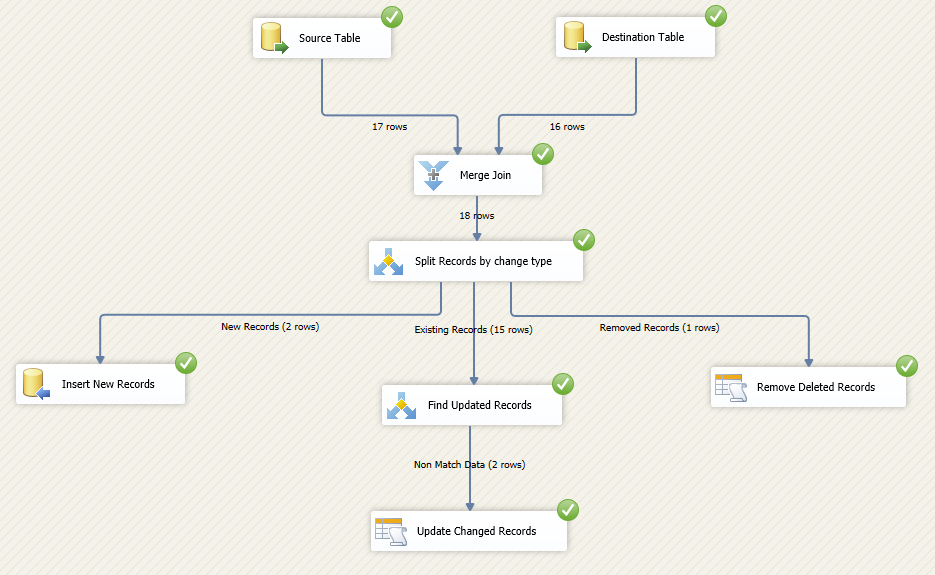
Previously I’ve wrote about design and implementation an UPSERT with SSIS. UPSERT is about Update existing records, and Insert new records. Today I want to extend this to cover DELETED records as well. So method used in this post can be used to find INSERTED / UPDATED / DELETED records from the source table and apply those changes into the destination table.
In this example I used Merge Join Transformation, Conditional Split, and OLE DB Command transform to implement the solution. First we apply a full outer join on source and destination table on key column(s) with Merge Join transformation. Then we use a conditional split to find out the change type (removed, new, or existing records). Existing records will require another processing to find out is there any changes happened or not? We use another conditional split to compare value of equivalent columns in source and destination.
Source table used in this example is Department table from AdventureWorks2012 sample database which you can download online for free.
Solution:
1- Create an OLE DB Source for source table, use select command below to select data:
select *
from dbo.Department
order by DepartmentID
Note to the ORDER BY Clause in this statement. That part is required because Merge Join transform require sorted sources as input. Name this component as Source Table
2- Create another OLE DB Source for destination table. In this example source and destination has same table name but are in different databases. So we use same script as step 1 for this one as well. Name this component as Destination Table.
3- Right click on OLE DB Source, choose Show Advanced Editor. In the Advanced Editor window go to Input and Output Properties tab. Select the OLE DB Source Output, and change the IsSorted Property to true.
4- Expand OLE DB Source output, and then under Output Columns select DepartmentID. Then change the SortKeyPosition to 1.
5- Apply steps 3 and 4 for both OLE DB Sources (Source Table and Destination Table)
6- Drag and drop a Merge Join transformation, connect two OLE DB Sources to this. Set Source Table as left and Destination Table as right input of this transformation.
7- Go to Merge Join transformation editor, DepartmentID will be used as joining column (selected based on sort properties of previous components). Note that if you don’t sort input columns of the merge join transformation then you cannot get into the editor of this transformation and you face the error regarding sorting of inputs.
Select all columns from Source and Destination tables in the merge join transform, and rename them as picture below shows (add Source or Destination prefix to each column)
8- Add a Conditional Split transformation and write two expressions below to find out new records, and removed records. Also rename default output as existing records and screenshot below shows
Expressions used in this sample are very easy and simply find record changes. For example expression below:
!ISNULL(SourceDepartmentID) && ISNULL(DestinationDepartmentID)
Used to find new records. And literally means records that has SourceDepartmentID but not DestinationDepartmentID.
And this script used to find deleted records:
ISNULL(SourceDepartmentID) && !ISNULL(DestinationDepartmentID)
9- Add an OLE DB Destination and connect NEW RECORDS output to it. Set configuration for destination table and use columns with Source prefix in the column mapping of the OLE DB destination. This destination component will insert new records into the destination table.
10- Add an OLE DB Command and connect Removed RECORDS output to it. Create a connection to destination database, and write script below to delete records by input department ID:
delete from dbo.department where DepartmentID=?
In the column mappings, map DestinationDepartmentID to the parameter of statement.
11- Add another Conditional Split and connect Existing Records output to it. We use this component to find only records that had a change in one of the values. So we compare equivalent source and destination columns to find non-match data.
This is the expression used to find match data in screenshot below:
(SourceName == DestinationName) && (SourceGroupName == DestinationGroupName) && (SourceModifiedDate == DestinaitonModifiedDate)
12- Create a stored procedure in destination database to update the Department table.
CREATE PROCEDURE dbo.UpdateDepartment
@DepartmentID smallint
,@Name nvarchar(50)
,@GroupName nvarchar(50)
,@ModifiedDate datetime
AS
BEGIN
SET NOCOUNT ON;
UPDATE [dbo].[Department]
SET
[Name] = @Name
,[GroupName] = @GroupName
,[ModifiedDate] = @ModifiedDate
WHERE [DepartmentID] = @DepartmentID
END
13- Add another OLE DB Command and use non match output as the input data stream to it. Connect it to destination database, and write below statement in Component Properties tab’s SQLCommand property.
exec dbo.UpdateDepartment ?,?,?,?
14- Map input columns (with source prefixes) to parameters in the stored procedure as screenshot below shows
15- Run the package and you will see changes will be applied to destination table.
Testing the solution:
Here is data rows from source table
And data rows from destination table
Yellow records are new records
Pink records are updated records
Green record is deleted record (in destination table)
After running the package you will see records will be redirected to data path as implemented:
And destination table will pick changes:
[转]Insert, Update, and Delete Destination table with SSIS的更多相关文章
- Java-MyBatis-MyBatis3-XML映射文件:insert, update 和 delete
ylbtech-Java-MyBatis-MyBatis3-XML映射文件:insert, update 和 delete 1.返回顶部 1. insert, update 和 delete 数据变更 ...
- 关于MyBatis mapper的insert, update, delete返回值
这里做了比较清晰的解释: http://mybatis.github.io/mybatis-3/java-api.html SqlSession As mentioned above, the Sql ...
- mybatis select/insert/update/delete
这里做了比较清晰的解释: http://mybatis.github.io/mybatis-3/java-api.html SqlSession As mentioned above, the Sql ...
- [转] hive0.14-insert、update、delete操作测试
FROM : http://blog.csdn.net/hi_box/article/details/40820341 首先用最普通的建表语句建一个表: hive>create table te ...
- Hive支持行级update、delete时遇到的问题
Hive从0.14版本开始支持事务和行级更新,但缺省是不支持的,需要一些附加的配置.要想支持行级insert.update.delete,需要配置Hive支持事务.(行级的insert好像不配置也能运 ...
- MySQL数据库INSERT、UPDATE、DELETE以及REPLACE语句的用法详解
本篇文章是对MySQL数据库INSERT.UPDATE.DELETE以及REPLACE语句的用法进行了详细的分析介绍,需要的朋友参考下 MySQL数据库insert和update语句引:用于操作数 ...
- 利用insert,update和delete注入获取数据
0x00 简介 利用SQL注入获取数据库数据,利用的方法可以大致分为联合查询.报错.布尔盲注以及延时注入,通常这些方法都是基于select查询语句中的SQL注射点来实现的.那么,当我们发现了一个基于i ...
- Mysql 下 Insert、Update、Delete、Order By、Group By注入
Insert: 语法:INSERT INTO table_name (列1, 列2,...) VALUES (值1, 值2,....) 报错注入: insert into test(id,name,p ...
- [Hive - LanguageManual] DML: Load, Insert, Update, Delete
LanguageManual DML Hive Data Manipulation Language Hive Data Manipulation Language Loading files int ...
随机推荐
- Struts2学习笔记03 之 Result组件
二.Result原理 1.stream 2.redirectAction 3.Json
- LeetCode解题报告——Convert Sorted List to Binary Search Tree & Populating Next Right Pointers in Each Node & Word Ladder
1. Convert Sorted List to Binary Search Tree Given a singly linked list where elements are sorted in ...
- SecureCrt的操持连接办法
保持连接: options -> global options -> General -> Default Session,点击Edit default settings按钮,在Te ...
- JS获取 KindEditor textarea 标签 html内容失败的解决方法。
KindEditor 这个 东西 研究的不多,JS在通过调用getElementById 获取文本id的内容时候,KindEditor 尚未将内容同步,官方给的解决方法是afterBlur: func ...
- NOI2014 起床困难综合症 day1t1
感觉NOI题在向简单方向发展,或者说明年会难到暴呢? 直接模拟啊,枚举每个二进制数位,看经过变换之后是否为1及为1的条件即可.\( O(nlogm)\). 然后...跪了一个点,第五个死活比标准大一. ...
- javascript大神修炼记(4)——循环
读者朋友们大家好,今天,我们继续接着前面的内容讲,前们我们已经讲了条件分支,今天我们就讲循环,顾名思义就是,重复执行相同的操作,正常循环是受程序控制的,不正常的情况,就会出现死循环,那就是我们的代码中 ...
- CSS3主要的几个样式笔记
1.边框:border-color: 设置对象边框的颜色. 使用CSS3的border-radius属性,如果你设置了border的宽度是X px,那么你就可以在这个border上使用X ...
- Centos的 mysql for python的下载与安装
mysql-python的安装包下载地址:http://sourceforge.net/projects/mysql-python/files/latest/download linux环境是 Cen ...
- (3) go 指针
1.获取地址 取地址 &i 2.指针 var p *int=&i ptr 是一个地址 *ptr 是可看成一个变量,该地址所在的变量,也就是 num 3.常见值类型 引用类型 值类型:栈 ...
- 洛谷P3385 [模板]负环 [SPFA]
题目传送门 题目描述 暴力枚举/SPFA/Bellman-ford/奇怪的贪心/超神搜索 输入输出格式 输入格式: 第一行一个正整数T表示数据组数,对于每组数据: 第一行两个正整数N M,表示图有N个 ...