
Flume环境搭建_五种案例(转)
Flume环境搭建_五种案例
http://flume.apache.org/FlumeUserGuide.html
A simple example
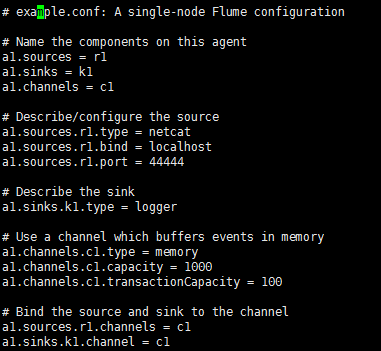
Here, we give an example configuration file, describing a single-node Flume deployment. This configuration lets a user generate events and subsequently logs them to the console.
# example.conf: A single-node Flume configuration

# Name the components on this agent

a1.sources = r1

a1.sinks = k1

a1.channels = c1

# Describe/configure the source

a1.sources.r1.type = netcat

a1.sources.r1.bind = localhost

a1.sources.r1.port = 44444

# Describe the sink

a1.sinks.k1.type = logger

# Use a channel which buffers events in memory

a1.channels.c1.type = memory

a1.channels.c1.capacity = 1000

a1.channels.c1.transactionCapacity = 100

# Bind the source and sink to the channel

a1.sources.r1.channels = c1

a1.sinks.k1.channel = c1
This configuration defines a single agent named a1. a1 has a source that listens for data on port 44444, a channel that buffers event data in memory, and a sink that logs event data to the console. The configuration file names the various components, then describes their types and configuration parameters. A given configuration file might define several named agents; when a given Flume process is launched a flag is passed telling it which named agent to manifest.
Given this configuration file, we can start Flume as follows:
$ bin/flume-ng agent --conf conf --conf-file example.conf --name a1 -Dflume.root.logger=INFO,console
Note that in a full deployment we would typically include one more option: --conf=<conf-dir>. The <conf-dir> directory would include a shell script flume-env.sh and potentially a log4j properties file. In this example, we pass a Java option to force Flume to log to the console and we go without a custom environment script.
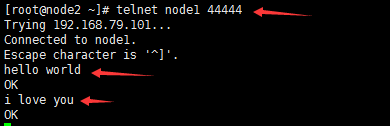
From a separate terminal, we can then telnet port 44444 and send Flume an event:
$ telnet localhost 44444

Trying 127.0.0.1...

Connected to localhost.localdomain (127.0.0.1).

Escape character is '^]'.

Hello world! <ENTER>

OK
The original Flume terminal will output the event in a log message.
12/06/19 15:32:19 INFO source.NetcatSource: Source starting

12/06/19 15:32:19 INFO source.NetcatSource: Created serverSocket:sun.nio.ch.ServerSocketChannelImpl[/127.0.0.1:44444]

12/06/19 15:32:34 INFO sink.LoggerSink: Event: { headers:{} body: 48 65 6C 6C 6F 20 77 6F 72 6C 64 21 0D          Hello world!. }
Congratulations - you’ve successfully configured and deployed a Flume agent! Subsequent sections cover agent configuration in much more detail.
以下为具体搭建流程
Flume搭建_案例一:单个Flume

安装node2上
1. 上传到/home/tools,解压,解压后移动到/home下
2. 重命名,并修改flume-env.sh









Flume搭建_案例二:两个Flume做集群
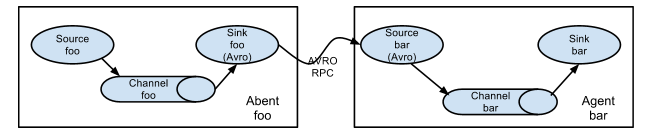
MemoryChanel配置capacity:默认该通道中最大的可以存储的event数量是100,trasactionCapacity:每次最大可以从source中拿到或者送到sink中的event数量也是100keep-alive:event添加到通道中或者移出的允许时间byte**:即event的字节量的限制,只包括eventbody
在/etc/profile下
node1,node2下创建测试目录test_flume,并分别在node1,node2下创建配置文件——flume21,flume22

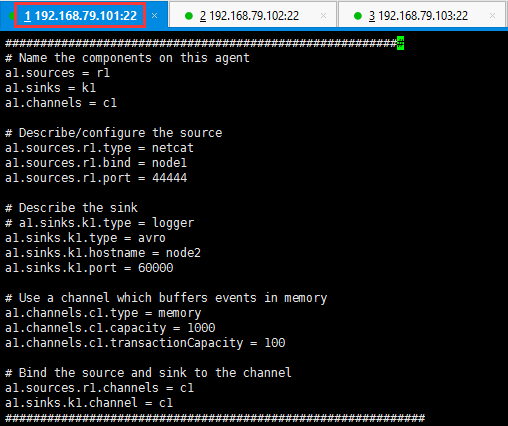

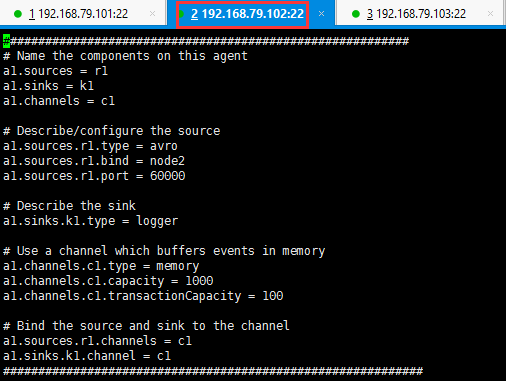
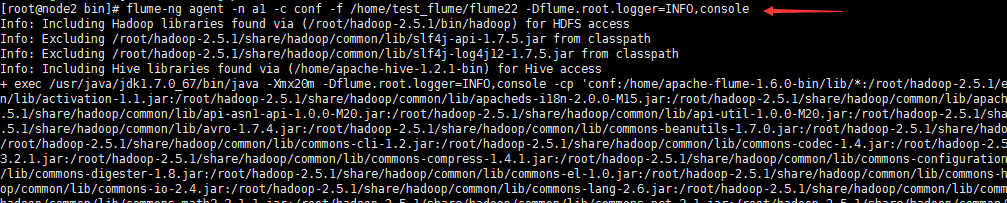
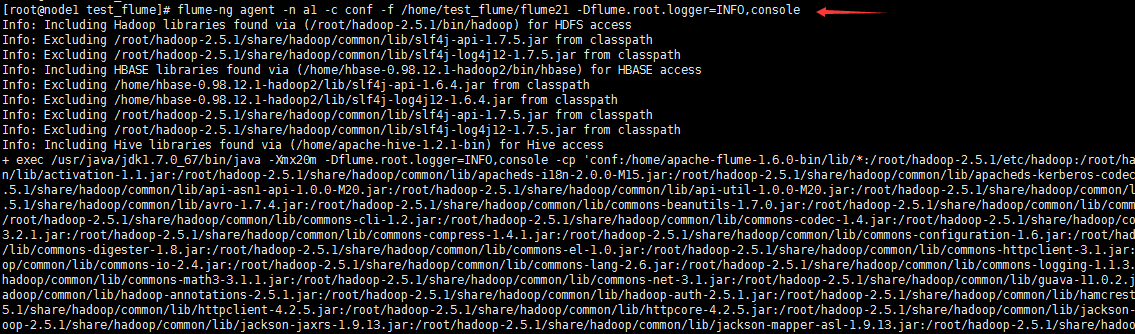
先启动node02的Flumeflume-ng agent -n a1 -c conf -f avro.conf -Dflume.root.logger=INFO,consoleflume-ng agent -n a1 -c conf -f /home/test_flume/flume22 -Dflume.root.logger=INFO,console再启动node01的Flumeflume-ng agent -n a1 -c conf -f simple.conf2 -Dflume.root.logger=INFO,consoleflume-ng agent -n a1 -c conf -f /home/test_flume/flume21 -Dflume.root.logger=INFO,console



Flume搭建_案例三:如何监控一个文件的变化?
在/etc/profile下


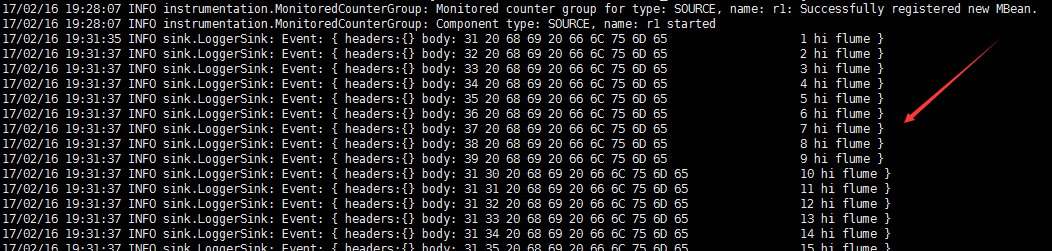
启动Flumeflume-ng agent -n a1 -c conf -f exec.conf -Dflume.root.logger=INFO,consoleflume-ng agent -n a1 -c conf -f /home/test_flume/flume3 -Dflume.root.logger=INFO,console

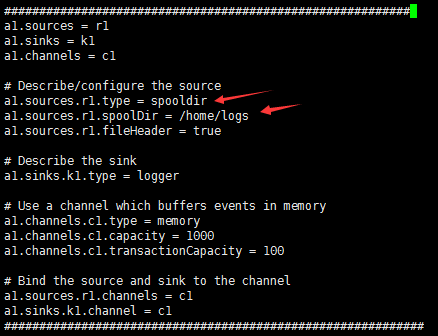
Flume搭建_案例四: 如何监控一个文件:目录的变化?
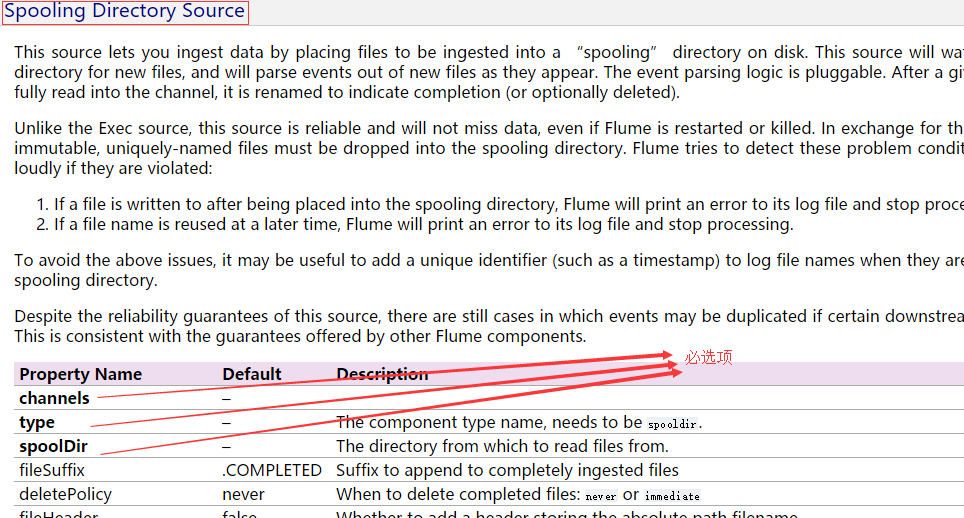
在/etc/profile下



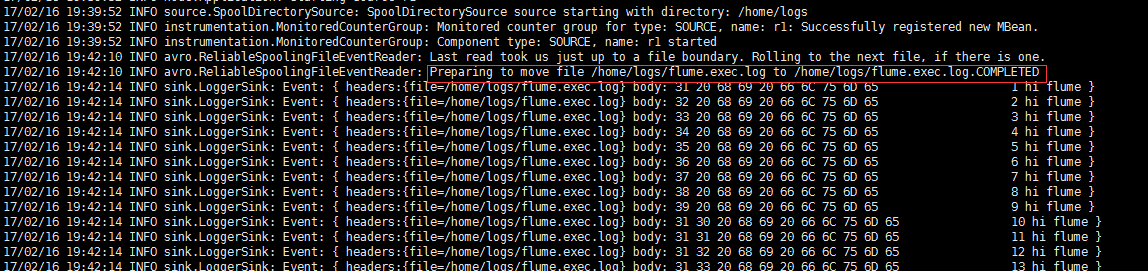
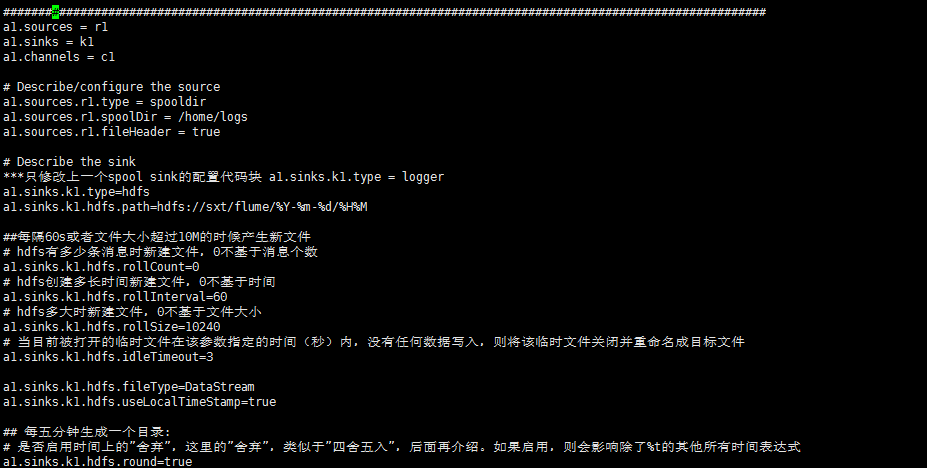
Flume搭建_案例五: 如何定义一个HDFS类型的Sink?

Flume搭建_案例五_配置项解读

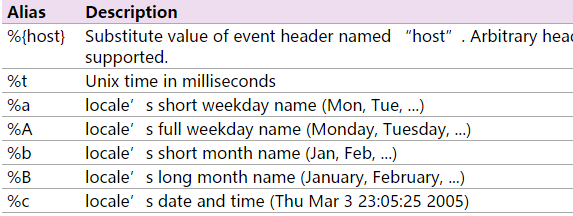
| hdfs.rollInterval | 30 | Number of seconds to wait before rolling current file (0 = never roll based on time interval) |
| hdfs.rollSize | 1024 | File size to trigger roll, in bytes (0: never roll based on file size) |
| hdfs.rollCount | 10 | Number of events written to file before it rolled (0 = never roll based on number of events) |
4. 多长时间没有操作,Flume将一个临时文件生成新文件?
| hdfs.idleTimeout | 0 | Timeout after which inactive files get closed (0 = disable automatic closing of idle files) |
5. 多长时间生成一个新的目录?(比如每10s生成一个新的目录)
四舍五入,没有五入,只有四舍
(比如57分划分为55分,5,6,7,8,9在一个目录,10,11,12,13,14在一个目录)
| hdfs.round | false | Should the timestamp be rounded down (if true, affects all time based escape sequences except %t) |
| hdfs.roundValue | 1 | Rounded down to the highest multiple of this (in the unit configured using hdfs.roundUnit), less than current time. |
| hdfs.roundUnit | second | The unit of the round down value - second, minute or hour. |
在/etc/profile下

Flume环境搭建_五种案例(转)的更多相关文章
- Flume环境搭建_五种案例
Flume环境搭建_五种案例 http://flume.apache.org/FlumeUserGuide.html A simple example Here, we give an example ...
- Hadoop Hive概念学习系列之hive三种方式区别和搭建、HiveServer2环境搭建、HWI环境搭建和beeline环境搭建(五)
说在前面的话 以下三种情况,最好是在3台集群里做,比如,master.slave1.slave2的master和slave1都安装了hive,将master作为服务端,将slave1作为服务端. 以 ...
- 从环境搭建到回归神经网络案例,带你掌握Keras
摘要:Keras作为神经网络的高级包,能够快速搭建神经网络,它的兼容性非常广,兼容了TensorFlow和Theano. 本文分享自华为云社区<[Python人工智能] 十六.Keras环境搭建 ...
- 03 Mybatis:01.Mybatis课程介绍及环境搭建&&02.Mybatis入门案例
mybatis框架共四天第一天:mybatis入门 mybatis的概述 mybatis的环境搭建 mybatis入门案例 -------------------------------------- ...
- Kafka开发环境搭建(五)
如果你要利用代码来跑kafka的应用,那你最好先把官网给出的example先在单机环境和分布式环境下跑通,然后再逐步将原有的consumer.producer和broker替换成自己写的代码.所以在阅 ...
- [刘阳Java]_EasyUI环境搭建_第2讲
在EasyUI的第1讲中我们介绍了学习EasyUI能够做什么,这次我们得快速搭建一个EasyUI环境,来测试一下它的运行效果 1.jQuery EasyUI环境搭建 <script type=& ...
- 第3章 文件I/O(5)_五种I/O模型
6. I/O处理方式(5种I/O模型) 6.1 几个概念的辨析 (1)同步和异步 ①是访问数据的方式,主要是针对IO(资源.数据)而言的.关键在于I/O操作完成后,有没有提供通知机制. ②同步的IO, ...
- Linux 下LAMP环境搭建_【all】
LAMP = Linux + Apache + Mysql + PHP 0. Linux环境搭建 Linux 系统安装[Redhat] 1.http服务软件分类及企业实战用途介绍 静态程序: Apac ...
- Linux 下LNMP环境搭建_【all】
LNMP = Linux + Nginx + Mysql + PHP 1.0 Linux环境搭建 Linux 系统安装[Redhat] 1.1. FastCGI介绍 1.什么是CGI(common g ...
随机推荐
- socket、tcp/ip协议、udp协议
socket通常也称作"套接字",用于描述IP地址和端口,是一个通信链的句柄,应用程序通常通过"套接字"向网络发出请求或者应答网络请求. socket起源于Un ...
- Windows 上 Nginx 路径的陷阱
第一次用 Nginx 配置 Vhosts. 使用了 Windows 路径 C:\ww\fa\public,没有问题. 我以为 Nginx 的高级特性. 后来要建了一个 Vhosts,发现死活进不了. ...
- Oracle 补丁体系 及 opatch 工具 介绍
一. CPU(Critical Patch Update) 一个CPU内包含了对多个安全漏洞的修复,并且也包括相应必需的非安全漏洞的补丁.CPU是累积型的,只要安装最新发布的CPU即可,其中包括之前发 ...
- mySQL 教程 第3章 数据类型和数据完整性
准备数据库 创建练习数据库,以下实验都是在这个数据库中完成. 练习1:比较各种数值型 create table tmp1 ( id INT, name VARCHAR(25), deptId deci ...
- Spring的IOC原理 通俗解释
1. IoC理论的背景我们都知道,在采用面向对象方法设计的软件系统中,它的底层实现都是由N个对象组成的,所有的对象通过彼此的合作,最终实现系统的业务逻辑. 图1:软件系统中耦合的对象 如果我们打开机械 ...
- gcc gdb调试 (三)
编写代码过程中少不了调试.在windows下面,我们有visual studio工具.在linux下面呢,实际上除了gdb工具之外,你没有别的选择.那么,怎么用gdb进行调试呢?我们可以一步一步来试试 ...
- 【EasyUI学习-3】Easyui tabs入门实践
作者:ssslinppp 1. 摘要 一般我们在设计程序主框架的时候,当点击(子)菜单时,希望相应界面都在tabs页中显示: 在显示的时候,如果之前打开过该界面,则希望重新选中对应的tab ...
- JVM内存监视手段和内存溢出解决方案
引言 本文仅关注一些常见的虚拟机内存监视手段,以及JVM运行时数据区各个部分内存溢出的发生和对应的解决方案,总体来说属于概括性总结,涉及相对不是很深入,目的是让自己和其它初学者有一个框架性.概念性的了 ...
- bzoj3932 任务查询系统
Description 最近实验室正在为其管理的超级计算机编制一套任务管理系统,而你被安排完成其中的查询部分. 超级计算机中的任务用三元组(Si,Ei,Pi)描述,(Si,Ei,Pi)表示任务从第Si ...
- linux 守护进程 daemon
Linux的Service/Daemon你真的懂了吗? Linux 守护进程的启动方法 linux系统编程之进程(八):守护进程详解及创建,daemon()使用 linux守护进程 daemon 详解