
Unity3D学习笔记(二十五):文件操作
using System.Collections;

using System.Collections.Generic;

using UnityEngine;

using System.IO;

public class LessonFile : MonoBehaviour {

       // Use this for initialization

       void Start () {

        //判断文件是否存在

        if (File.Exists(@"D:\桌面\Directory\Text.txt"))

        {

            Debug.Log("文件存在");

        }

        //删除文件,注意文件的后缀

        File.Delete(@"D:\桌面\Directory\Text.txt");

        //移动文件,可以通过这种方式来对文件进行重命名,注意后缀名

        //文件名可以不同,后缀名也可以不同(改变文件的类型)

        File.Move(@"D:\桌面\Directory\JPG.jpg", @"D:\桌面\Directory\PNG.png");

        //拷贝文件,前后名字可以不一致,后缀名也可以不一致

        File.Copy(@"D:\桌面\Directory\PNG.png", @"D:\桌面\Directory\GIF.gif");

        //创建文件

        FileStream fsCreate = File.Create(@"D:\桌面\Directory\Create.txt");

        fsCreate.Close();//关闭文件流

    }

       // Update is called once per frame

       void Update () {

       }

}
using System.Collections;

using System.Collections.Generic;

using UnityEngine;

using System.IO;

public class LessonDirectory : MonoBehaviour {

       // Use this for initialization

       void Start () {

        //获取当前应用程序(工程)的绝对路径

        Directory.GetCurrentDirectory();

        Debug.Log(Directory.GetCurrentDirectory());

        //@取消转义

        string str = @"\";

        Debug.Log(str);

        //判断指定的文件夹路径是否存在

        if (Directory.Exists(@"D:\桌面\Directory"))

        {

            Debug.Log("Directory文件夹存在");

        }

        //创建文件夹

        Directory.CreateDirectory(@"D:\桌面\Directory\File1");

        Directory.CreateDirectory(@"D:\桌面\Directory\File2");

        //删除文件夹,对于文件夹里有文件的情况,如果使用一个参数去删除会报错

        //对于文件夹里有文件的情况,我们使用重载的第二个参数传入true表示强制删除

        Directory.Delete(@"D:\桌面\Directory\File1");

        //移动文件夹,可以通过这种方式来实现文件夹的重命名

        Directory.Move(@"D:\桌面\Directory\File2", @"D:\桌面\Directory\File3");

        //获取文件夹下的所有文件

        string[] files = Directory.GetFiles(@"D:\桌面\Directory");

        foreach (var item in files)

        {

            Debug.Log(item);

        }

        //获取指定路径下的所有文件夹

        string[] directorys = Directory.GetDirectories(@"D:\桌面");

        foreach (var item in directorys)

        {

            Debug.Log(item);

        }

    }

       // Update is called once per frame

       void Update () {

       }

}
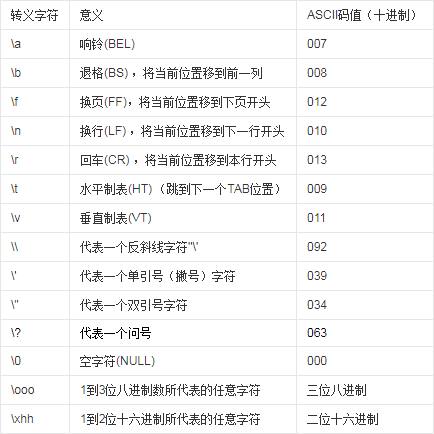

打开一个文件流之后,一定要关闭,否则会占用
using System.Collections;

using System.Collections.Generic;

using UnityEngine;

using System.IO;

public class LessonFile : MonoBehaviour {

       // Use this for initialization

       void Start () {

        //判断文件是否存在

        if (File.Exists(@"D:\桌面\Directory\Text.txt"))

        {

            Debug.Log("文件存在");

        }

        //删除文件,注意文件的后缀

        File.Delete(@"D:\桌面\Directory\Text.txt");

        //移动文件,可以通过这种方式来对文件进行重命名,注意后缀名

        //文件名可以不同,后缀名也可以不同(改变文件的类型)

        File.Move(@"D:\桌面\Directory\JPG.jpg", @"D:\桌面\Directory\PNG.png");

        //拷贝文件,前后名字可以不一致,后缀名也可以不一致

        File.Copy(@"D:\桌面\Directory\PNG.png", @"D:\桌面\Directory\GIF.gif");

        //创建文件

        FileStream fsCreate = File.Create(@"D:\桌面\Directory\Create.txt");

        fsCreate.Close();//关闭文件流

    }

       // Update is called once per frame

       void Update () {

       }

}

using System.Collections;

using System.Collections.Generic;

using UnityEngine;

public class LessonTryCatch : MonoBehaviour {

    public GameObject obj;

       // Use this for initialization

       void Start () {

        Debug.Log("开始try");

        try

        {

            Debug.Log("try 语句块!");

            Debug.Log(obj.name);//这句话一定会报错,跳转catch

            Debug.Log("打印名字");

        }

        catch (System.Exception e)

        {

            Debug.Log("catch 语句块!" + e);

            Debug.Log("错误信息:" + e);

            Debug.Log(obj.name);//如果catch报错,之后的代码都不会执行

        }

        Debug.Log("结束try");

    }

       // Update is called once per frame

       void Update () {

       }

}
作业:读取文本内容,显示在UI的text组件上,并实现内容滚动
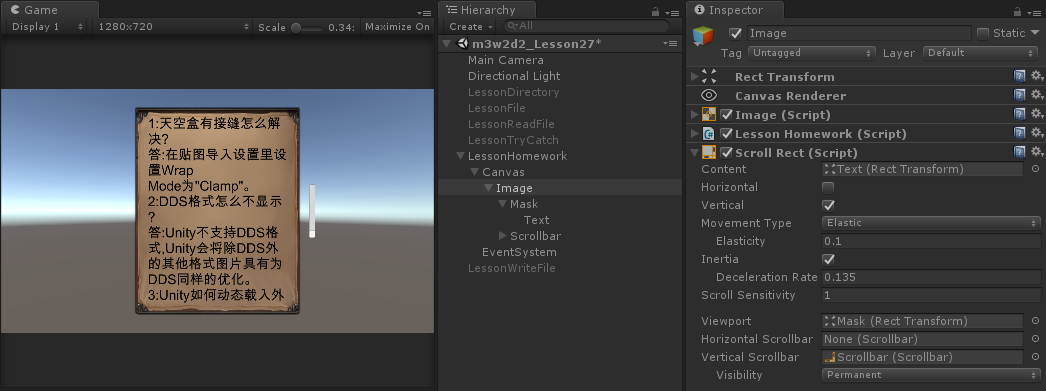
文本位置调整
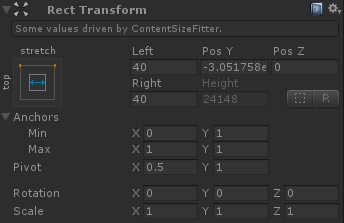
文本自动扩容

读取文件
using System.Collections;

using System.Collections.Generic;

using UnityEngine;

using System.IO;

using System.Text;

using UnityEngine.UI;

public class LessonHomework : MonoBehaviour {

    public const string filePath = @"D:\桌面\1.txt";

    private Text text;

    private void Awake()

    {

        text = transform.Find("Mask/Text").GetComponent<Text>();

    }

    // Use this for initialization

    void Start () {

        FileStream fs = File.Open(filePath, FileMode.Open);

        try

        {

            byte[] bytes = new byte[fs.Length];

            int ret = fs.Read(bytes, , (int)fs.Length);

            string str = Encoding.UTF8.GetString(bytes);

            text.text = str;

        }

        catch (System.Exception e)

        {

            Debug.Log(e.ToString());

        }

        fs.Close();

    }

       // Update is called once per frame

       void Update () {

       }

}
写入文件
using System.Collections;

using System.Collections.Generic;

using UnityEngine;

using System.IO;

using System.Text;

public class LessonWriteFile : MonoBehaviour {

    public const string filePath = @"D:\桌面\Directory\ReadFile.txt";

    // Use this for initialization

    void Start () {

        //string filePath1 = Directory.GetCurrentDirectory();

        //filePath1 = filePath1 + "\\Directory\\";

        //写入文本文件

        //1、打开文件

        FileStream fs = File.Open(filePath, FileMode.Open);

        // FileStream fs = File.Open(filePath, FileMode.Append);//追加模式

        Debug.Log("游标的位置:" + fs.Position);

        //第一个参数:向前移或向后移多少位,第二个参数:从什么位置开始移动

        //对于想要把游标移动到文件的末尾

        //方法1

        fs.Seek(fs.Length, SeekOrigin.Begin);

        //方法2

        fs.Seek(fs.Length - fs.Position, SeekOrigin.Current);

        //方法3

        fs.Seek(, SeekOrigin.End);

        //对于想要把游标移动到文件的开始

        //方法1

        fs.Seek(, SeekOrigin.Begin);

        //方法2

        fs.Seek(-fs.Position, SeekOrigin.Current);

        //方法3

        fs.Seek(-fs.Length, SeekOrigin.End);

        Debug.Log("游标的位置:" + fs.Position);

        //为了保证文件打开之后一定能关闭,文件操作写在Try Catch里

        try

        {

            //2、把要写入的内容转成字节数组

            string str = "做一只快乐的小鱼苗~";

            byte[] bytes = Encoding.UTF8.GetBytes(str);

            //3、写入文件

            //第一个参数:写入文件的内容转换成的字符串

            //第二个参数:从字节数组中的第几位开始写入

            //第三个参数:从字节数组中写入多少位

            fs.Write(bytes, , bytes.Length);

        }

        catch (System.Exception e)

        {

            Debug.Log(e.ToString());

        }

        //最终关闭文件流

        fs.Close();

       }

       // Update is called once per frame

       void Update () {

       }

}
using System.Collections;

using System.Collections.Generic;

using UnityEngine;

using System.IO;

public class LessonStreamReader : MonoBehaviour {

    public const string filePath = @"D:\桌面\Directory\ReadFile.txt";

    // Use this for initialization

    void Start () {

        //文本读写器

        //打开文件,保证路径是正确的,有效的

        StreamReader sr = new StreamReader(filePath, System.Text.Encoding.UTF8);

        try

        {

            //string str = sr.ReadLine();//只读取一行。

            string str = sr.ReadToEnd();//从开始读到结尾

            Debug.Log("读取的内容: " + str);

        }

        catch (System.Exception e)

        {

            Debug.Log(e.ToString());

        }

        //最后一定要关闭文件

        sr.Close();

    }

    // Update is called once per frame

    void Update () {

       }

}
文本写,不能操作游标,如果不使用追加模式,默认清空原有内容,重新写入
using System.Collections;

using System.Collections.Generic;

using UnityEngine;

using System.IO;

public class LessonStreamWrite : MonoBehaviour {

    public const string filePath = @"D:\桌面\Directory\ReadFile.txt";

    // Use this for initialization

    void Start () {

        //文本读写器

        //1、打开文件

        //这个重载,会把文件内容全部清除,重新写入内容

        //StreamWriter sw = new StreamWriter(filePath);

        //这个重载,是追加模式,第二个参数指定是否追加,第三个参数是指定编码格式

        StreamWriter sw = new StreamWriter(filePath, true, System.Text.Encoding.UTF8);

        try

        {

            sw.Write("Hello World!");

        }

        catch (System.Exception e)

        {

            Debug.Log(e.ToString());

        }

        //最后一定关闭文件

        sw.Close();

    }

       // Update is called once per frame

       void Update () {

       }

}
using System.Collections;

using System.Collections.Generic;

using UnityEngine;

using System.IO;

using System.Threading;

public class LessonCopyFile : MonoBehaviour {

    public UnityEngine.UI.Slider slider;

    public const string sourceFilePath = @"D:\桌面\1.rar";

    public const string targetFilePath = @"D:\桌面\2.rar";

    private float maxValue = 1f;

    private float currentValue;

    private bool isStop = false;

    // Use this for initialization

    void Start () {

        //小文件的拷贝

        //CopyFile(sourceFilePath, targetFilePath);

        //大文件的拷贝

        //TestCopyFile();

        //大文件的线程拷贝

        //1.申请一个Thread的对象

        Thread th = new Thread(TestCopyFile);

        //2.启动这个线程

        th.Start();

    }

    // Update is called once per frame

    void Update () {

        //滑动条赋值

        slider.normalizedValue = currentValue / maxValue;

    }

    private void OnDestroy()

    {

        isStop = true;

    }

    //小文件的拷贝

    void CopyFile(string sourceFile, string targetFile)

    {

        //拷贝,就把源文件的内容写入到新的文件中

        //1.读取源文件的内容

        FileStream source = File.Open(sourceFile, FileMode.Open);

        byte[] bytes = new byte[source.Length];

        try

        {

            //读取内容

            source.Read(bytes, , bytes.Length);

        }

        catch (System.Exception e)

        {

            Debug.Log(e.ToString());

        }

        source.Close();

        //2.写入新文件

        FileStream target = File.Open(targetFile, FileMode.Create);

        try

        {

            //写入新文件

            target.Write(bytes, , bytes.Length);

        }

        catch (System.Exception e)

        {

            Debug.Log(e.ToString());

        }

        target.Close();

    }

    void TestCopyFile()

    {

        Debug.Log("开始拷贝");

        CopyBigFile(sourceFilePath, targetFilePath);

        Debug.Log("拷贝结束");

    }

    void CopyBigFile(string sourceFile, string targetFile)

    {

        FileStream source = new FileStream(sourceFile, FileMode.Open);

        FileStream target = new FileStream(targetFile, FileMode.Create);

        byte[] bytes = new byte[];//限制每次拷贝100 * 1024个字节大小的内容

        maxValue = source.Length;

        try

        {

            long readCount = ;

            //必须保证所有的内容都写入到另一个文件中了, 跳出循环

            //只要保证每次读取的长度的累加值 大于等于 文件流的大小

            while (readCount < source.Length)

            {

                int length = source.Read(bytes, , bytes.Length);

                target.Write(bytes, , length);

                readCount += length;

                currentValue = readCount;

                //当组件销毁时,停止多线程里的while循环,防止程序停止运行时,多线程仍在执行

                if (isStop)

                {

                    break;

                }

            }

        }

        catch (System.Exception e)

        {

            Debug.Log(e.ToString());

        }

        source.Close();

        target.Close();

    }

}
using System.Collections;

using System.Collections.Generic;

using UnityEngine;

using System.IO;

using UnityEngine.UI;

public class LessonLoadTexture : MonoBehaviour {

    public RawImage image;

    // Use this for initialization

    void Start () {

        image.texture = LoadFileTexture(@"D:\桌面\1.jpg");

        image.SetNativeSize();

        //加载网上的

        //StartCoroutine(LoadTexture(@"https://timgsa.baidu.com/timg?image&quality=80&size=b9999_10000&sec=1527592090920&di=60ad08a7d15d3f91e7a370a9479b5d50&imgtype=0&src=http%3A%2F%2Fimage.yy.com%2Fyywebalbumbs2bucket%2Ffa63ba48c11f46278f9f2be98a141138_1499771837216.jpeg"));

        //加载本地的 如果要www加载本地的图片,那么在路径前要加 file://

        //StartCoroutine(LoadTexture(@"file://D:\桌面\1.jpg"));

    }

    // Update is called once per frame

    void Update () {

       }

    Texture LoadFileTexture(string filePath)

    {

        //把图片转换成字节数组

        FileStream fs = File.Open(filePath, FileMode.Open);

        byte[] bytes = new byte[fs.Length];

        try

        {

            fs.Read(bytes, , bytes.Length);

        }

        catch (System.Exception e)

        {

            Debug.Log(e.ToString());

        }

        fs.Close();

        //把字节数组转换成图片

        Texture2D tex = new Texture2D(, );

        if (tex.LoadImage(bytes))//把从字节数组中加载图片

        {

            return tex;

        }

        else

        {

            return null;

        }

    }

    IEnumerator LoadTexture(string path)

    {

        WWW www = new WWW(path);

        yield return www;//图片加载完成后,在执行后面的步骤

        //string.IsNullOrEmpty(error)  判断error不能为null 也不能为“”

        if (www != null && string.IsNullOrEmpty(www.error))

        {

            image.texture = www.texture;

            image.SetNativeSize();

        }

        else

        {

            Debug.LogError("加载错误");

        }

    }

}
Unity3D学习笔记(二十五):文件操作的更多相关文章
- python3.4学习笔记(二十五) Python 调用mysql redis实例代码
python3.4学习笔记(二十五) Python 调用mysql redis实例代码 #coding: utf-8 __author__ = 'zdz8207' #python2.7 import ...
- Java基础学习笔记二十五 MySQL
MySQL 在dos中操作mysql 连接mysql命令: mysql -uroot -p密码 ,连接OK,会出现mysql> 对数据库的操作 创建一个库 create database 库名 ...
- Java学习笔记二十五:Java面向对象的三大特性之多态
Java面向对象的三大特性之多态 一:什么是多态: 多态是同一个行为具有多个不同表现形式或形态的能力. 多态就是同一个接口,使用不同的实例而执行不同操作. 多态性是对象多种表现形式的体现. 现实中,比 ...
- PHP学习笔记二十五【类的继承】
<?php //定义父类 class Stu{ public $name; protected $age; protected $grade; private $address;//私有变量不会 ...
- Unity3D学习笔记(十五):寻路系统
动画生硬切换:animation.play();//极少使用,常用融合方法 动画融合淡入:animation.CrossFade(“Idle”, 0.2f);//0.2f为与前一动画的融合百分比为20 ...
- angular学习笔记(二十五)-$http(3)-转换请求和响应格式
本篇主要讲解$http(config)的config中的tranformRequest项和transformResponse项 1. transformRequest: $http({ transfo ...
- python3.4学习笔记(二十四) Python pycharm window安装redis MySQL-python相关方法
python3.4学习笔记(二十四) Python pycharm window安装redis MySQL-python相关方法window安装redis,下载Redis的压缩包https://git ...
- 学习笔记:CentOS7学习之二十五:shell中色彩处理和awk使用技巧
目录 学习笔记:CentOS7学习之二十五:shell中色彩处理和awk使用技巧 25.1 Shell中的色彩处理 25.2 awk基本应用 25.2.1 概念 25.2.2实例演示 25.3 awk ...
- python3.4学习笔记(二十六) Python 输出json到文件,让json.dumps输出中文 实例代码
python3.4学习笔记(二十六) Python 输出json到文件,让json.dumps输出中文 实例代码 python的json.dumps方法默认会输出成这种格式"\u535a\u ...
- Nodejs学习笔记(十五)--- Node.js + Koa2 构建网站简单示例
目录 前言 搭建项目及其它准备工作 创建数据库 创建Koa2项目 安装项目其它需要包 清除冗余文件并重新规划项目目录 配置文件 规划示例路由,并新建相关文件 实现数据访问和业务逻辑相关方法 编写mys ...
随机推荐
- SQL SERVER深入学习学习资料参考
SQL SERVER深入学习学习资料参考 1.微软Webcast<sql server 2000完结篇>. 尽管微软Webcast出了很多关于Sql Server的系列课程,但是最为深入讲 ...
- android 操作SD卡上的文件
(1)说明:操作SD卡上的文件须要增加下面权限 在SD卡上创建和删除文件权限 <uses-permission android:name="android.permission.M ...
- dfs模板(真心不会深搜)
栈 #include <stdio.h> #include <string.h> ][]; ][]; ,-, , }; , ,-, }; int Min; void dfs(i ...
- Cobbler 自动化部署系统
yum安装 yum install -y epel-release yum install -y httpd dhcp tftp cobbler cobbler-web pykickstart xin ...
- zabbix3.0 centos7 yum 安装与简单配置
参考文档https://www.zabbix.com/documentation/3.0/start zabbix是一个基于WEB界面的提供分布式系统监视以及网络监视功能的企业级的开源解决方案.zab ...
- python 皮尔森相关系数
皮尔森理解 皮尔森相关系数(Pearson correlation coefficient)也称皮尔森积矩相关系数(Pearson product-moment correlation coeffic ...
- php7安装memchced扩展
tar -zxvf memcached-3.0.3.tgz cd memcached-3.0.3 phpize yum install libmemcached libmemcached-dev ./ ...
- Linux编译安装中configure、make和make install各自的作用
这些都是典型的使用GNU的AUTOCONF和AUTOMAKE产生的程序的安装步骤. ./configure是用来检测你的安装平台的目标特征的.比如它会检测你是不是有CC或GCC,并不是需要CC或G ...
- Navicat 连接 Mysql8.0 出现2059问题的解决方法
``` 登陆Mysql后执行命令 ALTER USER 'root'@'localhost' IDENTIFIED WITH mysql_native_password BY 'password'; ...
- FAFU 1395
动态规划:...翻牌FAFU 1395 动态规划