
Java-JUC(八):使用wait,notify|notifyAll完成生产者消费者通信,虚假唤醒(Spurious Wakeups)问题出现场景,及问题解决方案。
模拟通过线程实现消费者和订阅者模式:
首先,定义一个店员:店员包含进货、卖货方法;其次,定义一个生产者,生产者负责给店员生产产品;再者,定义一个消费者,消费者负责从店员那里消费产品。
店员:
/**

 * 店员

 */

class Clerk {

    private int product = 0;

    /**

     * 进货

     */

    public synchronized void purchase() {

        if (product >= 10) {

            System.out.println("产品已满。。。");

        } else {

            System.out.println(Thread.currentThread().getName() + ":" + ++product);

        }

    }

    /**

     * 卖货

     */

    public synchronized void sell() {

        if (product <= 0) {

            System.out.println("产品缺貨。。。");

        } else {

            System.out.println(Thread.currentThread().getName() + ":" + --product);

        }

    }

}
生产者
/**

 * 生产者 不断的生产产品给店员

 * */

class Productor implements Runnable{

    private Clerk clerk;

    public Productor(Clerk clerk){

        this.clerk=clerk;

    }

    public void run() {

        for(int i=0;i<20;i++){

            clerk.purchase();

        }

    }

}
消费者
/**

 * 消费者 不断的从店员那里消费产品

 * */

class Consumer implements Runnable{

    private Clerk clerk;

    public Consumer(Clerk clerk){

        this.clerk=clerk;

    }

    public void run() {

        for(int i=0;i<20;i++){

            clerk.sell();

        }

    }

}
此时,运行程序,运行结果如下:
Productor-A:1

Productor-A:2

Productor-A:3

Productor-A:4

Productor-A:5

Productor-A:6

Productor-A:7

Productor-A:8

Productor-A:9

Productor-A:10

产品已满。。。

产品已满。。。

产品已满。。。

产品已满。。。

产品已满。。。

产品已满。。。

产品已满。。。

产品已满。。。

产品已满。。。

产品已满。。。

Consumer-A:9

Consumer-A:8

Consumer-A:7

Consumer-A:6

Consumer-A:5

Consumer-A:4

Consumer-A:3

Consumer-A:2

Consumer-A:1

Consumer-A:0

产品缺貨。。。

产品缺貨。。。

产品缺貨。。。

产品缺貨。。。

产品缺貨。。。

产品缺貨。。。

产品缺貨。。。

产品缺貨。。。

产品缺貨。。。

产品缺貨。。。
从运行打印结果可以发现这里存在两个问题:
1)一旦生产者发现店员产品已满时,仍然没有停止生产产品,在不断地生产生产产品;
2)一旦消费者发现店员产品缺货时,依然时不断地消费消费。
这里明显是有缺陷的,现实中应该是:一旦发现货物满时,就不在进货,而是开启卖货行为;当卖货行为发现无货时,开始进货行为。
针对生产者消费者改进:
消费者、生产者、客户端调用代码不变,只修改店员类:
/**

 * 店员

 */

class Clerk {

    private int product = 0;

    /**

     * 进货

     */

    public synchronized void purchase() {

        if (product >= 10) {

            System.out.println("产品已满。。。");

            try {

                this.wait();

            } catch (InterruptedException e) {

                e.printStackTrace();

            }

        } else {

            System.out.println(Thread.currentThread().getName() + ":" + ++product);

            this.notifyAll();

        }

    }

    /**

     * 卖货

     */

    public synchronized void sell() {

        if (product <= 0) {

            System.out.println("产品缺貨。。。");

            try {

                this.wait();

            } catch (InterruptedException e) {

                e.printStackTrace();

            }

        } else {

            System.out.println(Thread.currentThread().getName() + ":" + --product);

            this.notifyAll();

        }

    }

}
此时运行结果:
Productor-A:1

Consumer-A:0

产品缺貨。。。

Productor-A:1

Productor-A:2

Productor-A:3

Productor-A:4

Productor-A:5

Productor-A:6

Productor-A:7

Productor-A:8

Productor-A:9

Productor-A:10

产品已满。。。

Consumer-A:9

Consumer-A:8

Consumer-A:7

Consumer-A:6

Consumer-A:5

Consumer-A:4

Consumer-A:3

Consumer-A:2

Consumer-A:1

Consumer-A:0

产品缺貨。。。

Productor-A:1

Productor-A:2

Productor-A:3

Productor-A:4

Productor-A:5

Productor-A:6

Productor-A:7

Productor-A:8

Consumer-A:7

Consumer-A:6

Consumer-A:5

Consumer-A:4

Consumer-A:3

Consumer-A:2

Consumer-A:1
此时,从结果运行来说是按照我们希望的结果出现了。
改进后带来问题一:
修改店员类的最大进货数为1,把生产者一次生产20修改为2,消费者一次消费20也修改为2。
/**

 * 生产者 不断的生产产品给店员

 */

class Productor implements Runnable {

    private Clerk clerk;

    public Productor(Clerk clerk) {

        this.clerk = clerk;

    }

    public void run() {

        for (int i = 0; i < 2; i++) {

            clerk.purchase();

        }

    }

}

/**

 * 消费者 不断的从店员那里消费产品

 */

class Consumer implements Runnable {

    private Clerk clerk;

    public Consumer(Clerk clerk) {

        this.clerk = clerk;

    }

    public void run() {

        for (int i = 0; i < 2; i++) {

            clerk.sell();

        }

    }

}
店员类:
/**

 * 店员

 */

class Clerk {

    private int product = 0;

    /**

     * 进货

     */

    public synchronized void purchase() {

        if (product >= 1) {

            System.out.println("产品已满。。。");

            try {

                this.wait();

            } catch (InterruptedException e) {

                e.printStackTrace();

            }

        } else {

            System.out.println(Thread.currentThread().getName() + ":" + ++product);

            this.notifyAll();

        }

    }

    /**

     * 卖货

     */

    public synchronized void sell() {

        if (product <= 0) {

            System.out.println("产品缺貨。。。");

            try {

                this.wait();

            } catch (InterruptedException e) {

                e.printStackTrace();

            }

        } else {

            System.out.println(Thread.currentThread().getName() + ":" + --product);

            this.notifyAll();

        }

    }

}
此时运行结果:
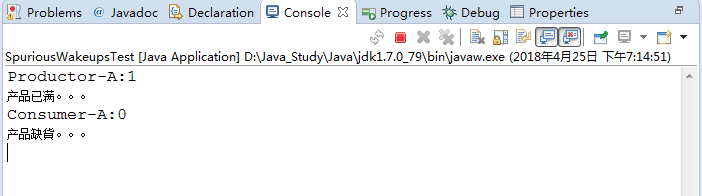
从运行结果上来看,程序是一个死锁现象。
为什么会发生死锁问题?
从运行结果上来看分析:
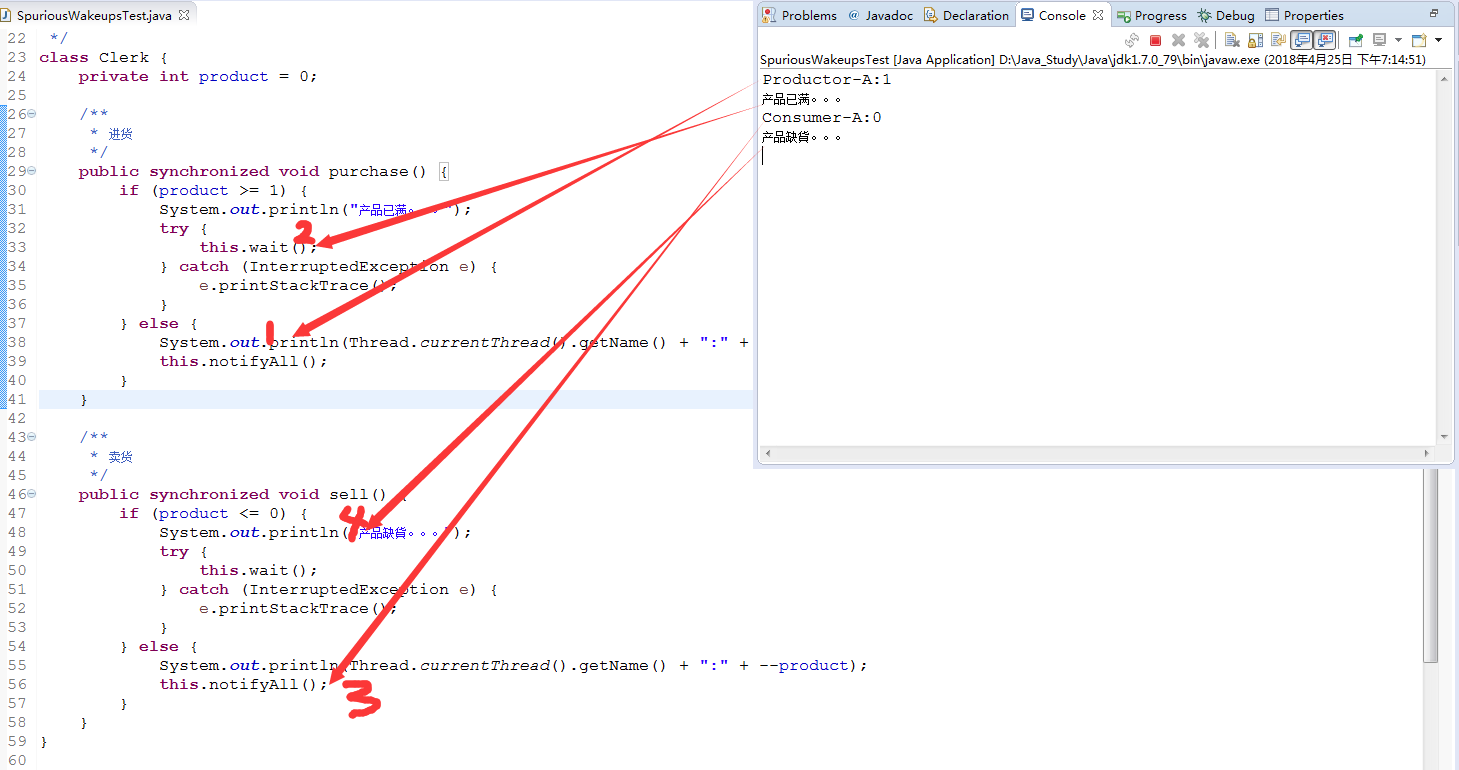
分析:
1)当purchase()运行“2”是处于this.wait()等待状态时,此时sell()开始运行;
2)sell()运行时,第一次走3当运行到this.notifyAll()时,开始运行4和purchase()等待向下执行(一旦向下执行purchase将不再被调用,原因生产者只有两次循环机会),而运行‘4’时打印‘产品缺货’,而且代码走入this.wait()处于一直等待状态。
因此会看到程序一直未结束状态,这个属于代码的一个BUG。
解决方法:
修改店员类:
/**

 * 店员

 */

class Clerk {

    private int product = 0;

    /**

     * 进货

     */

    public synchronized void purchase() {

        if (product >= 1) {

            System.out.println("产品已满。。。");

            try {

                this.wait();

            } catch (InterruptedException e) {

                e.printStackTrace();

            }

        }

        System.out.println(Thread.currentThread().getName() + ":" + ++product);

        this.notifyAll();

    }

    /**

     * 卖货

     */

    public synchronized void sell() {

        if (product <= 0) {

            System.out.println("产品缺貨。。。");

            try {

                this.wait();

            } catch (InterruptedException e) {

                e.printStackTrace();

            }

        }

        System.out.println(Thread.currentThread().getName() + ":" + --product);

        this.notifyAll();

    }

}
在运行发现程序正常结束,打印结果如下:
Productor-A:1

产品已满。。。

Consumer-A:0

产品缺貨。。。

Productor-A:1

Consumer-A:0
改进后带来问题二(虚假唤醒):
此时修改客户端调用代码:
public class SpuriousWakeupsTest {

    public static void main(String[] args) {

        Clerk clerk = new Clerk();

        Productor productor = new Productor(clerk);

        Consumer consumer = new Consumer(clerk);

        new Thread(productor, "Productor-A").start();

        new Thread(consumer, "Consumer-A").start();

        new Thread(productor, "Productor-B").start();

        new Thread(consumer, "Consumer-B").start();

    }

}
之前只有一个生产者和一个消费者,修改后让其拥有两个生产者和两个消费者,此时运行代码如下:
Consumer-A:-1
产品缺貨。。。
Productor-A:0
Productor-A:1
Consumer-A:0
Consumer-B:-1
产品缺貨。。。
Productor-B:0
Productor-B:1
Consumer-B:0
从代码分析逻辑来看,输出解雇貌似毫无逻辑,此现象就是一个虚假唤醒现象。
问题分析:
1)缺货时,两个consumer线程都进入wait状态;
2)当另外一个生产者生产了产品并调用了notifyall,此时两个consumer线程都被唤醒并跳过wait,进入消费代码
System.out.println(Thread.currentThread().getName() + ":" + --product);
,因此导致一个输出产品数为0,另外一个产品数为-1。
解决办法:
基于while来反复判断进入正常操作的临界条件是否满足:
    synchronized (obj) {

            while (<condition does not hold>)

                obj.wait();

            ... // Perform action appropriate to condition

     }
此处理方案来此ava.lang.Object API的wati方法说明信息中。
店员修改:
/**

 * 店员

 */

class Clerk {

    private int product = 0;

    /**

     * 进货

     */

    public synchronized void purchase() {

        while (product >= 1) {

            System.out.println("产品已满。。。");

            try {

                this.wait();

            } catch (InterruptedException e) {

                e.printStackTrace();

            }

        }

        System.out.println(Thread.currentThread().getName() + ":" + ++product);

        this.notifyAll();

    }

    /**

     * 卖货

     */

    public synchronized void sell() {

        while (product <= 0) {

            System.out.println("产品缺貨。。。");

            try {

                this.wait();

            } catch (InterruptedException e) {

                e.printStackTrace();

            }

        }

        System.out.println(Thread.currentThread().getName() + ":" + --product);

        this.notifyAll();

    }

}
运行结果:
Productor-A:1

产品已满。。。

Consumer-B:0

产品缺貨。。。

Productor-B:1

产品已满。。。

Consumer-A:0

产品缺貨。。。

Productor-B:1

Consumer-B:0

Productor-A:1

Consumer-A:0
Java-JUC(八):使用wait,notify|notifyAll完成生产者消费者通信,虚假唤醒(Spurious Wakeups)问题出现场景,及问题解决方案。的更多相关文章
- java多线程 生产者消费者案例-虚假唤醒
package com.java.juc; public class TestProductAndConsumer { public static void main(String[] args) { ...
- java 多线程之wait(),notify,notifyAll(),yield()
wait(),notify(),notifyAll()不属于Thread类,而是属于Object基础类,也就是说每个对像都有wait(),notify(),notifyAll()的功能.因为都个对像都 ...
- Java多线程之wait(),notify(),notifyAll()
在多线程的情况下,因为同一进程的多个线程共享同一片存储空间,在带来方便的同一时候,也带来了訪问冲突这个严重的问题.Java语言提供了专门机制以解决这样的冲突,有效避免了同一个数据对象被多个线程同一时候 ...
- 如何在 Java 中正确使用 wait, notify 和 notifyAll – 以生产者消费者模型为例
wait, notify 和 notifyAll,这些在多线程中被经常用到的保留关键字,在实际开发的时候很多时候却并没有被大家重视.本文对这些关键字的使用进行了描述. 在 Java 中可以用 wait ...
- 转:【Java并发编程】之十:使用wait/notify/notifyAll实现线程间通信的几点重要说明
转载请注明出处:http://blog.csdn.net/ns_code/article/details/17225469 在Java中,可以通过配合调用Object对象的wait()方法和no ...
- 【java线程系列】java线程系列之线程间的交互wait()/notify()/notifyAll()及生产者与消费者模型
关于线程,博主写过java线程详解基本上把java线程的基础知识都讲解到位了,但是那还远远不够,多线程的存在就是为了让多个线程去协作来完成某一具体任务,比如生产者与消费者模型,因此了解线程间的协作是非 ...
- 【Java并发编程】:使用wait/notify/notifyAll实现线程间通信
在java中,可以通过配合调用Object对象的wait()方法和notify()方法或notifyAll()方法来实现线程间的通信.在线程中调用wait()方法,将阻塞等待其他线程的通知(其他线程调 ...
- 【Java并发编程】之十:使用wait/notify/notifyAll实现线程间通信的几点重要说明
在Java中,可以通过配合调用Object对象的wait()方法和notify()方法或notifyAll()方法来实现线程间的通信.在线程中调用wait()方法,将阻塞等待其他线程的通知(其他线程调 ...
- java并发编程(十)使用wait/notify/notifyAll实现线程间通信
转载请注明出处:http://blog.csdn.net/ns_code/article/details/17225469 wait()方法:public final void wait() thr ...
随机推荐
- 您该选择PRINCE2 还是 PMP认证
您该选择PRINCE2 还是 PMP认证? 很多人都问我,这是一个非常常见的问题,作为一个项目经理,他们是否应选择PRINCE2或PMP认证,因为这两个认证都是全世界非常流行的. PRINCE2 是一 ...
- [Go] ok 判断 汇总
1.判断 类型 类似于 JavaScript 中 typeof 和 Java 中 instanceof var a interface{} newA, ok := a.(string) // 如果 o ...
- Parallel Programming--perfbook
https://www.kernel.org/pub/linux/kernel/people/paulmck/perfbook/perfbook.html
- 改进架构,实现动态数据源,减少java维护
怎样不用写java代码来完毕开发? 对于大部分的产品和项目来说.页面变化是很头痛的事情.每次小功能上线,新客户到来,都须要进行定制改造,不断的开发维护.每次开发一方面要修改页面,一方面要修改serve ...
- EF Code First更新数据库时报错:provider: SQL Network Interfaces, error: 26
在使用EF Code First更新数据库时报如下错误: 在与 SQL Server 建立连接时出现与网络相关的或特定于实例的错误.未找到或无法访问服务器.请验证实例名称是否正确并且 SQL Serv ...
- JPA & Hibernate 注解
1 . @Entity(name="EntityName") 必须 ,name 为可选 , 对应数据库中一的个表 2 . @Table(name="",cata ...
- C#编程(五十二)----------有序列表
有序列表 如果需要基于对所有集合排序,就可以使用SortedList<TKey,TValue>类.这个类按照键给元素排序.这个集合中的值和键都可以使用任意类型. 下面的例子创建了一个有序列 ...
- 《Erlang程序设计(第2版)》
<Erlang程序设计(第2版)> 基本信息 作者: (瑞典)Joe Armstrong 译者: 牛化成 丛书名: 图灵程序设计丛书 出版社:人民邮电出版社 ISBN:9787115354 ...
- COUNT DISTINCT ROW_NUMBER DENSE_RANK 以及对COUNT去重(非PARTITION)
1:COUNT DISTINCT SELECT COUNT(DISTINCT [QS_QuestionStem].Id) AS ReqCount1, ...
- [转]wget 下载整个网站,或者特定目录
FROM : http://www.cnblogs.com/lidp/archive/2010/03/02/1696447.html 需要下载某个目录下面的所有文件.命令如下 wget -c -r - ...